Six months ago, a services company came to us with a problem that sounded simple. Their operations team was spending 40 hours per week manually entering data from client intake forms into their database. One person, full-time, copying from PDFs and CSV exports into rows in a spreadsheet that fed their production database.
They wanted it automated. We said we could do it in three weeks.
We were off by one day.
Here’s what that actually took.
What 40 Hours of Manual Entry Actually Looks Like
Before we could automate anything, we needed to understand what the 40 hours consisted of. We assumed it was mostly typing. It wasn’t.
The ops person handling this had a process: open the form, cross-check against the previous entry for that client to catch duplicates, validate specific fields by eye (email format, phone format, date ranges that made logical sense), and then type into the database. The 40 hours included all of that checking work, not just the keystrokes.
And it wasn’t one form type. It was four:
- Client intake PDFs: sent directly by email, some scanned from paper, some filled digitally. Three different layout versions depending on when the client onboarded.
- Service request forms: submitted through their website, exported as CSV every morning, imported one row at a time.
- Third-party referral forms: two partner organizations, two different formats, neither matching the internal schema.
- Follow-up questionnaires: one-page documents emailed back, printed, re-entered manually.
That variety is what made this harder than a standard PDF extraction task. Four input types, three layout versions for one of them, two external schemas to translate. Each one needed its own extraction logic.
The Obvious Approach That Didn’t Work
First instinct: use AWS Textract to extract fields from PDFs, map them to database columns, and insert. For the CSV exports, skip Textract and parse directly.
The CSV approach worked fine. We had that running in two days.
The PDFs were the problem.
Textract’s Forms API identifies key-value pairs in structured forms. On clean, digitally-filled PDFs, it extracted most fields correctly. On scanned forms, accuracy dropped to 71%. On the third-party referral forms with non-standard layouts, it was 58%.
We ran Textract against 200 historical forms we’d manually verified. That 58% number ended the “extract and insert directly” approach immediately. A phone number entered as “555-012-3456” (one transposed digit from a scan artifact) going straight into the database doesn’t just create a wrong record. It creates a wrong record that looks right. That’s worse than a skipped entry, because now you have bad data with no flag on it.
We needed a validation layer before anything touched the database.
The Pipeline We Built
Five stages end to end:
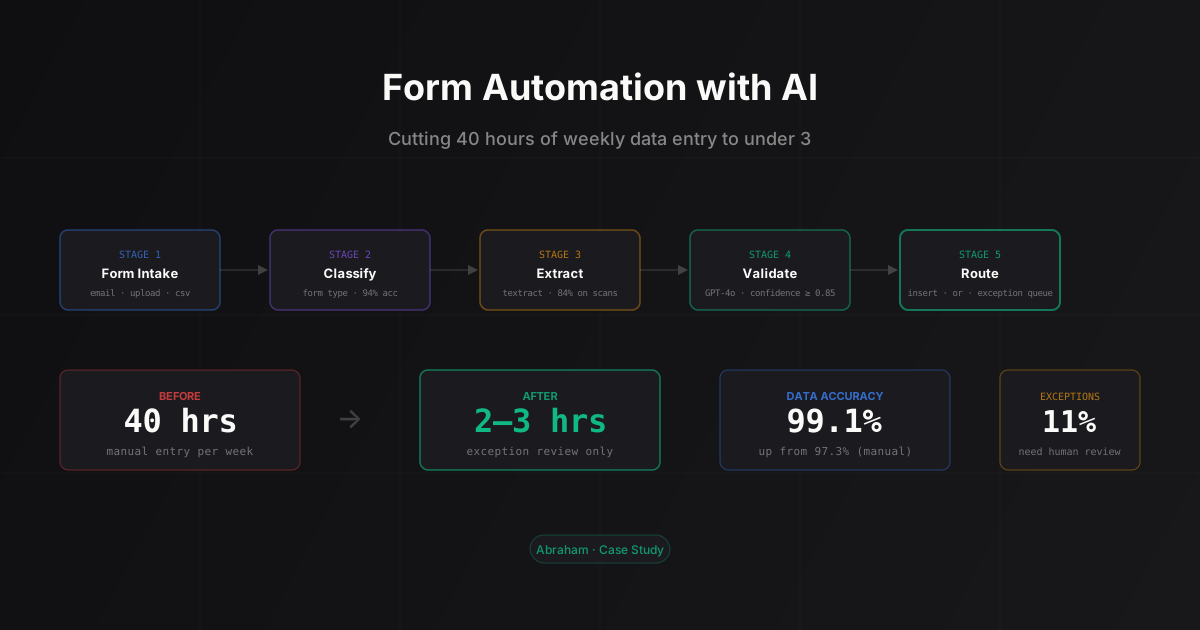
Form Intake → Classification → Extraction → Validation → RoutingForm Intake: Forms arrive three ways. A Python script monitors the client’s inbox via IMAP, pulls attachments that match expected formats, and drops them into an S3 bucket. Web form exports get pulled via a scheduled job every morning. Direct uploads go to the same bucket. One landing zone regardless of source.
Classification: Before extraction, each form gets classified by type. We trained a simple classifier on 400 labeled examples (the four types plus an “unknown” class). It runs on a thumbnail of the first page plus the filename pattern. Accuracy on our test set: 94%. Unknown-class forms go directly to the exception queue without extraction.
Extraction: Textract handles PDFs. We added a preprocessing step for low-quality scans: convert to grayscale, increase contrast, apply a sharpening filter, then send to Textract. That bumped scanned form accuracy from 71% to 84%. Not great, but workable with the validation step behind it. CSV exports skip Textract entirely and go through a column-mapping parser.
Validation: This is where GPT-4o comes in. For each extracted form, we run a validation pass using structured outputs to get consistent JSON back. The model checks field formats, flags logical inconsistencies (a service start date before the intake date, a phone number that fails any known format), and checks required fields against a business rule set we encoded for each service type.
The response includes a confidence score per field and a list of flags. Any form with flags, or with confidence below 0.85 on a required field, goes to the exception queue. Everything else proceeds to insert.
Routing: Clean forms get inserted to the database directly. Flagged forms go to a review interface showing the original form image side-by-side with the extracted fields. The reviewer can correct, approve, or reject. Corrections get logged for monthly accuracy reviews.
The Exception Threshold Question
This was the part that took the most iteration, and it’s what I’d flag for anyone building a similar pipeline.
We initially set the confidence threshold at 0.90: anything below 90% confidence on any required field goes to manual review. That threshold sent 34% of forms to the exception queue. Better than 40 hours per week, but not by as much as the client was hoping for.
We spent two days analyzing the exception queue contents. Most of it was phone number formatting variation: “(555) 012-3456” vs “555-012-3456” vs “+15550123456”, all representing the same number. The model was flagging format variation as low confidence, but the data was fine.
The fix wasn’t changing the threshold. It was adding a normalization step before validation. Normalize phone numbers, emails, and dates to canonical formats first, then run the confidence check. Phone numbers normalize to E.164 format. Dates normalize to ISO 8601. Emails get lowercased and stripped of trailing whitespace.
That dropped the exception rate from 34% to 11%. The validation model wasn’t wrong. We just were asking it to evaluate data that hadn’t been cleaned yet.
At 11%, the exception queue takes about 2-3 hours weekly to clear depending on batch quality. That’s the honest number. On a good week with mostly clean digital forms, it’s under 2 hours. On a bad week with a batch of older-format referral forms and a few messy scans, it’s closer to 3.5. Either way, it’s a fraction of the original 40.
The Numbers After Six Weeks
- Weekly time spent on data entry: 40 hours → 2-3 hours of exception review
- Exception rate: 11% of all forms requiring human review
- Data accuracy on a 300-record random audit: 99.1% (up from ~97.3% estimated under manual entry)
- Forms processed per day: 85-120, up from a previous soft cap of 60 (the bottleneck was the person, not the system)
The accuracy improvement was the piece that surprised the client’s CEO. Manual data entry is careful work but it’s not perfect, especially on a 40-hour-per-week job that gets monotonous. The normalization step the pipeline does on every record is something a human can’t apply consistently across thousands of entries.
Two Things I’d Do Differently
Get the ops person into the review UI design from the start. We built the first version of the exception interface ourselves and showed it to her afterward. She had three usability notes that would have taken two hours to fix during build and took a full day to retrofit: she wanted to see the client’s previous database entry alongside the new form (for duplicate checking she was already doing in her head), she wanted keyboard shortcuts instead of mouse clicks for approve/reject, and she wanted to flag exceptions as “client error” vs “extraction error” separately so she could identify clients who consistently submit poorly-filled forms.
All three were reasonable requests. None of them required rearchitecting anything. We just hadn’t thought to ask.
Build the monthly accuracy audit from day one. We ran the first audit at week six. That’s when we discovered the phone number normalization problem. If we’d been auditing from week one, we’d have caught it in week two.
The pipeline’s been running for four months now without major issues. Most weeks it just runs and nobody thinks about it. That’s the goal.
If you want to understand whether this kind of automation makes sense for your specific forms setup, you can read about how we built a similar extraction pipeline for call analysis to get a feel for how we approach document processing problems. For a broader look at which automation use cases actually pay back, the business automation framework covers the rubric we apply before we start any project like this.
Dealing with high-volume manual data entry that should be automated? Book a 30-minute call and we’ll tell you where the actual complexity in your specific setup is likely to be.
FAQ
How long does building a form automation pipeline take?
For a setup like this (four input types, validation logic, exception queue, database insert), three to four weeks is realistic. Simpler cases (one consistent form type, clean digital PDFs, simple schema) can ship in under two weeks. The timeline scales mostly with the number of distinct form layouts and how complex the validation rules are.
When does AI form automation make sense vs a simple OCR solution?
Simple OCR works when your forms are consistent and your tolerance for extraction errors is high. If you have layout variation across form versions, low-quality scans, or validation rules that go beyond field format checking, you need an LLM in the validation loop. The LLM adds cost per form but it’s the only thing that catches logical inconsistencies that pattern-matching misses.
What does it cost to run this kind of pipeline?
For the client above, processing 85-120 forms per day, the monthly running cost is around $120: AWS Textract AnalyzeDocument at $0.015 per page, GPT-4o structured-output validation at roughly $0.02-0.03 per form, plus S3 and compute. At that volume, it’s well under a single headcount line item.
Can this handle forms that aren’t PDFs?
Yes. Web form exports as CSV are actually the easiest case. We also handle Excel files and Typeform exports. The harder cases are multi-page applications with section breaks and conditional fields. Those need more work on the extraction and validation prompts, but the pipeline structure is the same.
What’s the risk if our form layouts are inconsistent or scanned quality is low?
Low-quality scans and non-standard layouts increase the exception rate, not the error rate. The pipeline is designed to hold uncertain extractions for human review rather than silently insert bad data. If scan quality is consistently poor across your form corpus, you can expect a higher exception rate (we saw 34% before the normalization step, down to 11% after). That’s still a large improvement over manual entry, but the ROI math changes if exceptions consume most of the time saved. The short answer: bring a sample of your actual forms to any scoping conversation and we’ll run a quick test before committing to a timeline.