Three people were spending four hours a day copy-pasting form submissions between tools.
Not because there were no automation options. The client had Zapier. They were using it for simple stuff: log a form submission to Google Sheets, send a Slack ping when something came in. But anything that needed judgment in the middle, classifying what kind of request it was, deciding how urgent it looked, drafting a first response, they were doing by hand.
Their intake volume was manageable but growing. About 40 submissions per day across three intake channels: a Typeform for customer support requests, a Webflow form for partnership inquiries, and a HubSpot landing page form for product demos. Each submission needed to be read, categorized into one of five buckets, scored for urgency (low/medium/high), and routed to the right person on Slack with a draft response suggestion.
Three people were doing that. Combined, about four hours of manual work per day.
We built them an ai workflow automation system. Here’s what that actually looked like.
Why n8n, Not Zapier or Custom Python
The client’s first instinct was to ask whether we could fix their Zapier setup. We looked at it. The problem wasn’t Zapier’s integrations; those were fine. The problem was that Zapier’s AI step is essentially a wrapper around a single API call with no retry logic, no structured output enforcement, and limited error branching. When the AI returns something unexpected, Zapier stalls.
Custom Python was the other obvious option. I’ve built automation pipelines in Python before. The maintenance overhead is real: you need a server, a cron scheduler or task queue, error monitoring, deployment pipeline. For a 40-form-per-day workflow at a 30-person company, that’s more infrastructure than the problem warrants.
n8n sits in the middle. It’s a visual workflow tool like Zapier, but it has a Code node where you can run arbitrary JavaScript (or Python in recent versions). That means you can write custom retry logic, parse structured output properly, and log errors exactly where you need them. We’d used n8n on a form automation project earlier in the year, so we had a sense of where it was solid and where it got annoying.
We set up n8n Cloud (the $20/month Starter plan). Self-hosting was on the table but the client’s ops lead didn’t want to manage uptime for an internal tool. Cloud was the right call here.
The Architecture
The full workflow has three stages.
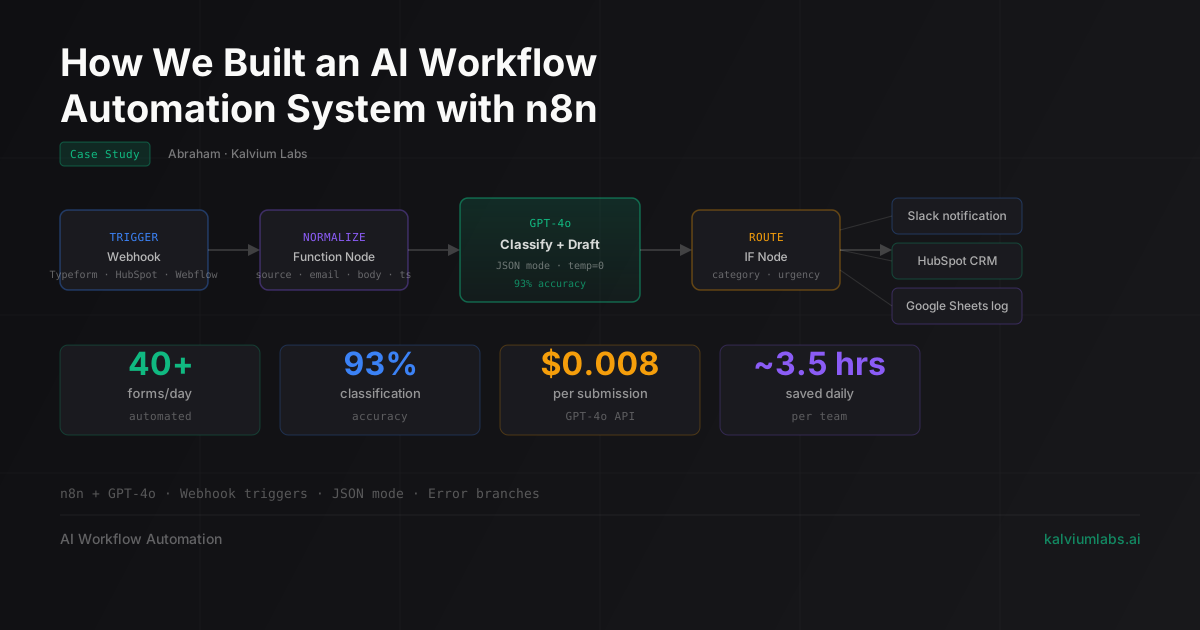
Stage 1: Ingest and normalize. Three separate triggers cover the three intake channels. Typeform has a native n8n node. The Webflow and HubSpot forms use webhook triggers, which n8n handles via its built-in webhook URLs. Each trigger fires into a normalizer, a Function node with about 50 lines of JavaScript that maps each form’s field names and structure to a standard shape: source, email, subject, body, timestamp. Everything downstream only sees that schema.
This was actually the most tedious part of the build. The three forms used different field names for essentially the same data. Typeform called the message field What can we help you with? (the literal question text). Webflow used message. HubSpot used description. Writing the normalizer meant mapping each source manually, and we had to iterate a few times when we found edge cases (empty body fields, submissions with attachments, one form that sent HTML in the message field instead of plain text).
Stage 2: AI classification and drafting. This stage calls GPT-4o twice.
The first call does classification. It sends the normalized submission and asks for a JSON response with three fields: category (one of five options), urgency (low, medium, high), and confidence (0-1 float). Temperature is set to 0. We’re using the OpenAI Chat Completions API via n8n’s HTTP Request node rather than the built-in OpenAI node, because the HTTP Request node gives us full control over the request body.
The second call drafts a suggested response. It takes the classification output from the first call and the original submission, and produces a 2-3 sentence draft the team member can send or edit. Temperature is 0.4 here, which gives slightly more varied output than classification needs.
Stage 3: Route and log. An IF node branches on category. Each branch posts to the appropriate Slack channel via the Slack node, including the classification, urgency badge, draft response, and a link back to the source form record. A separate Set node feeds into a HubSpot node that creates or updates a contact record. Everything gets written to a Google Sheets log regardless of which branch it hits.
JSON Mode and Why It Mattered
The first version of Stage 2 used a regular chat completion call with a prompt that said “respond with JSON only.” It worked fine in testing. In production, about 3% of responses came back with extra text around the JSON block (things like “Here is the classification:” before the JSON, or a follow-up sentence after the closing brace).
n8n’s JSON parsing step would error on those responses. We had Continue on Error turned on, so they didn’t break the workflow, but they’d hit the error branch instead of routing correctly. Over 40 submissions per day, that’s about one dropped submission per day.
We switched to OpenAI’s JSON mode, which enforces that the model response is valid JSON. You pass "response_format": {"type": "json_object"} in the request body, and the API guarantees the response is parseable JSON. Since making that switch, we’ve had zero JSON parsing errors across about 1,700 submissions.
One caveat: JSON mode works differently from structured outputs (which enforce a specific schema). JSON mode just guarantees valid JSON, not that your specific keys are present. We added a validation step after the parse to check that category, urgency, and confidence were all present before continuing. If any are missing, the submission goes to the error branch with a “missing fields” tag so the team knows to review it manually.
What Broke
Two things broke during the first week.
The n8n default HTTP request timeout is 60 seconds. GPT-4o responses on longer form submissions (some partnership inquiries ran 400+ words) were occasionally taking 55-65 seconds to complete. When the timeout hit, n8n reported the node as failed even if the API call had actually succeeded. We bumped the timeout to 120 seconds and added a check for existing CRM records before creating new ones, since the timeout errors were causing duplicate entries.
The second issue was Typeform batching. Typeform sends a webhook for each response, but during busy periods (Monday mornings mostly) we’d get 8-10 submissions in about 30 seconds. n8n processed them in parallel, which meant 8-10 concurrent GPT-4o API calls. That pushed us close to our OpenAI rate limits on a couple of occasions, without actually hitting them, but it was getting uncomfortable. We added a short sleep (2 seconds) in the normalizer Function node for Typeform submissions to spread concurrent calls out. Not elegant, but it works.
The error handling setup from our video auditing pipeline came in useful here. On that project we learned to treat error branches as first-class citizens in n8n, not afterthoughts. Every node that calls an external API has Continue on Error enabled, an error branch that tags the submission and logs it to a separate sheet row, and a Slack DM to the ops lead with the original payload. Nothing gets silently dropped.
Numbers After 6 Weeks
The workflow has been running since mid-March. Here’s where things stand:
- Volume: 40-50 form submissions processed per day (it’s grown since launch)
- Classification accuracy: 93% on a 200-submission manual audit we ran at the 4-week mark. The 7% errors were almost all ambiguous submissions that the team found hard to classify consistently themselves
- API cost: About $0.008 per submission (classification call + draft call). At 45 submissions per day, that’s roughly $11 per month in OpenAI costs
- Urgency scoring: We stopped tracking this separately after week two. The team found the Slack channel routing more useful than the urgency label, so we demoted urgency to a visible label rather than a routing condition
- Time saved: Hard to measure exactly, but the three people who were doing manual routing are spending about 30-40 minutes per day on intake work now instead of 4 hours. Most of that remaining time is reviewing the AI-drafted responses before sending, which they want to keep doing
One thing we haven’t solved: submissions that arrive in languages other than English. About 5% of form submissions come in Spanish or Portuguese. The classification still works because GPT-4o handles multilingual input, but the draft responses come back in English, which isn’t useful. We have a language detection step planned but haven’t shipped it yet.
FAQ
When does n8n make more sense than Zapier for AI workflows?
When you need structured output from your AI step, retry logic, or full control over the API request. Zapier’s built-in AI nodes pass a prompt and return raw text, with limited handling for errors or unexpected formats. n8n’s Code node lets you write custom parsing, validation, and retry logic in JavaScript. If your workflow needs AI-generated JSON that feeds into downstream steps, n8n is the more reliable choice.
How do you handle GPT-4o errors inside an n8n workflow?
Enable Continue on Error on every node that calls an external API, then build an explicit error branch that logs the original input and flags it for human review. For the GPT-4o call specifically: use JSON mode to eliminate schema violations, bump the request timeout to 120 seconds for longer inputs, and add a 2-3 second delay if you expect bursts that might push against rate limits.
What does an n8n + GPT-4o automation cost per month?
At 40-50 submissions per day using two GPT-4o calls per submission, OpenAI API costs run about $11 per month. n8n Cloud Starter is $20 per month. Self-hosting n8n on a small VPS costs $5-10 per month on Hetzner or DigitalOcean. Total: $31-41 per month depending on your setup, which compared to the Zapier AI plan and the manual labor it replaces is pretty favorable.
How long does it take to build a workflow like this?
For this project: two weeks from first call to go-live. That breaks down as 2 days of scoping (mapping the forms and the routing logic), 6 days building and testing the n8n workflow, 2 days of parallel running (both manual and automated processing, comparing outputs), and 2 days resolving the timeout and rate limit issues we hit in the first week of production. Simpler workflows with one input source and fewer routing branches would take less.
Can this scale beyond 50 submissions per day without changes?
The current setup would handle up to 200-300 per day without architectural changes. Beyond that, you’d need to add a queue in front of the AI steps to manage concurrency and rate limits more deliberately. n8n has a queue mode for this but it requires some additional setup on the self-hosted version. At 50 submissions per day, none of that’s necessary.
If you’re thinking through an automation like this, book a 30-minute call. We’ll look at your specific workflow and tell you whether n8n is the right fit or whether something simpler would do the job.