Every voice AI demo I’d seen before we started building SARA showed a bot booking a restaurant.
Siri, Alexa, the demos at AI conferences. All of them: “Schedule a meeting with Alex on Friday,” and the calendar opens. Or “Book a table at Nobu for two,” and a confirmation appears. That’s the mental model most people have for voice AI. It’s conversational. Multi-turn. Patient.
SARA is none of those things. And that difference is what made it genuinely hard to build.
We built SARA as a speech-to-action agent for an enterprise client’s operations team. The full case study is at /case-studies/sara-speech-agent/, but this post focuses on the distinction that most people miss before they commission a voice AI build. Their ops floor had eight people who spent about 40% of their day doing repetitive data entry across three internal tools: adding notes to accounts, marking tasks complete, creating follow-ups, updating status fields. All simple commands. All typed out 50-100 times per day per person.
They wanted voice commands. Not a chatbot. Not a booking assistant. A tool that would let them say “add note to Johnson account: invoice approved” and have it happen in under two seconds, without touching the keyboard.
This is what we built, and the parts that surprised us.
Why Speech-to-Action Is Different from Booking Bots
The difference isn’t obvious until you’re building.
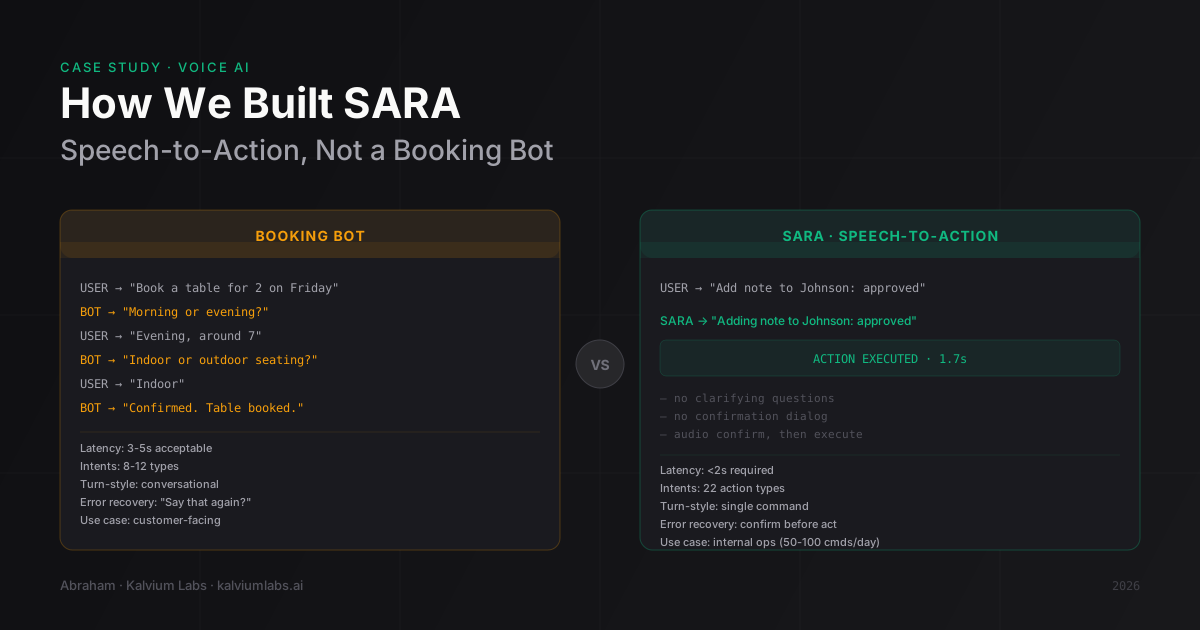
A booking bot lives in a conversational flow. It asks clarifying questions. “For how many people?” “Morning or evening?” “Do you want a window table?” Three-to-four second latency is fine because the user is already waiting for the bot’s question. The interaction is inherently slow.
Speech-to-action has no conversation. The user gives a command and expects the system to execute it. Immediately. No clarifying questions. No confirmation dialog. The client’s acceptable threshold for the voice-to-action loop was two seconds. In our testing, anything over 2.5 seconds made the ops team revert to typing. The mental model shifts from “talking to an assistant” to “waiting for a slow keyboard.”
The intent complexity is also different. A booking bot needs to handle maybe 8-10 intents well: book, cancel, reschedule, check availability, modify, confirm. Speech-to-action for a real ops workflow needed 22 distinct action types, each with 2-5 required parameters. The combinatorial surface is much larger.
And error recovery works opposite to what you’d expect. A booking bot can say “I didn’t catch that, could you repeat?” and nobody minds. For a productivity tool used 50+ times a day, “I didn’t catch that” is a failure. It breaks the flow. The user was already mid-task. We had to design a different recovery pattern.
What SARA Actually Handles
The client’s ops team manages account-level workflows across three internal tools: a CRM, a task manager, and an invoicing system. The voice commands they wanted:
- “Add note to [account]: [text]” (logs a note in the CRM)
- “Mark [task ID] complete” (closes a task)
- “Create follow-up for [account] on [date]” (schedules a reminder)
- “Update status for [account] to [value]” (changes an account field)
- “Flag invoice [number] for review” (marks a record in invoicing)
Simple individually. But there were 22 of these, with variations in how the team phrased them, and every one needed to work reliably under background noise in an open office.
The architecture (covered in depth in our original SARA build post) runs audio capture in the browser, streaming over WebSocket to a FastAPI backend, Deepgram’s streaming API for real-time transcription, then Claude with function calling for intent classification. The full flow hits 1.7 seconds desktop, 2.4 seconds mobile.
The Three Things That Surprised Us
The “please” problem. We built the intent classifier against a test dataset of commands. Clean, direct commands. “Add note to Johnson account: invoice approved.” That’s not how the ops team talked.
They said “please add a note to the Johnson account, it was approved.” “Could you mark the Sharma task complete?” “Hey SARA, can you schedule a follow-up for Tuesday for Mehta?”
Every softening phrase (please, could you, hey) added tokens the model had to filter through before extracting the actual intent. Misclassification jumped from 4% on our test set to 18% on real usage in week one.
We ended up creating a command card that showed the supported phrasing structures and posting it at each workstation. This felt crude. It worked. After two weeks of using the card, the team had internalized the patterns and didn’t need it anymore. But the lesson is: your intent classifier is only as good as the distribution of phrases it was trained on, and real users will always drift from your test set.
Error recovery design. When SARA misclassifies, what does the user hear?
Our first version said “I didn’t catch that.” Users hated it. Not because it was wrong, but because they had no idea what SARA thought it heard. They’d repeat the same command in the same way and get the same failure.
We switched to audio confirmation before execution: “Adding note to Johnson: invoice approved.” Brief, specific. If the user says nothing within 1.5 seconds, the action executes. If they say “no” or “wait,” it cancels.
This added about 200ms to every interaction. But it cut undo-requests (our proxy for misclassification acting on bad data) by 60%. Users caught errors before they happened instead of after. The 200ms was worth it.
Real noise conditions. We tested SARA in a quiet conference room. The client’s ops floor has background sound: phone calls from the sales team next door, HVAC, open-plan ambient noise.
End-of-speech detection calibrated in a quiet room didn’t survive real conditions. The system kept treating half-second pauses as end-of-speech and cutting users off mid-command. We needed a calibration session on-site, tuning the silence threshold to the actual noise floor. Then a second session two weeks after launch because ops team traffic patterns changed when they reorganized seating.
Plan for calibration. Not once. Ongoing.
When You Should (and Shouldn’t) Build This
Speech-to-action agents make sense for a specific kind of problem. A few signals that suggest you’re in that territory:
- Your team runs 30+ repetitive, structured commands per day per person
- The action set is bounded (you can enumerate what the system needs to handle)
- Sub-2s latency is necessary for adoption (users won’t tolerate waiting)
- The tool is internal (you control the environment, noise level, and training)
- The commands are single-turn (no need for the system to ask clarifying questions)
It’s the wrong approach if you need multi-turn conversation, if your commands are open-ended, if the tool will be used by external customers in unpredictable environments, or if your command frequency is low enough that typing is just as fast. We’ve talked to founders who wanted voice AI for a use case that would have two or three commands per hour. The calibration overhead and maintenance cost don’t justify it at that frequency.
Booking bots and customer service voice agents are a different product category. If that’s what you need, build for conversation, not for command execution.
What This Cost to Build
The engagement ran six weeks. We’d scoped four. The extra two weeks were calibration: one on-site session after launch, one follow-up session. We hadn’t scoped calibration as a line item, which was an error.
For similar projects now, we quote calibration as a separate phase rather than assuming the build is done when the code is deployed. Voice AI for internal productivity isn’t done at launch. It’s done when the team stops reverting to typing.
FAQ
What’s the difference between a voice AI agent and a booking bot?
A booking bot handles conversational multi-turn interactions with moderate latency. A voice AI agent for internal operations handles single-turn commands with sub-2s latency. The architecture, error-recovery design, and intent complexity are different for each. Most “voice AI” demos show booking-style interactions. SARA is command-style.
How much does it cost to build a voice AI agent for internal operations?
For a scoped set of 15-25 action types on an existing internal tool, expect six to ten weeks including a calibration phase. Fixed-bid in our range: $15-25K. Real-time voice infrastructure adds infra cost: Deepgram’s streaming API runs roughly $0.006/minute for Nova-2, which is near-zero for internal tools with bounded usage. The calibration sessions are the underestimated cost.
How long does it take for a team to adapt to a voice AI agent?
In our experience, two to three weeks before the team stops defaulting to typing for the commands SARA handles. The first week is high-friction: misclassifications, awkward phrasing, recalibration. By week three, most users are comfortable and usage stabilizes. Have someone on the team own the command card and update it as new phrasing patterns emerge.
What latency should I target for a voice AI agent to feel useful?
Two seconds end-to-end for internal tools. At 2.5 seconds, users start reverting to typing. At 3 seconds or more, adoption will be low regardless of accuracy. If your architecture can’t hit two seconds on the hardware your team uses (particularly mobile on cellular), you’ll need to either reduce intent complexity or add streaming UI feedback so the wait feels shorter.
Can SARA handle commands in multiple languages?
Deepgram Nova-2 supports multiple languages with strong English performance. We built SARA in English because the client’s ops team works in English. Multi-language support is technically feasible but adds intent classification complexity, particularly for mixed-language commands (“add note to compte Dubois: payment reçu”). We haven’t shipped a multilingual version of SARA.
We’ve built voice AI agents for two enterprise clients. If you’re evaluating whether speech-to-action is the right fit for your ops team, book a 30-minute call and we’ll tell you honestly whether it’s the right tool for what you’re describing.