Training teams still talk about course production cycles the way they talked about them in 2018. “A standard course takes four to six weeks.” “We can ship three to four per quarter.” These timelines have become institutional. They feel like laws of physics rather than process inefficiencies.
They’re not. The ceiling on course production time isn’t human capacity for good thinking. It’s the number of manual handoffs between the people doing the thinking.
An AI integration pipeline eliminates most of those handoffs. Not by replacing the instructional designer or the subject matter expert, but by collapsing the time between each step to near zero. Done right, our pipeline takes a course outline to published, SEO-ready content in under four hours. Here’s what we’ve learned building it for clients across EdTech, compliance training, and professional certification programs.
The Gap Between “Using AI” and Having a Pipeline
Most teams that say they’re using AI for course development mean one thing: they paste a course title into ChatGPT and use the output as a starting point. That’s not a pipeline. It’s one AI tool inserted into a 12-step manual process.
The difference matters. A one-step AI assist might save your instructional designer half a day per course. That’s real, but it doesn’t change the fundamental shape of your production cycle. You still have the same number of handoffs. The same wait times between stages. The same review bottleneck where drafts sit in a SME’s inbox for two weeks.
A pipeline automates the connections between steps, not just the steps themselves. The output of each stage feeds directly into the next, with our human decision points consolidated rather than distributed across the whole chain.
When we’re scoping these builds with clients, the fastest teams we benchmark don’t have more instructional designers. They have fewer handoffs.
What the 4-Hour Pipeline Actually Looks Like
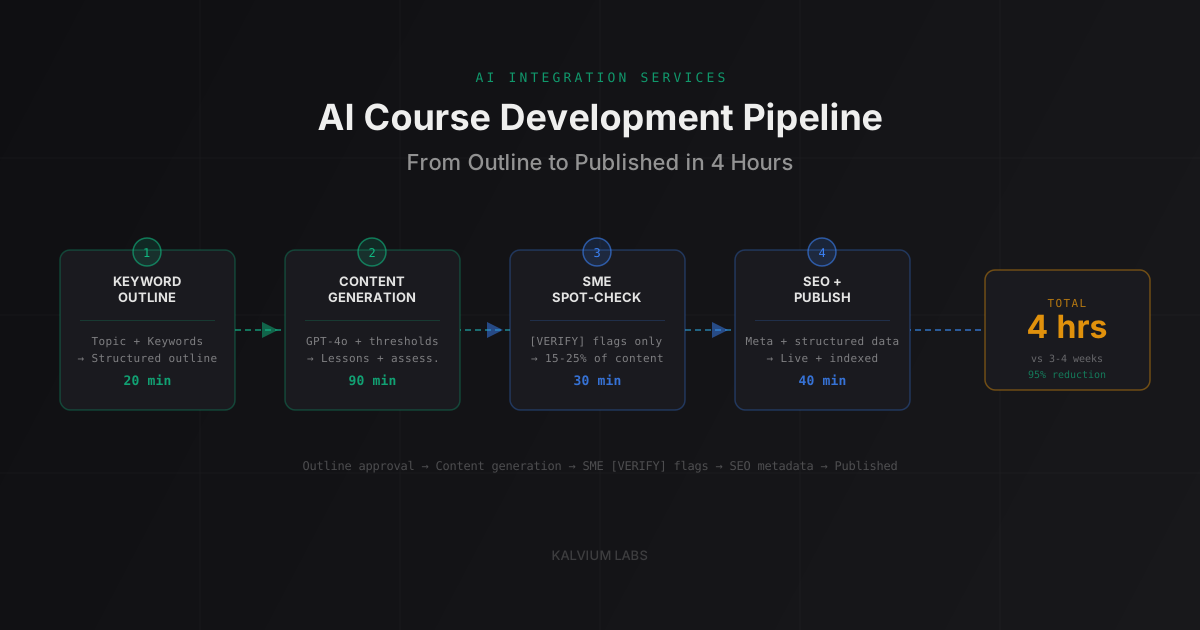
The four stages break down like this:
| Stage | Input | What AI Does | What Humans Do | Time |
|---|---|---|---|---|
| 1. Topic to Outline | Course title + target keywords | Structured outline with learning objectives | Approve or revise outline | 20 min |
| 2. Content Generation | Approved outline | Full lesson content, assessments, activities | Review output against rubric | 90 min |
| 3. SME Spot-Check | Generated content + [VERIFY] flags | Flag low-confidence sections | Verify flagged content only | 30 min |
| 4. SEO and Publish | Reviewed content | Meta tags, structured data, keyword mapping | Final publish approval | 40 min |
The key design principle: the human never reviews everything. They make decisions (approve outline, verify flagged sections, hit publish) rather than consuming all output. That’s the difference between a four-hour cycle and a four-week cycle.
One thing to flag upfront: our 90-minute content generation estimate assumes GPT-4o on a well-structured prompt template. The generation itself takes under 10 minutes for a standard five-lesson course. The 90 minutes is mostly our review pass on the output. If you skip that review pass, you’ll save time in the short run and create problems in the next sprint. We’ve skipped it once when a client was under deadline pressure. We won’t do it again.
Stage 1: Keyword-Driven Outline Generation
This is where the automated SEO work happens, and most teams skip it entirely.
An AI-generated outline starting from just a course title will be logically structured but not keyword-optimized. The topics it picks, the terminology it uses, the subtopics it surfaces: they’ll reflect what the AI knows about the subject, not what learners are actually searching for. Those aren’t the same thing.
Consider a course titled “Data Privacy for Startups.” A generic AI outline might cover GDPR fundamentals, CCPA compliance, data minimization principles, and breach notification timelines. All accurate. None of it maps to how startup founders actually search for this topic. The real queries cluster around “what data can I legally collect from users,” “GDPR compliance checklist for US startups,” “how to respond to a DSAR as a small team.”
Keyword-aware outline generation changes the structure. We feed in the course title plus 10-15 queries pulled from Google Search Console or Keyword Planner. The AI uses those as constraints when generating learning objectives and module structure. Our output is a course that covers what learners need and uses the vocabulary they use when searching for it.
This stage takes twenty minutes. Most of that is running our keyword pull and reviewing the draft outline. The AI generation itself takes thirty seconds.
Stage 2: Content Generation With Quality Thresholds
This is where teams hit the quality wall.
The naive approach: prompt the AI to “write lesson 3 on data minimization.” That produces something that looks complete and reads smoothly but isn’t reliably accurate for specialized content. It sounds authoritative without being accountable.
The threshold approach we use solves this differently. We don’t ask the AI to write a good lesson. We ask it to write a lesson that meets specific measurable criteria: covers the stated learning objective, includes at least two concrete examples, uses no more than 300 words per concept, flags any claims that require source verification. When the output doesn’t meet those criteria, our pipeline re-prompts automatically.
This is a prompting architecture decision, not just prompt engineering. The difference: prompt engineering is about getting better outputs from a single prompt. Prompting architecture is about designing the multi-step generation flow, including what happens when outputs are out of spec.
We’ve built this into client content pipelines across several domains. One EdTech client cut SME review time from three to four days per course to about 45 minutes after switching to threshold-based generation. The SME wasn’t reviewing less carefully. They were spending time on genuinely uncertain content instead of rereading paragraphs that were clearly correct. That full build is here.
Our stack for this stage is straightforward. We use GPT-4o for generation (better at following explicit structural constraints than most alternatives at the same context length). A structured prompt template stored in the pipeline rather than typed each time. Automated output validation via Python or Node.js before the content moves to review.
Stage 3: SME Review in Under 45 Minutes
This is the stage most pipeline designs get wrong.
The typical approach: route everything through the SME. They read the whole course, flag issues, return it for revision. Two rounds later, it’s approved. That’s the four-week cycle.
The pipeline approach: route nothing through the SME except what the AI flagged as uncertain. AI models know what they don’t know, if you ask them to report it. A prompt that includes “if any claim in this section is based on your training data rather than provided source material, add a [VERIFY] tag” produces content with explicit uncertainty markers. The SME reviews those sections. The rest is provisionally approved.
[VERIFY] tags typically appear on 15-25% of a generated course’s content. A SME reviewing 20% of a course rather than 100% can complete a review pass in under an hour for a standard five-lesson course.
This doesn’t work perfectly. Calibration is the problem: some AI models are overconfident (tag nothing) and others are underconfident (tag everything). GPT-4o tends toward overconfidence on factual claims in technical domains. In our experience, you need explicit prompting to surface uncertainty in those areas. We haven’t found a model yet that gets this right by default without some domain-specific calibration.
The other limitation: [VERIFY] tagging catches factual overconfidence but doesn’t catch structural errors. If the AI builds a learning sequence in the wrong order, or omits a concept that should precede another, that won’t be tagged. That’s why our outline approval step matters so much. Structural errors are far cheaper to catch at the outline stage than in generated content.
Stage 4: Publishing With an Automated SEO Layer
Most course platforms give you a text field for course title, a textarea for description, and maybe a tags input. The SEO layer is usually whatever the instructional designer types in those fields before hitting publish. Which, in most teams, is whatever comes to mind.
Automated SEO as part of the pipeline treats those fields as programmatically generated, not manually filled. The same keyword data from stage 1 informs the meta title, the meta description, structured data markup, and the course summary. The AI generates consistent, keyword-targeted metadata for every course rather than relying on whoever’s publishing that day to remember to do it.
This matters more for external-facing courses (certification programs, public catalogs, anything you want indexed) than for internal training content. But even internal content benefits: AI-powered workplace search indexes work better when content is consistently structured. Teams using Notion, Confluence, or any LMS with semantic search find that well-structured content surfaces faster in internal queries.
For teams building a fully automated content publishing operation, this same pipeline architecture applies to blog posts, documentation, and marketing content. We’ve covered how that broader content automation works in our AI content marketing post. The AI Content Engine we’ve built for clients handles the full loop: keyword research, generation, quality gates, publishing, and performance tracking that feeds back into the next batch of topics.
Build vs Buy: The Honest Calculation
There are solid off-the-shelf tools in this space. Articulate 360 is the most widely used authoring platform, and it has AI features built into Rise and Storyline. Adobe Learning Manager has AI-powered personalization. Synthesia handles video courses with AI avatars. For most use cases, these tools are genuinely good.
In our discovery calls, our first question is always: how many courses per quarter are you targeting? For teams producing under 20 per quarter, off-the-shelf wins. The tools are built for instructional designers, they handle edge cases, and the economics of SaaS vs. custom build typically favor SaaS at low volumes.
The calculation shifts somewhere between 20 and 50 courses per quarter. Three things change at that volume:
You’re hitting the limits of generic tools in ways specific to your content domain. Compliance training that must track specific regulatory rubrics. Technical courses that need to validate against code execution. Clinical education requiring structured reference management. These requirements don’t fit cleanly into general-purpose authoring tools.
The API-level customization you need (connecting to your LMS, your taxonomy, your existing SME workflow) isn’t available in the SaaS tier you can afford.
Your per-course production cost at scale makes a one-time build investment pencil out. At 40 courses per quarter, reducing production time from three weeks to four hours saves roughly 320 person-hours per quarter. That’s 1,280 hours per year. What’s a person-hour worth at your organization?
We’ve run this calculation with enough clients now to say: the threshold question is almost always that simple once you put real numbers to it.
FAQ
How much does a custom AI course development pipeline cost to build?
For a pipeline covering the four stages above, a custom build typically runs $15,000-$30,000 as a fixed-bid project. The range depends on LMS API complexity and the number of content domains the pipeline needs to handle. Operating costs after launch are low, mostly LLM API charges running $5-$20 per course at average course length depending on model choice.
Will AI-generated course content pass a quality review?
With threshold-based generation and [VERIFY] flagging, most AI-generated content passes SME review with minor edits rather than rewrites. From client builds: first-pass acceptance rate runs 70-80% when generation is well-structured. That rate drops significantly with lower-quality prompting and goes up when the AI is given source material to work from rather than generating purely from training data.
How does automated SEO work for content behind a login?
For LMS-hosted content requiring authentication, traditional crawl-based SEO doesn’t apply to the course content itself. The automated SEO layer matters most for course landing pages, catalog pages, and public preview content. For AI-powered internal search within an LMS, consistent metadata and content structure improve retrieval quality even when public indexing isn’t the goal.
What happens when the AI generates incorrect content?
The [VERIFY] tagging system catches factual overconfidence. Structural errors are caught in outline approval before content generation. Subtle accuracy issues in highly specialized domains, where even the SME might not immediately spot them, are the residual risk. That’s why a human stays in the final approval loop. The pipeline makes that human’s time more efficient; it doesn’t eliminate the need for one.
Does this pipeline work for video-based courses?
The text content stages (outline, lesson script, assessment questions) transfer directly to video scripts. Video production adds a separate stage. Platforms like Synthesia or HeyGen handle AI-avatar video generation from scripts. The full text-to-published-video cycle adds two to four hours on top of the text pipeline, depending on rendering time and the number of review rounds on the video output.
If you’re trying to figure out whether your course production volume justifies a custom AI pipeline or whether an off-the-shelf tool is the better call, we can usually work through the math in thirty minutes. Book a call and bring your current production numbers.