Every founder I talk to wants to build AI. The harder question is: build AI where?
Drop a feature in the wrong place and you’ve spent $30,000 generating outputs nobody reads. Pick the right spot and the same budget can cut an operational cost by 70% within six months. I’ve watched this play out across more than 20 builds. The startups that get year-one ROI from AI share one trait: they didn’t pick the flashiest use case. They picked the one that replaced something they were already paying for.
This post covers seven use cases we’ve seen produce clear, measurable payback within 12 months. Not theoretical payback. Numbers from actual builds.
Why Most Founders Pick the Wrong Use Case First
The wrong use case has a specific pattern. It sounds impressive in a pitch deck. It involves LLMs doing something technically interesting. It’s usually aimed at customers, not operations. And it doesn’t replace any existing cost. It just adds capability.
Adding capability is useful. It’s not a year-one ROI play.
The use cases that pay back fastest share a different profile: they replace something you’re already spending money on (human labor, agency fees, software subscriptions), they work on data you already have (call recordings, documents, support tickets), and they produce a result you can measure against a before-state. “We ran 500 QA calls per week manually. Now we run zero” is a number. “Our AI makes the product smarter” is not.
A 2024 McKinsey AI survey found that the highest-reporting AI value areas were supply chain and operations (where the before/after cost is measurable), not customer experience (where the impact is harder to isolate). That’s not intuitive to most startup founders, but the pattern holds across the builds we’ve done too.
What “Pays Back in Year One” Actually Means
Before I get into the list, it’s worth being precise about “pays back.”
For our purposes: a use case pays back in year one if the cost savings or revenue generated by the AI feature, over 12 months, exceeds the build cost plus the operating cost of running it. That’s it.
Build cost at Kalvium Labs, for the use cases below, typically ranges from $15,000 to $40,000 depending on complexity. Operating cost (API tokens, infrastructure, vector DB) runs $200 to $2,000 per month for early-stage usage. So you’re looking for a use case that can produce $20,000 to $60,000 in value over 12 months.
Two types of value count: cost avoidance (you stop paying for something) and revenue acceleration (the AI helps you close or retain customers faster). Cost avoidance is easier to prove to a CFO. Revenue acceleration is real, but takes longer to attribute cleanly.
For a fuller breakdown of what AI products actually cost to build and run, this post on year-one AI costs covers the line items most proposals leave out.
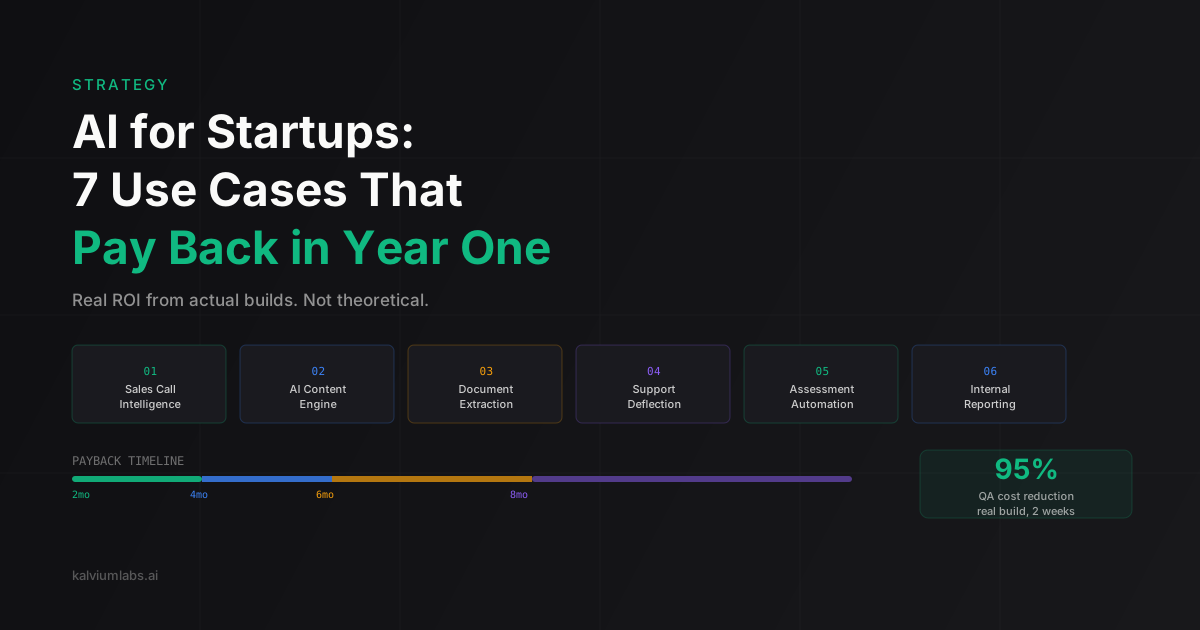
The 7 Use Cases, Ranked by Payback Speed
These aren’t ranked by ROI size. They’re ranked by how quickly a startup with a working prototype can actually close the loop between “we built this” and “here’s the number.” Shorter loops are better in year one.
1. Sales Call Intelligence
What it does: records, transcribes, and analyzes sales or support calls. Flags compliance issues, scores reps against a rubric, surfaces coaching moments, and generates automated summaries.
Why it pays back fast: if you have a team of 5+ reps, you’re either spending real money on manual QA review, letting compliance slide, or both. An AI system replaces the review cost directly.
Real numbers from a build we completed for an enterprise tech company: 40% improvement in compliance adherence, 95% reduction in QA review cost, deployed in two weeks. The QA team had been reviewing 20% of calls manually; the AI reviewed 100% from day one.
The model we used for transcription was Deepgram Nova-2, which runs at roughly $0.04 per hour of audio. For 500 hours of call recordings per month, that’s $20 in transcription cost. Compare that to the labor cost of manual review at the same volume.
Tools needed: Deepgram or AssemblyAI for transcription, a structured scoring prompt, your CRM for context. No proprietary model fine-tuning required.
2. AI Content Engine
What it does: generates, publishes, and measures content at a cadence no human team can sustain without significant headcount.
Why it pays back fast: if you’re spending $3,000 to $8,000 per month on content (agencies, freelancers, internal writers), the math tilts quickly. An AI content engine running at $500 to $2,000 per month can outproduce that spend in terms of volume and consistency.
Real numbers from Fertilia Health, a medical practice we built this for: 0 to 5,000 weekly impressions in five weeks, ranked position 2 on Google for target keywords, 109 consultations directly attributed to content, 40+ monthly visits arriving from ChatGPT citations. Zero ad spend. The content system has since been cited by AI search tools as a source, which is a distribution channel most content teams aren’t even measuring yet.
The use case generalizes well beyond healthcare. It works anywhere that consistent topical authority drives business. SaaS, professional services, e-commerce. The underlying mechanism is the same: keyword-driven topic selection, quality gates, feedback loop between traffic data and future content. Content creation time per article is now a constraint of editorial review, not writing capacity.
3. Document and Form Extraction
What it does: reads incoming documents (contracts, invoices, applications, medical records, permits) and extracts structured data without human input.
Why it pays back fast: document processing is almost always a repetitive manual task sitting somewhere in your ops stack. The before-state is easy to measure in hours per week. The after-state is near-zero.
A form automation build we ran for a client had the team spending 40 hours per week on manual data entry from intake forms. After deploying an OCR plus LLM extraction pipeline, that same work takes two hours per week. At a fully-loaded labor cost of $35 per hour, that’s $1,330 per month in savings. Build cost paid back in under three months.
The technical implementation is straightforward: a vision-capable model (GPT-4o or Claude 3.5 Sonnet) with a structured extraction prompt, a validation layer that flags low-confidence extractions for human review, and an output webhook to your existing system. The human-in-the-loop design is what makes it production-safe. Don’t build a fully automated pipeline for documents with legal or financial consequences. Build an automation that surfaces exceptions, not one that silently misses them.
4. Customer Support Deflection
What it does: handles tier-1 support queries through a conversational AI with access to your knowledge base, past tickets, and product documentation.
Why it pays back: support cost is a volume game. If you’re handling 200 tickets per week and your average cost per ticket (fully loaded: labor, tooling, overhead) is $8, you’re spending $1,600 per week. Deflecting 30% of those tickets saves roughly $25,000 per year. A well-built support bot costs $8,000 to $15,000 to build and $200 to $500 per month to run.
The honest failure mode here: support bots built with generic prompts and no domain context perform poorly and erode customer trust fast. The ones that pay back are built with your actual support history, your real documentation, and a clear escalation path to humans. The AI handles the repetitive questions. Humans handle anything where the answer isn’t in the knowledge base.
Implementation stack: RAG (retrieval-augmented generation) over your Zendesk or Intercom history, a vector database (pgvector if you’re already on Postgres, Pinecone if you want managed), a streaming interface. For most startups, the setup time is two to four weeks. The knowledge base maintenance is ongoing.
5. Assessment and Evaluation Automation
What it does: runs structured assessments, scores free-text or code responses, generates rubric-based feedback, and produces reports at a scale humans can’t match.
Why it pays back: this use case is particularly strong for EdTech, professional training, recruiting, and any business where humans are scoring subjective responses. Manual grading is expensive and inconsistent. AI grading at 94% agreement with human reviewers is both cheaper and more consistent.
An EdTech provider we built for saw a 95% reduction in course development time after deploying an AI evaluation pipeline (from three to four weeks per course down to one day). The platform handles coding challenges, written assessments, and project submissions. The before-state was a team of five evaluators working full-time on assessment review. The after-state was one person doing quality checks on AI outputs.
The technical requirement that trips most teams up: you need a strong rubric. AI evaluation is only as consistent as the evaluation criteria you give it. Vague rubrics produce vague scores. If your human evaluators can’t agree on a rubric, the AI won’t either.
6. Internal Reporting and Data Analysis
What it does: connects to your operational data (Postgres, BigQuery, your SaaS tools via API) and answers natural-language questions without requiring SQL or analyst capacity.
Why it pays back: analyst time is expensive and in short supply at early-stage startups. If your CEO, head of sales, and head of ops are all waiting on the same analyst to pull reports, you’re either bottlenecking decisions or building a culture of opinion-based choices because the data takes too long to get.
An internal AI analyst can’t replace a data scientist. What it can do is eliminate the 60 to 70 percent of analyst time that goes to routine reporting: how many users completed onboarding this week, what’s the average deal size by segment, which support categories are trending up. That time gets freed for actual analysis.
The implementation risk: connecting AI to production databases requires careful permission scoping. You want read-only access, query sandboxing, and output validation that catches nonsense SQL before it runs. We’ve built this stack several times and the scoping conversation with the engineering team usually takes longer than the actual build.
7. Video and Audio Quality Assurance
What it does: watches or listens to media content (training videos, recorded lectures, product demos, customer-facing video) and checks it against a quality rubric.
Why it pays back: this is niche, but when it fits, the fit is tight. If your business produces or reviews video at scale, manual QA is a headcount problem. An automated pipeline that checks every video for audio quality, content accuracy, pacing, and rubric compliance runs faster than real-time and doesn’t require a viewer.
We built a video auditing system for an online education client that was reviewing 40 to 60 hours of video per week manually. The automated pipeline checks each video for audio levels, transcript alignment, caption accuracy, and content completeness against a lesson rubric. Review time per hour of video dropped from 45 minutes of human attention to 8 minutes of exception review.
The technical stack: a vision model for visual checks, a speech model for audio, a structured rubric prompt, and an exception report per video. The hardest part is defining “good” in a way the AI can operationalize. Same principle as the assessment use case: the rubric is the product.
Which One Fits Your Stage
Before you pick one, run it through three questions.
First: do you have the data? Most of these use cases require existing data to work. No call recordings, no call intelligence product. No document history, no useful extraction. No support tickets, no relevant knowledge base. The use case that requires data you don’t have yet is a six-to-twelve month build, not a year-one ROI play.
Second: can you measure the before-state? If you can’t put a number on what you’re doing today (hours per week, cost per unit, tickets per week), you can’t prove the ROI in year one. The measurement infrastructure is as important as the AI.
Third: can you prototype it in a week? If the answer is no, the integration complexity is probably too high for a first build. Start with the use case where you can show a working prototype on your actual data in a short timeframe. That discipline prevents six-month builds that discover a data problem in month five.
Y Combinator’s current priorities include several of these use cases as specific areas where they see opportunity for new companies. That’s not just a validation signal. It’s a signal about what paying customers are willing to fund.
| Use Case | Payback Speed | Data Required | Build Complexity |
|---|---|---|---|
| Sales call intelligence | 2-4 months | Call recordings | Low |
| AI content engine | 3-6 months | Target keywords | Medium |
| Document/form extraction | 2-4 months | Document samples | Low-Medium |
| Support deflection | 4-6 months | Ticket history + docs | Medium |
| Assessment automation | 3-5 months | Sample responses + rubric | Medium |
| Internal reporting | 4-8 months | Clean data access | High |
| Video/audio QA | 3-5 months | Video archive + rubric | Medium |
The internal reporting use case has the longest tail because it requires clean, well-structured data and a permission model that’s usually more complex than the other six. If your data is a mess, start with documents or calls instead.
And if you still aren’t sure where to begin, the build vs buy AI decision framework is a useful filter before you scope anything.
FAQ
How much does it cost to build one of these AI use cases for a startup?
Build cost for the simpler use cases (call intelligence, document extraction, support bot) runs $15,000 to $30,000 at studio rates over four to eight weeks. More complex implementations (internal analyst, video QA with custom rubrics) typically land in the $30,000 to $50,000 range. Operating cost after launch is $200 to $2,000 per month depending on usage volume. The ROI math requires knowing your before-state cost, which we always work through before proposing a scope.
How long does it take to see measurable results?
For operational use cases with clear before-states (call QA, document extraction, assessment automation), you’ll typically see measurable results within four to eight weeks of go-live. Content use cases take longer to show organic traffic results (three to six months) but you can measure content output quality from day one. The fastest ROI we’ve seen was the form automation project: three months to full payback.
Do these use cases require fine-tuning a custom model?
No, for most of them. The use cases above rely on off-the-shelf models (GPT-4o, Claude 3.5 Sonnet, Deepgram) with structured prompting, retrieval layers, and rubric design. Fine-tuning adds cost and complexity without clear ROI for most startup use cases. We only recommend it when you have proprietary domain vocabulary that general-purpose models genuinely don’t handle, or when you’ve run a use case successfully on general models and need to optimize cost at scale.
What’s the biggest mistake startups make when implementing these?
Skipping the data audit. Every one of these use cases depends on the quality and structure of existing data. Teams that spend four weeks on the AI build and discover in week five that their call recordings are stored in three incompatible formats, or their support tickets have no tagging, end up rebuilding the data pipeline before they can build the product. We now run a one-week data audit before committing to a scope for any of these use cases.
Can we start with more than one use case at once?
We’d recommend against it. Not because it’s technically impossible, but because you dilute the measurement. Year-one ROI requires a clear before-state and a clean attribution of improvement to the AI change. Running two or three use cases simultaneously makes that attribution murky. Start with the highest-payback use case, measure it cleanly, and then use that proof to justify the next one.
If you’re working through which of these fits your startup, we’re happy to run through the data audit questions in a 30-minute call. Book a 30-minute call and we’ll tell you honestly which use case fits your stage and data, and what the realistic payback looks like.