A client asked me during sprint three why we were spending four days in QA on a document parser that was supposed to be straightforward: PDFs in, structured JSON out.
“I thought you said this was done,” he said.
“The code is done,” I said. “The model isn’t done yet.”
He wasn’t being difficult. He genuinely didn’t understand that there were two different things to be done. Traditional software has one: the code works or it doesn’t. AI has two: the code works, and the model does what you actually need it to do. Those two things can be true and false in every combination.
That’s the core difference between AI testing and normal software testing, and it’s why we built a completely separate QA process for LLM-based products.
What Normal QA Catches (and What It Misses Entirely)
In traditional software delivery, QA means confirming that deterministic logic behaves as specified. You submit a form, the right record appears in the database. You call an API, you get a 200 and the correct JSON shape. Unit tests, integration tests, end-to-end tests. When they pass, you ship.
That approach catches regressions in code. It doesn’t catch regressions in model behavior, because model behavior isn’t deterministic.
The same prompt, sent twice, can return two different answers. One correct, one plausible but wrong. A test suite doesn’t know what the right answer looks like for an arbitrary user question. It only knows what shape the output is supposed to have.
Here’s a real example from one of our builds. We shipped a compliance checker for a sales team: the model read call transcripts and flagged policy violations. Our unit tests confirmed that the classification endpoint returned a valid JSON object with the right fields. Every test passed. When we loaded actual transcripts from the client’s most recent quarter, the model flagged 34% of calls as violations. The client’s human reviewers had historically flagged around 8%.
The code was working exactly as designed. The model was overcalibrated on our development data. Standard QA had no way to catch that, because it had no way to know what 8% should feel like on real transcripts.
That’s the fundamental gap. And it’s why we built a separate framework for AI testing.
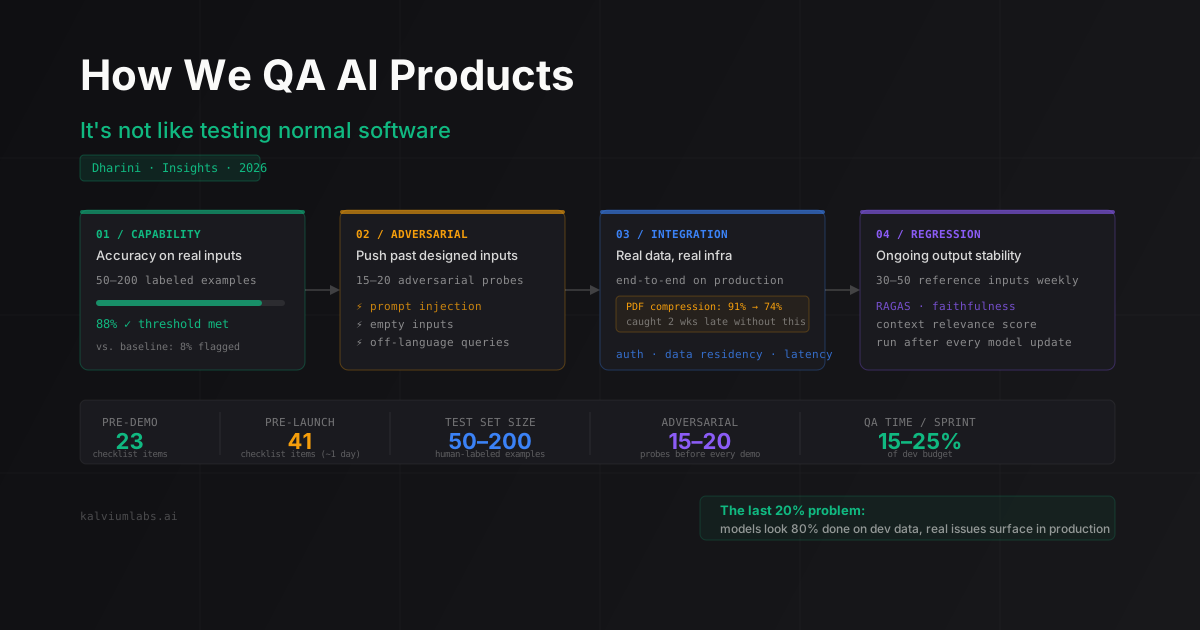
The Four Areas of AI QA We Run on Every Product
We learned, sometimes at cost, that AI product QA has to cover four areas. Each catches failure modes the others miss.
Capability testing. Does the model do the job it’s supposed to do, on inputs that represent what it’ll actually see in production? Before any model work starts, we build a test set of 50 to 200 examples labeled by a human who knows the domain, usually a client representative. Then we measure against that test set: precision, recall, or accuracy against ground truth. Not impressionistically. With numbers.
A demo is not a test. Demos are curated. Test sets aren’t.
Adversarial testing. What happens when users push the model in directions you didn’t design for? Jailbreak attempts. Queries in a language the system wasn’t built for. Inputs that are extremely long, or have no relevant content at all. We run 15 to 20 adversarial inputs before every client demo, because the first thing a technical stakeholder does in a demo is try to break it.
One pattern we see constantly: models that handle clean, well-formed inputs beautifully start hallucinating when the input is ambiguous or incomplete. A document parser that nails full PDFs might fabricate structured fields when you give it a one-page fax. You won’t catch that unless you test for it specifically.
For LLM products where end users interact with the model directly, we also test prompt injection: inputs designed to override the system prompt or extract internal configuration. This matters more than most teams expect.
Integration testing. The model doesn’t live in isolation. It connects to the client’s database, their auth system, their notification infrastructure. Integration testing confirms that the full pipeline works end to end, on real data, not mocked data.
This is where we’ve had the most expensive surprises. One project: our parser worked correctly on the PDFs we used during development. In production, the client’s document management system compressed PDFs at upload. The compressed files degraded our OCR step enough that accuracy dropped from 91% to 74%. Same model, same code, different input data. Integration testing on real infrastructure would have caught that two weeks earlier than we did.
Real data integration testing is not optional. It’s the step teams skip most often and regret most reliably.
Output regression testing. LLMs change. Vendor model updates shift behavior in ways that don’t always get announced. Your system prompt might work identically for four months and then produce consistently worse outputs after a quiet model update. We keep a set of reference inputs with expected outputs for every AI product we’ve shipped, and we re-run them after any change to the model, the prompt, or the underlying infrastructure.
For RAG systems specifically, we use RAGAS to score faithfulness and context relevance programmatically so we’re not manually reviewing output diffs after every deploy. For classification tasks, we maintain a CSV of 30 to 50 labeled examples and run them on a schedule. The goal isn’t catching every possible failure. It’s catching the obvious ones before the client does.
The Pre-Demo and Pre-Launch Checklists
Before every sprint demo, I run through a 23-item checklist with the engineering lead. It takes about three hours. Before a production launch, the full version runs 41 items and takes most of a day.
Here’s the core of the pre-demo checklist:
Capability check:
- Model accuracy meets the threshold defined in Sprint 0, tested against the agreed labeled set
- Accuracy broken down by input type, not just as an overall number
- Ground truth labels came from a human, not from a prior model run
Adversarial check:
- At least 15 adversarial inputs tested
- Prompt injection attempted and documented
- Empty or nonsense inputs produce a clean fallback, not a hallucination
Integration check:
- End-to-end pipeline tested on real client data, not synthetic fixtures
- Auth flow tested with a real account
- At least one failure scenario tested: what happens when the upstream data source is unavailable?
Output stability check:
- The same 10 reference inputs run before and after the sprint, with outputs compared
- Confidence scores are in an expected range if the model produces them
None of this is fast. Teams that skip it because of timeline pressure almost always end up in a longer conversation after launch.
For teams building LLM applications, OpenAI’s Evals framework is worth reviewing alongside RAGAS. The two together cover most of the capability and regression testing surface you’ll need. If you want to go deeper on evaluation pipeline architecture, we’ve covered the technical side in detail in our AI Evaluation Pipelines post.
The Mistake Almost Every Team Makes
Testing on synthetic or development data, then shipping into production.
It sounds obvious in retrospect. But it happens on nearly every project, including some of our earlier builds, because synthetic data is easier to work with. You control it. It’s clean. It’s available immediately. It makes the model look better than it will perform on the varied, sometimes contradictory data that real users produce.
The gap between your development test set and production reality is where AI testing failures live. The way to narrow that gap:
Get real data samples from the client as early as Sprint 0, before any model work begins. Run a data audit: what’s the actual distribution of input types? What are the edge cases in the real corpus? Run integration tests against staging infrastructure that mirrors production, not against localhost with mocked APIs.
We call this the “last 20% problem.” The model is usually 80% of the way there on development data. The final 20% appears when you expose it to production inputs. That 20% determines whether the client thinks the product works.
How “Done” Connects to QA
This connects directly to how we define done in AI sprints, which I’ve written about separately. The QA checklist and the definition of done are two sides of the same thing. You can’t call a sprint done without running the QA checklist. And you can’t meaningfully evaluate the checklist without knowing what accuracy threshold the sprint was aiming for.
The threshold gets defined in Sprint 0. Not at the end of development, when the temptation to ship is highest. If the compliance checker needs to agree with the human reviewer 88% of the time on a 200-sample test set, that’s the bar. When it hits 88%, the feature is done. If it’s at 83% after three rounds of tuning, that’s when we have a real conversation: invest more time, or ship at 83% and iterate in production?
That conversation is much easier when there’s a specific number to discuss.
When You Stop Testing and Ship
The question I get from engineering leads more often than any other QA question: when do we stop?
When the model passes the accuracy threshold defined in Sprint 0, and the adversarial and integration checks are green.
Not when everything is perfect. LLMs have probabilistic outputs, which means there’s always a failure mode you haven’t tested for. Waiting for perfection means not shipping.
The threshold is what makes shipping a decision rather than a guess. It’s also why we write it down before development starts and treat it as non-negotiable during QA.
One thing we’ve stopped doing: calling QA “done” after launch. For any AI product in production, we run the regression suite weekly and after every vendor model update. Model drift is real. Catching it via a scheduled check takes one hour. Catching it from a client complaint takes longer.
FAQ
How is LLM testing different from traditional software testing?
Traditional software testing checks that deterministic code behaves as specified. LLM testing checks that a probabilistic model produces outputs within an acceptable quality range across a representative input distribution. You can’t write a unit test that catches hallucination or model drift. You need evaluation frameworks, labeled test sets, and ongoing output monitoring.
How much time should we budget for AI product QA?
Plan for 15 to 25% of development time. A feature that takes four weeks to build typically needs three to five days of structured QA before it’s production-ready. That includes building the test set, running capability and adversarial checks, and doing integration testing on real client data. Teams that treat QA as a one-day sign-off usually regret it in the first week of production.
What tools do you use for LLM testing?
For RAG systems: RAGAS for faithfulness and context relevance scoring. For classification and structured output tasks: a CSV-based regression suite re-run after every model update. For prompt injection and adversarial testing: custom scripts against the production prompt stack. For end-to-end integration: Pytest for API pipelines, Playwright for interface-layer testing.
How often should you re-run QA on a deployed AI product?
At minimum: after every prompt change, after every model version update, and before every production release. Vendor model updates (OpenAI, Anthropic, Google) sometimes shift model behavior quietly. We’ve caught post-update accuracy drops on production systems by running scheduled regression checks weekly. If you’re waiting for users to report problems, you’ll always be a week behind.
At what accuracy threshold should we ship?
That number gets defined in Sprint 0, not at the end of development. A compliance checker that misclassifies 15% of calls might be unshippable. A content summarizer that’s off 20% of the time might be fine if users are reviewing outputs anyway. The right threshold depends on the risk profile of the use case and the client’s tolerance for error. We set it before engineering starts and treat it as a hard gate, not a guideline.
Figuring out what “good enough” means for your AI product before you start building is the most valuable hour of a discovery call. Book a 30-minute call and we’ll walk through the QA framework for your specific use case.