A founder told me, about three months into working with us, that he’d stopped dreading the weekly calls. He’d worked with a previous agency on an AI build, and their check-ins were mostly him asking questions and getting approximate answers. Nothing live. Nothing to react to. Just updates on what had been built, presented through slides.
With our setup, he said, he felt like he actually knew what was happening. Not because we sent more updates, but because he could see the thing working.
That distinction matters more than it sounds. The difference between a status update and a demo isn’t speed. It’s accountability. When you show working software, both sides know immediately whether you’re on track.
Why We Call It a Demo and Not a Check-In
The word matters. A check-in implies someone reporting to someone. A demo implies showing something.
When I schedule a “weekly check-in,” the unspoken assumption is that someone will present a summary and someone else will listen. That dynamic lets both parties be passive. The presenter might soften the hard parts. The listener might defer their real reaction to avoid conflict.
A demo doesn’t leave room for that. Either the feature works or it doesn’t. Either it matches what the client asked for or it doesn’t. There’s no narration that can bridge the gap between what’s on screen and what the client expected.
This is especially true for AI development projects. A client can sit through a slide that says “the model handles 85% of queries correctly” and nod along. Put that same client in front of the live system and ask them to type five real queries from their business, and the reaction tells you everything: where the model falls short, what use cases they actually care about, what “working” means in practice versus in a presentation.
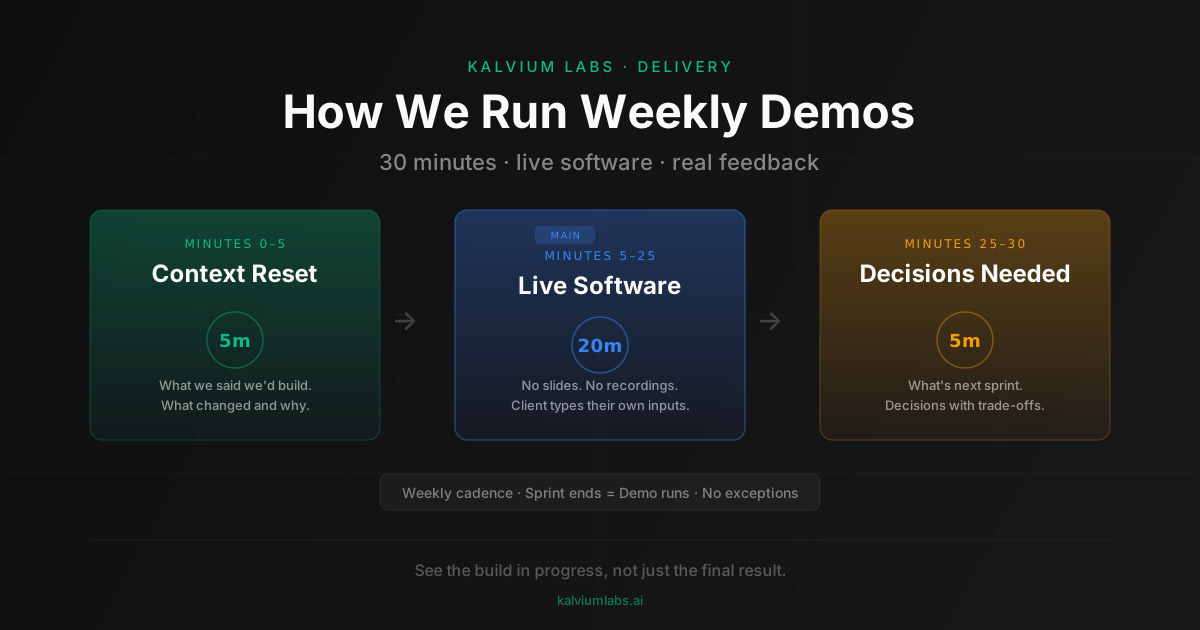
The 30-Minute Structure
We run demos in 30 minutes. Not because that’s a convenient calendar slot, but because longer demos lose focus. Atlassian’s sprint review guide recommends no more than 1 hour per sprint week, and we’ve found 30 minutes is more than enough when the format is tight.
The structure doesn’t change week to week.
First 5 minutes: context reset
I open every demo the same way: “Last week we said we’d build X. Here’s what we built.” One sentence, no preamble about challenges the team faced or decisions made along the way. That context belongs in the sprint handoff document, not the demo opening.
For more on this, read our guide on The Handoff Document We Send After Every Sprint. If something changed from the original plan, I say it now: “We planned to ship the PDF export feature this sprint. We didn’t, because we found a latency issue in the extraction step that needed fixing first. Here’s what we built instead.” Brief, direct, no spin.
Next 20 minutes: live software only
No slides. No screen recordings. No staged screenshots. The client watches us interact with the actual deployed system on staging.
We do the first three interactions ourselves to show the happy path. Then we hand over control. We ask the client to try it with their own examples. This is where demos get interesting. Clients always type inputs we hadn’t anticipated. Those moments reveal gaps that 20 minutes of scripted demos would never surface.
For AI projects, this window is particularly useful. A language model that handles the examples we tested might respond unpredictably to the examples the client actually cares about. Better to surface that in a demo than in production.
Last 5 minutes: what’s next and what we need from you
Two things: one paragraph on what the next sprint delivers, and any decisions the client needs to make before we start. I frame decisions the same way every time: “This is the decision, here are the two options, and here’s what changes depending on which way you go.”
I don’t end the call without a decision or a clear timeline for one. “Let me think about it” becomes “let me know by Thursday, because if we don’t hear back by then, we’ll default to option A and adjust in the next sprint.”
Getting the Demo Environment Ready
Demo failures don’t come from the engineering. They come from environment setup.
Before every demo, we verify the staging environment is current. Not current as of Tuesday, current as of the morning of the call. AI systems have a habit of behaving differently depending on context: rate limits on third-party APIs, cached responses that don’t reflect the latest model updates, integration environments that drift out of sync with production.
Three things we always check before the demo starts.
First, the API keys. Every time, without exception. A demo where a feature fails because of an expired key looks like engineering failure. It isn’t. It’s an ops failure. We own it either way.
Second, the data we’re demoing against. For systems that read from a client’s data source, we verify the connection and confirm the data set matches what the client has seen before. If the demo data changed since last week, we tell them.
Third, a dry run in the 30 minutes before the call. Every feature we plan to show, run once end-to-end. If something breaks, we know what to say instead of scrambling in front of the client.
Handling Live Failures
Demos go wrong. That’s not a failure mode of bad projects; it’s a feature of showing real software.
LLMs are nondeterministic by design. The same query might produce a slightly different response today than it did yesterday. This isn’t a bug; it’s how sampling works at non-zero temperature settings. An external API might have an outage during the exact 30-minute window of your call. A feature that worked five times in a row in testing might produce an unexpected result in demo minute 14.
The rule is: narrate honestly, don’t minimize.
If the model produces a wrong or unexpected output, say so directly. “That’s not the response we expect for that input. Let me show you what it does with the queries we’ve been testing against.” Then show the expected behavior. Don’t pretend the unexpected output didn’t happen. Clients notice, and pretending undermines the trust the demo is supposed to build.
The worst response to a live failure is silence followed by a smooth pivot. The best response is acknowledgment followed by context: “That’s a known edge case with the current model version. We’ve logged it and it’s on the backlog for sprint four.” One sentence. Move on.
We ran a demo for an edtech client where the content generation output used the wrong formatting on three consecutive queries. I said it directly: a template integration bug we’d introduced that morning. I showed them the correct output from the previous day’s build. We fixed it in the following two hours. The client didn’t lose confidence in the project. They thanked me afterward for not glossing over it.
How Demo Feedback Shapes the Next Sprint
The feedback a client gives in a demo is the most reliable signal we get on whether the project is heading in the right direction.
Clients don’t give precise technical requirements in a discovery call. They give intent. As I’ve written about in the five questions I ask before writing code, the discovery process surfaces intent, but intent and implementation aren’t the same thing until a client sees the implementation working.
A demo converts intent into reaction. And reaction is specific in ways intent can’t be.
“I want the AI to summarize customer feedback” is intent. “This summary is too long, I need three sentences max and I want the key complaint surfaced first” is reaction. The second version is actionable. It shapes the next sprint directly. You can’t get there without showing something first.
I keep a short notes document open during every demo. Not to transcribe the conversation, but to capture verbatim phrases. When a client says “this is almost right but it’s missing the urgency I need,” I write that down word for word. “Urgency” means something specific to them that I’ll ask about in the follow-up. Paraphrasing those moments in sprint planning loses something.
The best AI development company feedback loops close the gap between what clients imagine and what engineers build. Weekly demos don’t guarantee that. But they give you a structured opportunity to check that gap seven times over a seven-sprint project, rather than finding out at the end that you spent six sprints in the wrong direction.
What Bad Demos Look Like
Since it’s useful to know what we’re avoiding, here’s what I’ve seen go wrong before we settled on this format.
Demo presented via slide deck: the client sees a screenshot of a finished state and assumes the implementation is more complete than it is. Two sprints later, reality catches up.
Demo scheduled bi-weekly “to save time”: by the time the call happens, four things have changed, two of them need client decisions that should have happened a week ago, and the founder has built up a list of questions that could have been answered incrementally. The bi-weekly call takes 90 minutes and leaves everyone with more action items than they had before.
Demo where the engineer presents and the PM is on mute: clients direct questions to the engineer, who answers them in technical terms the client can’t fully evaluate. Scope changes get agreed to without a PM in the loop to log them. The next sprint starts with three undocumented decisions floating in someone’s memory.
All of these problems are process problems, not engineering ones. The fix is the same in each case: structure the demo so that showing, reacting, and deciding happen in order, every week, in 30 minutes.
FAQ
How often should an AI development company run client demos?
Weekly is the standard we hold to. Less frequent than weekly, and scope drift accumulates between touchpoints. Monthly demos on a fast-moving AI build are almost guaranteed to surface surprises the client shouldn’t have had to wait a month to see. The cost of a 30-minute weekly call is low relative to the cost of a three-week correction.
What should I expect to see in an AI project demo?
Working software on staging, not slides or screenshots. A capable AI development company should show you the actual system responding to real inputs. Ask to provide your own test cases, not just the ones the team prepared. The difference between a scripted demo and a live one is where you discover the gaps.
What if the demo reveals the AI isn’t working as expected?
That’s the point of the demo. Finding a problem at week two costs a sprint adjustment. Finding it at month three costs a project rebuild. The best outcome of a demo where something doesn’t work is a specific, documented change to the sprint backlog. Ask your PM: “What changes in the next sprint because of what we just saw?” If the answer is vague, push for something specific.
How do scope changes from demos get managed?
Changes get documented in the sprint handoff document before the next sprint starts. Every adjustment comes with a trade-off: “We’re adding X based on your feedback from the demo, which means Y moves to sprint N.” The client confirms it. Not to build a paper trail, but because written confirmation makes the trade-off real. Undocumented scope changes are how projects end up two sprints behind where everyone expected.
Should demos include engineers or just the PM?
For most demos, the PM runs it. For technically complex demonstrations, especially where the client may ask architecture questions, having the relevant engineer available (not presenting, just available) is useful. What we avoid is demos that become engineering briefings. If the client needs a 10-minute explanation of how the model works to understand what they’re seeing, that’s a sign the demo needs to be simplified, not that more engineers need to be on the call.
Want to see how we structure an AI build from week one, including what the weekly demos look like? Book a 30-minute call and I’ll walk you through our delivery process end to end.