Eight of our twelve agentic projects started with LangChain. Four got rewritten to LangGraph mid-build. The rewrites weren’t because LangChain was wrong for agents. They happened because we reached for it on problems it wasn’t designed to solve.
This post covers what actually broke, what LangGraph adds (and what it costs), and the decision matrix we use today before picking a framework.
What LangChain Is Actually Good At
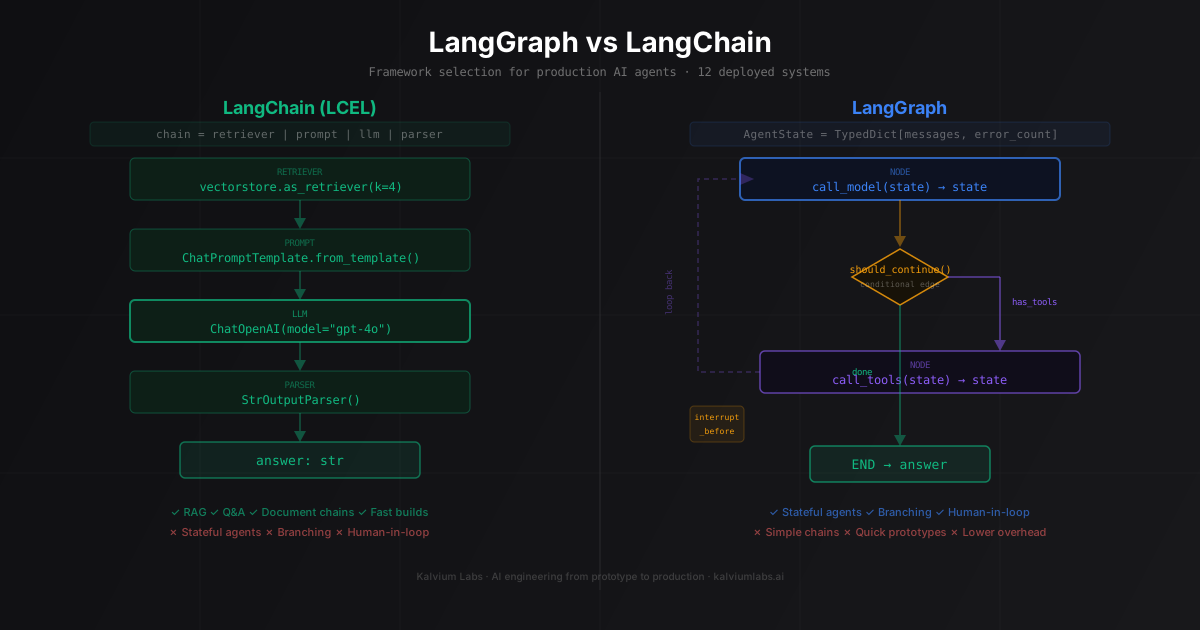
LangChain started as a chaining library. The modern version is LCEL (LangChain Expression Language), which uses the pipe operator to compose components:
from langchain_core.prompts import ChatPromptTemplate
from langchain_core.output_parsers import StrOutputParser
from langchain_core.runnables import RunnablePassthrough
from langchain_openai import ChatOpenAI, OpenAIEmbeddings
from langchain_community.vectorstores import FAISS

# A basic RAG chain
vectorstore = FAISS.from_documents(documents, OpenAIEmbeddings())
retriever = vectorstore.as_retriever(search_kwargs={"k": 4})

prompt = ChatPromptTemplate.from_template("""
Answer based only on the context provided.
Context: {context}
Question: {question}
""")

chain = (
    {"context": retriever, "question": RunnablePassthrough()}
    | prompt
    | ChatOpenAI(model="gpt-4o")
    | StrOutputParser()
)

answer = chain.invoke("What are the payment terms?")
The pipe syntax is readable, the components are reusable, and LCEL handles streaming, batching, and async out of the box. For RAG pipelines, document Q&A, and simple LLM calls with retrieval, LangChain is the right tool. It builds fast, tests cleanly in isolation, and produces straightforward tracebacks when something breaks.
LangChain also has an enormous ecosystem of integrations. We’ve stopped writing custom PDF loaders, FAISS wrappers, and web search tools. They exist. For the standard retrieval stack, it’s hard to beat.
The part where LangChain struggles: when the execution path needs to branch.
Where LangChain Breaks for Agents
The standard LangChain agent loop prompts the model, executes tool calls, adds results to message history, and repeats until the model stops calling tools. This works when the happy path is short and linear.
Production traffic finds the gaps. Three failure patterns we hit repeatedly:
State management becomes imperative. A LangChain agent passes state through mutable dicts and message lists. When you need conditional behavior (“if the tool returns an error, route differently than if it returns empty results”), you write Python logic outside the chain. As branching gets more complex, the chain becomes a wrapper around an if-else tree that’s harder to test than a plain class. We’ve seen this get to 400 lines before a team admitted the framework wasn’t helping anymore.
Mid-session interrupts aren’t designed in. One project needed a human approval step before the agent took high-value actions. In LangChain, we built this with a database polling loop and a signal mechanism bolted onto the outer agent loop. It worked. It was also 200 lines of custom code outside the framework that needed separate maintenance.
Typed error handling is missing. When a tool call fails at step 7 of a 10-step agent, LangChain’s default behavior is to return the error to the model and hope it recovers. If you want structured recovery (retry transient errors with backoff, return context to the model for invalid inputs, halt on fatal errors), you write it yourself. The patterns from our agentic AI production post cover this in depth. LangChain gives you the loop, not the infrastructure around it.
These are solvable within LangChain. They’re also exactly the problems LangGraph was built to address.
What LangGraph Adds
LangGraph treats an agent as a directed graph. Nodes are functions that transform state. Edges connect nodes, including conditional edges that route based on current state. The entire execution is tracked as state transitions, not just a flat message list.
A minimal agent graph:
from langgraph.graph import StateGraph, END
from langchain_core.messages import HumanMessage, ToolMessage
from typing import TypedDict, Annotated
from operator import add

class AgentState(TypedDict):
    messages: Annotated[list, add]  # appended, not replaced
    error_count: int

def call_model(state: AgentState) -> dict:
    response = llm_with_tools.invoke(state["messages"])
    return {"messages": [response]}

def call_tools(state: AgentState) -> dict:
    last_message = state["messages"][-1]
    results = []
    for tool_call in last_message.tool_calls:
        tool = tools_by_name[tool_call["name"]]
        try:
            result = tool.invoke(tool_call["args"])
            results.append(ToolMessage(content=str(result), tool_call_id=tool_call["id"]))
        except Exception as e:
            results.append(ToolMessage(content=f"Error: {e}", tool_call_id=tool_call["id"]))
            return {"messages": results, "error_count": state["error_count"] + 1}
    return {"messages": results}

def should_continue(state: AgentState) -> str:
    last_message = state["messages"][-1]
    if not hasattr(last_message, "tool_calls") or not last_message.tool_calls:
        return "end"
    if state["error_count"] >= 3:
        return "end"
    return "tools"

graph = StateGraph(AgentState)
graph.add_node("agent", call_model)
graph.add_node("tools", call_tools)
graph.set_entry_point("agent")
graph.add_conditional_edges(
    "agent",
    should_continue,
    {"tools": "tools", "end": END}
)
graph.add_edge("tools", "agent")

app = graph.compile()
result = app.invoke({
    "messages": [HumanMessage(content="Check our inventory and flag anything below reorder threshold")],
    "error_count": 0
})
Three things this adds over a LangChain agent loop:
State is typed and explicit. AgentState defines exactly what the agent tracks. Every node reads from and writes to this schema. When something goes wrong at step 8, you can inspect the exact state at each prior checkpoint.
Conditional edges are first-class. The should_continue function is just Python. Check anything: error counts, state flags, tool call patterns. The branching logic lives in a testable function, not buried in the loop.
Human-in-the-loop is one line. LangGraph supports interrupts natively: pause the graph at a specific node, persist state, wait for external input, then resume from the exact checkpoint.
from langgraph.checkpoint.memory import MemorySaver

checkpointer = MemorySaver()  # Use Postgres in production, not MemorySaver
app = graph.compile(
    checkpointer=checkpointer,
    interrupt_before=["execute_action"]
)

# First call: runs until it hits execute_action, then pauses
thread_config = {"configurable": {"thread_id": "session-001"}}
partial_result = app.invoke(initial_state, config=thread_config)
proposed_action = partial_result["proposed_action"]

# Human reviews proposed_action here (Slack notification, async review, etc.)
# After approval, resume from the checkpoint with None input:
final_result = app.invoke(None, config=thread_config)
The None input tells LangGraph to resume from the saved checkpoint. The graph remembers everything: message history, tool results, the proposed action. No re-running prior steps. This one feature drove our first LangGraph migration.
Three Production Patterns We Use
Pattern 1: Research agent with a step limit
class ResearchState(TypedDict):
    question: str
    sources_checked: int
    findings: list[str]
    is_complete: bool

def should_research_more(state: ResearchState) -> str:
    if state["is_complete"]:
        return "summarize"
    if state["sources_checked"] >= 5:
        return "summarize"  # Hard limit: never check more than 5 sources
    return "search"

graph = StateGraph(ResearchState)
graph.add_node("search", search_node)
graph.add_node("evaluate", evaluate_findings)  # Sets is_complete=True if sufficient
graph.add_node("summarize", write_summary)
graph.set_entry_point("search")
graph.add_edge("search", "evaluate")
graph.add_conditional_edges("evaluate", should_research_more)
graph.add_edge("summarize", END)
The sources_checked counter is in state, enforced by a routing function. We log every session that hits the limit. It reliably signals the question is too broad or the search tool is returning low-relevance results.
Pattern 2: Parallel research branches
When a task decomposes into independent sub-tasks, run them concurrently and merge:
from langgraph.constants import Send

def route_to_analysts(state: AnalysisState) -> list[Send]:
    return [
        Send("analyze_financial", {"company": state["company"], "aspect": "financial"}),
        Send("analyze_technical", {"company": state["company"], "aspect": "technical"}),
        Send("analyze_market", {"company": state["company"], "aspect": "market"}),
    ]

graph.add_conditional_edges("router", route_to_analysts)
The Send API fans out to multiple node instances running concurrently. Results merge when all branches complete. We use this for competitive analysis, due diligence, and multi-section content generation.
Fair warning: parallel branches writing to overlapping state need explicit merge functions, and merge logic is where bugs hide. We’ve had two incidents where parallel branches wrote conflicting data and the merge silently kept one version. Audit merge functions carefully.
Pattern 3: Approval gate before high-impact actions
# Compile with interrupt before a specific node
app = graph.compile(
    checkpointer=postgres_checkpointer,  # Postgres, not MemorySaver
    interrupt_before=["send_email_node"]
)

# Phase 1: agent plans, proposes email draft, then pauses
result = app.invoke(initial_state, config=thread_config)

# Team reviews draft in Slack (we send a notification from the graph)
# Phase 2: resume after approval
final = app.invoke(None, config=thread_config)
See the LangGraph persistence docs for available checkpointer backends. We use AsyncPostgresSaver in production.
Where LangGraph Falls Short
Debugging is still harder than it should be. The graph structure makes the intended flow obvious, but when something breaks, you’re still reading message history. LangGraph has state inspection via app.get_state(), but it’s not a debugger. We add explicit logging after every node:
def search_node(state: ResearchState) -> dict:
    results = search_tool.invoke(state["question"])
    logger.info(
        "search_node",
        extra={"results_count": len(results), "question": state["question"][:100]}
    )
    return {"findings": state["findings"] + [r["content"] for r in results]}
Same instrumentation we’d add to a custom loop. LangGraph doesn’t eliminate it.
Checkpointing has serialization footguns. Everything in your state dict needs to serialize cleanly when using a persistent checkpointer. We’ve hit this twice: once with a Pydantic v2 model that used a custom serializer, once with a numpy array that appeared in tool results. Both caused silent failures that only surfaced when trying to resume a paused session. The error messages were not helpful. Keep state values as Python primitives and standard containers. If you need complex objects, serialize them at the node level before they touch state.
Cross-graph state sharing is still awkward. We’ve built systems where a research graph and an execution graph share state. LangGraph doesn’t have first-class support for this. Our solution: shared Postgres tables with explicit hand-offs at the boundary. It works. We’ve seen race conditions when both graphs update shared state simultaneously. The LangGraph team has a multi-agent pattern in the docs, but the current patterns feel like workarounds.
Testing the full graph is tedious. Individual nodes are just functions, so unit testing them is easy. Testing the complete graph requires mocking the model and tool calls consistently across multiple steps. We write node-level unit tests and 2-3 integration tests that run the full graph against a fixture. We don’t attempt to cover every branching path in the integration suite.
The Decision Matrix
| Situation | Use |
|---|---|
| RAG pipeline, document Q&A, retrieval chain | LangChain (LCEL) |
| Tool-calling agent, linear execution, 1-2 tools | LangChain |
| Prototype or proof of concept | LangChain |
| Agent with conditional branching based on tool results | LangGraph |
| Human-in-the-loop approval step required | LangGraph |
| State needs to persist across sessions or restarts | LangGraph |
| Multi-step tasks with parallel sub-tasks | LangGraph |
| Production agent needing fine-grained error handling and observability | Custom loop |
| Tight latency requirements with complex debugging needs | Custom loop |
The “custom loop” row needs more context. LangGraph adds structure at the cost of abstraction. A custom loop is around 100 lines of Python with no framework magic. Every state transition is explicit. Error handling is exactly what you wrote. When something breaks at 2 AM, the stack trace points to your code.
We’ve built on LangGraph for 4 projects and custom loops for 3. The custom loops were cases where we needed cost tracking and observability we couldn’t get from LangGraph without significant wrapper code. The build-vs-framework decision from first principles is covered in our AI agents architecture post.
What We Still Don’t Have a Good Answer For
Streaming intermediate state from LangGraph graphs. LangGraph supports streaming tokens from the model, but streaming structured intermediate state (“the agent is on step 3 of 5, here’s what it found so far”) requires custom infrastructure. We’ve implemented this with WebSockets and explicit state publishing from nodes. It works, but the client-side consumption is fragile enough that we’ve had to rebuild it twice.
Long-horizon tasks with growing context. After 25-30 tool calls, context windows start showing degradation even at 200K tokens. The model forgets early results or becomes inconsistent about what it’s already done. Summarization helps (compress early steps into a condensed block) but introduces errors when the model omits details it considered unimportant. We set hard session length limits and break long tasks into sub-tasks with explicit hand-offs. It works. It’s not elegant, and the “autonomous” part of agentic AI hits a ceiling we haven’t figured out how to raise.
FAQ
Should I migrate an existing LangChain agent to LangGraph?
Only if the current system is actively causing problems. If it works, ships on time, and debugs reasonably, the migration cost (2-5 days for a mid-sized agent) is not worth it unless you need a specific LangGraph feature like human-in-the-loop or persistent sessions. We’ve done two of these migrations. Both were driven by concrete new requirements, not “LangGraph is better” reasoning.
Is LangGraph production-ready?
Yes, with caveats. Core graph execution and stateful agents have been stable across four of our production deployments. The persistence layer is the most footgun-prone part. Use Postgres in production (not MemorySaver), and validate that your state types serialize cleanly before relying on checkpoint resume. LangGraph v0.2+ is significantly more stable than earlier versions.
How does LangGraph compare to AutoGen or CrewAI?
Different target problems. AutoGen is built for multi-agent conversations where agents talk to each other, better for autonomous research workflows. CrewAI wraps LangChain with a higher-level “crew” abstraction, easier to get started but less control. LangGraph gives the most control and sits closest to a custom loop with framework support for state management. If reliability and debuggability matter more than rapid prototyping, LangGraph beats CrewAI for production systems.
What about LangChain v0.3’s improved agent support?
LangChain v0.3 improved the built-in tool-calling agent: better error handling, cleaner structured tool output, more reliable message formatting. For simple agents (1-3 tools, linear execution, no branching), the gap with LangGraph narrowed. We still reach for LangGraph when state persistence or conditional routing is in scope. But if you’re on a deadline with a straightforward agent, v0.3 LangChain is more competitive than it was a year ago.
How long does a production LangGraph agent take to build?
For a mid-complexity agent (4-6 nodes, 2-3 tools, Postgres persistence), plan 3-5 days from scratch to deployed. Most of that time goes to state schema design and conditional edge logic, not the LangGraph API itself. The framework is learnable in an afternoon. Getting the state schema right so you don’t refactor mid-build takes iteration. We’ve found that designing the TypedDict before writing any node code saves a day of rework.
We build and deploy production agentic AI systems for startups. If you want a technical walkthrough of whether LangChain or LangGraph fits your specific system, book a 30-minute call. We’ll tell you honestly which way to go.