We’ve debugged 23 agentic AI failures across client deployments this year. Four patterns account for nearly all of them: malformed tool calls, infinite planning loops, error cascades, and context overflow. None of these are model quality problems. They’re infrastructure problems.
This post covers the patterns we’ve converged on after building six agentic systems in production. Not theory. What actually shipped, what broke, and what we changed.
Why Most Agentic Systems Fail in Production
The demo version of an agentic system works because the happy path is short. Tool calls return clean JSON. The model plans two or three steps, executes them, done.
Production traffic finds every gap in that story. Users ask things the model wasn’t designed for. External APIs return 504s mid-session. The model hallucinates a parameter name that doesn’t match your schema. What happens next determines whether you have a working agent or an expensive bug.
The four failure categories:
- Malformed tool calls. The model calls a tool with parameters that fail schema validation. Usually caused by underspecified JSON schemas where the model has to guess at format.
- Infinite planning loops. The model re-plans the same step, burning tokens and API budget. Usually caused by missing step limits or ambiguous completion criteria.
- Error cascades. One tool failure leaves the agent in inconsistent state, and subsequent steps fail for different reasons. Root cause buried 6 steps back.
- Context overflow. Long sessions exhaust the context window, causing the model to forget earlier tool results. Starts happening around step 15-20 with larger models.
Tool-Calling Design That Doesn’t Break
The JSON schema you write for a tool is not documentation. It’s a contract the model uses to generate calls. A loose schema produces loose calls.
Schema Design Principles
Here’s a tool definition we would have written six months ago:
# Underspecified: breaks in production
tools = [{
    "name": "search_database",
    "description": "Search the customer database",
    "input_schema": {
        "type": "object",
        "properties": {
            "query": {"type": "string"},
            "filters": {"type": "object"}
        }
    }
}]
The filters field is an open object. We’ve seen models pass {"status": "Active"} (wrong case, database rejects it), {"created_before": "yesterday"} (invalid date format), and {"limit": 1000} (not a filter at all, but the model tried). All valid JSON. All incorrect.
Here’s the same tool, specified tightly:
tools = [{
    "name": "search_database",
    "description": "Search customer records. Returns up to 50 matching records.",
    "input_schema": {
        "type": "object",
        "properties": {
            "query": {
                "type": "string",
                "description": "Full-text search. Leave empty to use only filters.",
                "maxLength": 200
            },
            "status_filter": {
                "type": "string",
                "enum": ["active", "inactive", "pending", "all"],
                "default": "all"
            },
            "date_range": {
                "type": "object",
                "properties": {
                    "after": {
                        "type": "string",
                        "format": "date",
                        "description": "ISO 8601: YYYY-MM-DD"
                    },
                    "before": {
                        "type": "string",
                        "format": "date"
                    }
                }
            },
            "max_results": {
                "type": "integer",
                "minimum": 1,
                "maximum": 50,
                "default": 20
            }
        }
    }
}]
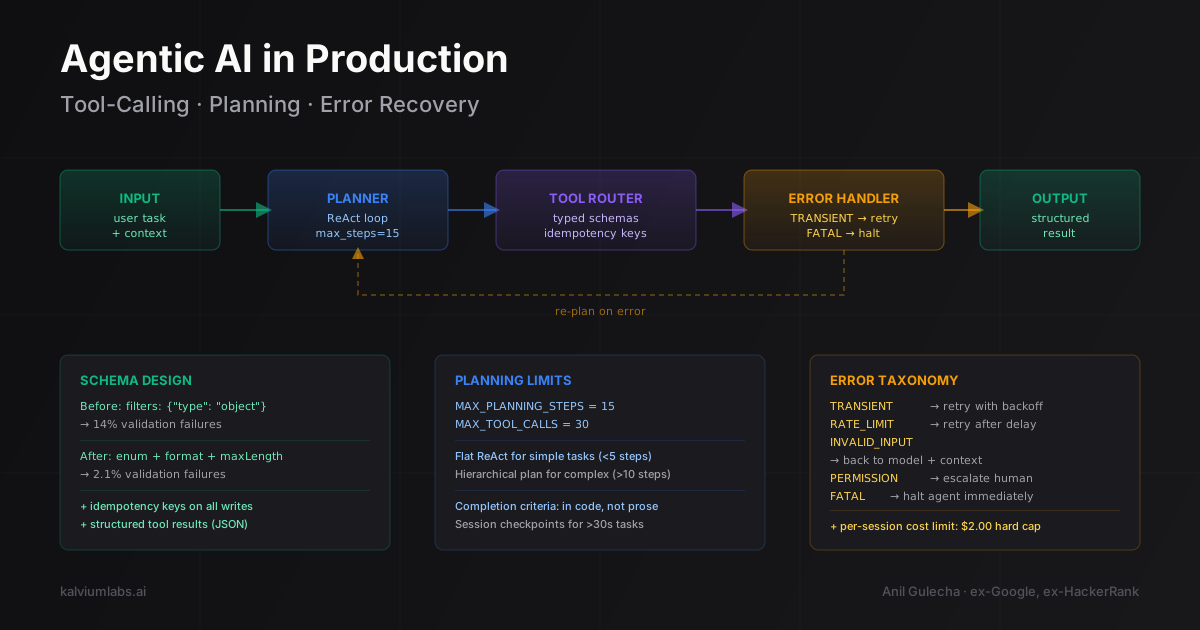
The model can’t invent status values. It can’t use natural language date strings. We measured this on a production data retrieval agent: before tightening schemas, 14% of tool calls failed validation. After: 2.1%.
What we got wrong initially: we tried to add descriptions as the only constraint (“query should be a valid date string”). Models ignore description-only constraints when they’re conflicting with what they think the user wants. Add machine-readable constraints (enum, format, minimum, maximum). Treat descriptions as hints, not guardrails.
Idempotency Is Not Optional for Write Operations
Any tool that modifies state needs to be idempotent. Without it, your error recovery will corrupt data.
The scenario that breaks things: the model calls a “create customer record” tool, the call succeeds on the server, but the network drops before the response returns. The agent sees a timeout. Without idempotency, the retry creates a duplicate.
async def create_customer_record(
    data: CustomerData,
    idempotency_key: str,
) -> CustomerRecord:
    # Check for existing operation with this key
    existing = await db.get_idempotency_result(idempotency_key)
    if existing:
        return existing  # Return original result, don't create duplicate

    record = await db.create_customer(data)
    await db.store_idempotency_result(idempotency_key, record, ttl=3600)
    return record
The agent generates the key before calling (we use uuid4()). On retry, it passes the same key. We still find this missing in the majority of agentic codebases we’ve reviewed from other teams. It’s one of those things that doesn’t matter until it does, and when it does, the debugging session is painful.
Structured Tool Results
What a tool returns shapes the model’s next step. String results force the model to parse meaning from prose, which it does inconsistently across different phrasings.
# String result: model has to interpret meaning
return f"Found 3 records. First one is John Smith, active since 2023..."

# Structured result: model references fields directly
return {
    "count": 3,
    "records": [
        {"id": "CUS-001293", "name": "John Smith", "status": "active", "since": "2023-04-15"},
        {"id": "CUS-001294", "name": "Sarah Chen", "status": "inactive", "since": "2022-11-03"},
    ],
    "query_time_ms": 45
}
The model can reference records[0].id in the next step without holding “the first one was John Smith” in working memory. This matters most in sessions with 12+ steps where the context is filling up with earlier results.
Planning Architectures That Don’t Loop
The standard planning approach in agentic AI is ReAct (Reasoning + Acting): the model alternates between reasoning about what to do and acting by calling tools. It’s the basis of most agent frameworks.
The paper tested on question-answering benchmarks with known correct answers. Real production tasks don’t have ground truth the model can verify against. When the model can’t tell whether its current state matches the goal, it re-plans indefinitely.
Bounded Planning Loops
Every planning loop needs a hard step limit in code. Not in the system prompt. In code.
MAX_PLANNING_STEPS = 15
MAX_TOOL_CALLS = 30

async def run_agent(task: str, tools: list[Tool]) -> AgentResult:
    messages = [
        {"role": "system", "content": SYSTEM_PROMPT},
        {"role": "user", "content": task}
    ]
    step_count = 0
    tool_call_count = 0

    while step_count < MAX_PLANNING_STEPS:
        response = await call_model(messages, tools)

        if response.stop_reason == "end_turn":
            return AgentResult(
                success=True,
                output=response.content,
                steps=step_count
            )

        if response.stop_reason == "tool_use":
            tool_calls = response.tool_calls
            tool_call_count += len(tool_calls)

            if tool_call_count > MAX_TOOL_CALLS:
                return AgentResult(
                    success=False,
                    error="Tool call budget exceeded",
                    steps=step_count,
                    partial_output=extract_partial_result(messages)
                )

            results = await execute_tools_parallel(tool_calls)
            messages.extend(format_tool_results(tool_calls, results))

        step_count += 1

    return AgentResult(
        success=False,
        error=f"Planning limit reached after {step_count} steps",
        partial_output=extract_partial_result(messages)
    )
Set MAX_PLANNING_STEPS based on task complexity, not a universal constant. A simple data retrieval agent should max out at 5 steps. A research agent that browses multiple sources might legitimately need 20. We log every session that hits the limit. It’s a signal the task is too complex for the current planning approach, or the model is looping on a specific subtask that needs a different tool design.
Hierarchical Planning for Multi-Step Tasks
For tasks with genuinely many steps, flat ReAct loops become unreliable. The model loses track of the high-level goal as context fills with tool results. The pattern that works better: a planner model that generates a structured plan, followed by an executor that runs each step independently.
async def hierarchical_agent(task: str, tools: list[Tool]) -> AgentResult:
    # Planner generates a structured step list
    plan = await call_model(
        messages=[
            {"role": "system", "content": PLANNER_PROMPT},
            {"role": "user", "content": task}
        ],
        response_format={"type": "json_schema", "schema": PLAN_SCHEMA},
        tools=[]  # Planner doesn't call tools
    )

    steps = plan["steps"]
    results = []

    for i, step in enumerate(steps):
        # Each executor gets a short context with just this step + prior results
        step_result = await run_agent(
            task=step["description"],
            tools=filter_tools_for_step(tools, step["required_tools"])
        )
        results.append(step_result)

        if not step_result.success and step["required"]:
            return AgentResult(
                success=False,
                error=f"Required step {i+1} failed: {step_result.error}",
                completed_steps=i,
                partial_results=results
            )

    return AgentResult(success=True, steps=steps, results=results)
The key advantages: each executor gets a focused context instead of the entire session history. Tool availability is scoped to the current step, which reduces hallucinated tool calls. Required vs. optional steps are explicit at planning time.
The tradeoff: the planner adds a model call (latency plus cost). For tasks under 5 steps, flat ReAct is simpler. For anything over 10 steps, hierarchical planning pays for itself in reliability.
Testable Completion Criteria
The model’s sense of “done” is unreliable without explicit checks. We’ve seen agents declare success after a tool call returns an error (the model interpreted the error message as a result) and continue looping after a task is clearly complete (the task description was ambiguous about what “finished” looks like).
Make completion criteria testable in code:
@dataclass
class CompletionCriteria:
    required_output_keys: list[str]
    validation_fn: Callable[[dict], bool]

def check_completion(agent_result: dict, criteria: CompletionCriteria) -> bool:
    if not all(k in agent_result for k in criteria.required_output_keys):
        return False
    return criteria.validation_fn(agent_result)

# Example: data retrieval task must return records in the expected schema
retrieval_criteria = CompletionCriteria(
    required_output_keys=["records", "count"],
    validation_fn=lambda r: isinstance(r["records"], list) and r["count"] == len(r["records"])
)
For a code-writing agent, the completion check is: does the output pass a syntax check and the specified test cases? Encode these in code, not in natural language instructions to the model.
Error Recovery That Doesn’t Cascade
When a tool call fails, the agent infrastructure should classify the error and apply the correct recovery strategy. Most implementations let the model decide how to handle the error message, which produces inconsistent behavior.
Typed Error Taxonomy
Every tool should return errors in a structured format the infrastructure can act on:
from enum import Enum
from dataclasses import dataclass
from typing import Any

class ErrorType(Enum):
    TRANSIENT = "transient"          # Retry with backoff
    INVALID_INPUT = "invalid_input"  # Return to model with context
    PERMISSION = "permission"        # Escalate to human
    NOT_FOUND = "not_found"          # Route around or fail gracefully
    RATE_LIMIT = "rate_limit"        # Retry after delay
    FATAL = "fatal"                  # Stop the agent

@dataclass
class ToolError:
    type: ErrorType
    message: str
    retry_after_seconds: int | None = None
    context: dict[str, Any] | None = None

@dataclass
class ToolResult:
    success: bool
    data: dict | None = None
    error: ToolError | None = None
The error handler reads the type and applies the correct strategy:
async def handle_tool_error(
    tool_name: str,
    error: ToolError,
    attempt: int,
    max_retries: int = 3
) -> ToolResult | None:
    if error.type == ErrorType.TRANSIENT:
        if attempt < max_retries:
            backoff = 2 ** attempt  # 1s, 2s, 4s
            await asyncio.sleep(backoff)
            return None  # Signal: retry this tool call

    if error.type == ErrorType.RATE_LIMIT:
        delay = error.retry_after_seconds or 30
        await asyncio.sleep(delay)
        return None  # Retry after delay

    if error.type == ErrorType.INVALID_INPUT:
        # Don't retry. Return structured error to the model.
        return ToolResult(
            success=False,
            error=ToolError(
                type=ErrorType.INVALID_INPUT,
                message=f"Tool '{tool_name}' rejected the input: {error.message}. Revise parameters.",
                context=error.context
            )
        )

    if error.type == ErrorType.FATAL:
        raise AgentFatalError(f"Tool '{tool_name}' fatal error: {error.message}")

    # NOT_FOUND and PERMISSION: return to model for routing
    return ToolResult(success=False, error=error)
The agent infrastructure handles transient errors and rate limits without surfacing them to the model. The model doesn’t see a 2-second retry delay. It only sees the eventual result, or a structured error message if retries are exhausted. This keeps the model’s context clean and prevents it from “learning” from the error narrative in ways that cause unpredictable behavior downstream.
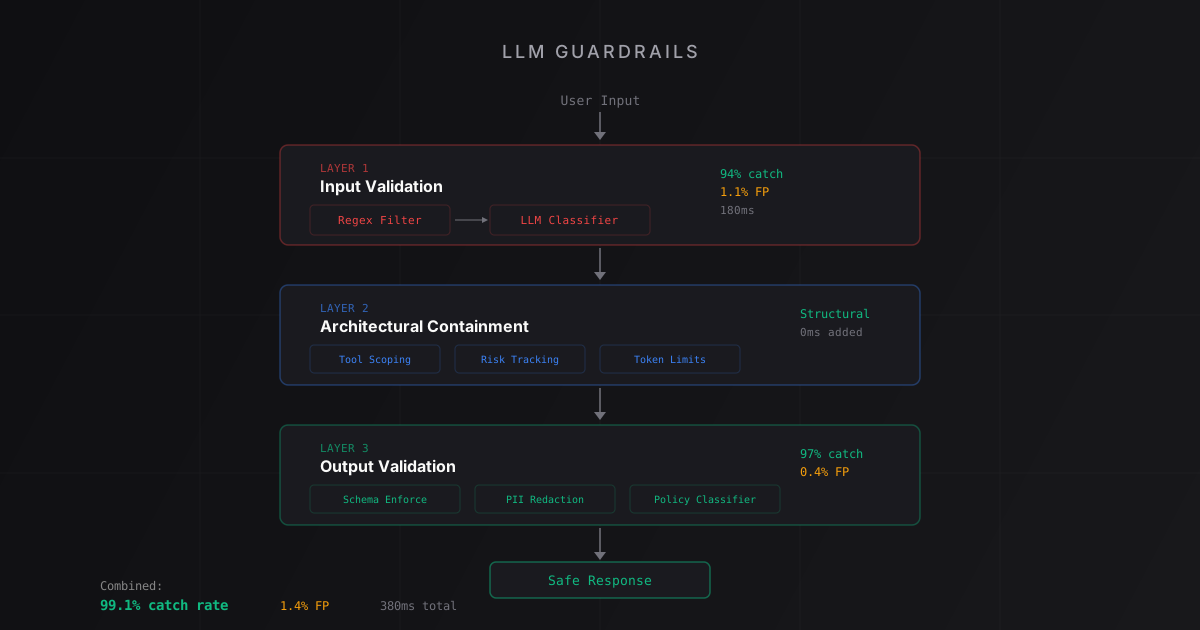
For the complementary problem of preventing malformed requests from reaching the agent in the first place, the input validation layer in our LLM guardrails post covers the patterns we use.
Checkpoint-Based Session Recovery
Long agentic sessions need checkpointing. Not for the model’s sake, but for yours. When a 20-step session fails at step 14, you want to resume from step 13, not restart from zero.
@dataclass
class AgentCheckpoint:
    session_id: str
    messages: list[dict]
    completed_steps: int
    timestamp: datetime

async def run_agent_with_checkpoints(
    session_id: str,
    task: str,
    tools: list[Tool],
) -> AgentResult:
    checkpoint = await load_checkpoint(session_id)
    if checkpoint:
        messages = checkpoint.messages
        logger.info(f"Resuming session {session_id} from step {checkpoint.completed_steps}")
    else:
        messages = [
            {"role": "system", "content": SYSTEM_PROMPT},
            {"role": "user", "content": task}
        ]

    # ... run agent loop, saving checkpoint after each completed step ...
    await save_checkpoint(session_id, AgentCheckpoint(
        session_id=session_id,
        messages=messages,
        completed_steps=current_step,
        timestamp=datetime.utcnow()
    ))
We use checkpointing for batch agents (data pipelines, content generation, analysis tasks) where a session might run for 30-120 seconds. For real-time chat agents with sub-second latency requirements, the storage overhead isn’t worth it.
Observability: You Can’t Debug What You Can’t Trace
You can’t debug agentic AI from logs alone. You need a trace: the full message sequence, every tool call with its input and output, timing data, cost per step, and the final outcome.
@dataclass
class ToolCallTrace:
    tool_name: str
    input_params: dict
    output: dict | None
    error: ToolError | None
    latency_ms: int
    attempt_number: int

@dataclass
class StepTrace:
    step_number: int
    model_input_tokens: int
    model_output_tokens: int
    tool_calls: list[ToolCallTrace]
    latency_ms: int
    cost_usd: float

@dataclass
class SessionTrace:
    session_id: str
    task: str
    steps: list[StepTrace]
    outcome: str  # "success", "loop_limit", "tool_error", "fatal"
    total_cost_usd: float
    total_latency_ms: int
When a client reports “the agent gave a weird answer to this question,” we pull the trace, find the step where the model’s reasoning diverged, and identify whether it was a schema problem, a planning limit issue, or something in the system prompt.
The open-source options are workable. LangSmith handles tracing well if you’re in the LangChain ecosystem. Braintrust is more model-agnostic. We built our own trace format because we needed tight integration with cost tracking and the data structure differences between Anthropic and OpenAI messages created friction with the existing tools. It took two days to build and we’ve used it on every agentic project since.
Also note: the Anthropic API supports parallel tool calls natively. Log each parallel batch as a single step with multiple ToolCallTrace entries. Flattening parallel calls into sequential trace entries makes the timing data meaningless.
What We Still Don’t Have a Good Answer For
Two problems we’ve accepted as unsolved, at least for now.
Concurrent writes and state consistency. When the model calls multiple tools in parallel, and two of them write to overlapping state, you need locking. If one succeeds and the other fails, rollback logic gets complicated fast. Our current solution: declare certain tool combinations as non-concurrent in the tool schema and execute them sequentially. Inelegant but stable. We’d rather have explicit sequencing than an intermittent race condition we can’t reproduce in staging.
Long-horizon planning with context growth. After 25-30 tool calls, even 200K-token context windows show degradation. The model forgets early results or becomes inconsistent about what it’s already done. Summarization helps (compress early steps into a condensed summary) but introduces its own errors when the model omits details it considered unimportant. We set hard session length limits and break long tasks into sub-tasks with explicit handoffs. It works. It’s not elegant, and it means the “autonomous” part of agentic AI has a ceiling we haven’t figured out how to raise.
FAQ
When does it make sense to build agentic AI versus a simpler LLM integration?
Use an agent when the task genuinely requires multiple sequential decisions where each step depends on the result of the previous one. Examples: a research pipeline that browses multiple sources, a data workflow that queries a database, checks results, and triggers actions based on conditions, or a customer support flow that looks up account history before responding. If the task can be handled in a single LLM call with a well-designed prompt, don’t build an agent. The operational overhead isn’t worth it for anything a single-turn system can handle reliably.
How much does agentic AI cost compared to a standard LLM call?
Significantly more. A single agentic task might trigger 5-15 model calls instead of 1, each with growing context as the session progresses. A task that completes in 8 steps using Claude 3.5 Sonnet (our default for complex planning) typically costs $0.04 to $0.12 in API fees. At scale, that adds up fast. We use cheaper models (Haiku-class) for tool routing and classification steps, and reserve Sonnet for the planning steps that need reasoning quality. For high-volume batch agents, Llama 3.1 70B via Groq cuts costs by 80-90% with acceptable quality for simple retrieval and routing tasks.
LangGraph or a custom agent loop?
LangGraph is worth using when your workflow is a directed graph with known branching points and you want a visual representation. It handles state management and conditional routing cleanly, and the graph structure forces you to think about failure paths explicitly. Use a custom loop when you need fine-grained control over error handling, cost tracking, and observability. Our post on building AI agents from scratch covers the decision framework in more depth. Custom loops add 2-4 hours of setup time but produce systems that are easier to trace when something goes wrong at 3 AM.
What model works best for production agentic AI in 2026?
Claude 3.5 Sonnet for planning-heavy agents. It follows tool schemas more accurately than GPT-4o in our testing (fewer malformed tool calls) and handles multi-step reasoning better. GPT-4o for agents where structured output reliability is the top priority. For cost-sensitive batch agents, Llama 3.1 70B via a local deployment or Groq API is the right call: 80-90% cost reduction with acceptable quality for retrieval and routing tasks that don’t require complex planning.
How do I prevent an agent from running up a large API bill on a single failed session?
Set per-session cost limits in your agent loop, not just step limits. Calculate cost after each step and halt if you exceed a threshold. We set $0.50 as the soft limit and $2.00 as the hard limit for most production agents. When the soft limit trips, the agent finishes its current tool call and extracts a partial result. When the hard limit trips, it terminates immediately. In two years of running production agents, we’ve had exactly one session hit the hard limit: a user who deliberately constructed an infinite task. The limit worked.
We build and deploy agentic AI systems for startups. If you want a technical walkthrough of what an agent architecture would look like for your specific use case, book a 30-minute call and we’ll scope it honestly.