We hit the Cloudflare Workers CPU limit at 4ms into a JSON parsing operation.
The payload was 18KB: a Deepgram transcript with speaker diarization data. We were doing JSON.parse() on the whole thing before chunking it for embedding. Totally normal in a Node.js Lambda. On Workers, it consumed 40% of our available CPU time before we’d done anything useful.
That was the moment we understood: Workers isn’t a cheaper Lambda. It’s a different execution model that requires a different way of thinking about AI workloads. The constraints are real, but so are the advantages. Global deployment in 300+ data centers, cold starts under 100ms, and a development model that pushes you toward stateless request handling.
This is what we’ve learned building three production AI systems on Workers over the last year.
What Workers Actually Is (and Isn’t)
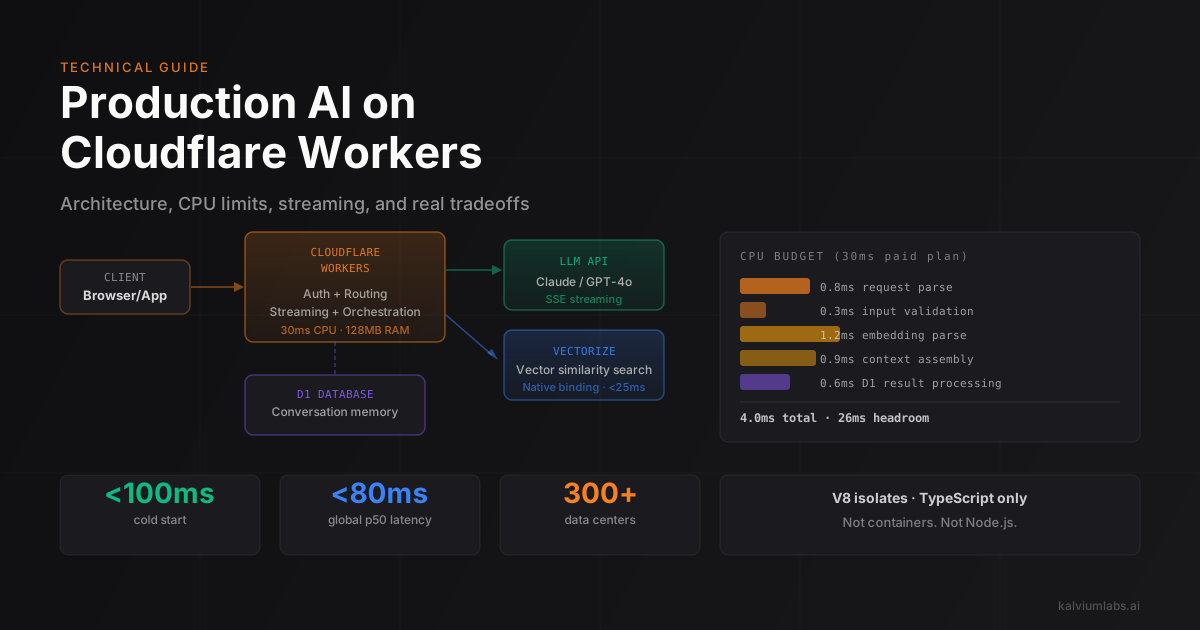
Workers runs on V8 isolates, not containers. Each isolate is a sandboxed JavaScript engine. There’s no filesystem. No native add-ons. No child_process. The runtime is closer to a browser service worker than to Node.js.
The implications for AI workloads:
Memory: 128MB per isolate. A naive LangChain chain with full conversation history and embedded documents will hit this. You need to externalize state.
CPU time: 10ms on the free plan, 30ms on paid (Workers Paid, $5/month). This is wall-clock CPU time, not total request duration. A request that waits for an external API call doesn’t consume CPU during the wait. But your synchronous JavaScript (parsing, encoding, chunking, sorting) all counts.
Request duration: Up to 30 seconds on paid plans for HTTP requests. Enough for most LLM calls, tight for multi-step agent pipelines.
No native modules: No node:crypto, no C++ bindings. This rules out some Python-based ML libraries that people try to run server-side. It also rules out sharp for image processing and a handful of popular npm packages that ship native binaries.
What Works doesn’t constrain you on: outbound HTTP requests, WebSockets, streaming responses, KV reads, D1 SQL queries, R2 object reads, and Vectorize similarity search. Those are all handled in the Workers runtime efficiently.
Request Handling: The Right Split
The pattern that works for AI workloads: Workers handles routing, auth, and lightweight orchestration. LLM inference, embedding generation, and heavy computation happen in external services. Workers is the glue layer, not the compute layer. It’s a similar split to what we described in the prompt architecture post: a lightweight router makes decisions, and specialized components do the actual work.
Here’s the request flow we use for a RAG endpoint:
// src/index.ts
import { Env } from './types';
import { retrieveContext } from './retrieval';
import { streamCompletion } from './completion';
import { authenticate } from './auth';

export default {
  async fetch(request: Request, env: Env): Promise<Response> {
    // Authentication is a KV lookup (fast, no CPU cost)
    const authResult = await authenticate(request, env);
    if (authResult.ok === false) {
      return new Response('Unauthorized', { status: 401 });
    }

    // Parse only what we need, not the full body
    const { query, tenantId } = await parseQuery(request);

    // Retrieval: Vectorize similarity search
    // This is an outbound HTTP call; doesn't count against CPU
    const context = await retrieveContext(query, tenantId, env);

    // Stream the LLM response back to the client
    // TransformStream lets us proxy the OpenAI/Anthropic SSE stream
    return streamCompletion(query, context, env);
  }
};

async function parseQuery(request: Request): Promise<{ query: string; tenantId: string }> {
  // Parse only the fields we need; don't deserialize the whole body if it's large
  const body = await request.json() as Record<string, unknown>;
  return {
    query: String(body.query ?? '').slice(0, 2000),  // hard cap
    tenantId: String(body.tenantId ?? ''),
  };
}
The key constraint in parseQuery: we only parse what we need and we cap input length immediately. On a previous project, we were passing the full user message (potentially megabytes of conversation history) into the Workers function before filtering it. That was consuming 2-4ms of CPU just on the initial parse.
Streaming LLM Responses Through Workers
Streaming is worth doing properly. A non-streaming LLM response on a 30-second timeout means the user stares at a blank response field for 3-8 seconds. With streaming, they see tokens appearing after 200-400ms.
Workers has first-class streaming support via TransformStream and ReadableStream. Here’s how we proxy an Anthropic streaming response:
// src/completion.ts
export async function streamCompletion(
  query: string,
  context: string,
  env: Env
): Promise<Response> {
  const anthropicResponse = await fetch('https://api.anthropic.com/v1/messages', {
    method: 'POST',
    headers: {
      'x-api-key': env.ANTHROPIC_API_KEY,
      'anthropic-version': '2023-06-01',
      'content-type': 'application/json',
    },
    body: JSON.stringify({
      model: 'claude-3-5-haiku-20241022',
      max_tokens: 1024,
      stream: true,
      system: `You are a helpful assistant. Answer based on the following context:\n\n${context}`,
      messages: [{ role: 'user', content: query }],
    }),
  });

  if (anthropicResponse.ok === false || anthropicResponse.body == null) {
    return new Response('LLM error', { status: 502 });
  }

  // Pipe the Anthropic SSE stream directly to the client
  // Workers won't buffer this; chunks pass through as they arrive
  return new Response(anthropicResponse.body, {
    headers: {
      'content-type': 'text/event-stream',
      'cache-control': 'no-cache',
      'transfer-encoding': 'chunked',
      'access-control-allow-origin': '*',
    },
  });
}
One issue we hit: Anthropic’s SSE format doesn’t match OpenAI’s exactly. If your frontend uses a library that expects OpenAI’s format (like openai-streams or most ChatGPT-style UIs), you need a transform step. We built a lightweight TransformStream that converts content_block_delta events to choices[0].delta.content format:
function anthropicToOpenAITransform(): TransformStream<Uint8Array, Uint8Array> {
  const encoder = new TextEncoder();
  const decoder = new TextDecoder();
  let buffer = '';

  return new TransformStream({
    transform(chunk, controller) {
      buffer += decoder.decode(chunk, { stream: true });
      const lines = buffer.split('\n');
      buffer = lines.pop() ?? '';

      for (const line of lines) {
        if (line.startsWith('data: ') === false) continue;
        const data = line.slice(6);
        if (data === '[DONE]') {
          controller.enqueue(encoder.encode('data: [DONE]\n\n'));
          continue;
        }

        try {
          const event = JSON.parse(data);
          if (event.type === 'content_block_delta' && event.delta?.text) {
            const openAIChunk = {
              choices: [{ delta: { content: event.delta.text }, finish_reason: null }]
            };
            controller.enqueue(encoder.encode(`data: ${JSON.stringify(openAIChunk)}\n\n`));
          }
        } catch {
          // skip malformed chunks
        }
      }
    }
  });
}
This runs inside the TransformStream so it consumes minimal CPU per chunk. The JSON parsing here is on small event objects (50-200 bytes), not the full transcript payload that burned us earlier.
Vectorize: When It’s Right and When It Isn’t
Cloudflare Vectorize is the native vector store for Workers. No network hop to an external service, native binding, and pricing that’s reasonable for smaller corpora.
Vectorize limits as of 2026:
| Limit | Value |
|---|---|
| Max vectors per index | 5,000,000 |
| Max dimensions | 1536 |
| Max metadata per vector | 10KB |
Max query topK | 100 |
| Indexes per account | 100 |
For a RAG system with under 2M documents at 1536 dimensions, Vectorize works well. Here’s the retrieval pattern:
// src/retrieval.ts
export async function retrieveContext(
  query: string,
  tenantId: string,
  env: Env
): Promise<string> {
  // Generate embedding: outbound HTTP, doesn't consume CPU while waiting
  const embeddingResponse = await fetch('https://api.openai.com/v1/embeddings', {
    method: 'POST',
    headers: {
      'Authorization': `Bearer ${env.OPENAI_API_KEY}`,
      'Content-Type': 'application/json',
    },
    body: JSON.stringify({
      model: 'text-embedding-3-small',
      input: query.slice(0, 8000),  // token limit guard
      dimensions: 1536,
    }),
  });

  const { data } = await embeddingResponse.json() as { data: Array<{ embedding: number[] }> };
  const embedding = data[0].embedding;

  // Query Vectorize with metadata filter
  const results = await env.VECTORIZE_INDEX.query(embedding, {
    topK: 8,
    filter: { tenantId },
    returnMetadata: 'all',
  });

  if (results.matches == null || results.matches.length === 0) return '';

  // Reconstruct context from metadata
  // Store full chunk text in metadata since R2 reads add latency
  return results.matches
    .map(match => match.metadata?.content as string)
    .filter(Boolean)
    .join('\n\n---\n\n');
}
The pattern of storing chunk text in vector metadata is a tradeoff. Vectorize’s 10KB metadata limit means you need to keep chunks under roughly 2,500 tokens. For most RAG use cases that’s fine. If you need longer context windows per chunk, store chunk IDs in metadata and fetch the full text from R2 or D1 as a second step.
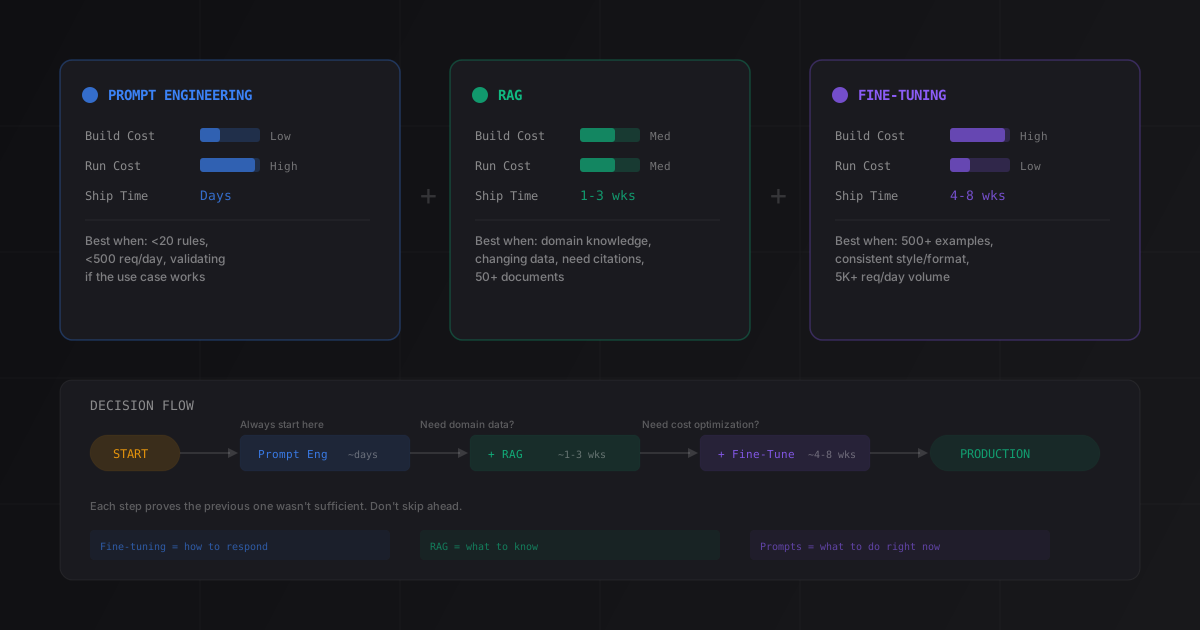
For more on this, read our guide on Fine-Tuning vs RAG vs Prompt Engineering.
Where Vectorize falls short
Metadata filtering in Vectorize is limited compared to Qdrant or pgvector (we covered those trade-offs in depth in our vector database comparison). You can filter on equality and range conditions, but not complex boolean queries across multiple metadata fields. We hit this on a compliance system where we needed to filter by tenantId AND (documentType = 'policy' OR documentType = 'regulation') AND effectiveDate > '2025-01-01'. Vectorize couldn’t express the OR condition in its filter syntax at the time. We moved that index to a self-hosted Qdrant instance and proxied it through Workers with an outbound HTTP call.
The performance difference for that workload: Vectorize was returning results in 15-25ms from the Workers context. The Qdrant call added 30-45ms of network latency to the same Workers function (Qdrant hosted on Fly.io in the same region). Acceptable for our use case, but not zero-cost.
D1 for Conversation State and Agent Memory
Workers has no persistent memory across requests by default. Every request starts fresh. For conversational AI systems, you need somewhere to store session state.
Cloudflare D1 is the native SQLite-compatible database for Workers. It binds directly to the Workers runtime, so reads don’t add network latency beyond the D1 query execution time.
Schema for a basic conversation memory store:
-- D1 schema for conversation state
CREATE TABLE IF NOT EXISTS conversations (
  id          TEXT    PRIMARY KEY,
  tenant_id   TEXT    NOT NULL,
  created_at  INTEGER NOT NULL,  -- Unix epoch seconds
  updated_at  INTEGER NOT NULL,
  summary     TEXT,              -- rolling summary when history gets long
  token_count INTEGER DEFAULT 0
);

CREATE TABLE IF NOT EXISTS messages (
  id              TEXT    PRIMARY KEY,
  conversation_id TEXT    NOT NULL REFERENCES conversations(id),
  role            TEXT    NOT NULL CHECK (role IN ('user', 'assistant', 'tool')),
  content         TEXT    NOT NULL,
  created_at      INTEGER NOT NULL,
  token_count     INTEGER DEFAULT 0
);

CREATE INDEX IF NOT EXISTS idx_messages_conversation
  ON messages (conversation_id, created_at DESC);

CREATE INDEX IF NOT EXISTS idx_conversations_tenant
  ON conversations (tenant_id, updated_at DESC);
One pattern we use to keep token counts sane: when a conversation exceeds 8,000 tokens of history, we run a summarization pass using a cheap model (Claude 3.5 Haiku) and replace the old messages with a single summary message. The summarization happens as a background task using Workers’ waitUntil API, so it doesn’t block the current response:
export default {
  async fetch(request: Request, env: Env, ctx: ExecutionContext): Promise<Response> {
    const session = await loadConversation(request, env);
    const response = await streamCompletion(session, env);

    // Summarization runs after response is sent
    // ctx.waitUntil keeps the Worker alive until the promise resolves
    if (session.tokenCount > 8000) {
      ctx.waitUntil(summarizeAndCompressHistory(session.id, env));
    }

    return response;
  }
};
waitUntil is the right tool for anything you want to happen after the response but that shouldn’t delay it: logging, cache warming, background indexing. Don’t block the response on work that doesn’t affect the answer.
The CPU Budget in Practice
The 30ms CPU limit sounds generous until you account for all the synchronous work in a typical request.
On one of our current production systems, I profiled the CPU usage breakdown for a RAG request:
| Operation | CPU Time |
|---|---|
| Request parsing + auth KV check | 0.8ms |
| Input validation + sanitization | 0.3ms |
| Embedding response parsing (JSON.parse on ~4KB) | 1.2ms |
| Context assembly from Vectorize results | 0.9ms |
| D1 query result processing | 0.6ms |
| Response streaming setup | 0.2ms |
| Total synchronous CPU | 4.0ms |
That leaves 26ms of headroom on a paid plan. Comfortable. But on an earlier version of the same system, context assembly was doing a re-ranking step in JavaScript: cosine similarity recalculation across the returned vectors to apply a custom scoring formula. That single operation cost 12ms of CPU for a top-8 result set at 1536 dimensions. We moved it to a Cloudflare Worker AI custom function (which runs GPU-side) and the problem disappeared.
The lesson: anything involving vectors, matrix operations, or processing many documents synchronously should happen outside the Workers CPU budget. Workers handles I/O-bound work efficiently. CPU-bound work needs to be offloaded or eliminated.
What We Still Get Wrong
Workers and D1 read replicas behave differently across data centers. D1 writes go to the primary (currently US-based). Reads are served from the nearest replica. For a globally-deployed AI assistant, a user in Singapore who writes a message to D1 and then immediately reads it back can sometimes miss their own write if the read hits a replica that hasn’t synced yet. This is documented in Cloudflare’s D1 consistency notes, but we didn’t internalize the implication until a client in Dubai reported intermittent conversation history issues.
The fix: for conversation state that a user just wrote, read from the same request context’s in-memory cache rather than re-querying D1. We maintain a session object in memory for the duration of the request. It’s obvious in retrospect.
There’s also no good answer yet for long-running agent pipelines on Workers. A multi-step agent that calls three tools, waits for external APIs, and generates a final synthesis response can easily take 15-20 seconds of wall-clock time. Workers’ 30-second limit handles this most of the time, but not always. For longer agent pipelines, we run the agent on a separate Fly.io instance and use Workers as the API gateway in front of it. This adds ~20ms of latency for the initial routing, which is acceptable for use cases that already have multi-second response times.
Decision Matrix: When to Use Workers for AI
Not every AI workload belongs on Workers. Here’s what the choice looks like in practice:
| Workload | Workers-native | External + Workers gateway |
|---|---|---|
| LLM inference (streaming) | Yes | n/a |
| RAG, < 2M vectors, simple filters | Yes (Vectorize) | n/a |
| RAG, 5M+ vectors or complex filters | No | Qdrant/pgvector |
| Conversational AI, < 100k sessions | Yes (D1) | n/a |
| Conversational AI, high-volume | No | Postgres |
| Single-step agent (1-2 tool calls) | Yes | n/a |
| Multi-step agent (5+ tool calls) | Marginal | Fly.io / Railway |
| Document processing (OCR, heavy parsing) | No | Lambda / Cloud Run |
| Image generation / multimodal inference | No | Replicate / Modal |
| Webhook ingestion + async processing | Yes | n/a |
The row that surprises people: single-step agents work fine on Workers if each tool call is an outbound HTTP request. The CPU limit applies to synchronous JavaScript, not to wait time on external calls. An agent that calls a search API, processes the results (under 5ms), and generates a response fits comfortably inside the execution model.
Setting Up the Project
For new AI projects on Workers, we start with this structure:
src/
  index.ts          # Main fetch handler
  retrieval.ts      # Vectorize + embedding logic
  completion.ts     # LLM streaming
  memory.ts         # D1 conversation state
  auth.ts           # KV-backed session tokens
  types.ts          # Env interface, shared types
wrangler.jsonc      # Worker config with bindings
schema.sql          # D1 schema (applied with wrangler d1 execute)
The wrangler config with all bindings:
// wrangler.jsonc
{
  "name": "ai-assistant",
  "main": "src/index.ts",
  "compatibility_date": "2026-01-01",
  "compatibility_flags": ["nodejs_compat"],

  "kv_namespaces": [
    { "binding": "SESSIONS", "id": "..." }
  ],

  "d1_databases": [
    { "binding": "DB", "database_name": "ai-conversations", "database_id": "..." }
  ],

  "vectorize": [
    { "binding": "VECTORIZE_INDEX", "index_name": "documents" }
  ],

  "vars": {
    "ENVIRONMENT": "production"
  }
}
Secrets (ANTHROPIC_API_KEY, OPENAI_API_KEY, etc.) go in via wrangler secret put, not in the config file. Cloudflare encrypts them at rest and they’re available as env.SECRET_NAME in the Workers runtime.
FAQ
Can I run a Python AI framework like LangChain on Cloudflare Workers?
Not directly. Workers runs JavaScript and TypeScript only (via V8 isolates). LangChain has a TypeScript port (langchain-ai/langchainjs) that works in Workers, though not all integrations are available and some internal operations hit the CPU limit for large document sets. For Python-based AI code, you need a separate compute layer (Fly.io, Cloud Run, or a Lambda function) and use Workers as the API gateway in front of it.
How does the Cloudflare Workers AI service compare to calling OpenAI directly?
Workers AI runs inference on Cloudflare’s own GPU infrastructure, accessible from Workers with zero network latency. The tradeoff: the model selection is more limited than OpenAI or Anthropic, and the most capable models (Claude 3.5 Sonnet, GPT-4o) aren’t available there. We use Workers AI for embedding generation and lightweight classification tasks where latency matters more than capability. For final generation and complex reasoning, we still call OpenAI or Anthropic.
What’s the right approach for handling large documents on Workers?
Split the work. Use Workers as an ingestion endpoint that receives the document, validates it, uploads it to R2 for storage, and then triggers a Cloudflare Queue message for processing. The actual chunking, embedding, and Vectorize upsert happen in a separate Queue Consumer Worker, which has its own CPU budget and can process asynchronously. This pattern keeps the ingestion request fast (under 500ms) and decouples it from the processing time of large documents.
How do I handle rate limiting for LLM APIs in Workers?
Use Cloudflare’s Rate Limiting API for per-user or per-tenant limits. For LLM API rate limits from providers, build a token bucket counter in KV: increment on each request, check the count before making the API call, and return 429 if the tenant has exceeded their per-minute or per-day limit. The KV operation takes under 1ms, which is acceptable overhead for every LLM request.
Does the 128MB memory limit cause problems for RAG systems?
Not usually. The in-memory footprint of a RAG request is: the query embedding (1536 floats = ~6KB), the top-8 retrieved chunks (maybe 8KB of text), and the response streaming buffer (a few KB at a time). That’s well under 128MB. The memory limit becomes a problem if you try to hold large conversation histories in memory, cache large document sets per-request, or load npm packages with large dependency trees. Keep request-level state small and externalize everything else to D1, KV, or R2.
Building an AI product and evaluating whether Cloudflare Workers fits your architecture? Book a 30-minute technical call and I’ll walk through the right infrastructure choices for your workload and team.