When automation consultants ran enterprise readiness reviews a few years ago, the finding that surprised leadership most wasn’t which roles were at risk. It was which tasks within every role weren’t automatable at all. Judgment calls, contextual decisions, conversations that required relationship context: these were genuinely resistant. But the same professionals doing those judgment calls were also spending 60-70% of their time on work that absolutely could be automated. Data entry, document classification, repetitive QA checks, formatting reports, copying data between systems.
Most organizations had it backwards. They worried about automating humans out of their judgment-intensive work, while the repetitive work piling up around those judgments was draining the capacity needed for high-value tasks.
That pattern hasn’t changed. What’s changed is that AI has dramatically expanded what “automatable” means, and with that expansion comes a new version of the same mistake. Companies now try to automate judgment calls using LLMs before they’ve automated the rule-based work around those calls. The result is fragile, expensive automations that need constant supervision, which produces exactly the skepticism about AI’s ROI that’s increasingly common in 2026.
So before we talk about what AI automation is worth building, let’s talk about what makes a workflow automatable in the first place.
The One Test That Separates Automatable From Not
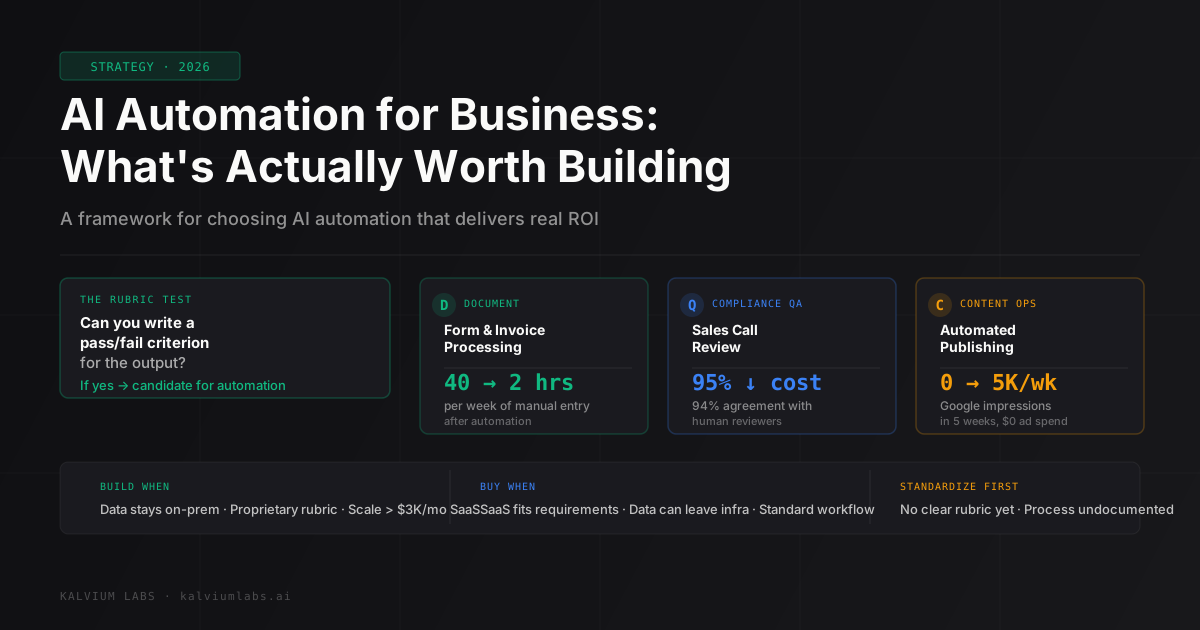
There’s a question that cuts through most automation planning faster than any framework: can you write a pass/fail rubric for the output?
Not a vague satisfaction criterion. An actual rubric. If the output contains X and doesn’t contain Y, it passes. If a human reviewed 100 outputs and would agree 95%+ of the time on which ones pass and which fail, the task is a candidate for automation.
If the rubric has too many “it depends” clauses, the task isn’t ready. Not because AI can’t handle nuance (it can handle quite a bit), but because you can’t validate the automation’s performance without clear acceptance criteria. Errors compound invisibly until something breaks badly.
This test rules out a lot of tempting automation projects:
- “Summarize customer feedback and flag actionable items”: what’s actionable varies by team, quarter, and who’s reading it
- “Review contracts and flag risky clauses”: risk tolerance is context-dependent and legally nuanced
- “Generate personalized outreach at scale”: personalization without relationship context produces noise
It keeps in a different set:
- “Extract specific fields from invoices and match them against purchase orders”: clear success/failure criteria
- “Transcribe sales calls and flag compliance violations against our script checklist”: the checklist is the rubric
- “Publish two SEO-targeted blog posts per day that pass 20 validation checks”: every check is binary
Start with the rubric test. If you can’t write the rubric, don’t build the automation yet.
What’s Actually Delivering ROI Right Now
Across the projects we’ve built over the past 18 months, three categories have produced the most consistent, measurable return. Not coincidentally, all three pass the rubric test cleanly.
Document processing and form automation. Taking structured or semi-structured documents (forms, invoices, intake questionnaires, registration data) and extracting, validating, and routing that data automatically. The payoff is direct: hours saved per week, measurable from day one. One services company we worked with had staff spending 40 hours per week manually entering form data into their database. The automation took data directly from submitted forms, validated field formats, flagged anomalies for human review, and inserted clean records. That 40 hours dropped to under 2 hours of exception handling. The rubric was clear: the extracted data either matches the source document or it doesn’t.
Compliance and quality assurance. Any process where the standard is written down and consistent. Call centers operating under regulatory requirements. EdTech providers grading against a rubric. Financial services QA-ing client communication against compliance scripts. We built a sales call compliance AI that reviewed calls against a specific checklist: 94% agreement rate with human reviewers, deployed in two weeks, reduced QA labor by 95%. That speed was possible because the compliance standard was already documented. The AI’s job was application, not interpretation.
Content operations. Publishing on a consistent schedule, at scale, with quality gates before anything goes live. The AI content engine we deployed for Fertilia Health (0 to 5,000 weekly Google impressions in five weeks) ran on data-driven topic selection, automated daily publishing, and performance tracking that fed back into the next topic batch. The automation worked because each step had clear success criteria: does the post pass 20+ validation checks, does the URL return HTTP 200, does Search Console confirm indexing within 72 hours.
All three categories share a structure: high repetition, clear rules, measurable outcome. The same pattern shows up consistently in McKinsey’s research on AI automation ROI: rule-based, data-intensive tasks see the fastest and most predictable payback from automation investment.
Where AI Automation Consistently Fails
The failures are more instructive than the wins, because the failure modes repeat.
Automating before standardizing. This is the most common mistake. A company wants to automate their onboarding process, but the onboarding process isn’t documented. It’s institutional knowledge living in three people’s heads that works differently depending on who handles the client. You can’t automate an undefined process. The AI produces inconsistent outputs because the inputs and expected outputs are inconsistent. The fix isn’t a better prompt. It’s standardizing the process first, then automating it.
Using AI for judgment calls that should stay with a human. LLMs can synthesize information and generate plausible outputs for judgment-intensive tasks. They can also be confidently wrong in ways that are difficult to catch without domain expertise. Customer escalation routing, hiring decisions, pricing exceptions: these are real LLM use cases in research papers. In production, the false confidence problem bites hard. A wrong judgment call from a human gets reviewed and corrected. A wrong judgment call from a system that sounds authoritative gets acted on.
Building custom infrastructure for problems SaaS already solves. For many business automation problems, off-the-shelf solutions now exist that took 12-18 months of engineering to build and are available for $50-500/month. Automating email parsing for lead capture, scheduling assistants, simple document OCR, basic chatbot flows: if you’re building custom infrastructure here, you’re probably spending money that belongs elsewhere. The custom build makes sense when your requirements genuinely don’t map to any existing tool, your data can’t leave your infrastructure for compliance reasons, or cost-at-scale has made the SaaS math worse than a one-time build.
The Build vs Buy Math
Here’s a decision framework that’s held up across the projects we’ve evaluated:
| Scenario | Recommendation |
|---|---|
| Established SaaS solution exists, fits your compliance requirements | Buy (don’t build unless you’re at major scale) |
| Off-the-shelf solution exists but needs significant customization | Evaluate carefully: integration often costs as much as building |
| Your data can’t leave your infrastructure (healthcare, finance, defense) | Build: cloud SaaS isn’t an option |
| Cost per transaction at your volume exceeds ~$3,000/month | Model the build cost; break-even is usually 6-9 months |
| Your requirements are genuinely unique (proprietary rubric, unusual format) | Build: no SaaS will match your exact spec |
The factor that doesn’t show up in this table: integration time. SaaS tools that require deep connections into existing systems often take longer to stand up than a targeted custom build. We’ve seen teams spend three months integrating a “quick setup” platform and emerge with something more brittle than a clean custom solution would have been.
Be honest about total cost of ownership. That includes the platform subscription, the engineering time to integrate, and ongoing maintenance as the platform updates and breaks your integrations. Compare that against: build cost, hosting cost, and engineering time to maintain code you own.
The OpenAI documentation on function calling gives a good sense of what API-level automation actually looks like: useful context if you’re evaluating whether a custom integration is feasible before you commit to SaaS.
What a First Automation Project Should Look Like
If this is your organization’s first serious AI automation project, scope matters as much as use case. A project that delivers in 2-4 weeks creates internal proof that this works. That proof funds the next project. A project that drags on for six months creates skepticism that never fully recovers.
The profile of a good first project:
- Saves 20+ hours per week of currently manual work
- Has clear success criteria measurable from day one
- Involves a single team, not cross-organizational coordination
- Doesn’t require integration with five or more existing systems
- Has a human review/override path so errors don’t cascade
Document processing fits this profile almost universally. Most organizations have at least one data entry workflow that’s repetitive, error-prone, and well-defined. That’s where to start.
The outcome from a 2-4 week project should include: the automation running in production, a documented error rate (what percentage of records require human review), and a weekly hours-saved number. Those three metrics justify the next project.
The Scope Translation Guide
Founders who’ve done more than one automation project develop a calibrated sense for estimates. If you’re on your first one, here’s the translation guide for common timelines.
“2 weeks” usually means 4 weeks. Not because anyone is being dishonest. Integration surprises always surface after work starts. The source system has an undocumented API limit. The output format varies more than the spec assumed. A validation case that wasn’t in the original requirements appears in week three. Build buffer for this.
“Fully automated” means “with exceptions handled manually.” No real-world automation handles 100% of cases. Well-designed ones handle 90-95% automatically and surface the remaining 5-10% for human review with enough context to resolve quickly. If someone tells you an automation eliminates all manual work, ask specifically about the exception-handling path.
The ongoing cost isn’t zero. Every automation has a maintenance surface. LLM providers update APIs. Source systems change their data formats. Compliance requirements update. Budget 10-15% of the initial build cost annually for maintenance. Custom automations that aren’t maintained degrade over time, which is how you end up with an “AI system” the team doesn’t actually trust and routes around.
We still don’t have a great answer for what happens to maintenance costs when an LLM provider sunsets a model version mid-contract. We’ve seen it happen once. The workaround took two weeks and wasn’t catastrophic, but it wasn’t free either.
FAQ
How much does AI automation for business typically cost to build?
For a targeted, well-defined single-workflow automation (document processing, a specific QA pipeline, form extraction), expect $5,000-8,000 over 2-4 weeks. Multi-workflow systems with complex integrations and custom model requirements range from $15,000-50,000 and take 1-6 months. The primary cost drivers are number of integrations, whether you need a fine-tuned or custom model, and how much exception-handling logic the workflow requires. Most organizations see payback inside six months on a well-scoped first project.
How do I know if my workflow is actually ready to automate?
Apply the rubric test: can you write a pass/fail criterion for every output the automation produces? If you and a colleague would agree 95%+ of the time on which outputs pass and which fail, the workflow is automatable. If the evaluation is subjective or context-dependent, standardize the process manually first, then automate it. The most common reason automation projects fail isn’t technology. It’s trying to automate a workflow that wasn’t well-defined to begin with.
What’s the difference between AI automation and traditional robotic process automation (RPA)?
RPA automates deterministic, rule-based processes: click this button, copy this field, paste it there. It breaks when the UI changes or data format changes. AI automation handles semi-structured data, natural language inputs, and variations that would break an RPA bot. The use cases overlap but AI automation is more resilient. The downside is that AI outputs are probabilistic rather than deterministic, so they need systematic validation: a pass/fail rubric applied to every output, not just spot checks.
When does buying a SaaS automation tool make more sense than building?
Buy when an established solution covers your requirements and your data can leave your infrastructure. Build when compliance prevents external data sharing, your workflow is genuinely unusual enough that no existing tool matches, or your cost-at-scale makes the SaaS subscription worse than a one-time build. The tipping point for custom builds is usually when you’d be paying more than $2,000-3,000/month in SaaS fees and the build cost is under $20,000. The break-even happens in under a year, and you own the asset afterward.
How do we measure whether our AI automation is working?
Three numbers matter: (1) manual hours replaced per week: measure actual before-and-after, not estimated savings, (2) exception rate (what percentage of cases require human review), and (3) error rate on automated cases: what percentage of the cases that went through automatically turned out to have errors. A healthy automation runs at 3-7% exception rate and under 1% error rate on automated cases. If your exception rate is above 15%, the rubric wasn’t clear enough or the input data has more variation than the build assumed.
Trying to figure out whether AI automation makes sense for a specific workflow in your business? Book a 30-minute call. We’ll tell you honestly whether it’s a build, a buy, or a “standardize first” situation, and what realistic scope and cost look like for your use case.