Every API infrastructure decision starts the same way: someone adds a tool to solve a specific problem, and then that tool becomes load-bearing for everything else.
Cloudflare AI Gateway follows this pattern. It starts as a logging solution. You drop in the proxy URL, replace api.openai.com with your gateway endpoint, and suddenly you have a dashboard showing token usage, request counts, and cost per model. That’s genuinely useful. Then you notice the caching feature. Then the rate limiting. Then the fallback provider routing. Six months later, every AI call in your product runs through this proxy, and you haven’t thought carefully about what that means for latency or vendor dependency.
I’m not saying that’s wrong. For many teams, the Cloudflare AI Gateway setup I just described is the right architecture. I am saying it’s worth making the decision deliberately rather than by convenience.
So let’s compare what you actually get from each approach.
What Cloudflare AI Gateway Does
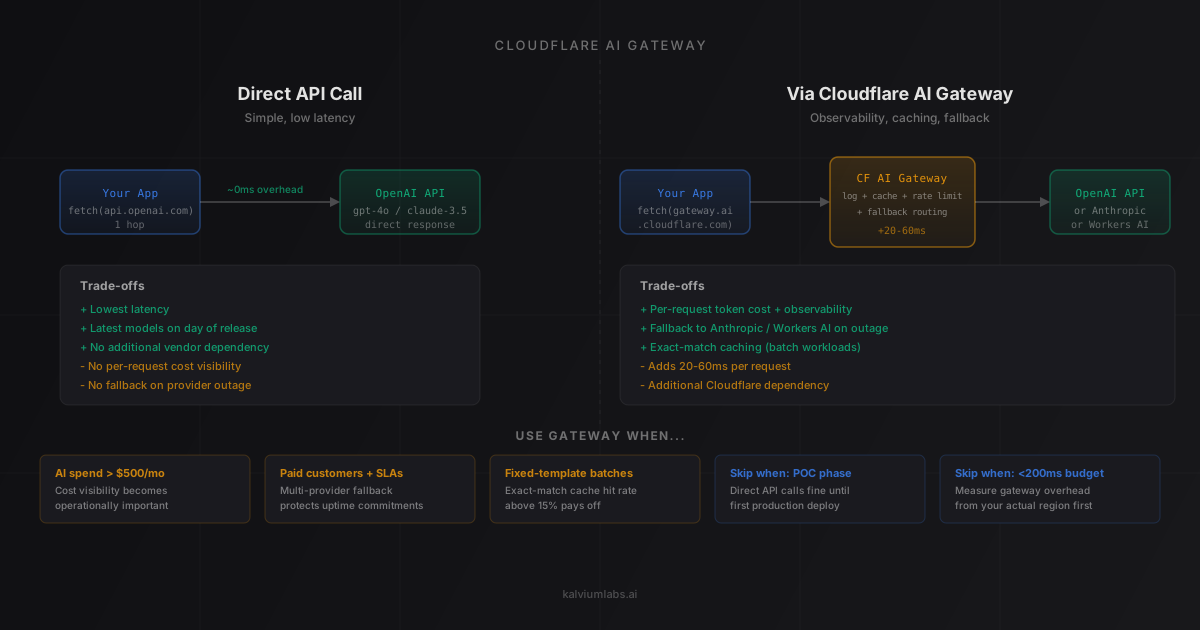
Cloudflare AI Gateway sits between your application and AI providers. Instead of calling https://api.openai.com/v1/chat/completions directly, you call a Cloudflare endpoint like https://gateway.ai.cloudflare.com/v1/{account-id}/{gateway-id}/openai/chat/completions. Cloudflare forwards the request, receives the response, and returns it to you.
The gateway supports multiple providers: OpenAI, Anthropic, Google AI Studio, Hugging Face, Replicate, and Cloudflare Workers AI. That multi-provider support matters for fallback routing, which I’ll get to shortly.
On every request, the gateway captures:
- The full request and response payload
- Token counts (input and output)
- Latency from the provider
- Cost estimate based on the model’s pricing
- Metadata you attach (user ID, session ID, environment)
That data flows into a real-time dashboard and can be exported to R2, Workers KV, or your own data pipeline.
The feature list also includes exact-match caching (identical prompts return a cached response without hitting the provider), rate limiting at the gateway level, and fallback routing (if OpenAI returns a 429 or 5xx, automatically retry against Anthropic or a different model).
What Direct API Calls Give You
When you call OpenAI directly, you get exactly what OpenAI returns, with no intermediary hop. The tradeoffs are clear:
You gain: Lower latency (no proxy overhead), full model availability on day of release, no additional vendor dependency for your AI calls, and simpler debugging when things break.
You give up: Per-request visibility into token usage and cost. OpenAI’s usage dashboard gives you aggregate numbers, not per-request detail tied to your own product’s dimensions. Without the gateway or equivalent logging, you’re building that visibility layer yourself or running blind.
That blind-running part catches teams by surprise. The first time your monthly OpenAI invoice doubles, and you spend three days auditing code trying to figure out which feature changed, is usually the moment someone asks “should we have set up a gateway from the start?”
The Latency Question
The most common objection to the gateway is latency. Adding a proxy hop adds latency. That’s not controversial.
The practical question is how much, and whether it matters for your use case.
From our experience running both approaches across different project types, the gateway adds between 20 and 60 milliseconds on most requests. The variance depends on where your server sits relative to the nearest Cloudflare Point of Presence. Cloudflare runs 330+ locations globally, so for most cloud-hosted applications the hop is short. But it’s not zero.
For reference: an OpenAI GPT-4o response takes 800ms to 4 seconds depending on output length. A gateway hop of 20-60ms on a 2-second response is 1-3% overhead.
For batch processing, background jobs, or async pipelines, that overhead is irrelevant. For real-time call coaching where you’re streaming tokens into an audio interface during a live conversation, every 20ms matters. For customer-facing chatbots with sub-2-second response time budgets, you want to know your latency headroom before adding a proxy.
The honest answer is that for most teams the gateway latency is fine. The cases where it isn’t are the same cases where you’d want to audit every other latency source in your stack first.
The Cost Visibility Problem (Why the Gateway Exists)
Here’s the problem Cloudflare AI Gateway actually solves.
OpenAI gives you an invoice. It might show you per-model breakdowns. What it doesn’t show you is which of your product’s features consumed 40% of your token budget, which customer segment costs 3x more to serve than others, or which system prompt change last Tuesday caused a 25% token increase in your most-used workflow.
Without that detail, you’re managing AI costs by instinct. You see the monthly bill jump and you review your code trying to figure out why. That’s a slow loop.
The gateway gives you a fast loop. Every request is logged with its cost estimate. You can break down spending by environment (dev vs production), by endpoint, by user segment, by model version. When the bill jumps, you know which call changed and why. For the full breakdown of how AI costs compound at scale across model choices, the real cost of building an AI product in 2026 has the token math.
This is the feature that makes the gateway worth the latency trade-off for most teams above a certain scale. Under around $200/month in AI spend, the analytics are nice to have. Above $500/month, they’re the difference between managing costs proactively and being surprised by invoices.
Caching: When It Works and When It Doesn’t
The gateway’s exact-match caching sounds better than it performs in practice for most applications.
Exact-match caching returns a cached response when the full request (model, system prompt, user message, temperature, and all parameters) matches a previous request exactly. That’s a narrow condition. Real user interactions rarely produce identical payloads twice. Cache hit rates for conversational AI products are typically under 5%.
Where exact-match caching does matter: classification tasks, extraction tasks, and any workflow that processes a fixed template with variable inputs. If your system prompt is 2,000 tokens and doesn’t change, and user messages are short and varied, caching doesn’t help with the user turn but also doesn’t hurt. If you’re running a batch job that sends the same prompt pattern with minor variations, cache hit rates can be meaningful.
For semantic caching (where the gateway considers semantically similar prompts as matches), Cloudflare has moved toward supporting this through integrations, but it’s not native in the base gateway. If semantic caching matters for your use case, you’ll want to evaluate third-party options like LangChain’s caching layer or a custom Redis-based solution.
Multi-Provider Fallback: More Useful Than It Looks
The feature I underestimated when we first evaluated the gateway is fallback routing.
OpenAI has outages. Not frequent, but they happen. When they do, any system calling OpenAI directly goes down. The gateway lets you define fallback providers: if OpenAI returns a 529 (overload) or 5xx error, automatically retry the request against Anthropic Claude or a different model.
This requires that your application supports multiple providers (the response schema from OpenAI and Anthropic is similar but not identical), and it requires that your prompts work across both. Neither of those is a given. But if you’ve built model-agnostic application logic from the start, the fallback routing is a resilience improvement that’s very hard to build yourself without the gateway.
For startups in the early product phase, the additional complexity usually isn’t worth it. For products serving paid customers with uptime commitments, the fallback routing justifies the gateway on its own.
Cloudflare Workers AI: A Different Use Case
It’s worth separating two things that the Cloudflare documentation sometimes conflates: the gateway as a proxy to external providers, and Cloudflare Workers AI as an inference platform.
Workers AI runs models directly on Cloudflare’s edge network. You don’t call OpenAI; you run Llama 3, Mistral 7B, or other open-source models that Cloudflare hosts. The gateway can route to Workers AI as one provider, which creates a potential architecture where you call GPT-4o for complex requests and fall back to a Workers AI model for simpler, cost-sensitive ones.
This is an interesting pattern for cost optimization, but it requires honest evaluation of Workers AI’s model quality against your requirements. The open-source models available are fast and cheap, but they’re not GPT-4o. If you’re routing simpler requests to them, define “simpler” clearly and test whether the model quality is acceptable before wiring up the fallback. (For more on building production AI systems on Cloudflare’s platform, this architecture guide covers CPU limits, memory constraints, and streaming patterns in detail.)
The Decision Framework
Five questions determine whether the gateway is the right choice for your project:
1. What’s your monthly AI spend? Under $200/month: the gateway’s cost analytics are nice-to-have. You’re unlikely to extract enough value from the dashboard to justify the additional architecture complexity.
Over $500/month: cost visibility becomes operationally important. At this level, you’re making active decisions about model selection, prompt compression, and caching strategy. Per-request data makes those decisions data-driven.
2. What are your latency requirements? Sub-200ms total response budget (rare for LLM applications, but not impossible for classification tasks): evaluate gateway latency carefully and test it from your actual deployment region.
Over 1 second is acceptable for your use case: the gateway overhead is not a decision driver.
3. Do you need multi-provider resilience? You have paid customers with uptime commitments and your product depends on LLM availability: the fallback routing feature is worth the gateway.
You’re pre-revenue or in early testing: direct API calls are fine. Don’t engineer for a resilience requirement you don’t have yet.
4. Do you run fixed-template batch workloads? If yes, evaluate exact-match caching. Run a one-week test with representative traffic and measure actual cache hit rates. Above 15%, caching pays for the gateway latency. Below 5%, the feature isn’t helping.
5. How much observability infrastructure have you already built? If you have Datadog, Honeycomb, or equivalent with AI calls already instrumented: the gateway’s analytics dashboard largely duplicates what you have. The main addition is the provider-level cost estimate per request.
If you have no AI-specific observability: the gateway is a faster path to that capability than building it yourself.
Where We Land
For most of the projects we build for clients, the gateway becomes the right choice when the product has moved past the first real users and the team starts asking cost questions. The typical inflection point is month two or three of production, when the founder looks at the OpenAI invoice and asks which feature is consuming the most tokens.
At that moment, if you don’t have the gateway or equivalent logging in place, you’re retroactively instrumenting a running system. That’s harder than having the proxy set up from the start.
We don’t recommend the gateway for POC or prototype phase. The latency overhead and additional complexity isn’t worth it when you’re validating product assumptions. We add it before or at the first production deployment, and we configure it to log everything while caching nothing until we’ve measured whether caching actually helps for the specific use case.
That phased approach, POC without the gateway and production with it, matches the tool’s actual value profile. It’s an operational and cost management tool, not a development productivity tool. That distinction matters for when you introduce it.
FAQ
Does Cloudflare AI Gateway cost money to use?
The gateway itself is free on Cloudflare’s standard plan. You pay nothing to Cloudflare to route requests through it. You still pay OpenAI (or Anthropic, etc.) for the actual model calls. If caching is enabled and a cached response is served, you don’t pay the provider for that call. Log storage uses Workers KV and R2, which have generous free tiers and then per-GB pricing above that.
How much latency does Cloudflare AI Gateway add in practice?
Based on our measurements across several production systems, the overhead is typically 20-60ms per request from servers hosted on major cloud providers in US or European regions. This assumes proximity to a Cloudflare Point of Presence, which holds true for almost any cloud-hosted application. For most LLM calls that take 800ms to 4 seconds, this is less than 5% overhead.
Can I use Cloudflare AI Gateway with Anthropic Claude, not just OpenAI?
Yes. The gateway supports OpenAI, Anthropic, Google AI Studio, Workers AI, Azure OpenAI, Hugging Face, Replicate, Perplexity, Mistral, Groq, and others. You configure each provider separately with the relevant API key, and the gateway handles routing. Analytics and caching work the same way across all providers, which is useful if you’re running multi-model systems.
Should I use Cloudflare AI Gateway if I’m not hosting on Cloudflare Workers?
Yes, you can. The gateway is a standalone Cloudflare product. Your application can be hosted anywhere: AWS, GCP, Azure, Fly.io, Render, or on-premise. You just replace the provider API endpoint in your code with the gateway URL. The only requirement is a Cloudflare account (free tier works).
When should I skip the gateway and call the provider directly?
Three scenarios where direct API calls are clearly better: you’re in POC or prototype phase and haven’t validated the product yet; latency is your primary constraint and you’ve measured that the gateway overhead exceeds your budget; or you already have robust observability infrastructure and the gateway analytics would duplicate what you have. In all other cases, setting up the gateway before your first production deployment is cheaper than retrofitting it later.
If you’re designing the infrastructure for an AI product and want a second opinion on the architecture, book a 30-minute call. We’ve built and operated AI systems with and without the gateway, and we’ll tell you honestly which path fits your scale.