We shipped a compliance AI to production in February. Accuracy on our eval set: 91%. Two weeks later, the client flagged a problem. Transcripts generated by their new call recording software were scoring wrong at a 34% error rate.
We hadn’t tested that transcript format. The golden set we’d built reflected the transcripts available during development. Production found the gap in 14 days.
That’s the core problem with AI evaluation: you don’t know what you don’t test, and production always finds what your test suite missed. The solution isn’t a perfect test suite. It’s a pipeline that catches regressions fast and continuously extends coverage based on what production reveals.
Why Standard Testing Doesn’t Transfer
Software testing is relatively deterministic. A function that adds two integers either returns the right value or it doesn’t. You write a test case, it passes or fails, and a failure means something is broken.
LLM outputs aren’t deterministic. The same input at temperature 0 returns different results across model versions, sometimes within the same version. “Correct” is often a distribution, not a point. A compliance scorer might be wrong 8% of the time by design because the use case only requires 92%+ accuracy.
Standard unit testing frameworks give you false confidence for AI systems. Green tests don’t mean working AI. They mean your deterministic assertions happened to pass today.
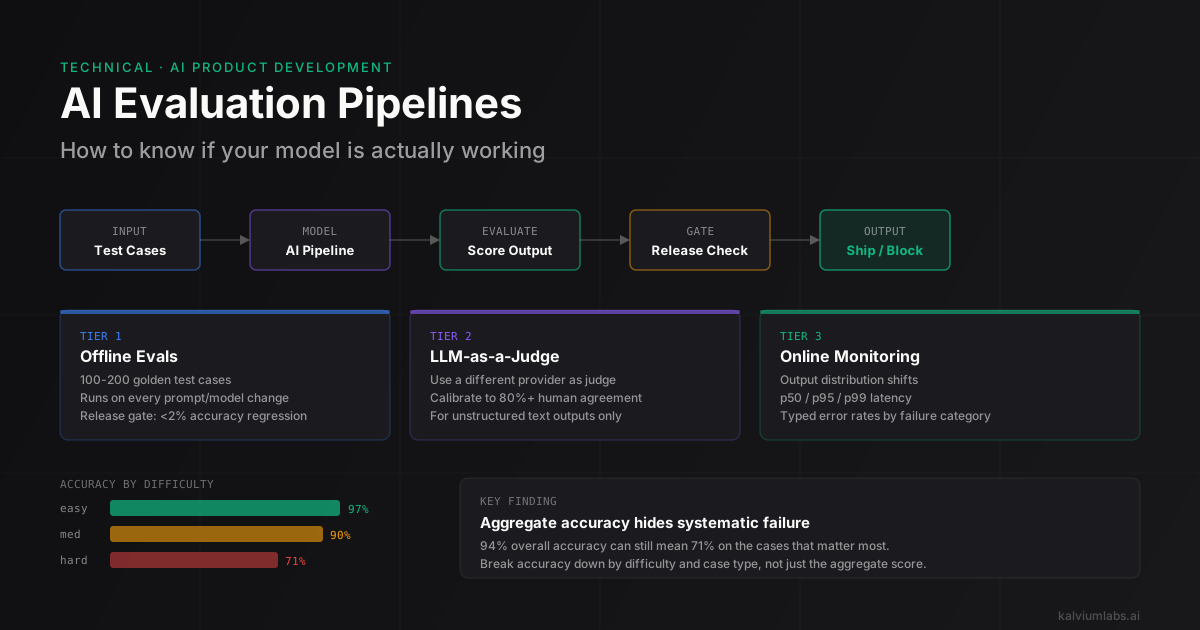
What works instead is a tiered system:
| Tier | What It Tests | When It Runs |
|---|---|---|
| Offline evals | Accuracy on known inputs | Every change to model, prompt, or pipeline |
| LLM-as-a-judge | Quality of unstructured outputs | Same as offline evals, plus spot checks |
| Online monitoring | Distribution, latency, error rates | Continuously in production |
| Human review | Edge cases, quality drift | Weekly or on anomaly detection |
You need all three. Any one tier alone leaves blind spots.
Building Offline Evals
Offline evals are the test suite equivalent for AI. You build a golden dataset of (input, expected_output) pairs and run every candidate change against it before shipping.
The hard part isn’t running the evals. It’s building the golden dataset.
The Golden Test Set
A useful golden set for a classification or extraction task has three components.
Typical cases. 60-70% of your test set should reflect the distribution you expect in production. For our compliance scorer, that’s transcripts with standard formatting, common compliance failures, and edge cases you’ve already seen.
Adversarial cases. 15-20% should be cases designed to break the system. Transcripts with unusual formatting. Borderline cases where human experts might disagree. Inputs that specifically stress-test instructions you’ve added to the system prompt.
Regression cases. 15-20% should come from production failures. Every bug you find in production gets a test case. This is what prevents the same failure from shipping twice.
For most AI tasks, 100-200 test cases is enough to get a stable accuracy estimate. Under 50 and your accuracy numbers have too much variance to trust. More than 500 cases and you’re investing more in eval infrastructure than it’s worth for early-stage systems.
# Golden test case structure
{
  "id": "case_042",
  "input": {
    "transcript": "...",
    "call_date": "2026-02-14",
    "agent_id": "A-1041"
  },
  "expected": {
    "rule_1": {"passed": True, "evidence": "Agent stated name at 0:12"},
    "rule_2": {"passed": False, "evidence": "Guaranteed 8% returns at 3:47"},
    "rule_3": {"passed": True, "evidence": "Risk disclosure at 18:22"},
    "rule_4": {"passed": False, "evidence": "no consent recorded"}
  },
  "metadata": {
    "source": "production_failure",
    "date_added": "2026-02-18",
    "difficulty": "hard",
    "tags": ["new_transcript_format", "guarantee_violation"]
  }
}
The metadata.source field tells you why this case exists. The difficulty tag lets you analyze accuracy separately on easy vs hard cases. You might have 94% overall accuracy but 61% on difficulty: hard, which tells you exactly where to focus improvement effort.
Running the Evals
import asyncio
import time
from dataclasses import dataclass

@dataclass
class EvalResult:
    case_id: str
    accuracy: float
    latency_ms: float
    tokens_used: int
    passed: bool
    failure_reason: str | None = None

async def run_eval_suite(
    test_cases: list[dict],
    model_config: dict,
    prompt_version: str
) -> list[EvalResult]:
    tasks = [
        evaluate_single(case, model_config, prompt_version)
        for case in test_cases
    ]
    return await asyncio.gather(*tasks)

async def evaluate_single(case, model_config, prompt_version) -> EvalResult:
    start = time.time()
    output = await run_model(case["input"], model_config, prompt_version)
    latency = (time.time() - start) * 1000

    accuracy = score_output(output, case["expected"])
    threshold = 0.85  # Task-specific, not arbitrary

    return EvalResult(
        case_id=case["id"],
        accuracy=accuracy,
        latency_ms=latency,
        tokens_used=output.total_tokens,
        passed=accuracy >= threshold,
        failure_reason=get_failure_reason(output, case["expected"]) if accuracy < threshold else None
    )
For structured outputs like a compliance scorer, the scoring function is straightforward:
def score_output(output: dict, expected: dict) -> float:
    correct = 0
    total = len(expected)

    for rule_id, expected_result in expected.items():
        if rule_id not in output:
            continue
        if output[rule_id]["passed"] == expected_result["passed"]:
            correct += 1

    return correct / total
For unstructured text outputs, you need LLM-as-a-judge. More on that in the next section.
The Release Gate
No change to a production AI system ships without running the full eval suite. The gate:
from statistics import mean

HARD_CASES = {"case_039", "case_042", "case_055", "case_071"}  # curated adversarial set

def should_ship(
    new_results: list[EvalResult],
    baseline_results: list[EvalResult]
) -> tuple[bool, str]:
    new_acc = mean([r.accuracy for r in new_results])
    base_acc = mean([r.accuracy for r in baseline_results])

    # Must not regress more than 2% on overall accuracy
    if new_acc < base_acc - 0.02:
        return False, f"Accuracy regressed: {base_acc:.3f} -> {new_acc:.3f}"

    # Must not regress on hard cases at all
    new_hard = mean([r.accuracy for r in new_results if r.case_id in HARD_CASES])
    base_hard = mean([r.accuracy for r in baseline_results if r.case_id in HARD_CASES])
    if new_hard < base_hard:
        return False, f"Hard-case accuracy regressed: {base_hard:.3f} -> {new_hard:.3f}"

    # p95 latency must not regress more than 15%
    new_p95 = sorted([r.latency_ms for r in new_results])[int(len(new_results) * 0.95)]
    base_p95 = sorted([r.latency_ms for r in baseline_results])[int(len(baseline_results) * 0.95)]
    if new_p95 > base_p95 * 1.15:
        return False, f"p95 latency regressed: {base_p95:.0f}ms -> {new_p95:.0f}ms"

    return True, "All gates passed"
The 2% regression tolerance isn’t arbitrary. LLM outputs have natural variance across runs. A new model version might score 89.4% vs a baseline of 90.1% not because it’s worse, but because of sampling noise. The buffer prevents false failures from blocking improvements.
LLM-as-a-Judge for Unstructured Outputs
Structured outputs are easy to evaluate programmatically. Unstructured text is harder. How do you know if a summary is accurate? If an explanation is clear? If a generated email is on-tone?
LLM-as-a-judge: use a second model to evaluate the output of your primary model.
JUDGE_PROMPT = """Evaluate this AI-generated response on the following criteria.

Task: {task_description}
User input: {user_input}
AI response: {ai_response}
Reference answer (if available): {reference_answer}

Score each criterion from 1-5:
- Accuracy: Does the response correctly address the user's question?
- Completeness: Does the response cover all key points?
- Clarity: Is it easy to follow without ambiguity?
- Appropriateness: Is the tone right for the context?

Output as JSON:
{{"accuracy": N, "completeness": N, "clarity": N, "appropriateness": N, "overall": N, "reasoning": "..."}}
"""

async def judge_output(
    task: str,
    user_input: str,
    ai_response: str,
    reference: str | None = None
) -> dict:
    response = await client.chat.completions.create(
        model="gpt-4o",
        messages=[{
            "role": "user",
            "content": JUDGE_PROMPT.format(
                task_description=task,
                user_input=user_input,
                ai_response=ai_response,
                reference_answer=reference or "None provided"
            )
        }],
        response_format={"type": "json_object"}
    )
    return json.loads(response.choices[0].message.content)
Calibration
LLM judges are biased. GPT-4o as a judge gives slightly higher scores to GPT-4o responses than to Claude responses doing equivalent work. It prefers longer responses. It rates authoritative-sounding text higher even when it’s less accurate.
You need calibration runs before trusting your judge. The process:
- Take 50 examples from your eval set.
- Have 2-3 humans rate the same outputs using the same rubric.
- Run the judge on those 50 examples.
- Compute agreement between judge scores and human scores, collapsed to pass/fail.
We target 80%+ agreement. If your judge disagrees with humans more than 20% of the time on your specific task, the judge criteria need revision.
One calibration finding from our compliance project: our judge rated “thorough explanations” higher than human reviewers. Human reviewers cared about accuracy first. The judge cared about length and specificity. We added an explicit anti-length-bias instruction to the judge prompt and calibration agreement improved from 74% to 83%.
Also: the judge should be from a different provider than the model being evaluated. Using GPT-4o to judge GPT-4o outputs introduces systematic bias toward GPT-4o style outputs. We use Claude 3.5 Sonnet to judge GPT-4o outputs and vice versa. For criteria on picking which model handles which role in production, see the LLM selection for production breakdown.
The RAGAS library covers RAG-specific evaluation metrics thoroughly. The OpenAI Evals framework provides infrastructure for running systematic eval suites across many task types if you want a more formal setup than rolling your own.
Online Monitoring in Production
Offline evals test what you knew at build time. Online monitoring catches what you didn’t.
Three signals worth tracking:
Output distribution. If 95% of your compliance scores are “pass” in dev and 40% are “pass” in production, something’s wrong. Either the production data distribution is genuinely different, or there’s a silent bug. Track the distribution of output categories and alert on major deviations. What counts as “major” depends on your task: a 10-point shift in a stable scoring system is a red flag. A 10-point shift in a task that varies naturally by day of week isn’t.
Latency breakdown. Track p50, p95, and p99 separately. P95 spikes usually mean the model is struggling with certain input types. P99 spikes often indicate timeout or retry storm patterns. Both have different root causes. Logging the actual inputs on p99 requests lets you add them to your adversarial test set.
Typed error rates. Track structured error categories, not just HTTP 5xx counts. “JSON parsing failed” means your output parser has a format mismatch with what the model is returning. “Timeout after 30s” means you hit long-tail inputs that trigger very long chains of thought. “Tool call failed” means your function schema has an issue. Each type points to a specific fix.
from dataclasses import dataclass, field
from datetime import datetime

@dataclass
class ProductionMetrics:
    request_id: str
    model: str
    prompt_version: str
    input_tokens: int
    output_tokens: int
    latency_ms: float
    output_category: str      # What the model decided
    error: str | None = None  # Typed error name
    timestamp: datetime = field(default_factory=datetime.utcnow)

def track_production_call(func):
    """Decorator to capture production AI metrics."""
    async def wrapper(*args, **kwargs):
        start = time.time()
        try:
            result = await func(*args, **kwargs)
            await send_to_monitoring(ProductionMetrics(
                latency_ms=(time.time() - start) * 1000,
                output_category=classify_output(result),
                # ... populate from result
            ))
            return result
        except Exception as e:
            await send_to_monitoring(ProductionMetrics(
                latency_ms=(time.time() - start) * 1000,
                error=type(e).__name__,
                # ... populate from exception context
            ))
            raise
    return wrapper
We use MLflow LLM Tracking for production AI metrics. It doesn’t assume anything about your framework, which matters when you’re using raw API calls instead of LangChain or a similar agent framework. LangSmith is the better option if you’re already in the LangChain ecosystem.
Prompt Regression Testing
Prompt changes are code changes. Treat them the same way.
Every prompt has a version number in git. Every version has an eval result file attached:
// prompts/compliance/v3_scorer_eval.json
{
  "prompt_version": "v3",
  "eval_date": "2026-03-22",
  "test_set_version": "v5",
  "overall_accuracy": 0.912,
  "accuracy_by_difficulty": {
    "easy": 0.97,
    "medium": 0.90,
    "hard": 0.71
  },
  "p95_latency_ms": 1840,
  "avg_tokens_per_call": 2240,
  "regressions_vs_v2": [
    "case_089: rule_4 detection dropped from pass to fail"
  ],
  "improvements_vs_v2": [
    "case_094, case_101: new transcript format now handled correctly",
    "case_112: guarantee detection improved on ambiguous phrasing"
  ]
}
The regressions_vs_v2 field is the most important. If a new prompt version fixes the bugs that triggered the update but introduces regressions elsewhere, you need to weigh the trade-off explicitly. Two improvements for one regression might be worth shipping. One improvement for three regressions isn’t.
The full prompt versioning structure we use is covered in the prompt architecture post, but the short version: prompts live in prompts/{system}/{vN_name.txt}, the production config points to specific versions, and no version ships without the eval JSON attached.
What We Got Wrong
Building evals after production. On our first two AI projects, we built the eval suite after shipping. The team was focused on getting the system working, not on verifying that it kept working after changes. The first time a “quick prompt tweak” broke production for 6 hours, we understood why evals come first.
Aggregate accuracy hiding systematic failure. A compliance scorer at 94% overall accuracy sounds solid. But if the 6% of errors are all false negatives on the same rule type (missed disclosures), the system is systematically failing on the most legally important compliance check. We spent two weeks optimizing the wrong things because we weren’t breaking down accuracy by rule type. Always analyze accuracy by the dimensions that matter for your task, not just the aggregate.
Trusting the judge score, then doubting it. We shipped a content quality system where the LLM judge consistently scored outputs 0.7-0.8 out of 1.0. We assumed this meant calibration issues and shipped anyway. The judge was right. Human reviewers gave similar scores. We’d built a system producing mediocre content by our own standards, and the judge caught it. We didn’t trust the signal. Now we treat any judge score below 0.75 as a quality flag that requires human review before the eval gate can pass.
Not logging production inputs. Production data is the best source of new test cases. We didn’t log inputs for the first three months on one project. When we finally started logging, we found 40+ input patterns we’d never tested. Adding them to the eval set revealed two bugs that had been running silently for weeks. Log inputs from day one. Add the interesting ones to your golden set.
FAQ
How many test cases do I need in my golden set?
100-200 cases is enough to get a stable accuracy estimate for most tasks. Under 50 cases and your accuracy estimates have 5-7 percentage point variance run to run, making it impossible to detect small regressions reliably. More than 500 cases is rarely worth the maintenance cost for early-stage systems. Start with 100, add a case from every production failure, and rebuild the set quarterly.
Should I use a separate model as the judge?
Yes, and from a different provider than the model being evaluated. Using GPT-4o to judge GPT-4o outputs introduces systematic bias toward GPT-4o style outputs. Disagreements between judges from different providers (GPT-4o judging Claude output, Claude judging GPT-4o output) are often more informative than the scores themselves because they reveal where the two models have different implicit assumptions about quality.
What’s the minimum eval pipeline for a small team?
A 100-case golden test set, a script that runs your pipeline against it and outputs accuracy and p95 latency, and a rule that nothing ships without running this script. That’s it. A CSV file for test cases, a Python script for evaluation, and git for prompt versioning covers 90% of what you need. Add LLM-as-a-judge only when you have unstructured outputs that can’t be evaluated programmatically.
How do I handle non-deterministic outputs in evals?
Run each test case 3 times and take the median score. For classification tasks at temperature 0, you’ll see very little variance. For generation tasks, variance can be significant. We’ve measured 10-12 percentage point spreads on generation quality for the same input across three runs. If you see high variance for a specific case at temperature 0, that case is ambiguous and worth manual review before keeping it in the eval set.
How do I know when an online monitoring alert is a real problem vs noise?
Track the baseline distribution for at least two weeks before treating any alert as actionable. Output distribution, error rates, and latency all have natural daily and weekly patterns. A compliance scorer might shift 5-8 percentage points between Monday (start of week, fresh calls) and Friday (end of week, different call types). That’s not a regression. A 20-point shift in the opposite direction from the weekly pattern is. Alert thresholds should be based on your observed variance, not arbitrary numbers.
Building an AI system that needs to stay accurate after deployment? We build evaluation pipelines as part of every production AI project. Book a 30-minute call and I’ll walk through how we’d set up evals for your use case.