A founder I work with told me, three weeks into a build, that he’d been deleting our status updates without opening them.
He wasn’t unhappy with the project. The demos were solid, delivery was on track, and the team was responsive. He just didn’t open the updates.
“They were too long,” he said. “And they told me things I already knew from the demo. I kept meaning to read them properly, but I never did.”
That conversation changed how I write status updates.
Why Most Status Updates Don’t Get Read
The default format for software project status updates is well-intentioned and nearly unreadable. It covers what we did this sprint, what we’re doing next sprint, any blockers, and a note that things are going well. It runs 400-600 words and assumes the client has time to synthesize it into an understanding of where the project actually stands.
Founders running a startup don’t have that time.
The problem isn’t that they don’t care about the project. It’s that status updates written for the sender’s comfort, not the reader’s questions, bury the signal in a lot of prose that gives the client nothing to act on.
For more on this, read our guide on Day 1 Discovery. Three questions every client actually has when a status update arrives:
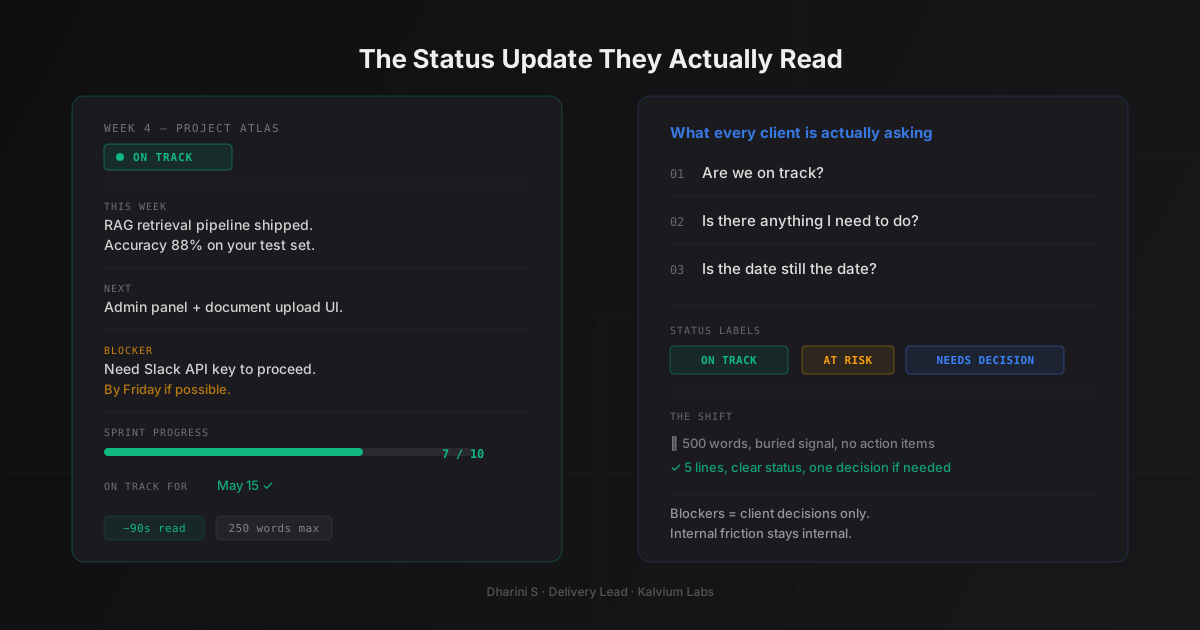
- Are we on track?
For more on this, read our guide on 5 Questions I Ask Every Client Before We Write a Single Line of Code.
- Is there anything I need to do right now?
- Is the date still the date?
A well-written status update answers those three in the first five lines. Everything else is supporting detail.
The Format We Send Now
We’ve iterated on this over more than a year of weekly updates across more than a dozen active projects. What’s below is what we actually send. It runs about 200 words and takes a client under two minutes to process.
For more on this, read our guide on Why AI Projects Run Over Budget.
Week [N]: [Project Name]
Status: On track / At risk / Needs decision
This week: [One sentence. What the team shipped or completed.]
Next: [One sentence. What the team is working on until the next update.]
Blocker (if any): [Specific decision or input needed from the client, with a clear deadline.] OR: Nothing blocking us right now.
Sprint progress: [X of Y tasks completed (Z%).]
On track for [date]: Yes / See note below.
That’s the summary block. If anything is other than “on track,” a short paragraph below the block explains why and what we need.
The client can read the summary block in 30 seconds and know whether they need to read further. If everything is fine, most of them don’t. That’s intentional. Demanding 10 minutes of someone’s attention to confirm a project is running smoothly doesn’t add value. It adds noise.
The Opening Line Is Not Optional
The “Status:” line is the most important line in the update. It’s also the one most teams leave out, or soften until it communicates nothing.
I’ve seen status updates that open with “We’ve had a productive sprint with some interesting learnings.” That tells the client nothing. Is the project on track? Did something go wrong? Is there something they need to do?
The status line should be one of three things: “On track,” “At risk,” or “Needs decision.”
“At risk” means we’re still going to deliver, but something happened this sprint that the client should know about before the next demo. “Needs decision” means there’s a specific choice the client has to make before we can proceed. I use that label when I need a response within 24-48 hours, not when I’m flagging something vague.
Crisp labels matter because they train clients to read the status line first. After a few weeks of updates, most of our clients can scan the label, decide if they need to read further, and close the email in 15 seconds if everything is green. That’s the behavior we want.
What Goes in the Blocker Section (and What Doesn’t)
The blocker section is the most misused part of the status update format.
The default instinct is to list everything that made the sprint harder: a third-party API with intermittent downtime, a data format we had to adjust for, a model version that didn’t behave the way the documentation described. These aren’t blockers. They’re sprint challenges the team handled.
A blocker, in the context of a client-facing update, is something the client needs to resolve. That’s a specific definition. If we need access to a system, a decision on a feature trade-off, a data sample we don’t have, or confirmation on a compliance requirement before we can continue, those go in the blocker section with a clear “what we need” and a “by when.”
If we’re stuck on something internal, it doesn’t belong in the status update. The client can’t resolve it, and listing it makes the project sound chaotic without giving them anything to do.
The distinction sounds simple but requires discipline. In the client communication templates we use for sprint handoffs, we separate internal sprint friction from client dependencies explicitly. That structure forces the PM to ask, for every item: can the client act on this? If not, it stays in the internal sprint doc, not the external update.
The One Number Clients Actually Want
I added a sprint progress count to our updates about eight months ago. It’s the number clients refer back to more than anything else in the format.
“Sprint 4: 7 of 10 tasks completed (70%).” That’s all.
It tells the client exactly where the sprint stands without requiring them to infer anything. If we’ve completed 7 of 10 tasks and there are two working days left, they can reason about that without asking. If we’ve completed 2 of 10 tasks and there are three days left, the “at risk” flag in the status line means something concrete to them.
Percentage tracking also catches drift before it becomes a problem for me as PM. If we’re at 40% of committed scope at the sprint midpoint, I know before Friday that we need to accelerate or have a scope conversation. The number makes that visible to me, and when I include it in the update, to the client as well.
Some clients never look at the number. Some refer to it every week. Either way, it’s there.
When to Call Instead of Writing
Written updates work for green sprints. They work well when status is “on track” and there’s nothing the client needs to act on.
They don’t work for two situations.
The first is when something went meaningfully wrong. A significant architecture change, a data problem that affects the whole approach, a blocker that will delay delivery by a week or more. Those conversations go better as calls. A written message about a problem gives the client time to form a reaction before they understand the full context. A call lets me explain what happened, why, and what we’re doing about it before they’ve had a chance to get worried.
The Scrum Guide’s guidance on sprint reviews covers the regular inspection cadence well, but mid-sprint escalations are a judgment call. In my experience, the right judgment is almost always to call rather than write when the news is genuinely bad.
The second situation is when the client stops responding to updates. If I’ve sent two consecutive updates with a decision request and haven’t heard back, I stop sending written updates and pick up the phone. The written format assumes two-way communication. If one side has gone quiet, the format isn’t working. Atlassian’s guidance on sprint reviews and stakeholder communication frames this well: the goal of any status communication is shared understanding, not transmission of information. If understanding isn’t happening, switch formats.
GitLab’s remote communication handbook has a principle I’ve found useful here: when async communication breaks down, switch to synchronous immediately rather than sending a third async message.
The handoff document we send after every sprint records which items came from a written update and which from a call. That audit trail is useful during project reviews and for spotting patterns across sprints.
How the Format Evolves
What I send in week one isn’t what I send in week eight.
Early in a project, clients are still learning how to read the format and building a mental model of how the team works. Early updates tend to be slightly longer. More context, more explanation of terminology, more explicit notes about what each section means. I’m calibrating to their communication style at the same time they’re calibrating to mine.
By week four or five, the rhythm is established. Updates get shorter. Clients know what “at risk” means. They know to look at the blocker section first if there’s a decision pending. Most of what I used to explain in prose has become implicit.
One thing that doesn’t change across the project: the status line is always in the same place, in the same format. If I ever reorganize the structure, the status, the sprint progress count, and any blocker decision stay as the first three lines. Everything else can move.
FAQ
How long should an AI project status update be?
Two minutes to read, which is roughly 150-250 words for the summary block. Supporting detail can run longer, but only clients who need to understand a specific problem should need to read past the summary. If you’re writing 600-word updates every week, the format is probably working for you as the sender more than for your client as the reader.
For more on this, read our guide on How We Run Weekly Demos (And Why Clients Love Them).
How often should an AI development company send status updates?
Weekly is the right cadence for active builds. More frequent than that creates noise; less frequent leaves too large a gap, especially for AI work where things can shift quickly between model iterations or data validation steps. The exception is sprint zero or a data prep phase where not much is visibly moving. During those phases, a brief note every two weeks is sometimes enough until active development starts.
What should a status update say when the project is delayed?
The status line reads “At risk,” and the supporting paragraph explains: what happened, how much it affects the timeline, and what the team is doing to manage it. Don’t soften it. “Some challenges have come up” is harder to respond to than “we found that the data export format we planned for doesn’t match what your system produces. Best case, it costs two days. We’re testing an alternative approach now and will have clarity by Wednesday.” Specific is more reassuring than vague, even when the news isn’t good.
What do you do when a client asks for more detail in their updates?
Ask them what they’re actually looking for. Requests for “more detail” usually mean one of two things: they’re uncertain about a specific part of the project and the updates aren’t addressing it, or they’ve been burned by a vendor who sounded positive in updates and then missed a deadline. For the first case, adding a targeted note on the area they’re worried about usually resolves it. For the second case, the issue is trust, not word count.
What’s the difference between a status update and a sprint handoff document?
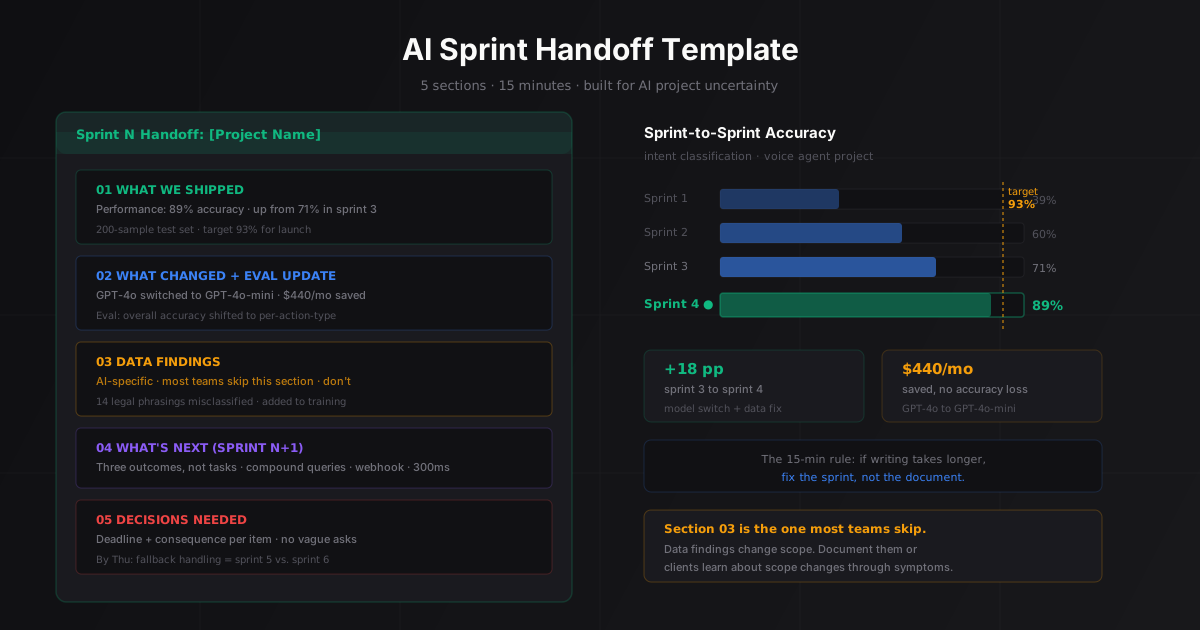
The status update is for the client. It answers: are we on track, is there anything you need to do, and what happens next. The sprint handoff document is for the project team (and the client can read it if they want the full picture). It covers what was committed, what shipped, what was deferred and why, and what carries into the next sprint. Most clients don’t need the handoff doc. The ones who do ask for it, and we share it when they do.
If your current AI development company’s updates feel like noise, that’s worth raising. Book a 30-minute call and I can walk you through what good project communication looks like from a PM who runs AI builds weekly.
For more on this, read our guide on What Good AI Delivery Looks Like.