A client messaged me on a Monday morning three weeks into our engagement. He’d double-booked himself for Wednesday’s demo slot. Could we move it?
Then he looked at his calendar again, realized what he’d be giving up, and came back with a second message: “Actually, I’ll push the other thing. The demo is more useful.”
For more on this, read our guide on Why I Push Back on ‘AI Features’ That Are Just Marketing. I sat with that for a minute. He’d worked with development teams before. He knew what a weekly check-in felt like when it wasn’t useful. The fact that he’d re-categorize our call as something worth protecting told me the format was doing its job.
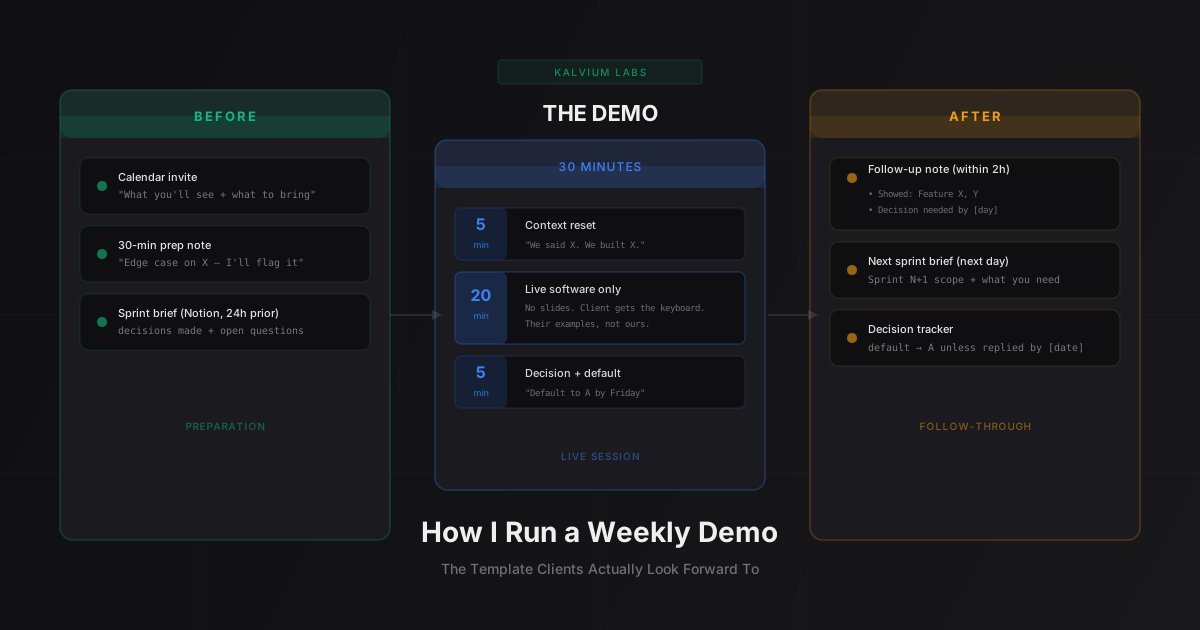
This post is about what goes into that format, beyond the 30-minute structure. It’s about the communication before and after the call that makes clients arrive ready to engage rather than treating the demo as a box to check on their calendar. The 30-minute structure itself is covered separately, but structure alone isn’t what makes clients look forward to these calls.
Why Most Demos Feel Like Checkboxes
The problem with most development demos isn’t the engineering. It’s the framing.
When clients get a calendar block labeled “Weekly Check-In: Sprint 4 Review,” they arrive prepared for a status update. They half-listen while checking email. They say “sounds good” to things they haven’t fully processed. They come with a stockpile of questions from the week, none of which they’ve thought through.
When clients get a calendar block that tells them what to expect and what they need to bring, they arrive differently. They’ve thought about which use cases to test. They’ve cleared 30 minutes to actually pay attention. They know a decision is waiting for them at the end.
The content of the meeting is the same either way. The client’s mental preparation is not.
The Calendar Invite Copy I Write Every Time
I write the calendar invite description for every sprint demo. Not a copy-pasted template, but a brief written for that specific sprint.
For more on this, read our guide on 5 Questions I Ask Every Client Before We Write a Single Line of Code.
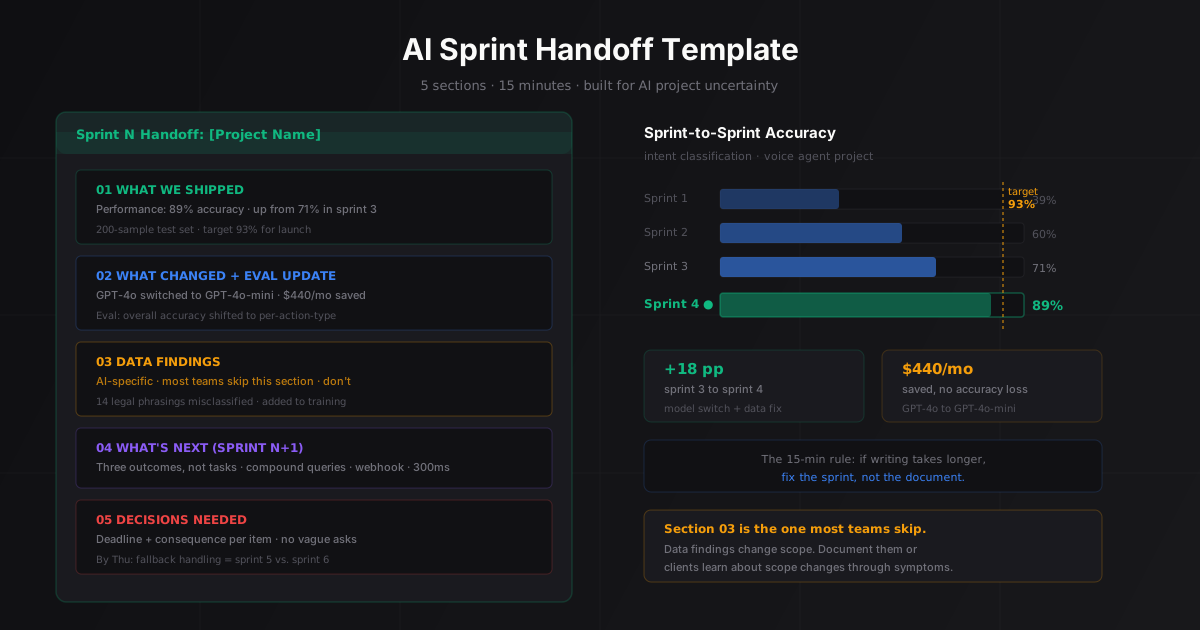
For more on this, read our guide on AI Sprint Handoff.
For more on this, read our guide on Client Communication Template for Every AI Sprint. Here’s the pattern:
Demo: Sprint [N] | [Company name]

What you'll see today:
- [Feature 1 in plain English, not technical terms]
- [Feature 2 in plain English]
- [Feature 3 if applicable]

What to bring:
- A few queries or examples you'd want to test live
- Decision on [specific question from last week, if pending]

Format: 30 minutes, live system only. No slides.
We'll hand you the keyboard for the middle 20 minutes.

[Video link here]
This takes about four minutes to write. But it changes what happens in the room.
Clients arrive knowing what they’re going to see. They’ve thought about which examples to test. And critically, they’ve seen the phrase “we’ll hand you the keyboard,” which tells them this is an active session, not a presentation.
The “decision on [X]” line does something specific. If there’s a decision pending from the last sprint, naming it in the invite means the client has had time to think about it before the call. I don’t need to re-explain it from scratch during the five minutes I have at the end.
The 30-Minute Prep Note
An hour before every demo, I send a short note to the founder directly. Not to the shared project channel. To them personally via Slack or WhatsApp.
It looks like this:
Hey, quick note before we jump on.

Today we're showing [Feature X] and [Feature Y].

[Feature X] is working well. I'd love for you to try it with your
own examples. [Feature Y] has an edge case we haven't fully resolved
on [specific input type], and I'll flag it during the demo so you see
it before it shows up in production.

See you at [time].
That last part, naming the thing that’s not quite right before the client finds it themselves, is the part I didn’t include in earlier demos and now never skip.
AI systems have edge cases. Every demo has at least one moment where the model does something unexpected. If I name it before the call, it becomes context. If the client discovers it mid-demo without warning, it becomes a concern. The pre-demo note reframes the imperfection as evidence that we’re paying attention, not hiding things.
What I Don’t Do in the First Five Minutes
The first five minutes of a demo are wasted by most teams.
They use them to explain decisions made during the sprint. Why they chose one approach over another. What they considered and ruled out. What changed from the original plan.
None of that belongs in the demo. If the rationale matters, it goes in the sprint handoff document, which I send out 24 hours before the demo via a shared Notion page. The demo isn’t for explaining. It’s for showing.
What I do in the first five minutes: “Last sprint, we said we’d deliver X. We delivered X. Let me show you.” Then I open the live system.
If something changed from the plan, I say it in one sentence: “We couldn’t finish [Y] this sprint because [simple reason]. Here’s what we built instead, and [Y] shows up in sprint [N+1].” Then I stop talking.
The contrast I’ve noticed: clients who sit through a five-minute explanation of what was done tend to check out for the next five minutes while the software is running. Clients who see the software immediately in the first 30 seconds stay engaged for the full 30 minutes. Basecamp’s Shape Up methodology makes a similar point about “betting” on cycles: the demo is about showing the bet paying off, not explaining the thinking behind it.
How I Close Without Losing the Decision
The last five minutes are where most demos leave momentum on the table.
Teams close with “any questions?” and a vague summary of what’s coming next sprint. The client says “looks great” and both sides hang up. The pending decision slides into the following week.
I close with one of two scripts depending on whether there’s a decision needed.
When a decision is needed:
"Before we wrap: [specific decision] is on the table.
The two options are [A] and [B].

If we go with A, [consequence A in one sentence].
If we go with B, [consequence B in one sentence].

I need to know by [specific day] to hit our sprint start date.
If I don't hear back by then, I'll default to [A] and we can
adjust next sprint if needed. Does that work?"
The default clause isn’t pressure. It’s what keeps projects from stalling when founders get pulled into other priorities. A founder who knows we’ll proceed with option A unless they say otherwise will make the decision. A founder who gets an open-ended “let us know what you think” won’t prioritize it.
When no decision is needed:
"We're in good shape. Next sprint delivers [feature].
We'll need [data/access/input] from your side by [day].
I'll send the sprint brief tomorrow. Same time next week?"
Short. Clear. The only question is a scheduling one.
The Follow-Up Note (Two Hours Later)
Within two hours of the demo, I send a written summary. Not a full sprint report. A short note.
Sprint [N] Summary: [Date]

Showed today:
- [Feature 1]: Working. Client tested [N] examples, [reaction or feedback].
- [Feature 2]: Working. Edge case on [input type], addressed in sprint [N+1].

Decision needed: [Decision X] by [Day].
Defaulting to [Option A] unless I hear otherwise.

Sprint [N+1] delivers: [Feature list in plain English].
We need from you: [Access / data / input needed].

Questions? Reply here or WhatsApp.
This note does three things. It gives the client a record they can share internally with stakeholders who weren’t on the call. It names the pending decision one more time so it doesn’t get buried. And it shows that we move fast: the summary arrives before the client has finished their next task after hanging up.
Founders working with us for the first time often say they didn’t expect the follow-up so quickly. That’s the point. Speed of follow-up is how you signal the same thing that speed of delivery signals: we’re paying attention.
The whole communication chain, invite description plus pre-demo note plus the demo itself plus the follow-up, is what makes ai development services feel like a partnership rather than a vendor engagement. That’s what a founder protects on his calendar.
FAQ
How long should an AI sprint demo take?
30 minutes is the practical upper limit for a weekly cadence. Longer demos lose focus and drift into requirement-gathering. The constraint forces preparation: you show only what matters rather than walking through every decision the engineering team made. If you consistently need more than 30 minutes, the problem is usually that too many topics are being discussed in the demo rather than handled async.
What if the client keeps rescheduling or skipping demos?
If a client cancels or reschedules more than twice in a row, the problem isn’t their schedule. It’s either that the demos aren’t showing enough progress to feel worth attending, or the person in the room isn’t the actual decision-maker. I have a direct conversation: “I’ve noticed we’ve moved the demo a few times. Is Thursday not working, or is there someone else who should be in the room?” That question tells you more than the rescheduling did.
Should I send the sprint brief before the demo or just the invite description?
Send both, but separately and at different times. The invite description (which goes out when you schedule the call) tells the client what they’ll see and what to bring. The sprint brief (which I send 24 hours before the demo) covers the decisions made during the sprint, the rationale for any changes, and the open questions I need their input on. The brief goes to Notion or a shared doc. The invite description goes in the calendar event. Don’t combine them, and don’t send the brief the morning of the demo.
How do you handle something breaking live?
Name it immediately: “This part isn’t working as expected right now. Here’s what the working state looks like, and here’s what we’ll fix before it goes to production.” Then move forward. Dwelling on the failure extends the awkward moment. Naming it, explaining the fix path, and continuing is more confident than trying to debug live or skipping past it without acknowledgment. Per the agile principle of working software as the primary measure of progress, showing something that doesn’t fully work is still showing progress if you’re transparent about what’s left.
What’s different about demos for technical founders vs non-technical ones?
The format doesn’t change. The vocabulary does. With a technical founder, you can say “the embedding retrieval step is adding about 800ms of latency and we’re evaluating whether to cache the query vectors.” With a non-technical founder, you say “responses are slightly slower than we want, and we’re working on a fix that should roughly halve the wait time.” Same information, different framing. The live software is what both types of clients are actually reacting to, regardless of how you describe it.
Running an AI project and want to see how we run discovery, demos, and delivery? Book a 30-minute call and the first session includes a scoping conversation at no cost.
For more on this, read our guide on Discovery Call Checklist.