Three days before the first demo, the client sent a Slack message that changed the scope of what we were building.
“Can we add something like ‘why is AAPL down today?’”
They’d seen a Bloomberg demo. They wanted to type plain English questions about their watchlist in real time and get answers. We’d just finished the data pipeline. Adding natural language queries on top of live market data, in three days, felt like a completely different project.
It wasn’t. It was the same architecture with an extra layer. Here’s how we built both.
What the Client Needed
A quantitative trading startup, tracking a portfolio of US equities. Their traders were juggling multiple terminal windows: price feeds in one, volume in another, news in a third. Switching between them was costing reaction time on intraday moves, and they were making small errors they couldn’t afford to make.
The ask: a unified analytics dashboard pulling live price and volume data, automatically flagging anomalies, and letting traders query the data in plain English. “What’s happened to NVDA options volume in the last hour?” Type the question, get an answer, stay in one window.
Three hard constraints: data had to reach the dashboard in under 2 seconds from the market event, the AI layer couldn’t add latency to the live price display, and the system had to handle 150 tickers simultaneously during market hours without falling behind.
The Constraint That Shaped Everything
If you run an LLM call on every price tick for 150 stocks, you’re looking at hundreds of calls per second during active trading. That’s not economically viable at standard API pricing. At GPT-4o’s typical response time (800ms to 1.5 seconds), it’s also latency-breaking for a dashboard that needs to feel live.
This constraint is the reason the architecture looks the way it does. Real-time data and AI inference don’t belong on the same path. You need two parallel pipelines, and they have to be designed independently before you figure out how they display together.
Splitting the Architecture
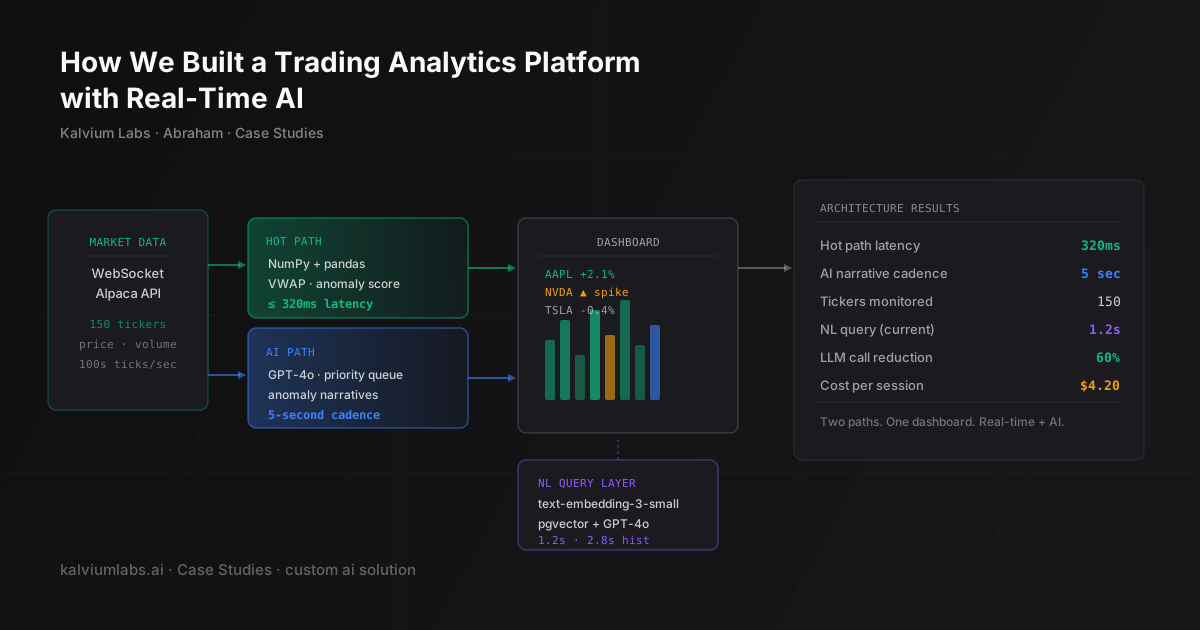
The final system has two pipelines running in parallel:
WebSocket (Alpaca) → Hot Path (math only, 320ms) → Live price display
                  ↘
                    AI Path (5-second cadence) → Narrative sidebar
Hot path handles the live display. We ingest market data from Alpaca’s WebSocket API using a Python async consumer. Every tick updates in-memory price and volume state. Every 500ms, we compute derived metrics: VWAP, price change from open, and a volume anomaly score (standard deviations from the 20-period rolling average). A Server-Sent Events stream pushes the snapshot to the browser.
No LLM touches this path. It’s NumPy and pandas throughout. Median latency from market event to dashboard update came out at 320ms, measured over a week of live market data.
AI path runs on a 5-second cadence. A background worker takes the latest state snapshot, checks which tickers have moved more than 1.5% or had a volume spike above 2 standard deviations, and for those tickers, calls GPT-4o to generate a short narrative. The narrative goes into a sidebar next to the live price, not into the live display itself.
Traders see the raw number update in real time, and they read AI context beside it. Two components, two cadences.
The multi-stage pipeline pattern was something we’d worked through on our meeting intelligence build, where separating transcription from extraction from indexing made each stage easier to reason about and fix independently. Same logic applies here.
Natural Language Queries on Live Data
The “why is AAPL down today?” feature is a different problem from the narrative sidebar. Users expect a response in under 3 seconds. The data context has to be rich enough to be useful but compact enough to fit in a prompt.
We couldn’t send raw tick data. A full day’s tick feed for one stock is megabytes. Instead, we precompute a structured summary per ticker, updated at 1-hour intervals during the session. The summary includes the key numbers (open, current, high/low, volume vs. 30-day average) plus any anomaly flags we’d already detected on the hot path.
When a query comes in, we identify which tickers it’s about, fetch their summaries, and pass them to GPT-4o with the question. That response time sits at about 1.2 seconds median. Acceptable for a query.
For historical queries (“how has TSLA traded around earnings over the last 4 quarters?”), we pre-embed the period summaries using text-embedding-3-small and store them in pgvector. The query goes through the same embedding model, retrieves the 5 most relevant summaries, and those become the context. Similar to how we handled schema compression in the text-to-SQL data analyst build: pass structured metadata, not raw data.
Historical queries take about 2.8 seconds. We set a visible “Searching history…” indicator in the UI during the retrieval step so the latency doesn’t feel like a freeze.
What Broke
Two failures worth documenting.
The 30-second cadence was too slow. The first version of the AI path ran every 30 seconds for all flagged tickers. The problem: 30 seconds is a long time during active market hours. A stock could spike, get a news hit, and retrace within that window. Narratives would arrive describing moves that had already reversed. Traders started ignoring the AI sidebar because it was consistently stale.
We tightened to 5 seconds. That introduced a different issue: rate limits during high-volatility periods when 15 tickers were all moving simultaneously. The fix was a priority queue. Largest anomaly score gets processed first. Minor movements get skipped entirely during heavy traffic. The sidebar shows “high market activity, AI context paused” instead of stale output. Traders told us they preferred that to wrong context.
In-memory state was the wrong call. We used in-memory price/volume state on the hot path because it was fast to build. It was also impossible to query historically. Two weeks after launch, the client asked for “show me the last 6 hours of NVDA price action.” We had to retrofit a write path to Redis Streams to persist the tick data and serve the replay. That should have been in the first version. It took four days to add and introduced a small performance regression on the hot path that we’re still optimizing.
The Numbers
| Metric | Value |
|---|---|
| Hot path latency (tick to dashboard) | 320ms median |
| AI narrative cadence | 5 seconds (per flagged ticker) |
| Tickers monitored simultaneously | 150 |
| NL query latency (current data) | 1.2s median |
| NL query latency (historical) | 2.8s median |
| LLM call reduction from priority queue | ~60% |
| Per-session compute cost (market hours) | $4.20 |
The $4.20 per session cost surprised us. We’d budgeted $8-12 based on the initial 30-second cadence for all tickers. The priority queue is the main reason it came down.
What I’d Do Differently
Two things.
First: time-series persistence from day one. In-memory state is fast to prototype. It’s a trap for anything where historical queries are even vaguely in scope. If a client is watching a live dashboard, they will eventually want to look backward. Design the write path before you need it.
Second: event-driven triggers instead of a fixed cadence on the AI path. The 5-second interval is better than 30, but the real answer is triggering narrative generation when the anomaly score crosses a threshold, not on a timer. We built a basic event trigger as a later iteration, but it introduced edge cases around concurrent triggers on the same ticker during high volatility, and we haven’t had time to debug them. The interval is still running in production. I’d build the event-driven version first and debug it before shipping.
FAQ
What market data provider did you use?
Alpaca Markets for US equities: WebSocket for real-time quotes, REST for end-of-day historical data. For options data, a separate provider with a REST API polled every minute. Options tick data is expensive and the client’s use case didn’t require it at tick frequency. No affiliation with either provider.
How does the AI narrative handle news events?
It doesn’t. The platform doesn’t ingest news feeds. Narratives describe price and volume action: “significant volume spike, price down 3.4% from open.” Not “earnings miss” or “analyst downgrade.” Adding news ingestion was in scope for a later phase, but the client decided to keep it separate to avoid reliability issues from a third feed during the initial launch.
How do you handle WebSocket disconnects during market hours?
A heartbeat check (ping every 10 seconds, expected pong). On disconnect, the consumer fetches a REST snapshot for all 150 tickers to re-sync state before resuming the WebSocket feed. The reconnect window is typically 3-8 seconds. We flag the gap visually on the dashboard rather than backfilling it. Backfilled data has different latency characteristics and could mislead on timing-sensitive reads.
What would it take to add more tickers?
The hot path scales horizontally. Adding tickers increases memory and compute on the hot path linearly, which is cheap. The bottleneck is the AI path: more tickers means more LLM calls, and the priority queue only helps if the majority of tickers are quiet. At 250+ tickers in a volatile session, you’d want to either tighten the anomaly threshold (only the biggest movers get narratives) or batch multiple tickers into one prompt instead of one call per ticker. We haven’t needed to go past 150 yet.
Building a real-time data product and figuring out where AI fits in the hot path? Book a 30-minute call. We can usually tell you in 20 minutes whether the architecture you’re thinking of will hold up.