The QA team was spending 6 hours every day watching videos.
Not all videos, obviously. Nobody can review everything. They were sampling about 8% of the total output, selected by gut feel, and flagging issues on a 14-point checklist. The senior reviewer had been doing this for two years. She knew what to look for. The problem was that she was the only one who knew, and she couldn’t scale.
The client made instructional videos, about 200 per week across a distributed team of creators. Each video went through an internal review before publishing. The review covered things like: correct brand colors on screen, logo placement, audio levels, proper slide transitions, captions present, correct outro sequence. Stuff that sounds simple but takes about 4 minutes per video to check thoroughly.
4 minutes times 200 videos is 800 minutes. That’s a full two days of reviewing per week, and they were only doing 8% coverage because it was all they could afford to review.
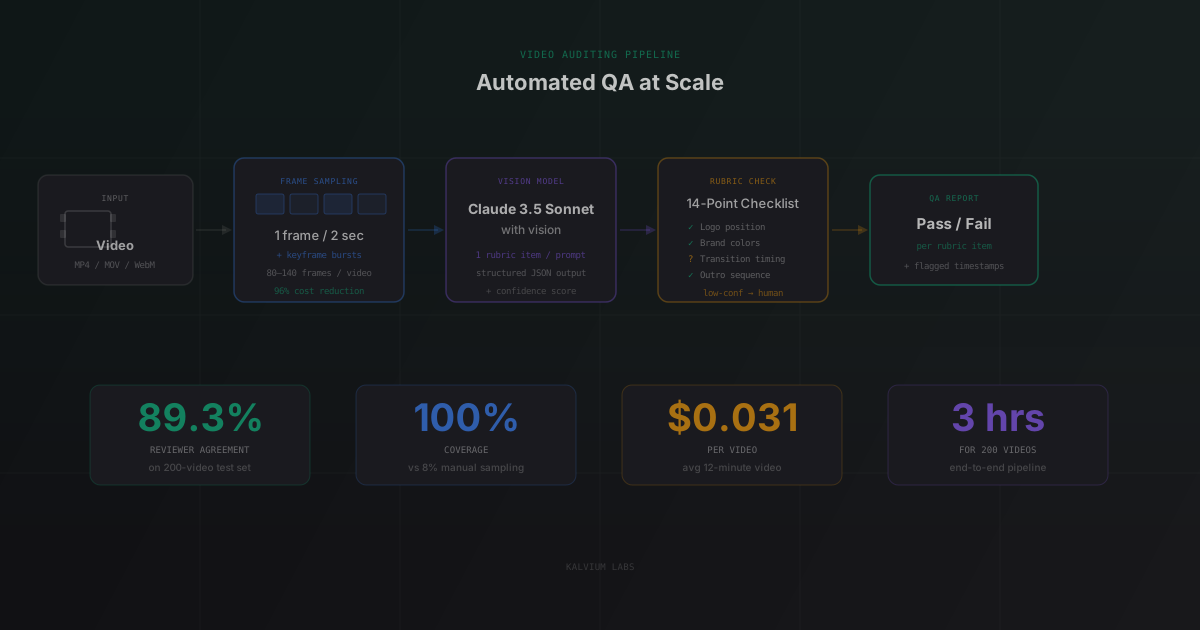
We built a system that now audits all 200 videos automatically, in about 3 hours, at 89.3% agreement with their senior reviewer.
Why Video QA Is Harder Than It Looks
I’d built image classifiers before. I’d worked with vision APIs. I assumed video auditing would just be “run the image classifier on frames.” It’s not, for a few reasons.
First, video has time. A “correct outro sequence” isn’t about one frame, it’s about whether frames appear in a specific order and timing. An image classifier can’t tell you that. You need temporal reasoning.
Second, the 14-point checklist wasn’t designed for automation. Some items were clear (“logo visible in bottom-right corner on all title slides”), some were ambiguous (“audio quality is acceptable”). The ambiguous ones took the most negotiation to define precisely enough for an AI to evaluate consistently.
Third, the client’s videos came from three different tools: Camtasia, Loom, and OBS. Each exported slightly different container formats with slightly different metadata. Getting reliable timestamps from all three formats took two days we hadn’t budgeted for.
I’ll walk through how we solved each piece.
Frame Sampling: Don’t Be Naive About This
The naive approach is to extract every frame and run the vision model on all of them. For a 12-minute video at 30fps, that’s 21,600 frames. At GPT-4o Vision pricing (roughly $0.003 per image in a multi-image prompt), full frame processing would cost around $65 per video. For 200 videos per week, that’s $13,000 a week. Not happening.
We went with sparse sampling, extracting one frame every 2 seconds and adding keyframe detection on top. We’d used a similar cost-control strategy in our AI call analyzer build, where processing 100% of audio was the initial assumption and turned out to be unnecessary. The keyframe detector (a lightweight scene change detector using frame differencing, nothing fancy) flagged frames with significant visual change from the prior frame. Those got included regardless of the 2-second interval.
For a 12-minute video, this produced 80-140 frames on average, depending on how frequently scenes changed. At that volume, GPT-4o Vision processing dropped to about $0.031 per video.
We lost almost nothing on accuracy. The items that required full-frame coverage, like checking whether a logo is visible, don’t need 30 frames per second. They need a consistent sample across the video duration, which 2-second intervals provided.
The one category that needed denser sampling: transitions. We added a specific 5-frame burst around each detected cut to ensure transition quality checks could see the before and after states.
The Vision Model Decision
We tested three options: GPT-4o with vision, Claude 3.5 Sonnet with vision, and Moondream (a small, locally hostable vision model).
Moondream was fast and cheap but didn’t handle multi-step reasoning well. Asking it “is the logo in the correct position relative to the bottom-right corner, accounting for 5% margin tolerance” produced inconsistent results. It’s good for simple classification but the QA rubric needed more.
GPT-4o and Claude 3.5 Sonnet were close in accuracy. Claude was slightly better at following structured output instructions consistently, which mattered a lot here because we needed reliable JSON for every evaluation, not occasional prose summaries. We went with Claude.
One thing that surprised me: both models had trouble with compressed video frames. When the video used aggressive H.264 compression (common in Loom exports), fine details like small text overlays and corner logos were harder to evaluate reliably. We added a step to extract frames at higher quality using ffmpeg’s -q:v 2 flag, which increased frame file sizes but reduced vision model errors on detail-heavy checks by about 15 percentage points.
Building the Rubric: Where Most of the Work Happened
The 14-point checklist existed as a Word document. Converting it into something a vision model could evaluate consistently took about three weeks of back-and-forth with the client’s QA lead.
Every item on the checklist had to be made concrete. Here’s an example of the transformation:
Original: “Audio quality is acceptable”
Revised for AI evaluation: “Audio quality evaluation requires an audio signal check (separate from vision). For vision-accessible audio issues: check for visible clipping indicators in any audio level displays shown in the recording. For this rubric item, flag only if the transcript (provided separately) shows consistent [inaudible] markers in 3 or more consecutive segments.”
That’s one item. We went through all 14 this way.
Three items turned out to be impossible to evaluate reliably from video frames alone. One required checking audio levels numerically, which isn’t visible in frames. Two involved timing precision below what sparse sampling could capture. We built separate checks for those: one using ffprobe to extract audio loudness data, two using a duration check on the extracted frame timestamps.
The full rubric ended up as a JSON schema where each item had: the check description, the frame types it applied to (all frames, title frames only, transition frames only), the expected output format, and the confidence threshold below which the system would flag for human review rather than making a call.
Evaluation Architecture: One Check Per Prompt
Our first implementation sent all 14 checklist items to the model in a single prompt along with a batch of sampled frames. We’d made a similar mistake building an AI evaluation pipeline for an EdTech assessment platform, combining rubric extraction and scoring in one call. The lesson is the same: multi-task prompts do each task worse than single-task prompts. It felt efficient. It wasn’t.
Combined evaluation produced 18 percentage points lower agreement with human reviewers than single-item evaluation. The model was satisficing: doing an ok job on each item but not a great job on any of them. Token budget pressure in a long combined prompt degraded precision on individual checks.
We switched to evaluating each rubric item independently. Thirteen separate API calls per video (fourteen minus one that used ffprobe instead). That’s more calls and more cost, but the per-item accuracy improvement paid for itself immediately. The QA system is only useful if it’s accurate; a cheaper but less accurate system just means you’re paying for bad data.
We batched the frames as a shared context and ran each checklist item as a separate user turn in a multi-turn conversation. That let the model maintain visual context across evaluations without reprocessing the images from scratch.
The Timestamp Problem (The Unglamorous Part)
I mentioned three video tools. Here’s what that actually meant in practice.
Camtasia exports MP4 files with proper container timestamps. Straightforward.
Loom exports MP4 files where the actual video start time is offset by 2-3 seconds from the container timestamp because of their preamble/loading screen. If you used container timestamps to extract “the opening sequence,” you were actually sampling the Loom loading animation, not the video content.
OBS exports with a configurable timestamp format and a session log file. The log format changed between OBS versions 29 and 30, which broke our parser silently until we noticed that videos recorded on OBS 30 were getting wrong frame selections.
We spent two days on timestamp normalization before we’d written a single AI call. The fix was a preprocessing step that fingerprinted each video by its first 5 frames and matched against known tool fingerprints to apply the right timestamp offset. Not elegant, but it covered 99.4% of inputs in the test set.
Where the 10.7% Disagreements Came From
When we ran the system against 200 videos that the senior QA reviewer had already evaluated, we got 89.3% agreement. That’s a number we’re comfortable with, but I want to be honest about what the 10.7% looks like.
About half of it (5.8 percentage points) was cases where the AI flagged an item the human had passed, or vice versa, and on review, the AI was actually correct. The human reviewer had inconsistencies in applying the rubric, especially on the items that we’d tightened the definition for.
About a quarter (2.6 percentage points) was genuine AI errors. Mostly on subtle logo placement checks where the logo was present but slightly outside the specified margin zone. The model’s spatial reasoning on sub-pixel boundary conditions isn’t reliable.
The remaining 2.3 percentage points were items where two different human reviewers disagreed with each other when we tested inter-reviewer reliability. We can’t call those AI errors.
We added a confidence score to every evaluation. Items where the model scores below 0.75 confidence get flagged for human review automatically. That handles most of the genuine AI error cases, at the cost of routing about 12% of items back to a human, which is acceptable.
FAQ
How much does AI video auditing cost compared to manual review?
At 200 videos per week, automated auditing costs about $6.20 per week in API calls ($0.031 per video). Manual 8% sampling, at the client’s labor rates, was costing about $640 per week. Full manual coverage would have been around $8,000 per week. The AI system is roughly 99% cheaper than full manual coverage and provides 100% coverage instead of 8%.
What video formats does this work with?
We built support for MP4, MOV, and WebM containers. The harder question is what tools produced the video, because each tool has quirks around timestamps and container metadata that need to be handled separately. Loom, Camtasia, and OBS each have preprocessing logic in our pipeline. New tools need a fingerprinting and offset calibration step before they work reliably.
Can this work for other types of QA checklists, not just video content?
Yes, with caveats. The rubric-per-prompt approach generalizes to any vision-based checklist. We’ve used similar architecture for document layout auditing and presentation slide QA. The challenge is always the same: translating an informal human checklist into precise, automatable criteria. Plan for 2-4 weeks of rubric definition work before you write any AI code.
What accuracy should I expect?
89-92% agreement with a single human reviewer is realistic for well-defined visual checklists. If your checklist has subjective items (“the design looks professional”), you’ll get lower agreement and more human-flagged edge cases. The more precisely you can define each criterion, the better the accuracy ceiling.
When does this stop making sense?
The economics break down below about 50 videos per week. At lower volumes, the setup cost (rubric definition, preprocessing pipeline, confidence calibration) doesn’t amortize quickly enough. For one-off or low-frequency auditing, a human reviewer is cheaper and the turnaround is faster. The system earns its keep when you need consistent, repeatable evaluation at scale.
If your team is spending significant time on video or content QA that follows a consistent checklist, we can usually build a working prototype in 72 hours that shows whether automation is viable for your specific rubric. Book a 30-minute call and we’ll walk through the checklist items with you.