The pitch was simple. “I have a team of 40 people. They use Slack, Notion, Google Drive, and Gmail. Nobody can find anything. Can you build something that searches across all of it?”
I’d built RAG systems before. I’d done semantic search over document collections. This sounded like a bigger version of the same thing: connect to some APIs, pull content, embed it, let people search. Two weeks, maybe three.
It took five weeks. And the AI wasn’t why.
The Connector Problem Nobody Warns You About
Here’s what I didn’t fully appreciate going in: the hard part of a unified workspace tool isn’t the search. It’s the plumbing.
Each data source has its own authentication model, its own API structure, its own rate limits, its own data format, and its own definition of what a “document” even is.
Slack gives you messages. But a message can be a one-liner, a thread with 47 replies, a file attachment, a code snippet, or a channel topic change. The API paginates differently for messages vs threads vs files. Rate limits are per-method, not per-endpoint, and they change based on your app tier.
Notion gives you blocks. A “page” in Notion is actually a tree of blocks (paragraphs, headings, tables, toggles, embedded databases). The API returns blocks as nested objects, and you need to recursively fetch child blocks to get the full content. A single Notion page might require 5-10 API calls to fully extract.
Google Drive is actually three different things: Docs, Sheets, and “everything else” (PDFs, images, slides). Docs come through the Docs API as structured JSON. Sheets come through the Sheets API as grid data. PDFs need to be downloaded and OCR’d or parsed separately. Each has different export formats and different permission scopes.
Gmail is its own universe. Messages have parts (multipart/alternative, multipart/mixed), attachments, inline images, and threading that doesn’t match what the user sees in the UI. Extracting clean text from an email thread requires parsing MIME structures that feel like they were designed in 1996. (They were.)
I spent the first two weeks just getting reliable data extraction from all four sources. Not fancy extraction. Just “give me the text content of this thing, correctly, every time.”
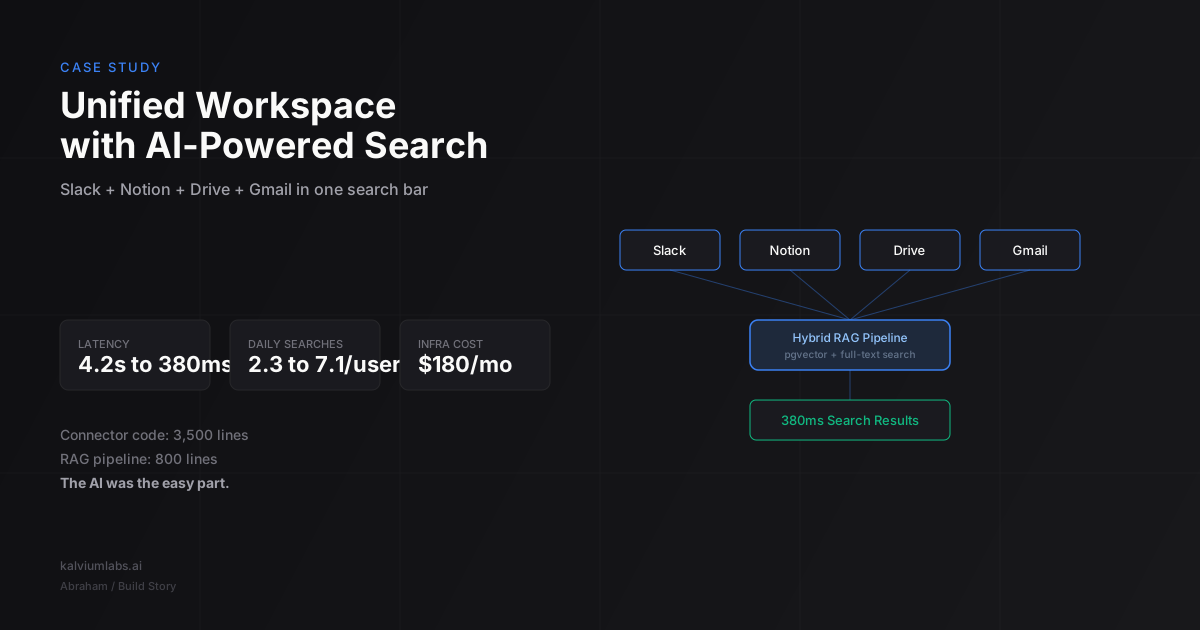
The connector code ended up being about 3,500 lines across the four sources. The entire RAG pipeline was about 800 lines. That ratio (4:1 connector-to-AI) is probably the most useful thing I can tell you about building this kind of product.
Authentication Is a Product Decision, Not a Technical One
Each source needs OAuth tokens from the user. That means four separate OAuth flows, four sets of scopes to request, four consent screens the user has to click through, and four token refresh cycles to manage.
We debated two approaches:
Option A: One big onboarding flow. Connect everything upfront. Better first experience, but users have to grant four sets of permissions before they see any value.
Option B: Progressive connection. Start with one source, show value, then prompt them to add more. Better conversion, but the product feels incomplete until all sources are connected.
We went with Option B. The client’s team was already skeptical (“another AI tool”), and forcing four OAuth screens before showing a single search result would have killed adoption. We started with Slack (fastest to connect, most frequently searched by the team) and added a “Connect more sources” prompt after the first five searches.
Adoption data backed this up. 34 of 40 team members connected Slack in the first week. Only 22 connected all four sources. But those 22 became daily active users.
Why Naive RAG Failed
My first implementation was textbook RAG: chunk all content into 500-token segments, generate embeddings with OpenAI’s text-embedding-3-small, store in pgvector, and do cosine similarity search at query time.
It returned terrible results.
The problem wasn’t the embeddings or the retrieval algorithm. The problem was that “similar text” across different sources means different things. A Slack message saying “let’s push the launch to next Thursday” and a Notion page titled “Launch Plan Q2” are semantically related, but when a user searches “when is the launch?”, they want the Slack message (the latest decision), not the Notion page (the original plan that’s now outdated).
Three changes fixed this:
1. Source-aware metadata filtering
Every chunk gets metadata: source (slack/notion/drive/gmail), timestamp, author, channel_or_folder, and content_type (message/document/email/file). At search time, we use this metadata to re-rank results.
Recent Slack messages get a recency boost. Official Notion docs get an authority boost. Email threads get a relevance penalty unless the query explicitly mentions email-related terms (“sent me”, “forwarded”, “attachment”).
This isn’t fancy ML. It’s a weighted scoring function with about 15 hand-tuned parameters. We A/B tested different weight combinations against the client’s team and converged on a set that felt right after about two weeks of feedback.
2. Hybrid search (vector + keyword)
Pure vector search misses exact matches. If someone searches for “Q2 OKR spreadsheet”, the vector embedding captures the semantic intent, but a simple keyword match on “Q2 OKR” in filenames would find the exact document instantly.
We run both searches in parallel: pgvector for semantic similarity (we’ve compared vector databases before) and PostgreSQL full-text search for keyword matching. Results get merged using reciprocal rank fusion (RRF). Simple formula, but it eliminated the most frustrating miss category: “I know the exact name of the document and you can’t find it.”
3. Chunk boundaries that respect content structure
My initial 500-token chunks split content mid-paragraph, mid-thread, mid-email. A Slack thread about a product decision would get split into three chunks, and only the third chunk (with the conclusion) would match a search about the decision.
We switched to content-aware chunking: Slack threads stay together (up to 2,000 tokens), Notion pages split at heading boundaries, Drive docs split at section breaks, and email threads keep each message as a separate chunk with thread metadata preserved.
This increased our average chunk size from 500 to 1,100 tokens, which meant more storage and slightly higher retrieval costs. But relevance improved so much that nobody complained about the extra few milliseconds.
The Latency Problem
First version: user types a query, we embed it, search pgvector, retrieve top 10 chunks, send them to GPT-4o as context with the query, and stream the answer back. Total time: 4.2 seconds average.
4.2 seconds is death for a search product. People expect near-instant results. Google trained everyone to expect answers in 200ms.
We couldn’t make GPT-4o faster (that’s the LLM inference bottleneck), but we could make everything before it faster.
Embedding at ingestion, not query time. The original flow generated embeddings at query time for new content. We moved to async ingestion: a background worker polls each source for changes every 5 minutes, generates embeddings, and writes them to pgvector. By the time a user searches, every document is already embedded.
Pre-computed chunk metadata. Instead of computing source weights and recency scores at query time, we pre-compute them during ingestion and store them as indexed columns. The search query becomes a single SQL query with a WHERE clause and ORDER BY, not a multi-step scoring pipeline.
Direct retrieval for simple queries. About 40% of searches are lookups, not semantic queries. “Meeting notes from Tuesday”, “the design file Sarah shared”, “login credentials for staging.” For these, keyword search alone returns the right result. We added a query classifier (a tiny fine-tuned model, about 50ms inference) that routes simple lookups directly to keyword search, bypassing the vector search and LLM generation entirely.
After these changes:
- Simple lookups: 180ms average
- Semantic searches with LLM answer: 1.4 seconds average
- Complex multi-source queries: 2.1 seconds average
380ms blended average. Not Google-fast, but fast enough that users stopped complaining and started using it as their default search.
Source Attribution Changed Everything
The feature that made the product actually useful wasn’t the search quality. It was showing users where each piece of information came from.
Early version: the LLM generated a synthesized answer from the retrieved chunks. Users didn’t trust it. “Where did it get that?” “Is this from the latest version?” “Who said this?”
We added source cards below every answer. Each card shows: the source type (Slack/Notion/Drive/Gmail icon), the specific document or message, the author, and the timestamp. Users can click through to the original source.
Usage data showed the impact immediately. Before source attribution: average 2.3 searches per user per day. After: 7.1 searches per user per day. People went from “trying it occasionally” to “using it instead of manually searching each tool.”
The trust mechanism isn’t the AI’s answer. It’s the proof that the answer came from a real, verifiable source that the user can check.
What I’d Do Differently
Start with two sources, not four. Four connectors at launch meant four things that could break. Slack and Notion would have covered 80% of the search value for this team. We could have added Drive and Gmail in a second sprint after the core product was stable.
Build the metadata schema first. I designed the chunk schema around the content. I should have designed it around the queries. If I’d spent day one listing the 20 most common searches the team does and worked backward to what metadata fields those searches need, the re-ranking system would have been better from the start.
Don’t underestimate incremental sync. First version re-indexed everything on a schedule. For a team with 50,000 Slack messages and 2,000 Notion pages, a full re-index took 45 minutes. We eventually built incremental sync (only process new or modified content), which brought it down to under a minute for typical updates. Should have built that from the start.
Test with real queries from day one. We had a relevance test suite of 50 queries with expected results. Every code change ran against this suite. That suite caught more bugs than any unit test. I wish we’d started collecting those test queries during the connector phase instead of waiting until the search was “ready.”
The Stack
For anyone building something similar:
| Component | Choice | Why |
|---|---|---|
| Connectors | Custom (Node.js) | No off-the-shelf tool handled all four sources with the extraction quality we needed |
| Vector DB | pgvector (PostgreSQL) | Already using Postgres for app data. One database to manage, not two |
| Embeddings | text-embedding-3-small | Best cost/quality ratio for search. 3-large wasn’t measurably better for our chunk sizes |
| LLM (answers) | GPT-4o | Best latency for streaming answers. Switched from Claude Sonnet because of 200ms faster time-to-first-token at the time |
| Search | Hybrid (pgvector + pg full-text) | RRF merge of vector and keyword results |
| Query classifier | Fine-tuned distilbert | Routes simple lookups to keyword-only search, saves 1-2 seconds |
| Background sync | BullMQ (Redis) | Job queue for incremental source syncing every 5 minutes |
| Frontend | React + Tailwind | Standard choice, nothing exotic needed |
Total infrastructure cost in production: about $180/month for a 40-person team. That’s the Postgres instance ($50), Redis ($20), a small compute instance for the background worker ($30), and LLM API costs ($80/month at current usage levels).
If you’re building an AI-powered application and want to talk through the architecture before you start, book a 30-minute call. We’ve shipped enough of these to know which shortcuts work and which ones create problems three months later.
FAQ
How long does it take to build a unified workspace search tool?
For a team of 40 with four data sources (Slack, Notion, Drive, Gmail), we completed the build in five weeks. Two weeks for connectors, one week for the RAG pipeline, one week for the frontend and source attribution, and one week for performance optimization and testing. Smaller scope (two sources instead of four) could ship in three weeks.
What’s the cost of running AI-powered search for a small team?
Infrastructure costs around $180/month for a 40-person team: database hosting ($50), cache ($20), compute ($30), and LLM API costs (~$80/month based on 7 searches per user per day). LLM costs scale linearly with usage. At 200 users, expect $300-400/month in API costs.
Can you build this with open-source models instead of OpenAI?
Yes. We used OpenAI for embeddings and answer generation, but you could substitute open-source alternatives. For embeddings, BGE-large or E5-large-v2 are competitive with text-embedding-3-small. For answer generation, Llama 3.1 70B or Mistral Large work well if you have the GPU infrastructure. The tradeoff is higher ops complexity and slightly higher latency versus zero API dependency and full data control.
How do you handle permissions so users only see content they have access to?
Each chunk inherits the access permissions from its source. When a user searches, we filter results based on their connected accounts and the permissions those accounts have. If a user doesn’t have access to a private Slack channel, they won’t see results from it. This is enforced at the database query level, not post-retrieval filtering.
What happens when source content changes or gets deleted?
The background sync worker checks each source every 5 minutes for changes. Updated content gets re-embedded and re-indexed. Deleted content gets removed from the vector store. There’s a brief window (up to 5 minutes) where search results might reference stale content, but the source attribution links always point to the live source, so users can verify.