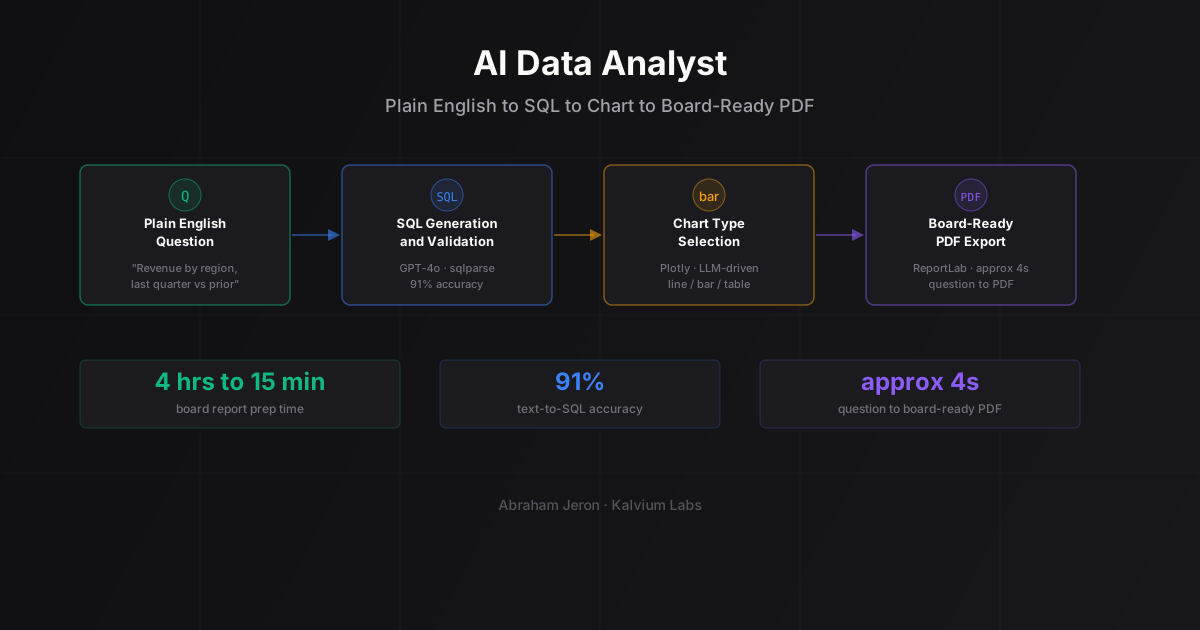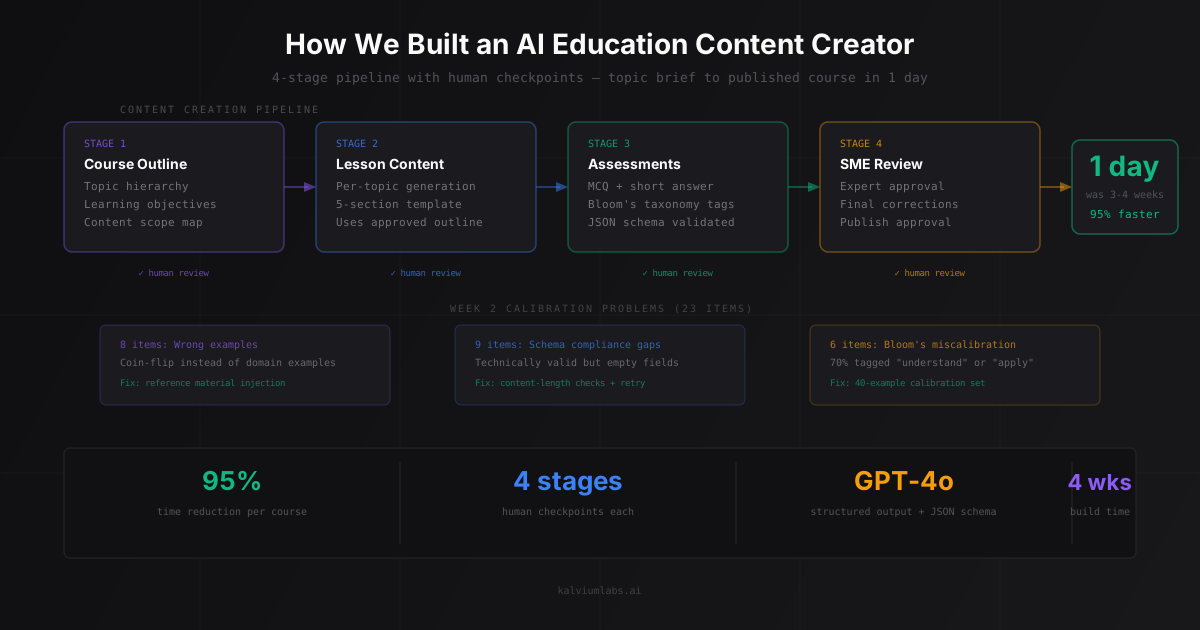
A few weeks ago we shipped a custom AI solution for a sales team with a compliance problem. This is the full build story: architecture decisions, what we got wrong twice before landing on the right approach, and the numbers after six weeks in production.
For more on this, read our guide on Video Auditing with AI.
For more on this, read our guide on How We Built a Data Analyst You Can Talk To.
For more on this, read our guide on How We Built an Advanced RAG System for Documents.
For more on this, read our guide on Building a Meeting Intelligence Tool. The short version: 40% improvement in sales compliance, 95% reduction in QA review cost, deployed in two weeks. The longer version is below.
The Problem We Were Hired to Solve
The client was an enterprise technology company. Their sales team was handling hundreds of calls a week. Their compliance team was manually reviewing maybe 5% of them.
That 95% gap wasn’t laziness. It was math. A human reviewer takes 20 to 30 minutes to properly audit a 15-minute sales call against a compliance checklist. You can’t hire enough reviewers to cover everything at that scale without the cost becoming absurd.
The result: compliance issues were getting missed. Calls that should have included specific disclosures, consent language, and product explanations often didn’t. They only found out during audits or, worse, complaints.
The ask: build something that reviews every call automatically, flags the failures, and tells the sales team why.
What We Tried First (That Didn’t Work)
Before landing on the final architecture, we took two wrong turns. Worth documenting because both feel like reasonable first moves.
Wrong turn 1: Keyword matching
The client’s initial expectation, and honestly our first instinct too, was keyword detection. Scan the transcript for required phrases like “this call may be recorded” or the specific risk disclosure language. If it’s there, mark it compliant. If not, flag it.
We had a prototype running by day two. It scored 58% accuracy against a labeled ground truth set the client had pre-built.
The problem: compliance isn’t about keywords. A rep can say “just so you know we record these calls” and a human reviewer would accept that. The exact keyword pattern doesn’t match. A rep can also read required language at 1.5x speed with zero comprehension opportunity for the customer. Keyword match passes. Genuinely compliant? Much less clear.
Keyword matching is a precision tool being asked to do a judgment task. It breaks at the edges.
Wrong turn 2: Real-time streaming analysis
The client had a secondary ask: could we flag compliance issues live, during the call, so a supervisor could intervene?
We spiked this for a day. The latency math didn’t work. Streaming Whisper with 5-second audio chunks introduced an 8-12 second lag between speech and transcript. By the time any analysis came back, the moment had passed.
Real-time compliance flagging is a different product. It needs WebSockets, a purpose-built streaming pipeline, and a supervisor actively watching a dashboard during every live call. That’s twice the build complexity for a use case requiring significant operational changes on the client side. We scoped it as a phase two, got agreement on that, and moved on.
For more on this, read our guide on How We Built Our Call Compliance AI.
For more on this, read our guide on How We Built a Trading Analytics Platform with Real-Time AI.
The Architecture That Actually Shipped
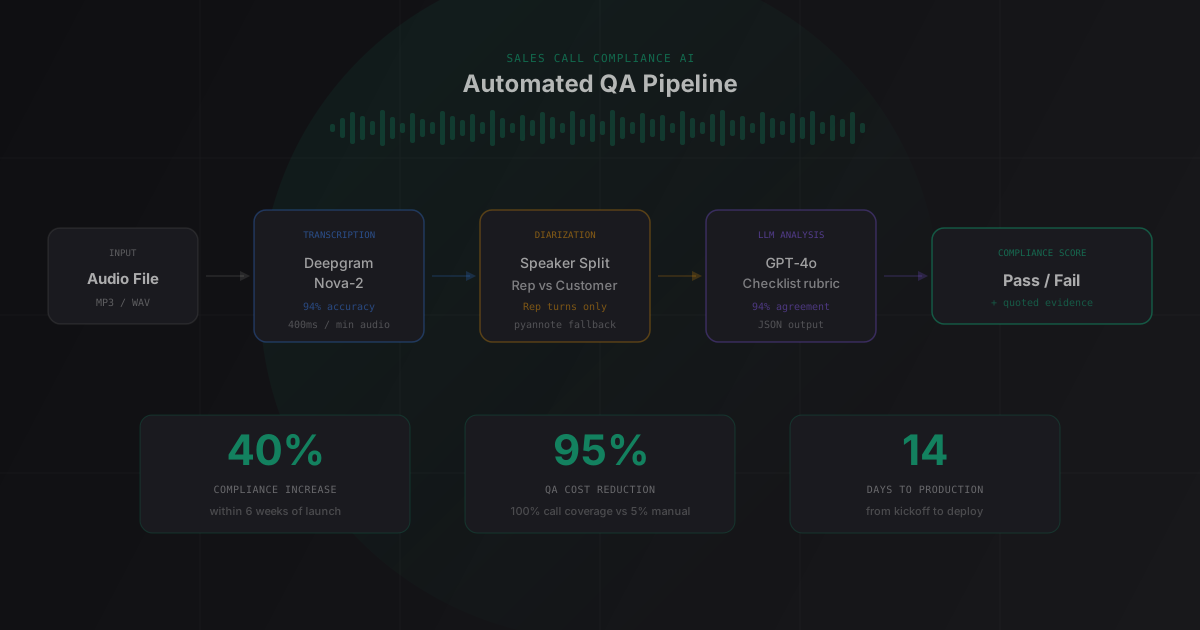
The final pipeline has five stages. Simple in concept, a few sharp edges in execution.
Audio File → Transcription → Speaker Diarization → LLM Compliance Analysis → Score + DashboardStage 1: Audio ingestion
Calls came in as MP3 files, typically 8 to 22 minutes long, exported from the client’s call recording platform via API webhook. We built a lightweight ingestion queue (Redis plus a worker process) that handled files as they arrived.
One thing we didn’t anticipate: audio quality varied a lot. Conference room calls with speakerphone had significant background noise. Mobile calls sometimes had barely audible customer audio. We spent a day writing a noise quality check that flagged low-SNR files for manual review rather than running them through the AI pipeline and producing bad transcripts.
Stage 2: Transcription
We started with Whisper large-v3 running locally. On clean audio it’s solid: around 4% word error rate on the validation set we tested (roughly 96% word accuracy). On noisy calls it degraded to around 18% WER, which isn’t good enough when you’re checking for specific regulatory language.
We switched to Deepgram’s Nova-2 by end of day three. Better noise handling, more consistent accuracy across call quality levels (around 6% WER on the same noisy test set), and meaningfully faster: roughly 400ms per minute of audio versus 3.2 seconds per minute for Whisper on our hardware. At 200+ calls per day, that latency difference adds up.
Stage 3: Speaker diarization
Compliance is about what the rep said, not the customer. Without diarization, you’re analyzing one blob of text. You want rep turns only going into the LLM.
Deepgram’s built-in diarization worked fine for standard two-party calls. For conference calls with three or more speakers, it got confused. We ran pyannote.audio as a fallback for those cases. Not the cleanest solution, but the client had relatively few multi-party calls and it covered the edge cases.
Stage 4: LLM compliance analysis
This is the core. Once we had a clean, diarized transcript (rep turns only), we passed it to GPT-4o with the compliance checklist baked into the system prompt.
The checklist wasn’t ours to write. It was the client’s. Getting them to articulate it in clear, unambiguous language took two full days of back-and-forth. That’s not a complaint: it’s the most important lesson from this project. The AI can only check what you’ve defined. “Make sure reps are being compliant” is not a checklist. “Rep must verbally confirm recording consent within the first 90 seconds” is a checklist item.
The prompt structure:
You are a compliance analyst reviewing a sales call transcript.

COMPLIANCE REQUIREMENTS:
1. Rep must confirm recording consent within the first 90 seconds
2. Rep must read the full risk disclosure before discussing product features
3. Rep must confirm customer identity using two verification methods
...

TRANSCRIPT (rep turns only):
[transcript here]

For each requirement: is it met? Quote the relevant section if yes.
If no, note the timestamp window where it should have occurred.
Output as structured JSON.
We evaluated JSON output from GPT-4o against the client’s labeled ground truth set (200 calls). 94% agreement. That was the threshold we’d agreed on before starting the evaluation, and it cleared it.
We also tested Claude 3.5 Sonnet as an alternative. Similar accuracy on the compliance task, noticeably better at generating natural-language explanations of why something failed. The sales team found those explanations useful for coaching conversations. We went with GPT-4o for cost and latency reasons at this volume, but built the model layer behind a config swap so they can move to Sonnet later without a rewrite. If you’re curious about how we structure that kind of flexibility, our post on AI agent architecture trade-offs covers the pattern in detail.
Stage 5: Scoring and dashboard
The LLM output for each call was structured JSON: each requirement, pass or fail, the relevant quote if passing, an overall score. We stored these in Postgres and put a simple three-view dashboard on top:
- Team overview: compliance rate by rep, by week
- Call detail: individual call with each failure highlighted and quoted
- Trend view: compliance rate over time
The QA team went from reviewing 5% of calls (random sample, hoping to catch issues) to having the AI flag specific failures across 100% of calls, with humans doing deep-dives only on the flagged ones.
The Numbers
After six weeks in production:
- 94% agreement between AI scoring and manual review on the 200-call validation set
- 40% increase in measured compliance across the sales team
- 95% reduction in QA review hours (humans reviewing 5% randomly versus targeted review of flagged calls from 100% coverage)
- 8 to 12 seconds end-to-end pipeline latency per call, from file receipt to score in the dashboard
- ~$0.04 per analyzed call (mostly transcription cost; the GPT-4o analysis for a 15-minute call runs under $0.02)
The compliance improvement took longer than the system did. The AI didn’t magically change rep behavior. The coaching feedback loop did. The system just made that loop possible at scale.
The 2-Week Timeline (Broken Down)
People always want to know how the two weeks actually worked. The honest answer: tight scoping and one fast pivot.
Week one:
- Day 1: Kickoff, architecture decision, access to sample recordings
- Day 2: Keyword prototype (disproves the approach), pivot decision made by end of day
- Day 3: Transcription pipeline with Deepgram, diarization evaluation
- Day 4-5: Compliance checklist workshops with client, LLM analysis prototype
Week two:
- Day 6-7: Accuracy evaluation against labeled ground truth, prompt iteration
- Day 8: Postgres schema, scoring storage, basic API
- Day 9: Dashboard build (React, three views)
- Day 10: End-to-end testing with live call data, noise quality handling
- Day 11-12: Staging deploy, client review, bug fixes
- Day 13-14: Production deploy, handoff docs, monitoring setup
Day two is where we almost lost the timeline. If we’d kept pushing on keyword matching for three more days, we’d have run out of runway. Cutting losses early matters more than I expected when working in two-week windows.
For more on making fast architecture decisions under time pressure, our post on AI chatbot development has similar lessons from a different product type.
What Surprised Us
A few things I didn’t see coming:
1. The compliance checklist was the hardest deliverable
We thought the technical build was the hard part. It wasn’t. The client had never written down a clear, ordered list of what “compliant” meant. Different team members had different interpretations. Edge cases had no agreed resolution. We needed a single ground truth before the AI could be calibrated against anything.
If you’re scoping a project like this, add two days for this workshop. It’s not optional and it can’t be done async.
2. 94% accuracy sounds great until you do the volume math
94% agreement means 6% disagreement. At 200 calls per day, that’s 12 calls where the AI and a human would score differently. Most of those are false positives (AI flags something a human would pass). Annoying but manageable.
The real risk is false negatives: calls the AI passes that humans would flag as non-compliant. We tuned the prompt to be deliberately conservative, flagging borderline cases rather than passing them. Better to have a few extra calls in the review queue than to miss a real violation.
3. Audio quality is an underrated infrastructure problem
This has nothing to do with AI. It’s an ops problem. Call recording platform export settings, phone infrastructure codec choices, background noise in call environments: these affect transcript quality more than the transcription model does. We spent more time on audio quality handling than on prompt engineering.
When AI Integration for Compliance Makes Sense
A custom AI integration for compliance review is worth building if:
- You’re processing more calls than your QA team can manually review (rough threshold: 50+ calls/week)
- You have a compliance checklist you can clearly define, or the willingness to spend time creating one
- The downside cost of missed compliance violations justifies the build
- You want a coaching feedback loop, not just an audit trail
It probably doesn’t make sense if:
- Your call volume is under 50 per week (manual review is cheaper and more accurate at that scale)
- Your compliance requirements change frequently (prompt and validation set updates are required every time requirements change)
- You don’t have call recording infrastructure in place
The AI doesn’t replace compliance judgment. It scales the application of judgment that humans have already documented and validated.
FAQ
What does a custom AI solution for sales call compliance typically cost to build?
Build cost varies with compliance complexity and call volume. Most projects in this category fall in the small-to-medium fixed-bid range. Ongoing running costs are mostly API usage (transcription and LLM calls), which for a team processing 200 calls per day runs around $250 to $300 per month at current pricing. The ROI case is usually clear when you compare that against manual QA staffing costs or the downside risk from undetected compliance violations.
How accurate is AI-based compliance checking compared to human reviewers?
On this project we measured 94% agreement between the AI and a human-labeled ground truth set of 200 calls. In practice, accuracy depends heavily on the clarity of the compliance checklist. Ambiguous requirements produce lower accuracy. Clear, specific, measurable requirements with direct quote criteria get you to 90%+ reliably with current models. Vague requirements get you to 70% and a lot of manual review anyway.
What AI integration services connect this to an existing call recording platform?
Most modern call recording platforms (Gong, Chorus, Five9, Salesforce, and others) have webhook or API export capabilities. The integration layer is typically a webhook receiver, a queue, and a worker process. Complexity depends on the platform’s API and audio format. We’ve built these integrations in a day or two for most common platforms. The AI pipeline itself is separate and platform-agnostic once audio arrives in a standard format.
Can this kind of system work in real time during a call, not just post-call?
Real-time analysis during a live call is architecturally different from post-call analysis and roughly twice the build complexity. You need streaming transcription, sub-second LLM latency, and a supervisor actively watching a dashboard during every call. That’s a meaningful operational change for the client side. Most teams get more value from same-day post-call results than from live intervention, since the behavioral change happens through coaching not interruption anyway.
How long does it take to deploy a custom AI solution like this from scratch?
For a well-scoped compliance analysis system, two weeks is achievable. The prerequisites are call recordings accessible via API, an agreed compliance checklist, and a client-side contact who can answer questions quickly during the build. Starting from a vague brief with no checklist and no data access adds days regardless of engineering speed. The checklist workshop alone takes two to three days when starting from nothing.
Building AI integration services for your sales or compliance team? See how our Call Analyzer service works or book a 30-minute call: we’ll tell you honestly whether this kind of automation makes sense for your call volume and what a prototype would look like.