Last week, while investigating what looked like a US desktop traffic spike on one of our blog posts, I pulled the raw session data in PostHog. Seventeen sessions in 5 minutes, all from the same IP block, all with a 412x732 viewport. That cadence doesn’t match human reading behavior. The user agent read:
Mozilla/5.0 (Linux; Android 10; K) AppleWebKit/537.36 (KHTML, like Gecko)
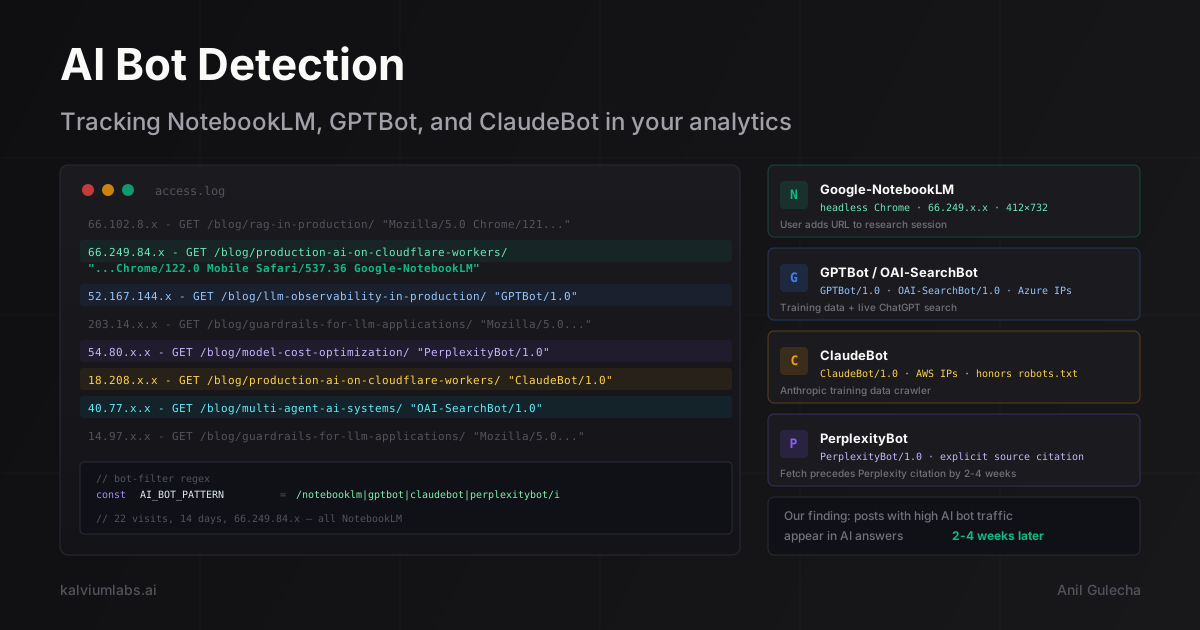
Chrome/122.0.6261.119 Mobile Safari/537.36 Google-NotebookLM
That post had been crawled by Google NotebookLM 22 times between April 9 and April 23. We had been counting every one of those fetches as a legitimate US desktop session in our traffic numbers.
The standard bot|crawl|spider regex you find in every analytics tutorial doesn’t catch this. NotebookLM runs headless Chrome with a near-complete mobile user agent string. The only identifier is Google-NotebookLM appended at the end, and most default bot filters don’t match it.
This post covers how to detect the six AI bots worth tracking, how to filter them from your analytics, and why the crawl frequency data is itself useful once you have it.
Why the Standard Bot Filter Misses AI Crawlers
The classic regex for bot filtering looks like this:
bot|crawl|spider|slurp|facebookexternalhit|ia_archiverIt works well for traditional crawlers because Googlebot, Bingbot, and most scrapers identify themselves clearly. They don’t pretend to be mobile Chrome.
AI crawlers behave differently. Several of them run real browser environments to execute JavaScript. NotebookLM uses headless Chrome. This means they send real browser headers (Accept-Language, Accept-Encoding), have realistic viewport sizes (412x732 for NotebookLM, the headless Chrome mobile default), complete page load events so client-side analytics SDKs fire, and use IP addresses from known cloud or search engine netblocks rather than obvious datacenter ranges.
The 412x732 viewport is one of the clearest signals. That’s the default Chrome DevTools mobile emulation size. No real mobile user has that exact viewport. If you see it in your analytics alongside a clustered request pattern from 66.249.84.x (a subset of Google’s 66.249.0.0/16 netblock), you’re looking at NotebookLM.
The only reliable detection approach is to match the specific string each AI crawler appends to its user agent, or to correlate IP addresses against known ranges. We now use this regex across both GA4 and PostHog:
notebooklm|google-extended|google-inspectiontool|chatgpt-user|oai-searchbot|
gptbot|anthropic-ai|claudebot|claude-web|perplexitybot|perplexity-ai|
youbot|bytespider|amazonbot|applebot|ccbot
A few of these (applebot, amazonbot) aren’t AI crawlers in the LLM-training sense, but they inflate traffic numbers the same way. I include them in the filter.
The Six AI Crawlers Worth Tracking
Each of these crawlers serves a different purpose. Understanding what triggers them changes how you interpret the data.
Google-NotebookLM runs when a user adds a URL to their NotebookLM research sources. It fetches the page to build a local knowledge base for that session. This is not the Google Search crawler. It has no effect on your GSC data or search ranking. What it signals is that someone is actively doing research using your content as a primary source, not just linking to it or skimming it.
GPTBot is OpenAI’s training data crawler. It respects robots.txt and OpenAI documents it publicly. You can block it with User-agent: GPTBot / Disallow: / if you don’t want your content in OpenAI’s training data. Most publishers don’t block it because being in the training corpus increases the chance of being cited in ChatGPT answers. The IPs come from Microsoft Azure ranges.
OAI-SearchBot is separate from GPTBot. This one handles ChatGPT’s live web search. It fetches pages in real time to answer user queries. A visit from OAI-SearchBot means your page was returned as a candidate result for an active ChatGPT search. The volume of OAI-SearchBot visits on a specific page is a direct proxy for how often your content gets surfaced in real-time ChatGPT answers.
ChatGPT-User fires when a ChatGPT user shares a URL in a conversation. It’s a real-time fetch triggered by user action, similar to how Slack or iMessage fetches URLs to generate link previews. High ChatGPT-User volume on a specific page means people are actively pasting your URL into ChatGPT sessions, which is a strong engagement signal.
ClaudeBot is Anthropic’s web crawling bot, used primarily for training data collection. Like GPTBot, it honors robots.txt exclusions. The IPs come from AWS ranges since Anthropic runs on AWS infrastructure.
PerplexityBot crawls pages for Perplexity’s answer engine. Frequent PerplexityBot visits on a post suggest Perplexity is regularly retrieving your content to answer related queries. This is actually a stronger citation signal than OAI-SearchBot because Perplexity explicitly surfaces its sources in the answer UI, making the citation visible to users.
Three Ways to Detect AI Crawlers
Detection happens at three points in the stack: server logs, Cloudflare’s analytics layer, or client-side via PostHog or GA4.
Server logs give you ground truth. Every request hits your access log before any client-side code runs. For Cloudflare Workers (what we use for this site), you can log the user agent in your worker handler:
export default {
  async fetch(request) {
    const ua = request.headers.get('user-agent') || '';
    const AI_BOT_PATTERN = /notebooklm|gptbot|oai-searchbot|chatgpt-user|claudebot|perplexitybot/i;

    if (AI_BOT_PATTERN.test(ua)) {
      const botName = ua.match(AI_BOT_PATTERN)?.[0]?.toLowerCase();
      console.log(JSON.stringify({
        type: 'ai_crawler',
        bot: botName,
        url: request.url,
        ip: request.headers.get('CF-Connecting-IP'),
        ts: new Date().toISOString()
      }));
    }

    // Continue with normal request handling
    return fetch(request);
  }
};
This logs to Cloudflare’s console.log stream, which you can read via Wrangler tail or route to a KV-backed counter.
Cloudflare Security Analytics gives you aggregate bot traffic by path without any code change. Under Security → Bots in the Cloudflare dashboard, verified bots (including GPTBot and ClaudeBot) get classified separately from likely-automated traffic. The limitation is granularity: you can see aggregate bot volume per path but can’t do the kind of per-session correlation that PostHog allows.
PostHog is where we do most of our AI bot analysis because we can write SQL against the raw event stream. The PostHog JS SDK fires on page load, which means NotebookLM (headless Chrome) triggers it. We keep the bot events in PostHog but filter them out of our standard dashboards using a cohort, and we have a separate saved insight showing only AI bot traffic.
Runnable HogQL Queries
These are the exact queries we run against our PostHog project. All tested and returning real data.
All AI crawler sessions in the last 30 days, broken down by bot type:
SELECT
  lower(
    arrayStringConcat(
      arrayFilter(x -> x <> '',
        [
          if(properties.$raw_user_agent ILIKE '%notebooklm%', 'notebooklm', ''),
          if(properties.$raw_user_agent ILIKE '%gptbot%', 'gptbot', ''),
          if(properties.$raw_user_agent ILIKE '%oai-searchbot%', 'oai-searchbot', ''),
          if(properties.$raw_user_agent ILIKE '%chatgpt-user%', 'chatgpt-user', ''),
          if(properties.$raw_user_agent ILIKE '%claudebot%', 'claudebot', ''),
          if(properties.$raw_user_agent ILIKE '%perplexitybot%', 'perplexitybot', '')
        ]
      ), ', '
    )
  ) AS bot_type,
  count() AS total_visits,
  countDistinct(properties.$pathname) AS unique_pages
FROM events
WHERE event = '$pageview'
  AND (
    properties.$raw_user_agent ILIKE '%notebooklm%'
    OR properties.$raw_user_agent ILIKE '%gptbot%'
    OR properties.$raw_user_agent ILIKE '%oai-searchbot%'
    OR properties.$raw_user_agent ILIKE '%chatgpt-user%'
    OR properties.$raw_user_agent ILIKE '%claudebot%'
    OR properties.$raw_user_agent ILIKE '%perplexitybot%'
  )
  AND timestamp > now() - INTERVAL 30 DAY
GROUP BY bot_type
ORDER BY total_visits DESC
Per-page crawl frequency (which posts are attracting the most AI bot traffic):
SELECT
  properties.$pathname AS page,
  count() AS total_fetches,
  countDistinct(properties.$ip) AS unique_ips,
  round(count() / countDistinct(properties.$ip), 1) AS fetches_per_ip
FROM events
WHERE event = '$pageview'
  AND (
    properties.$raw_user_agent ILIKE '%notebooklm%'
    OR properties.$raw_user_agent ILIKE '%gptbot%'
    OR properties.$raw_user_agent ILIKE '%oai-searchbot%'
    OR properties.$raw_user_agent ILIKE '%chatgpt-user%'
    OR properties.$raw_user_agent ILIKE '%claudebot%'
    OR properties.$raw_user_agent ILIKE '%perplexitybot%'
  )
  AND timestamp > now() - INTERVAL 30 DAY
GROUP BY page
ORDER BY total_fetches DESC
LIMIT 20
Detect IP clustering (this is the query that first caught the NotebookLM pattern):
SELECT
  properties.$ip AS ip,
  properties.$pathname AS page,
  count() AS fetches,
  min(timestamp) AS first_fetch,
  max(timestamp) AS last_fetch,
  dateDiff('minute', min(timestamp), max(timestamp)) AS span_minutes
FROM events
WHERE event = '$pageview'
  AND timestamp > now() - INTERVAL 7 DAY
GROUP BY ip, page
HAVING fetches >= 5
ORDER BY fetches DESC
LIMIT 20
That last query is exactly how we found the NotebookLM cluster. Seventeen fetches from 66.249.84.x on the same page, span_minutes of 0. That IP block is part of Google’s 66.249.0.0/16 netblock that Google’s crawlers use.
Filtering AI Bots from Your Analytics Views
Once you can identify AI bots, you have two options: exclude them from analytics entirely, or keep them but segment separately.
We do the second. The raw events stay in PostHog for the analysis above. We apply a cohort filter to our standard dashboards to exclude AI bot user agents, and we have a separate saved insight that shows only AI bot traffic.
In PostHog, the cleanest approach is a cohort:
- Go to Cohorts
- New cohort with filter:
$raw_user_agentdoes not match regexnotebooklm|gptbot|oai-searchbot|chatgpt-user|claudebot|perplexitybot - Apply this cohort as a global filter to your main pageview insights
For GA4, the equivalent lives under Admin → Data Streams → Enhanced Measurement. Add a filter condition for User Agent not containing each bot string. Note that GA4 filters apply to future data only. For retroactive analysis, you need GA4 Explorations with a custom dimension for user agent, which is more work to set up.
Cloudflare also provides one-click AI bot blocking at the edge, which blocks requests before they ever hit your server. This is useful if you want to block specific bots entirely, but note that blocking at the edge means they also can’t crawl your content for citation purposes.
What the Crawl Signal Tells You
A post crawled 22 times by NotebookLM in two weeks is a post that multiple users have added to their NotebookLM research workflows. That’s not random. Users choose which specific URLs to add as sources.
We’ve observed a consistent pattern: posts that get above-average AI crawler traffic tend to start appearing in AI answer engine results 2-4 weeks later. The fetch precedes the citation. We can’t prove causality from this sample size, but the correlation is tight enough that we now track AI crawler frequency as a content quality signal, not just noise to filter.
Pages with high OAI-SearchBot frequency appear more often in ChatGPT’s web-sourced answers. Pages with high PerplexityBot traffic appear in Perplexity answers with explicit source attribution. If your goal is visibility in AI-generated answers (sometimes called answer engine optimization or AEO), your AI crawler logs are a more direct signal than anything GSC shows you.
We also use the crawl data to decide which posts to deepen first. If a post is getting hit 5+ times per week by AI bots but a specific section is thin, that section gets expanded. The bots are effectively telling us which parts of our content library have genuine research traction.
Why We Publish the Bot-Filter Regex
We keep this regex public because the more publishers correctly segment AI bot traffic, the more accurate aggregate analytics become across the board. If you’re measuring AI-crawler traffic and getting useful signal from it, you’re doing something that wasn’t possible two years ago with the standard tooling.
Our AI Content Engine service includes AI crawler tracking as part of the measurement layer. For Fertilia Health, tracking which posts received AI bot traffic was how we confirmed ChatGPT was citing our content before we ever saw chatgpt.com referrals in GA4. The 40+ monthly visits from chatgpt.com that showed up in PostHog referrer data confirmed what the crawler logs had suggested three weeks earlier.
If you’re running content at any scale and not segmenting AI crawler traffic from human traffic, your conversion rates are understated, your engaged-visit percentages are wrong, and your “best performing” posts might just be the ones that got crawled most by NotebookLM.
If you’re building content infrastructure and want the full measurement stack, including AI crawler segmentation and citation tracking, book a 30-minute call and we can walk through how we set it up.
FAQ
What is the difference between Google NotebookLM and Googlebot?
Googlebot crawls the web to build Google Search’s index and directly affects your search ranking and GSC data. Google NotebookLM is a separate product. It fetches pages only when a user explicitly adds a URL to a NotebookLM research session. NotebookLM activity has no effect on your search ranking. It does signal that a human researcher considered your content worth adding to their knowledge base, which is a different kind of engagement signal.
How do I block AI bots if I don’t want them crawling my site?
Add User-agent: GPTBot and Disallow: / to your robots.txt for GPTBot. Do the same with User-agent: ClaudeBot for Anthropic’s crawler. Both respect robots.txt. For NotebookLM, Google hasn’t published a robots.txt exclusion token yet. Blocking at the Cloudflare edge (via the one-click AI bot blocking feature) stops requests before they reach your application, but also prevents those crawlers from indexing your content for citation purposes.
Will blocking AI bots hurt my SEO or AI search visibility?
Blocking GPTBot, ClaudeBot, or PerplexityBot does not affect Google Search ranking. These are entirely separate from Googlebot. The tradeoff is different: if your content isn’t in the retrieval index for ChatGPT or Perplexity, it can’t be cited in their answers. For content-marketing use cases where AI citations are a goal, blocking is counterproductive.
How do I know if NotebookLM is crawling my site specifically?
Run the IP clustering HogQL query from this post against your PostHog data. Look for session clusters from 66.249.x.x with 5+ fetches of the same page within a short window and viewport 412x732. If you don’t have PostHog, check your server access logs for Google-NotebookLM in the user agent string. In Cloudflare’s Security Analytics, NotebookLM shows up as a verified bot in the bot classification layer.
Does frequent AI bot crawling improve my ranking in AI answers?
Our observation is yes, with caveats. Posts with higher AI bot crawl frequency appear more often in AI-generated answers in the following weeks. The likely mechanism is that pages already in the retrieval index get prioritized for real-time lookups. Posts that combine strong content quality signals with specific technical depth (runnable code, real numbers, named tools) seem to get crawled and cited more consistently. But we’re working from our own data across one content portfolio, not a controlled study.