We shipped a call analyzer a few months ago for a client processing hundreds of sales calls per week. It transcribes every call, identifies who said what, runs each one through an LLM for structured analysis, and surfaces the results on a dashboard.
The results after six weeks in production: 40% improvement in team performance metrics and 95% reduction in the time their QA team spent on manual review. I wrote about the compliance-specific architecture in detail in the full build story. This post is about what we learned from actually running a call analyzer at scale, the patterns that only show up when you’re processing every call instead of a 5% sample, and what I’d tell someone considering building one.
What a Call Analyzer Actually Does
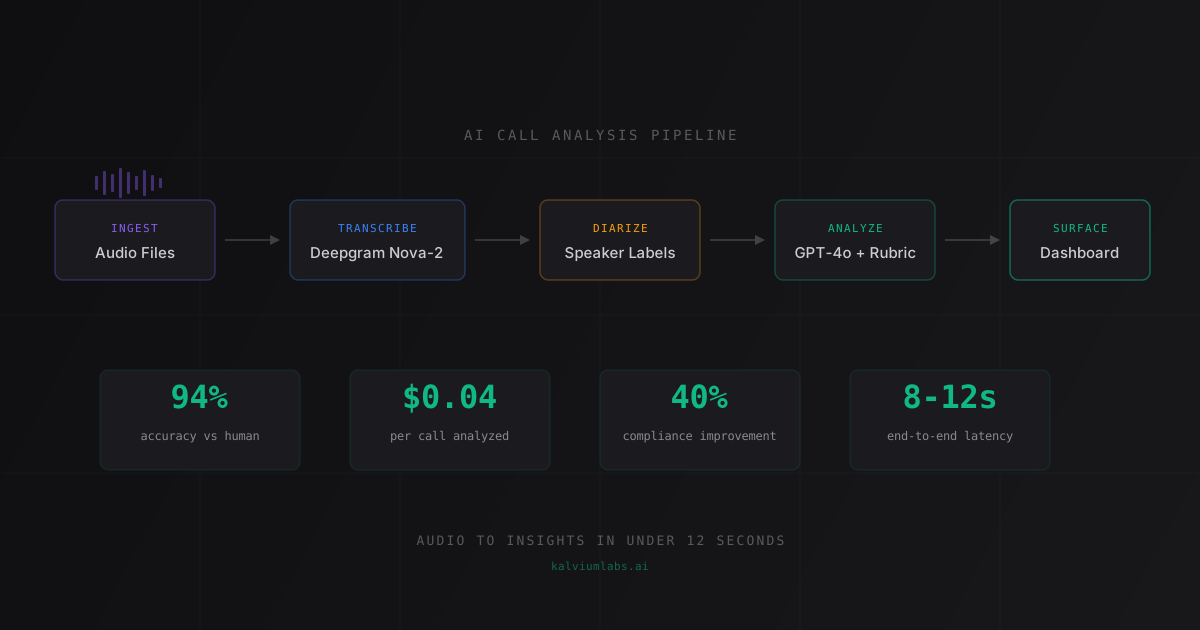
Most people hear “AI call analysis” and picture one thing. It’s four things chained together, and each one has its own failure modes.
Step 1: Transcription. Converting audio to text. Sounds simple. It isn’t. Sales calls come in wildly different quality levels: speakerphone calls with background noise, mobile calls with spotty connections, conference rooms with echo, headset recordings with varying mic sensitivity. Your transcription model needs to handle all of these without falling apart.
We started with Whisper large-v3 and ended up switching to Deepgram Nova-2 by day three of the build. Whisper was solid on clean audio (around 4% word error rate) but degraded to roughly 18% on noisy recordings. Deepgram held at about 6% across quality levels and ran at 400ms per minute of audio versus 3.2 seconds for Whisper. When you’re processing 200+ calls a day, both accuracy and speed compound.
Step 2: Speaker diarization. Figuring out who said what. A call transcript without speaker labels is useless for analysis because you need to know what the sales rep said versus what the customer said. Most of the analysis only runs against the rep’s turns.
For two-party calls, Deepgram’s built-in diarization worked fine. For conference calls with three or more speakers, it got confused and mislabeled turns. We brought in pyannote.audio as a fallback for those cases. Not the most elegant solution, but it covered the edge cases without adding significant latency.
Step 3: Analysis. This is where the LLM comes in. We pass the diarized transcript (rep turns only) to GPT-4o with a structured rubric. The model evaluates each section of the call against specific criteria and returns structured JSON: pass/fail results, relevant quotes, and explanations for each score.
We also tested Claude 3.5 Sonnet. Similar accuracy on the scoring task, noticeably better at explaining why something scored the way it did. Those explanations turned out to be more valuable than the scores themselves, because they gave managers concrete material for coaching conversations.
Step 4: Surfacing insights. The analysis is useless if nobody looks at it. We built a three-view dashboard: team overview (scores by rep, by week), call detail (individual call with highlighted sections), and trends over time. Dashboard design matters more than you’d think. If it takes more than two clicks to find a specific call’s analysis, nobody will use it. We learned that from watching the QA team use the first version.
The Patterns Nobody Warns You About
Before building this, I assumed the hard parts would be AI-related. Model selection, prompt engineering, accuracy tuning. Those were real challenges, but not the hardest ones.
Pattern 1: Audio quality is the actual bottleneck.
We spent more engineering time handling audio quality than on any other part of the system. Call recording platforms export audio in different codecs, at different bitrates, with different noise profiles. A single client’s calls can range from crystal-clear headset audio to barely-audible speakerphone recordings within the same day.
We ended up building a noise quality check that measured signal-to-noise ratio on each file before processing. Low-SNR recordings got flagged for manual review rather than being run through the pipeline. That decision (routing bad audio away from the AI instead of trying to make the AI handle bad audio) saved us at least a week of debugging that wouldn’t have solved the actual problem.
If you’re building a call analyzer: invest in audio quality filtering first. It’s cheaper to reject a bad input than to debug a bad output.
Pattern 2: 5% sampling misses everything interesting.
The client’s QA team had been manually reviewing about 5% of calls, selected randomly. When we turned on 100% coverage, the distribution of issues looked nothing like what the 5% sample had suggested.
The sampled reviews had painted a picture of generally good performance with occasional lapses. The full picture was different. Performance varied dramatically by time of day: afternoon calls scored 15 to 20 percentage points lower than morning calls. Calls over 18 minutes had twice the issue rate of shorter calls. And specific reps whose problems only appeared in clusters of 10 to 15 calls were too sparse to catch in a 5% random sample.
This isn’t really an AI insight. It’s a coverage insight. You can’t see patterns in data you’re not collecting. The AI’s value wasn’t being smarter than human reviewers. It was being able to review every single call, every single day, and making those patterns visible for the first time.
Pattern 3: The feedback loop matters more than the analysis itself.
Here’s what I genuinely didn’t expect. The 40% improvement in team metrics didn’t come from the AI finding problems. It came from the feedback loop the AI made possible.
Before the system, a rep might hear about an issue two to three weeks after the call happened, if they heard about it at all. With same-day analysis, the coaching conversation happens while the call is still fresh in everyone’s memory. That speed changes behavior in ways that quarterly audits never did.
The AI is the engine. The behavior change is the product. I keep coming back to this because it reframed how I think about building these systems. The model accuracy matters, sure. But the real value is in closing the time gap between “something went wrong” and “here’s what you can do differently.”
What We Tried That Didn’t Work
Two approaches that felt reasonable and weren’t.
Keyword matching for analysis. Our first prototype (and honestly the client’s initial expectation) was keyword detection. Scan transcripts for required phrases. If the exact language appears, mark it present. If not, flag it.
This scored 58% accuracy against a labeled test set. Call analysis isn’t about exact words. A rep can convey required information using different phrasing, and keyword matching misses that entirely. A rep can also read required language at double speed with zero comprehension opportunity for the customer, and keyword matching passes it.
LLM-based analysis against a structured rubric got us to 94% agreement with human reviewers. The jump from 58% to 94% isn’t incremental. It’s the difference between a tool people trust and one they stop checking after a week.
Real-time analysis during live calls. The client asked if we could flag issues during the call itself, so a supervisor could intervene in the moment. We spiked it for a day. Streaming Whisper with 5-second audio chunks introduced 8 to 12 seconds of lag between speech and transcript. By the time any analysis result came back, the moment had passed.
Real-time call analysis is a fundamentally different product. It needs WebSockets, a streaming transcription pipeline, sub-second LLM latency, and a supervisor actively watching a dashboard during every live call. That’s at least twice the build complexity for a use case the client’s ops team wasn’t set up to support anyway. We scoped it as a future phase and moved on. The right call, since same-day post-call feedback turned out to drive behavior change just as effectively.
Build vs Buy: When a Custom Call Analyzer Makes Sense
Tools like Gong and Chorus exist. They analyze calls. They have dashboards. They cost $100 to $150 per user per month. The obvious question: why build?
Sometimes you shouldn’t. If your needs are standard sales coaching and conversation analytics, Gong does it well and you’d spend months replicating features they’ve spent years refining. Buy it and move on.
Building a custom call analyzer makes sense when:
Your analysis criteria are domain-specific. The client we built this for had regulatory requirements that no off-the-shelf tool could check against. Their rubric had 23 specific items, including industry-specific disclosure language that Gong’s default models don’t cover. Custom rubric, custom build.
You need deep integration with internal systems. The client wanted analysis results flowing into their internal CRM and compliance audit trail. Building the pipeline ourselves meant we controlled the data flow end to end. With a SaaS tool, you’re working within their integration options, which may or may not include your internal systems.
Volume economics favor it. At 200+ calls per day, the per-call cost of our custom system is roughly $0.04 (mostly transcription API costs). That’s about $160/month for the entire team’s call volume. Gong at $125/user/month for a 20-person sales team is $2,500/month. The custom system is cheaper by more than 10x per month, though the upfront build cost changes the break-even math. At this client’s volume, the custom build paid for itself within two months.
You want to own the model and the iteration cycle. With a SaaS tool, you’re using their analysis model. If it doesn’t work well for your specific calls, your option is to wait for them to improve it. With a custom system, you can tune the prompts, swap models, and iterate on the rubric weekly. We’ve already done three rubric revisions since launch, each time improving accuracy on edge cases the original version missed.
The rough threshold: if you’re processing more than 50 calls per week and your analysis requirements go beyond generic sales coaching, it’s worth exploring a custom build. Below that, the economics almost always favor a SaaS tool or even manual review.
The Architecture in Brief
For the technical readers, here’s the pipeline:
Audio File -> Redis Queue -> Deepgram Nova-2 -> Speaker Diarization -> GPT-4o Analysis -> PostgreSQL -> React DashboardAudio arrives via webhook from the client’s call recording platform. A Redis queue handles ingestion and smooths out spikes. Deepgram transcribes with speaker labels. pyannote.audio handles multi-speaker edge cases. GPT-4o scores each call against the rubric and returns structured JSON. PostgreSQL stores everything. A React dashboard surfaces the three views: team overview, individual call detail, and trend analysis.
End-to-end latency: 8 to 12 seconds per call from file receipt to score in the dashboard. Running cost at current API pricing: roughly $0.04 per call, primarily the transcription cost.
The detailed technical breakdown, including the two wrong turns we took before landing on this architecture, is in the build story post. Production results — 40% team performance improvement and 95% QA time reduction — are covered at the top of this post.
What I’d Do Differently Next Time
Three things, if I were starting this project over.
Start the rubric workshop on day one. We waited until the transcription pipeline was working before sitting down with the client to define the analysis criteria. That was backwards. The rubric is the core product requirement. Everything else is infrastructure that serves it. I’d write the rubric first, even before choosing a transcription model, because the rubric tells you what level of accuracy you actually need from the transcription.
Build the audio quality filter before the analysis pipeline. We built analysis first and then discovered noisy audio was producing bad transcripts that produced bad scores. The quality filter should be the first component in the pipeline, not a patch added later. It’s a five-hour build that saves you twenty hours of debugging downstream.
Ship a bare-bones dashboard in week one. We built the dashboard in week two, after the analysis pipeline was stable. In hindsight, even a placeholder dashboard showing scores (with sample data) in week one would have given the client something tangible to react to. Their feedback on dashboard design was more actionable than their feedback on analysis accuracy, because they could see the dashboard but couldn’t evaluate accuracy without statistical analysis.
When to Start Building
If you’re thinking about a call analyzer for your team, here’s the quick checklist:
- Call volume above 50 per week. Below that, manual review is probably cheaper and more accurate. The AI’s advantage is scale, not quality on individual calls.
- You can define what you’re analyzing for. “Make sure reps are doing well” isn’t a rubric. “Rep must confirm recording consent within 90 seconds” is a rubric item. The AI can only check what you’ve clearly defined.
- You have call recordings accessible via API. If you’re recording calls but they live in a platform with no export capability, the first step is solving the data access problem, not building the analyzer.
- The cost of missed issues justifies the build. For compliance-sensitive industries, one missed violation can cost more than the entire system. For general sales coaching, the ROI calculation is more about rep performance improvement over time.
The call analyzer we built took two weeks from kickoff to production, and the client’s team saw measurable improvement within six weeks. The hard parts were the ones I didn’t anticipate: audio quality, rubric definition, and dashboard design. The AI model selection and prompt engineering, the parts I expected to be hard, turned out to be the most straightforward.
That’s the pattern with most AI builds. The AI is rarely the hard part. The infrastructure around it is.
FAQ
How much does it cost to build a custom AI call analyzer?
Build cost depends on the complexity of your analysis criteria and the integrations required. Most projects in this category fall in the $5,000 to $15,000 range for the initial build. Ongoing running costs are primarily API usage (transcription and LLM inference), which for a team processing 200 calls per day runs about $160 to $200 per month at current pricing. The ROI calculation should compare this against manual QA staffing costs or the per-user pricing of SaaS alternatives at your team’s size.
Can AI call analysis handle poor audio quality?
It works with moderate audio quality but degrades on very noisy recordings regardless of the model. Speakerphone in a loud room or poor mobile connections will produce bad transcripts, which produce bad analysis. The practical approach is to measure audio quality before processing and route low-quality recordings to manual review. Trying to make the AI accurate on bad audio is a losing fight. Better to fix the audio source (better headsets, recording platform settings) and handle edge cases with a quality filter.
What’s the difference between a custom AI call analyzer and tools like Gong?
Gong and similar tools are SaaS platforms with pre-built analysis models optimized for general sales coaching. A custom call analyzer is built around your specific rubric, integrated with your internal systems, and tunable to your exact needs. SaaS tools are faster to deploy and better for standard use cases. Custom builds are better when your criteria are domain-specific, you need deep integration with internal systems, or your call volume makes per-call pricing cheaper than per-user SaaS pricing.
How long does it take to build and deploy an AI call analyzer?
For a well-scoped system with clear analysis criteria, two weeks is achievable. The prerequisites: call recordings accessible via API, an agreed-upon analysis rubric, and a client-side contact who can answer questions quickly during the build. The rubric definition itself takes 2 to 3 days when starting from scratch, which is longer than most people expect. Without clear criteria and data access, add at least another week regardless of engineering speed.
Is AI call analysis accurate enough to trust?
At 94% agreement with human reviewers, it’s accurate enough for routine analysis and dramatically reduces the volume humans need to review manually. The better framing: AI handles 100% of calls at 94% accuracy, humans review the edge cases the AI flags as uncertain. That combination (100% AI coverage with human oversight on flagged calls) beats 5% random human sampling on every metric we measured. The AI doesn’t replace human judgment. It makes human judgment scalable.
Thinking about building an AI call analyzer for your sales or support team? Book a 30-minute call and we’ll tell you whether a custom build makes sense for your call volume, or if an off-the-shelf tool is the better fit.