47 minutes. That’s the average length of the meetings this tool processes. Every one of those 47 minutes contains decisions, commitments, questions that got half-answered, and context that someone will need three weeks from now when nobody remembers what was said.
The client had been recording meetings for months. They had terabytes of audio sitting in cloud storage. Nobody ever went back to listen to any of it, because scrubbing through a 47-minute recording to find the 30 seconds where someone committed to a deadline is not something anyone will do twice.
They wanted a system that could take a meeting recording and produce a structured summary with tagged action items, decisions, and open questions, all searchable across their entire meeting history. Here’s how we built it.
The Four-Stage Pipeline
The architecture isn’t complicated to describe. It’s complicated to get right at each stage.
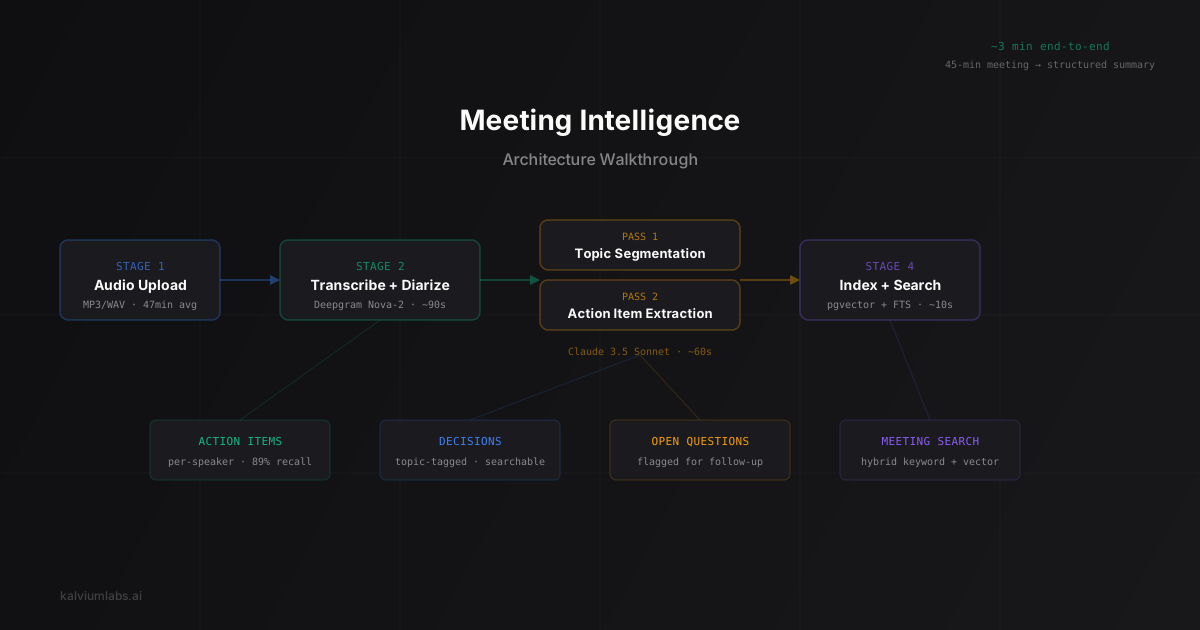
Audio Upload → Transcription + Diarization → LLM Extraction → Index + SearchEach stage has different constraints. Transcription needs accuracy. Diarization needs speaker consistency. LLM extraction needs structured output that doesn’t hallucinate action items that were never discussed. And search needs to work both for exact phrases (“Q2 pricing”) and semantic queries (“when did we talk about changing the subscription model”).
I’ll walk through each one, including the parts that broke.
Transcription: The Deepgram Decision
We’d already built transcription pipelines before. Our call compliance project taught us that audio quality matters more than model choice. That lesson applied here too, but meetings introduced a new wrinkle: overlapping speech.
Sales calls are mostly turn-based. One person talks, then the other. Meetings aren’t like that. Three people jump in during a brainstorm. Someone talks over someone else to agree. Side conversations happen while the main discussion continues.
We went with Deepgram Nova-2 again, but with their multichannel option disabled and diarize enabled from the start. For single-channel recordings (which most meeting platforms export), Nova-2’s built-in diarization handles two to four speakers reasonably well. Word error rate on our test set of 50 meetings: around 7%, compared to 5-6% on clean two-party calls. The extra error comes from crosstalk segments where two people are talking simultaneously.
One thing we didn’t anticipate: screen-share audio. When someone shares their screen during a Zoom call and plays a video or demo, the recording captures that audio mixed with the speaker audio. Deepgram transcribes the video narration as if it’s another meeting participant. We added a post-processing step that flags segments with sudden vocabulary shifts (technical narration mixed with casual meeting speech) and marks them as potential screen-share audio. It’s not perfect. It catches about 70% of cases.
Speaker Diarization: Harder Than It Sounds
Diarization is the process of figuring out who said what. For two speakers, it’s mostly solved. For four to six speakers in a meeting room with one shared microphone, it gets rough.
Deepgram’s built-in diarization worked for calls recorded through platforms like Zoom or Google Meet where each participant has a separate audio stream that gets mixed. The per-stream metadata helps the model separate speakers.
For in-person meetings recorded on a single device, we ran pyannote.audio as a secondary diarization pass. Pyannote’s speaker embedding model is better at separating overlapping voices from a single source. The tradeoff: it adds 40-60 seconds of processing time for a 45-minute recording, and it still struggles when two speakers have similar vocal ranges.
The real pain point was speaker labeling. Diarization gives you “Speaker 1”, “Speaker 2”, “Speaker 3”. It doesn’t tell you that Speaker 1 is the VP of Product. We built a mapping step where users can label speakers after the first meeting, and the system attempts to match voice embeddings in future meetings. The matching works about 80% of the time across recordings from the same platform. Cross-platform matching (someone on Zoom one day, Google Meet the next) is closer to 50%. We shipped it knowing the accuracy wasn’t great, with an easy manual correction UI.
Action Item Extraction: Where Prompting Strategy Matters
This was the section that took the most iteration. The first version was straightforward: pass the full transcript to Claude 3.5 Sonnet with instructions to extract action items, decisions, and open questions. Return structured JSON.
It worked, sort of. On our test set of 30 meetings with manually labeled action items, the first prompt achieved 62% recall. It was catching the obvious ones (“I’ll send the report by Friday”) and missing the implicit ones (“Can you check if that’s still the case?” followed by “Yeah, I’ll look into it”).
The problem was context collapse. When you dump a full 47-minute transcript into one prompt, the model treats it as one flat document. But meetings have conversational structure. An action item at minute 38 often references a discussion from minute 12. The model was losing that thread.
What fixed it: We split extraction into two passes.
Pass one: segment the transcript into topic blocks using an LLM call. Not rigid topic detection, just grouping consecutive speaker turns that discuss the same subject. We used Claude 3.5 Sonnet for this with a simple prompt: “Group these speaker turns into conversation topics. Output the start and end timestamps for each topic.”
Pass two: for each topic block, extract action items with the full topic context. The prompt includes who was speaking, what was discussed, and any references to earlier topics. We also prompt per-speaker: “What did Speaker 2 commit to doing?” rather than “What are all the action items?”
Per-speaker prompting was the single biggest improvement. Recall jumped from 62% to 89% on the same test set. The remaining 11% are mostly action items that were assigned non-verbally (a nod, a chat message) or implied through organizational hierarchy rather than explicit commitment.
Cost per meeting for the two-pass extraction: about $0.08 for a 45-minute meeting using Claude 3.5 Sonnet. Not cheap if you’re processing hundreds of meetings daily, but this client had 30-40 meetings per week across their team. At that volume, the cost is negligible compared to the time saved.
Search: Hybrid Is the Only Approach That Works
Once you have structured meeting data (summaries, action items, decisions, speaker labels), you need to make it searchable. Users ask two kinds of questions that require fundamentally different search strategies.
Exact queries: “Find meetings where we discussed the Acme contract.” This is keyword search. Postgres full-text search handles it fine. We use tsvector with a custom dictionary that includes company names, project names, and domain-specific terms.
Semantic queries: “When did we talk about changing our pricing model?” The phrase “changing our pricing model” might not appear in any transcript. The actual discussion might say “we should probably revisit the subscription tiers” or “the per-seat pricing isn’t working for enterprise customers.” Keyword search misses these entirely.
We use pgvector for the semantic side. If you want the full comparison of vector database options, our post on pgvector vs Pinecone vs Qdrant covers the tradeoffs in detail. Each topic block gets embedded using OpenAI’s text-embedding-3-small model and stored as a vector. Semantic queries get embedded the same way, and we do a cosine similarity search across topic embeddings.
The hybrid approach: run both searches in parallel, merge results, deduplicate by meeting ID, and rank by a weighted combination of keyword relevance and semantic similarity. We tuned the weights through trial and error on the client’s actual queries over the first two weeks. Ended up at roughly 0.6 keyword / 0.4 semantic for most query types, flipped to 0.4 / 0.6 when the query contains no proper nouns.
End-to-End Processing Time
For a 45-minute meeting recording:
| Stage | Time | Notes |
|---|---|---|
| Transcription + diarization | ~90 seconds | Deepgram async API |
| Topic segmentation | ~15 seconds | Claude 3.5 Sonnet |
| Action item extraction | ~45 seconds | Per-topic, parallelized |
| Embedding + indexing | ~10 seconds | Batch embed, Postgres insert |
| Total | ~3 minutes | From upload to searchable |
Three minutes felt acceptable. The client’s previous process was “hope someone took notes” or “never look at the recording again.” Three minutes for a structured, searchable, action-item-tagged summary is a meaningful improvement over both.
What I’d Build Differently
Two things I’d change if we started over.
Speaker identification should have been day one, not day four. We treated it as a nice-to-have and built the core pipeline first. But action items without speaker labels are significantly less useful. “Someone said they’d send the report” isn’t actionable. “Sarah said she’d send the report” is. We had to retrofit speaker labels into the extraction prompts and the search index, which cost us most of a day.
The topic segmentation model needs more constraints. Right now it occasionally creates topic blocks that are too granular (splitting a five-minute discussion into three two-minute blocks) or too coarse (merging two distinct topics because the transition was gradual). We’re still tuning this. Conversation topic detection in meetings doesn’t have well-established benchmarks the way sentiment analysis or named entity recognition does. It’s a judgment call, and the LLM’s judgment doesn’t always match the user’s expectations.
FAQ
What makes meeting intelligence different from just recording and transcribing meetings?
Transcription gives you text. Meeting intelligence gives you structure: who said what, what was decided, what needs to happen next, and the ability to search across months of meetings by topic. The difference is between a wall of text and an actionable summary. The transcription is maybe 20% of the engineering work. The extraction, labeling, and search infrastructure is the other 80%.
How accurate is AI action item extraction from meetings?
On our test set, we achieved 89% recall on action items using a two-pass extraction approach with per-speaker prompting. The remaining 11% are mostly implicit commitments (nods, non-verbal agreement) or items assigned through organizational context rather than explicit verbal commitment. Precision was higher at around 93%, meaning most extracted items were genuine action items with few false positives.
Can this kind of AI integration work with any meeting platform?
The system processes standard audio files, so any platform that exports recordings works. Zoom, Google Meet, Microsoft Teams, and most webinar platforms export MP3 or WAV. In-person recordings from a phone or dedicated device also work, though single-microphone recordings produce lower diarization accuracy. The AI integration connects through a file upload API or a webhook from the recording platform.
What does building a meeting intelligence tool cost to run per meeting?
Our running costs break down to roughly $0.12 per 45-minute meeting: about $0.03 for transcription (Deepgram), $0.08 for LLM extraction (Claude 3.5 Sonnet, two passes), and $0.01 for embedding and storage. At 30-40 meetings per week, that’s $15-20 per week in API costs. The cost scales linearly with meeting count and roughly linearly with meeting duration.
How long does it take to build a meeting intelligence tool from scratch?
For a well-scoped version (transcription, diarization, action item extraction, search), we’d estimate three to four weeks. The first two weeks cover the core pipeline and basic search. The third and fourth weeks cover speaker identification matching, search tuning with real user queries, and the UI polish that makes adoption stick. Ongoing iteration on extraction accuracy and topic segmentation is expected for the first month after launch.
Need AI integration services for your meeting workflow or another audio processing pipeline? Book a 30-minute call and we’ll scope what a prototype would look like for your use case.