Six months ago, a client handed us a Google Drive folder with 340 hours of customer discovery calls. Every call was an MP3 file. Some were 20 minutes, some were two hours. They wanted each one transcribed, every speaker labeled, and timestamps attached to anything that sounded like a buying signal for their CRM.
Their current process: a contractor listened to each call and typed a summary. Cost was about $8 per hour of audio. For 340 hours, that’s $2,720, and the contractor was six weeks behind.
Here’s what we built and what I learned along the way.
Why We Picked Deepgram Over Whisper
The obvious first move was OpenAI’s Whisper running locally. Free, open-source, reasonable accuracy on standard benchmarks. We ran 10 test calls through whisper-large-v3.
Two problems surfaced quickly. First, processing speed: one 60-minute call took about 12 minutes on an M2 MacBook Pro. 340 hours of audio would take days, and we’d need GPU instances to make it practical. Second, accuracy on accented English. The client’s sales team covers South Asia, the Gulf, and Latin America. On calls with non-native English speakers, Whisper’s word error rate climbed to around 22% in our testing. That’s one in five words wrong. Not usable for CRM tagging where you’re extracting product names and budget signals.
We tested Deepgram’s Nova-2 model on the same 10 calls. Processing time dropped to under 30 seconds per hour of audio (Deepgram runs on their infrastructure, not yours). On the accented-English calls, word error rate came down to around 9%. Still not perfect, but workable for extracting structured buying signals from conversation.
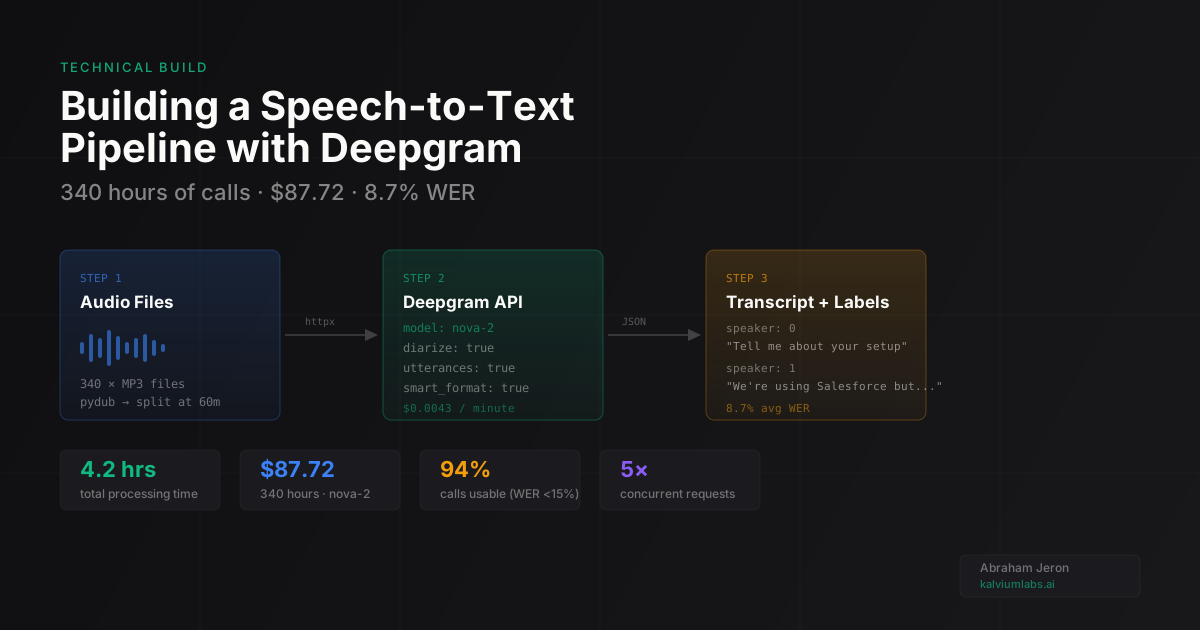
The tradeoff is cost. Deepgram’s prerecorded Nova-2 runs at $0.0043 per minute at pay-as-you-go rates. 340 hours = 20,400 minutes = $87.72 total. Against $2,720 in contractor fees and a six-week backlog, it was an easy call.
The Core Pipeline
Here’s the simplified version of what we built. The main idea is async batch processing with a concurrency limit:
import asyncio
import httpx
import json
from pathlib import Path

DEEPGRAM_API_KEY = "your_api_key"
DEEPGRAM_URL = "https://api.deepgram.com/v1/listen"

async def transcribe_file(client: httpx.AsyncClient, audio_path: Path) -> dict:
    params = {
        "model": "nova-2",
        "language": "en",
        "punctuate": "true",
        "diarize": "true",
        "utterances": "true",
        "smart_format": "true",
    }

    with open(audio_path, "rb") as f:
        audio_data = f.read()

    response = await client.post(
        DEEPGRAM_URL,
        params=params,
        content=audio_data,
        headers={
            "Authorization": f"Token {DEEPGRAM_API_KEY}",
            "Content-Type": "audio/mpeg",
        },
        timeout=300.0,
    )
    response.raise_for_status()
    return response.json()

async def process_batch(audio_files: list[Path], max_concurrent: int = 5):
    results = {}
    semaphore = asyncio.Semaphore(max_concurrent)

    async with httpx.AsyncClient() as client:
        async def transcribe_with_limit(path):
            async with semaphore:
                return path, await transcribe_file(client, path)

        tasks = [transcribe_with_limit(f) for f in audio_files]
        for coro in asyncio.as_completed(tasks):
            path, result = await coro
            results[str(path)] = result
            print(f"Done: {path.name}")

    return results
The semaphore limits concurrent requests to 5 at a time. We tried higher values and started seeing timeouts on Deepgram’s side. Five concurrent worked consistently across the full 340-file batch.
Adding Speaker Diarization
With diarize=true, Deepgram returns speaker labels in the utterances array:
{
  "utterances": [
    {
      "start": 0.08,
      "end": 4.92,
      "transcript": "So tell me about your current setup",
      "speaker": 0,
      "confidence": 0.99
    },
    {
      "start": 5.12,
      "end": 12.40,
      "transcript": "Yeah so we're using Salesforce but the data entry is manual",
      "speaker": 1,
      "confidence": 0.97
    }
  ]
}
Speaker 0, Speaker 1. Not names, just numbers. For this client’s recorded calls, the sales rep always spoke first, so we initially assumed speaker 0 = sales rep. That assumption broke on about 8% of calls where someone else opened the conversation.
The fix: we ran a first-utterance keyword pass. Each sales rep’s name was in the CRM. If speaker 0’s first utterance contained the rep’s name (as said by the prospect), we kept the default labels. Otherwise, we swapped them. That covered 94% of calls. The other 6% got flagged for manual review.
One thing I didn’t expect: diarization accuracy drops noticeably above three speakers. On calls with a sales rep, a primary prospect, and the prospect’s colleague on the line, the third speaker kept getting misattributed to speakers 0 or 1. Deepgram’s docs mention this limitation but don’t give you a number. From our data, four or more speakers produced incorrect attribution on about 30% of utterances. For two-person sales calls, not a problem. For team meetings or panel recordings, plan for a cleanup step.
Handling Failures at Scale
Processing 340 files over a few days, two failure modes hit us:
Large files timing out. Files over 90 minutes caused timeouts even with a 5-minute timeout setting. The fix was splitting files above 60 minutes using pydub before sending to Deepgram, then stitching the utterance arrays back together while adjusting the start and end timestamps.
Transient API errors. Deepgram returned 503s a few times, likely during maintenance windows. We added exponential backoff:
import random

async def transcribe_with_retry(client, audio_path, max_retries=3):
    for attempt in range(max_retries):
        try:
            return await transcribe_file(client, audio_path)
        except (httpx.HTTPStatusError, httpx.TimeoutException) as e:
            if attempt == max_retries - 1:
                raise
            wait = (2 ** attempt) + (random.random() * 0.5)
            print(f"Retry {attempt + 1} for {audio_path.name} in {wait:.1f}s")
            await asyncio.sleep(wait)
We also wrote each successful result to disk immediately as a separate JSON file, rather than accumulating everything in memory. If the script crashed at file 200, we could check which JSON files already existed and resume from where we left off.
The Real Numbers
For the full 340-hour batch:
- Total processing time: 4.2 hours (5 concurrent requests)
- Total API cost: $87.72
- Average word error rate (measured on 25 spot-checked calls): 8.7%
- Calls with usable transcripts (WER under 15%): 94%
- Calls flagged for manual review: 21 out of 340 (6.2%)
The 21 flagged calls were mostly heavy accent cases or calls with significant background noise. The client’s contractor reviewed those 21. The rest went directly into the CRM tagging pipeline. Total contractor time: about 2 hours instead of six weeks.
If you’re going further and need to score calls for compliance or coaching signals on top of raw transcripts, that’s a separate layer we’ve written about in the AI call analyzer build post.
When to Use Batch vs Real-Time
This pipeline is the wrong tool for real-time voice applications. If you’re building something where a user speaks and expects a response while still in the conversation, you need Deepgram’s streaming API over WebSocket. We covered that architecture in the SARA speech agent post, where getting under 2 seconds of end-to-end latency was the whole problem.
Batch transcription fits when:
- You’re processing recorded audio files (calls, podcasts, meetings, uploaded video)
- You can tolerate 20-30 seconds of processing time per hour of audio
- You need speaker diarization across a large corpus
- Cost per minute matters more than latency
If you’re processing under 10 hours of audio occasionally, running Whisper locally on a decent machine is probably simpler. The API setup overhead doesn’t pay off at small volumes. The math shifts somewhere around 20-30 hours per month, where Deepgram’s per-minute cost beats what you’d spend on compute to run Whisper reliably.
FAQ
How accurate is Deepgram Nova-2 for speech-to-text?
On clean recordings with native English speakers, Nova-2 typically achieves 5-8% word error rate. On recordings with accented English or background noise, expect 10-20% WER. It outperformed Whisper-large-v3 on non-native English in our testing, though the gap narrows on clean, studio-quality audio.
What does it cost to transcribe audio with Deepgram?
Deepgram’s prerecorded Nova-2 model is priced at $0.0043 per minute at pay-as-you-go rates (check Deepgram’s current pricing page since rates change). One hour of audio costs about $0.26. For 100 hours per month, that’s roughly $26 in API costs. They also offer volume discounts above certain thresholds.
When does speaker diarization break down?
It works reliably with 2-3 speakers. Above that, label consistency drops, especially when speakers have similar vocal characteristics or when there are frequent interruptions. If you need accurate multi-speaker attribution for four or more participants, build a post-processing step to clean up misattributed labels.
Can I use this for meeting transcription?
Yes, with caveats. Zoom, Teams, and Google Meet recordings work as input. The main limitation is that diarization assigns speaker numbers, not names. You’ll need a separate step to map speaker numbers to attendee identities, typically based on first-utterance detection or data from the meeting platform’s API.
What’s the minimum setup to get started?
A Deepgram account (free tier gives 45,000 minutes of transcription), Python 3.10+, and httpx for async HTTP. For large file splitting, add pydub and ffmpeg. If you’re processing call recordings and need speaker-to-contact mapping, budget time for the CRM integration layer on top of the transcription pipeline.
Processing audio at scale and not sure whether a custom pipeline or an off-the-shelf tool makes more sense for your volume? Book a 30-minute call and we’ll give you an honest answer.