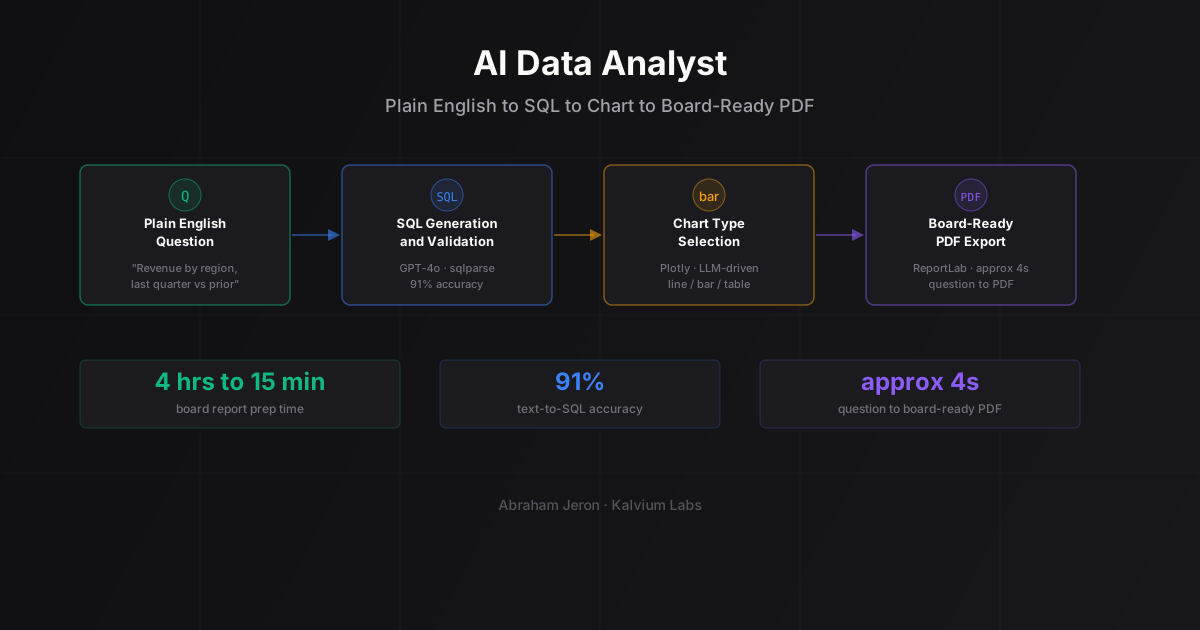
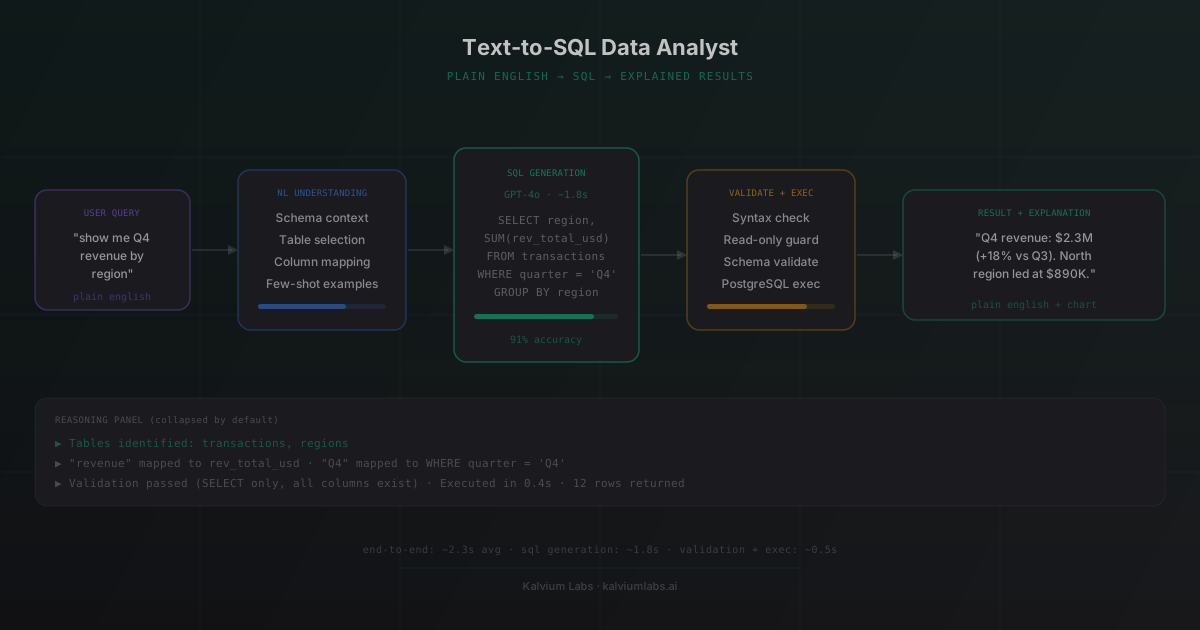
The exact architecture we shipped to a fintech analytics platform (3-week build): Schema-aware prompt construction → few-shot SQL generation via GPT-4o → three-layer validation (sqlparse syntax check + read-only allowlist + schema column check) → read-only PostgreSQL replica → second LLM pass for plain-English explanation + reasoning panel. Hit 91% accuracy on a 50-question finance benchmark. End-to-end latency: 2.3 seconds. Live demo and the full numbers on the SQL Data Analyst case study.
When this architecture is the right call (and when it isn’t):
| Your situation | Right call |
|---|---|
| Non-technical users querying a known schema (finance, ops, sales) | This pipeline. Ships in 3-5 weeks. |
| Schema with thousands of tables and unclear column meanings | Build a metadata layer first. Adds 2-4 weeks. |
| Read-only analytics, no writes ever | This pipeline as-is. Read-only enforcement is built in. |
| Users who already write SQL | Skip the AI layer. Give them a notebook. |
| Highly regulated data, audit trail required | This pipeline + query logging + human-in-the-loop on flagged queries. |
| Schema changes weekly | Add self-updating schema introspection. Treat it as a separate project. |
Want something like this for your stack? Try the live demo or book a 30-minute call to talk through your data shape.
The client’s finance team had two ways to get answers from their data: wait 48-72 hours for an analyst report, or learn SQL. Neither was working. Reports were always delayed. Nobody on the finance side was going to open a SQL editor. So they came to us asking for something in between.
What they got was an AI agent that takes a plain-English question, writes the SQL, runs it against their PostgreSQL database, and explains the answer back in plain English. With a reasoning panel that shows its work. This is the full build story, including what we got wrong twice before landing on the right approach.
The Problem Was Simpler Than It Looked
The client is a fintech analytics platform. They had two years of financial transaction data spread across about a dozen tables. Revenue by region, expense categories, vendor payments, budget vs. actuals. The kind of data a finance person lives in every day.
Their current workflow: finance team submits a request, data analyst writes the query, results come back 48-72 hours later. For time-sensitive decisions, that lag hurt.
The ask: build something where a finance user can type “show me Q4 revenue by region compared to Q3” and get an answer in seconds, not days.
The challenge hiding underneath: the users asking questions have zero SQL knowledge. They can’t look at a query and tell you if it’s right. And the data involves real financial figures, so bad queries returning wrong numbers isn’t just annoying. It’s a real business risk.
That second constraint shaped everything about the architecture.
Two Wrong Turns Before We Got It Right
Wrong Turn 1: Zero-Shot SQL Generation
The obvious first move: send the user’s question to GPT-4o with the database schema, ask for SQL, run it. We had a prototype running by end of day one.
Against a test set of 50 representative finance questions, it scored 40% accuracy. Not 40% on complex multi-join queries. 40% overall, including simple ones like “total expenses this month” that it got wrong because it guessed the wrong column name.
The core issue: the schema had non-obvious column names from years of legacy decisions. txn_amt_usd instead of amount. cost_ctr instead of cost_center. Zero-shot prompting doesn’t recover from that. The model reasons about what a column should be called, not what it’s actually called.
The fix: schema context isn’t just “here are the tables and columns.” You need natural language descriptions of what each column actually means. We added a metadata layer, a YAML file mapping each column to a plain-English description, and injected that into every prompt.
Accuracy jumped to 71%. Better. Still not production-ready for real financial data.
Wrong Turn 2: Running the SQL Without Validation
Before we figured out the schema context problem, we ran into a different issue. The app was crashing.
Some queries the model generated were syntactically invalid. Others referenced columns that don’t exist. One query tried to UPDATE a table. Not a bug in our system, the model just decided that was the right response to “can you fix the Q3 revenue figure?”
Running LLM-generated SQL without validation is how you corrupt a database in production. We caught this in development, which is the right time to catch it. We added a validation layer before the SQL ever reached a real database connection.
More on that below.
The Text-to-SQL Pipeline That Actually Shipped
After two weeks of iteration, the production pipeline has four steps.
Step 1: Schema-aware context injection
Before the user’s question goes to the model, we build a prompt that includes the relevant table schemas plus the natural language descriptions of each column. We don’t dump every table into the prompt. A lightweight embedding-similarity step picks the 3-5 most relevant tables for the given question.
This keeps prompt size manageable and keeps the model focused on the right data. Injecting 12 tables when the question only involves 2 adds noise without helping accuracy.
Step 2: Few-shot SQL generation via GPT-4o
The prompt includes 4-5 example question-to-SQL pairs, selected dynamically based on similarity to the current question. These examples aren’t static. They’re pulled from a labeled dataset we built during testing: 80 real finance questions with verified correct SQL.
We used GPT-4o (standard, not 4-turbo) for generation. We also tested Claude 3.5 Sonnet. Both are capable on straightforward queries. GPT-4o came out slightly ahead on multi-table joins in our evaluation, so that’s what shipped.
This step takes roughly 1.8 seconds on average. It’s the latency bottleneck for the whole pipeline.
Step 3: Validation
Covered in the next section.
Step 4: Execution and result handling
SQLAlchemy executes the validated query against a read-only replica of the client’s database. Results come back as a Python dictionary, then get formatted for display (a table in the UI) and passed to the explanation step.
Empty result sets get handled separately, because “your query returned 0 rows” needs a different explanation than “here are 47 rows of data.” In our early builds we weren’t doing this, and the model would sometimes explain an empty result as if it contained data. That was bad.
The Validation Layer You Can’t Skip
Most text-to-SQL tutorials jump straight from generation to execution. Don’t skip this part.
After the model generates SQL and before it touches the database, we run three checks.
Syntax check. sqlparse parses the query. If it’s malformed, it never reaches step two. The error message goes back to the model as context for a retry.
Read-only enforcement. We extract the SQL statement type using sqlparse’s token analysis. Anything that isn’t a SELECT gets rejected immediately. No INSERT, UPDATE, DELETE, DROP, nothing. The agent is a read-only analyst. Full stop.
Schema validation. We extract every table name and column name referenced in the query and check them against the actual schema. If the model generated a column called revenue_total and the real column is rev_total_usd, we catch it here instead of sending a database error back to the user.
If validation fails, we retry with the error included in the prompt: “Your previous SQL referenced column revenue_total which doesn’t exist. The correct column name is rev_total_usd.” The model self-corrects on the retry about 80% of the time.
Our production accuracy after all of this: 91% on the original 50-question test set. The remaining 9% are genuinely ambiguous questions, the kind where even a human analyst would ask for clarification before writing the query. That’s consistent with what the BIRD-SQL benchmark shows for complex real-world schemas: there’s a ceiling on automatic accuracy when natural language is inherently ambiguous.
Explaining the Results, Not Just Returning Them
A table of numbers isn’t an answer. Even “Q4 revenue was $2.3M” isn’t quite an answer without context.
After query execution, we send the results back to GPT-4o with a second prompt: “Here is the user’s original question, here is the SQL that ran, here is the result. Write a 2-3 sentence plain-English explanation that directly answers the question. Include a percentage comparison if the data supports it.”
We also added basic chart generation. If the result set has a date column and a numeric column, we render a bar chart using Recharts on the frontend. Finance users expect to see trends visually. Returning a raw data table made the output feel incomplete.
The explanation prompt adds about 0.5 seconds. Total end-to-end latency: roughly 2.3 seconds from question submission to results displayed. Fast enough that users don’t feel like they’re waiting.
The Reasoning Panel (The Part We Didn’t Plan)
Our initial demo had a clean interface: question input at the top, answer at the bottom. No intermediate steps visible.
First round of user testing feedback: “How do I know the answer is right?”
Fair. The users are non-technical, but they’re not naive. They’re looking at financial data that informs real decisions. Giving them a number with no way to verify it made them uncomfortable. Rightfully so.
So we added a reasoning panel. It’s a collapsible section below the answer showing three things:
- The generated SQL query (syntax-highlighted)
- The raw result set before formatting
- A short description of the model’s interpretation: which tables it chose and why
Collapsed by default, so it doesn’t overwhelm users who don’t care. But for anyone who wants to verify a result, it’s there.
This changed adoption. The finance team lead, who’d been skeptical during testing, started using the tool daily once she could see the SQL. She can’t read SQL fluently, but she could tell when the right table names were in there. That was enough.
Transparency builds trust faster than accuracy alone when you’re asking non-technical users to rely on an AI tool with real data. If you’re designing agents for this kind of audience, our post on AI agent architecture tradeoffs gets into the explainability design decisions in more depth.
What Shipped and Where It Runs
The full stack:
- Frontend: React with Tailwind, Recharts for charts, custom reasoning panel component
- Backend: FastAPI handling the pipeline, SQLAlchemy for database access
- LLM: GPT-4o via OpenAI API
- Database: Read-only replica of the client’s existing PostgreSQL instance
- Validation: sqlparse for syntax and token analysis, custom schema registry for column validation
Build time from kickoff to production: about three weeks. One week for the core pipeline and validation layer, one week for the frontend including the reasoning panel, one week for edge case testing against the full schema.
The client’s data analysts still work with the system now, but on different things. Routine questions (“what was X last quarter?”, “compare Y by region”) get handled automatically. The analysts focus on work that actually needs judgment: modeling, forecasting, interpreting anomalies. That’s a better use of their time.
See it working live on the SQL Data Analyst case study page or try the live demo directly.
FAQ
What is a text-to-SQL agent and how does it work?
A text-to-SQL agent converts a plain-English question into a SQL query that runs against your database. The core steps are schema-aware prompt construction, SQL generation via an LLM, validation, execution, and result explanation. The hard parts are making the schema context precise enough that the model picks the right tables and columns, and adding validation so malformed or destructive queries never reach production. Without both pieces, you’ll hit accuracy floors and security problems quickly.
How accurate is text-to-SQL in production?
Accuracy depends on your schema complexity and how much work you put into the prompting layer. Zero-shot approaches typically land around 40-60% on real-world schemas with non-obvious column names. With schema metadata, few-shot examples, and a validation-plus-retry loop, you can reach 85-95% on well-defined question types. The BIRD-SQL benchmark shows similar results at scale. The remaining errors tend to be genuinely ambiguous questions, where the natural language doesn’t unambiguously point to a single correct query.
Is it safe to let an AI generate and run SQL queries on my database?
Yes, with the right guardrails. We enforce read-only access by rejecting any SQL statement that isn’t a SELECT. Queries run against a read-only database replica, not the production write instance. We also validate that every table and column referenced actually exists in the schema before execution. These three controls cover the main risk categories: destructive queries, prompt injection attempts, and silent data errors from the model hallucinating column names. Don’t skip any of them.
How long does it take to build a custom AI solution like this?
For a text-to-SQL agent with this feature set (pipeline, validation, result explanation, reasoning panel), plan for three to five weeks. The variables are schema complexity and how well-documented your data model is. In our experience, the SQL generation pipeline ships fast. The time goes into testing edge cases on the real schema, handling empty results and errors gracefully, and building the UI to a point where non-technical users actually trust it. If you want to talk through your specific setup, book a call with us.
For more on this, read our guide on Video Auditing with AI.
For more on this, read our guide on How We Built a Sales Call Compliance AI in 2 Weeks.
What databases can a text-to-SQL agent work with?
The approach works with any SQL database: PostgreSQL, MySQL, SQLite, BigQuery, Snowflake, Redshift. The schema extraction step differs per database, since each has its own information_schema structure. But the LLM pipeline stays the same. For data warehouses like BigQuery and Snowflake, it’s worth adding a query cost estimator before execution, since a badly formed query can scan terabytes and generate an unexpected bill. For OLTP databases like PostgreSQL, the main concern is access control, not cost.