A document review agent we shipped last quarter handled its first hundred production requests without incident. Then we got a bug report: if users paused mid-review and came back 20 minutes later, the agent restarted from scratch.
The fix took 45 minutes with LangGraph’s checkpointing. The workaround we’d been prototyping without it would have taken a week: a custom serialization layer, a Redis state cache, and a session reconstruction function we’d need to maintain permanently. That gap is what this post is about: what LangGraph’s stateful architecture actually provides and how to use it correctly in production.
We’ve built six agents with LangGraph in the last four months, covering document processing, due diligence, content pipelines, and approval workflows. This is what we’ve learned.
What “Stateful” Actually Means in LangGraph
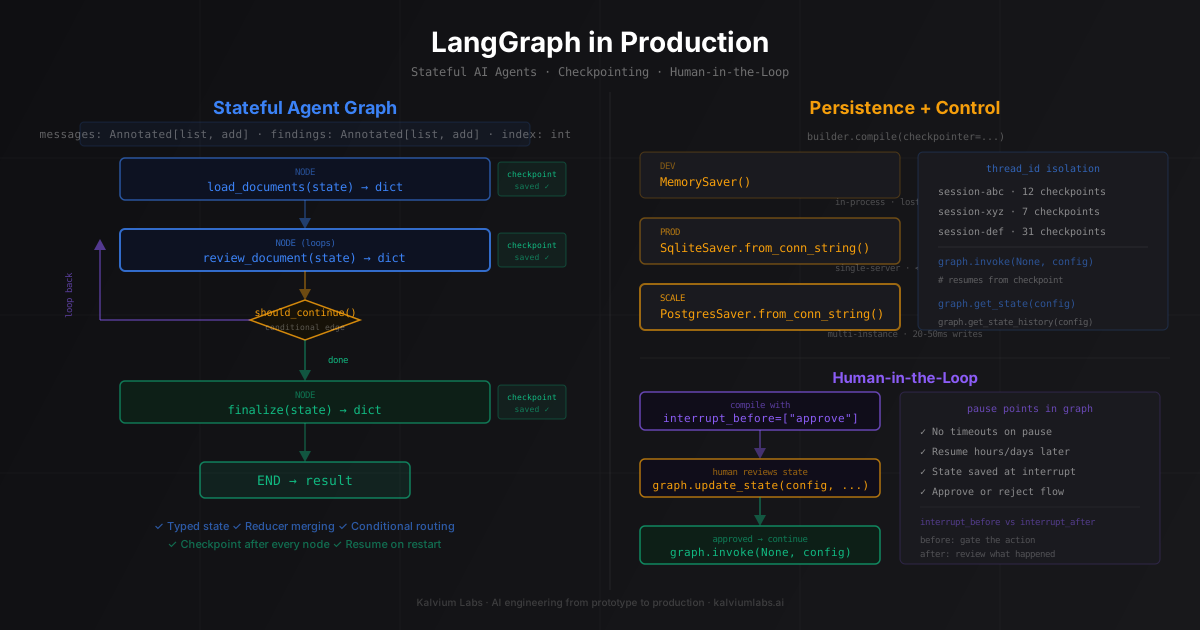
LangGraph represents an agent as a directed graph. Nodes are functions. Edges connect nodes, with optional conditional routing based on current state. The entire execution is tracked as a series of state transitions rather than a flat message list.
The key difference from a basic Python agent loop: state is explicit, typed, and checkpointed. Every node receives the current state, returns a partial update, and LangGraph merges those updates before routing to the next node.
from typing import TypedDict, Annotated
from operator import add
from langgraph.graph import StateGraph, END
from langchain_core.messages import BaseMessage, HumanMessage, AIMessage
from langchain_openai import ChatOpenAI

llm = ChatOpenAI(model="gpt-4o")

class ReviewState(TypedDict):
    # Annotated with add: new messages get appended, not overwritten
    messages: Annotated[list[BaseMessage], add]
    documents: list[str]
    findings: Annotated[list[str], add]  # accumulates across nodes
    current_doc_index: int               # overwrites each time
    review_complete: bool

def load_documents(state: ReviewState) -> dict:
    # Return only the keys you're updating
    docs = fetch_documents(state["messages"][-1].content)
    return {
        "documents": docs,
        "current_doc_index": 0
    }

def review_document(state: ReviewState) -> dict:
    idx = state["current_doc_index"]
    doc = state["documents"][idx]

    result = llm.invoke([
        HumanMessage(f"Review this document for compliance issues:\n\n{doc}")
    ])

    return {
        "findings": [f"Doc {idx}: {result.content}"],
        "current_doc_index": idx + 1
    }

def should_continue(state: ReviewState) -> str:
    if state["current_doc_index"] >= len(state["documents"]):
        return "finalize"
    return "review_document"

def finalize(state: ReviewState) -> dict:
    findings_text = "\n".join(state["findings"])
    summary = llm.invoke([
        HumanMessage(f"Summarize these compliance findings:\n{findings_text}")
    ])
    return {
        "messages": [AIMessage(summary.content)],
        "review_complete": True
    }

builder = StateGraph(ReviewState)
builder.add_node("load_documents", load_documents)
builder.add_node("review_document", review_document)
builder.add_node("finalize", finalize)
builder.set_entry_point("load_documents")
builder.add_edge("load_documents", "review_document")
builder.add_conditional_edges("review_document", should_continue)
builder.add_edge("finalize", END)
The Annotated[list, add] on messages and findings is doing more than it looks. Without the reducer, every node returning a messages key overwrites the previous list. With add, LangGraph applies the operator to merge updates. This matters most in parallel branches, where two nodes returning findings simultaneously would otherwise create a race condition. It also matters on re-invocations: if you pass initial state on resume, the reducer merges rather than replaces.
Designing Your State Schema
The state schema is the most consequential design decision in a LangGraph project. We’ve done two full schema rewrites after shipping agents that accumulated state faster than expected.
Two patterns to know before you start:
Accumulator vs. overwrite. Use Annotated[list, add] for anything that should grow across the agent’s lifetime: messages, findings, errors, completed steps. Use plain types for current state: which document index you’re on, whether approval was given, the current plan string. Accumulator fields survive restarts from checkpoints; overwrite fields take their last written value.
Keep state lean. Everything in state gets serialized to the checkpoint store on every node transition. One agent we built stored raw LLM responses including usage metadata in state. At 50 documents, the state object was 180KB per checkpoint. Postgres writes climbed to 400ms and started affecting response time. The fix was stripping state to just what downstream nodes actually need.
A state schema that caused us problems:
# Anti-pattern: bloated state
class BadState(TypedDict):
    messages: list[BaseMessage]       # grows unbounded without a pruning step
    raw_llm_responses: list[dict]     # full response objects with usage metadata
    document_chunks: list[str]        # entire document content stored in state
    debug_trace: list[str]            # logging data that belongs in your logger
What the schema should actually look like:
# Better: only what nodes need for routing and synthesis
class GoodState(TypedDict):
    messages: Annotated[list[BaseMessage], add]
    document_ids: list[str]           # IDs only; fetch content from storage inside each node
    findings: Annotated[list[str], add]
    current_index: int
    approved: bool
    errors: Annotated[list[str], add]
Fetch documents from your storage layer inside each node. Don’t carry document content through state.
Checkpointing: Persistence Without Writing Infrastructure
A graph compiled without a checkpointer runs stateless. Each invoke() call starts fresh. A graph compiled with a checkpointer saves state after every node transition, keyed by thread ID. LangGraph’s persistence layer handles the serialization and deserialization automatically.
from langgraph.checkpoint.memory import MemorySaver

# Development: in-memory (lost on process restart)
memory = MemorySaver()
graph = builder.compile(checkpointer=memory)

config = {"configurable": {"thread_id": "review-session-001"}}
result = graph.invoke(
    {
        "messages": [HumanMessage("Review these compliance documents")],
        "documents": [],
        "findings": [],
        "current_doc_index": 0,
        "review_complete": False
    },
    config
)
For production, swap the checkpointer without changing any graph code:
# Install: pip install langgraph-checkpoint-sqlite
from langgraph.checkpoint.sqlite import SqliteSaver

# Single-server: SQLite (no extra infrastructure)
with SqliteSaver.from_conn_string("./checkpoints.db") as checkpointer:
    graph = builder.compile(checkpointer=checkpointer)
    result = graph.invoke(initial_state, config)
For multi-instance deployments where multiple workers handle the same sessions, SQLite won’t work because the file isn’t shared. Use Postgres:
# Install: pip install langgraph-checkpoint-postgres
from langgraph.checkpoint.postgres import PostgresSaver

conn_string = "postgresql://user:password@host:5432/dbname"
with PostgresSaver.from_conn_string(conn_string) as checkpointer:
    checkpointer.setup()  # creates checkpoint tables on first run
    graph = builder.compile(checkpointer=checkpointer)
setup() creates the checkpoints, checkpoint_writes, and checkpoint_blobs tables. Run it once at deployment time.
Inspecting a checkpoint:
# Current state for a thread
state = graph.get_state(config)
print(state.values)         # current state dict
print(state.next)           # nodes about to execute
print(state.metadata)       # step count, run_id

# Full execution history for a thread
history = list(graph.get_state_history(config))
for checkpoint in history:
    print(checkpoint.metadata["step"], checkpoint.values.get("current_index"))
get_state_history() is surprisingly useful when debugging production failures. When a run produces wrong output, you walk backward through the history and find exactly which node introduced the error.
Thread IDs: How LangGraph Separates Sessions
Thread IDs let you run multiple concurrent agent sessions against the same compiled graph. Each thread ID gets its own isolated checkpoint history.
# Two different users, same graph
user_a_config = {"configurable": {"thread_id": "user-a-review-1"}}
user_b_config = {"configurable": {"thread_id": "user-b-review-1"}}

# These don't interfere
result_a = graph.invoke(user_a_state, user_a_config)
result_b = graph.invoke(user_b_state, user_b_config)

# Resuming user A after an interrupt
result_a_continued = graph.invoke(None, user_a_config)
Passing None as the first argument to invoke() resumes from the latest checkpoint for that thread. The agent picks up exactly where it left off. This is the fix that resolved the “restart from scratch” bug: we added a SQLite checkpointer, passed a stable thread ID per user session, and resume behavior came for free.
One operational detail: thread IDs are permanent by default. Old checkpoints accumulate in the store. Set a TTL at the infrastructure level. For SQLite: DELETE FROM checkpoints WHERE created_at < datetime('now', '-7 days'). For Postgres: the same pattern with NOW() - INTERVAL '7 days'. Run it as a scheduled job.
Human-in-the-Loop: Interrupts and Approval Gates
This feature justified LangGraph’s complexity for two of our six projects. We had agents that needed human approval before taking high-value actions: sending emails, mutating customer records, making API calls with money involved. Before LangGraph, we were building a database polling loop plus a custom signaling mechanism. It worked, but added 200+ lines of custom code outside the framework.
LangGraph compiles interrupt points into the graph itself:
# Pause before these nodes; state is saved, execution halts
graph = builder.compile(
    checkpointer=checkpointer,
    interrupt_before=["send_notification", "execute_payment"]
)
Any run that reaches send_notification or execute_payment pauses and waits. The state is saved at the checkpoint. The agent doesn’t time out. The human can approve hours later:
# First invoke: runs until the interrupt
config = {"configurable": {"thread_id": "approval-flow-789"}}
for event in graph.stream(initial_state, config, stream_mode="updates"):
    print(event)  # watch progress up to the pause

# Execution stopped at interrupt_before=["send_notification"]
current_state = graph.get_state(config)
print(f"About to send: {current_state.values['draft_notification']}")
# Output: About to send: "Your policy renewal is overdue. Click here to pay."

# Human reviews the draft and approves
graph.update_state(config, {"human_approved": True})

# Resume from the checkpoint
for event in graph.stream(None, config, stream_mode="updates"):
    print(event)  # send_notification runs, then continues
update_state() writes directly to the checkpoint without running any nodes. The subsequent stream(None, config) resumes from that checkpoint with human_approved: True visible to the send_notification node.
For rejection flows, route to a revision node instead:
def route_after_approval(state: ApprovalState) -> str:
    if state.get("human_approved"):
        return "send_notification"
    return "revise_draft"

builder.add_conditional_edges("await_approval", route_after_approval)
One mistake we made early: using interrupt_after instead of interrupt_before. With interrupt_after, the node runs before pausing, which means the action you wanted approval for has already executed. Use interrupt_before when the approval gates the action. Use interrupt_after when you want a human to review what just happened before the agent continues.
What We Got Wrong Building Our First Stateful Agent
Three mistakes that cost real debugging time:
State grew to 3MB per checkpoint. The first version of our due diligence agent stored full document content, raw LLM responses including logprobs, and a running debug trace in state. By document 15 of 30, checkpoint writes took 600ms and the state object was 3MB. We stripped it to document IDs, findings strings, and routing fields. Checkpoint writes dropped to 12ms.
Re-invocations doubled accumulator fields. If you resume a thread from an existing checkpoint and your initial state includes accumulator fields, LangGraph merges the initial state with the checkpoint. We had a bug where re-invoking a completed thread caused the messages list to double: the original messages plus the “new” initial messages we passed. The fix is to pass None as input on resume, or pass only the incremental update (the new user message, not the full initial state dictionary).
No iteration limit in conditional loops. An agent with a should_continue conditional edge can loop indefinitely if the exit condition isn’t met. A document validator that routed back to “check again” on any finding ran 80 iterations on a malformed document before we noticed. Add an iteration_count to your state and exit hard after a sane limit:
def should_continue(state: ValidatorState) -> str:
    if state["iteration_count"] >= 15:
        return "force_finalize"
    if not state["current_issues"]:
        return "finalize"
    return "recheck"
Update the count inside the recheck node, not the router. The router only reads state; it doesn’t update it.
When to Not Use LangGraph
The honest summary from six projects: LangGraph is worth the complexity when you need at least one of these: persistence across sessions, human approval gates, or parallel fan-out with state merging. If you don’t need any of those, a LangChain LCEL chain or a plain Python loop is the right call.
For single-request agents with no resumability requirement, a LangChain LCEL chain or even a plain Python loop is easier to build, easier to debug, and has no additional infrastructure cost. We use LangGraph specifically when the agent’s intermediate state matters beyond a single invocation. The LangGraph vs. LangChain comparison has the detailed decision matrix if you’re still choosing.
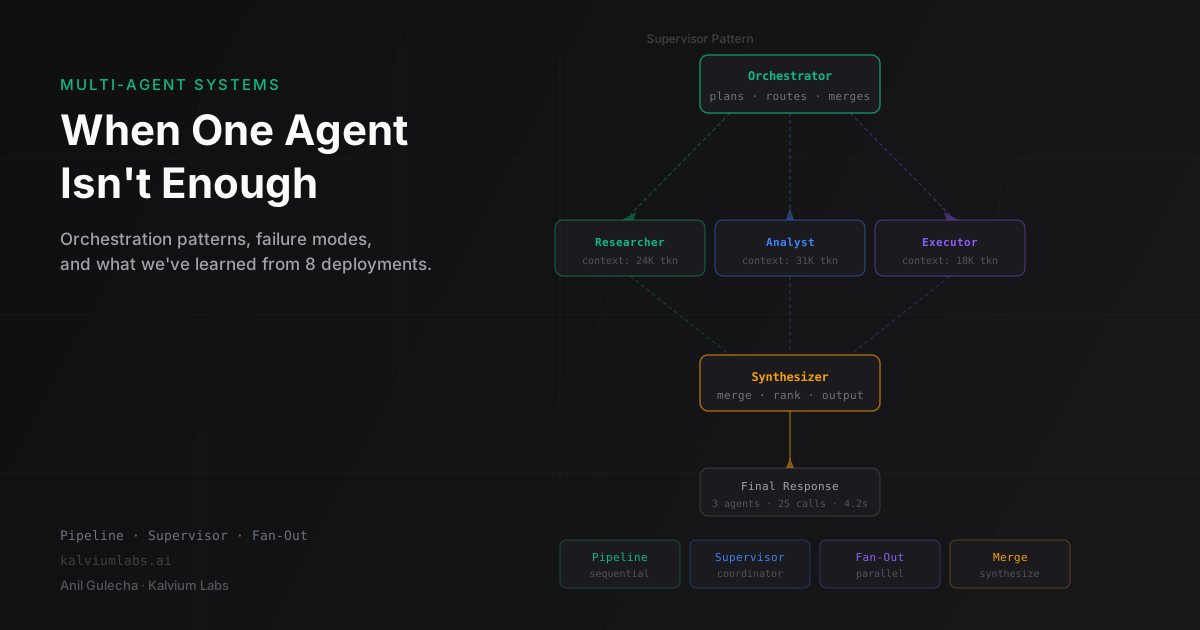
For multi-agent coordination patterns (supervisor, pipeline, parallel fan-out), the multi-agent systems post covers those patterns with the same state and checkpointing primitives described here.
FAQ
When do I need a checkpointer vs. storing state in my own database?
Use LangGraph’s checkpointer when you want to resume agent execution after interruptions, inspect execution history per step, or support human approval gates. If you only need the final result of a run, storing that in your own database is simpler. The checkpointer is most valuable when intermediate state matters: resuming a long-running review, debugging which specific step produced bad output, or gating execution on external approval.
What’s the production cost of checkpointing?
With SqliteSaver and a lean state schema (under 10KB per checkpoint), write latency is under 15ms. With a bloated schema (we’ve seen 500KB+ states), checkpoint writes can take 300-800ms and become the agent’s actual bottleneck. Keep state minimal. With PostgresSaver, expect 20-50ms per checkpoint write depending on schema complexity and network. Postgres is worth it when you need multi-instance scale or long-term checkpoint history for auditing.
How do I handle LangGraph agent failures in production?
Build retries at the state level, not the framework level. Add an error_count and last_error field to your state. Inside node functions, catch exceptions, increment the counter, and route to a retry or fallback node via a conditional edge. LangGraph won’t retry automatically on exceptions unless you design the graph to do it. Wrap individual nodes with asyncio.wait_for and return fallback state on timeout rather than raising. The with_timeout decorator pattern from our multi-agent work applies here unchanged.
Can I use LangGraph without any external checkpointer in production?
Yes, with MemorySaver. The caveat: state is lost when the process restarts. If your agents run within a single request-response cycle and you don’t need resumability, MemorySaver is fine. If sessions span multiple requests, hours, or require human approval gates, you need a persistent checkpointer (SqliteSaver or PostgresSaver).
What’s the difference between interrupt_before and interrupt_after?
interrupt_before=["node_name"] pauses execution before the named node runs. The node hasn’t executed yet, so a human can update state and control whether and how it runs. Use this for approval gates where the action itself needs authorization. interrupt_after=["node_name"] pauses after the node has already run. Use this when a human needs to review results before the agent continues, not when they need to authorize an action. Getting this backwards is the most common human-in-the-loop mistake: with interrupt_after, the action has already happened before the pause.
If you’re building a stateful AI agent and want a technical review of your state schema or checkpointing approach before you ship, book a 30-minute call. We’ll look at your architecture and tell you where the failure modes are.