Three weeks after shipping a RAG system to production, a client sent a screenshot: the assistant had confidently answered a question using context from the wrong document. We had no trace of what chunks were retrieved, no record of which prompt version was live, and no log of the model’s output before postprocessing. Finding the root cause took four days.
After that, we added observability to every LLM system we ship. Not out of best-practice instinct. Because we had no way to answer a basic question: “why did that response come out wrong?”
This is where LLM observability starts: not as a nice-to-have engineering practice, but as the minimum infrastructure for being able to debug your own system.
We’ve shipped LLM systems across compliance checking, document intelligence, and RAG-based search at the edge. The patterns here are distilled from what actually broke in those systems and what we had to build to understand why.
Why “It Works” Isn’t a Sufficient Signal
Traditional web apps fail loudly. An uncaught exception writes to stderr. A database timeout throws a 500. You get an alert and you look at the stack trace.
LLMs fail quietly. A model that’s degrading quality doesn’t throw an exception. It returns a 200 with a plausible-sounding response. The output is syntactically valid JSON. It passes your schema validation. But the answer is wrong, or subtly off, or it contradicts the source document it was supposed to summarize.
You don’t know this is happening because no alarm fired. You find out when a user emails you two weeks later, or when a client mentions it in a quarterly review.
The gap isn’t between “working” and “broken.” It’s between “working” and “working correctly.” Standard application monitoring doesn’t cover the second case.
Three scenarios where I’ve seen this matter:
A RAG pipeline that started silently failing retrieval. The vector search was returning results, but the embedding model had been updated and the new embeddings weren’t compatible with the index. The LLM was generating responses from the wrong context chunks. No errors. Wrong answers. It took us 11 days to find it because we had no trace of which chunks were being retrieved.
A classification pipeline where model drift changed the output distribution. We were routing queries by category. The model started over-classifying into the “other” bucket, which had a different downstream handler. Traffic patterns in the UI shifted, but we had no per-category accuracy metric to correlate it with.
A prompt update that changed behavior in ways nobody tested. A developer updated the system prompt to fix one edge case. The change also affected roughly 8% of normal queries in a way that introduced a systematic bias. We caught it six weeks later during a manual review.
All three were preventable with basic LLM observability. Not sophisticated ML monitoring. Just tracing and a few measured signals.
The Four Things You Actually Need to Track
Observability frameworks for LLMs typically propose dozens of metrics. In practice, most teams run with four categories, and adding more is useful only after these four are stable and instrumented.
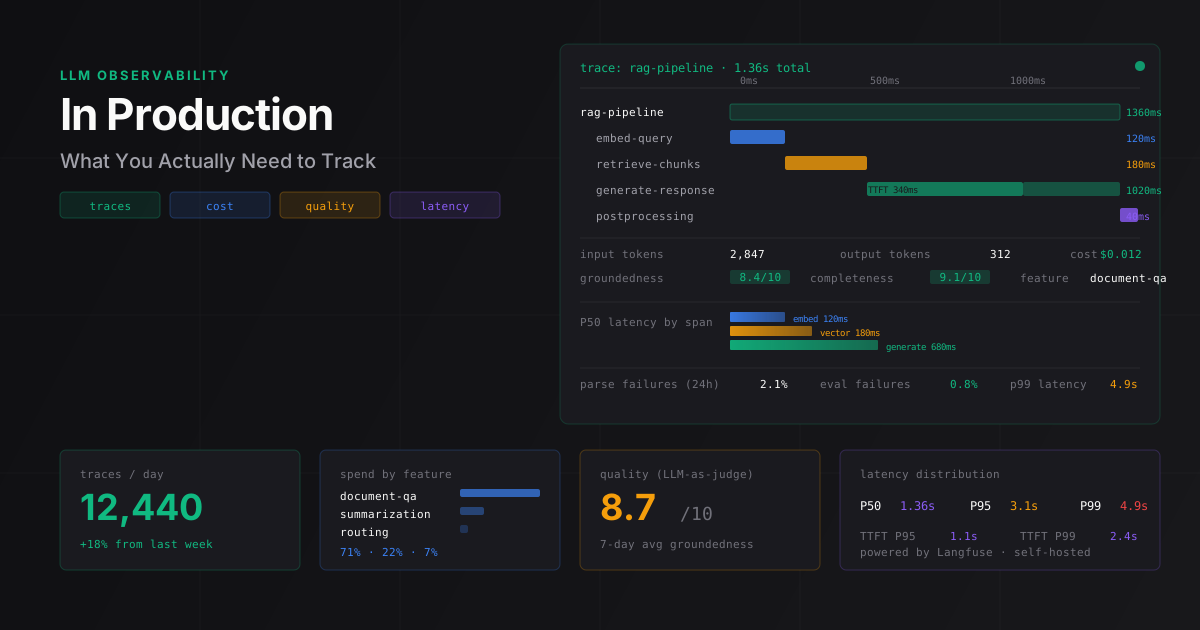
Distributed traces across multi-step pipelines. A “call the LLM” step is rarely isolated. Most production systems look like: receive user query, embed, retrieve, rerank, construct prompt, call model, parse output, validate, return. That’s 7-8 distinct operations, each with its own latency and failure modes. You need a trace that captures the full chain: what went in at each step, what came out, how long each step took, and which spans failed.
Token cost by feature. “LLM costs $X per month” is not useful. “$X per month, with feature A driving 67% of spend” is actionable. You need to attribute token consumption to the feature or workflow that generated it. If a feature suddenly starts consuming 3x more tokens than usual, something changed.
Latency breakdowns. Total response time matters, but it tells you nothing about where time is being spent. You want time to first token (TTFT), total generation time, retrieval latency (for RAG), and time spent in your application code. A 4-second P95 that’s almost entirely TTFT points to model capacity. A 4-second P95 that’s almost entirely retrieval points to your vector DB. Same total time, completely different fix.
Output quality signals. This is the one teams skip most. It’s also the one that catches the problems that matter most to users. Quality signals come in two forms: explicit (user thumbs up/down, flagging) and automated (running a separate evaluation against a rubric). Both are useful. Automated evaluation is more consistent and runs on every request.
Distributed Tracing: Implementation with Langfuse
Langfuse is what I recommend first for most teams. It’s open source (MIT), self-hostable on a single Postgres instance, and has SDKs for Python and TypeScript. It integrates natively with LangChain, LlamaIndex, OpenAI, and Anthropic. The basic integration is three lines of setup and one decorator on each function you want to trace.
Here’s a minimal RAG pipeline with full tracing:
import json
import anthropic
from langfuse import Langfuse
from langfuse.decorators import observe, langfuse_context

langfuse = Langfuse(
    public_key="lf-pk-...",
    secret_key="lf-sk-...",
    host="https://cloud.langfuse.com"  # or your self-hosted URL
)

client = anthropic.Anthropic()

@observe(name="embed-query")
def embed_query(query: str) -> list[float]:
    # Your embedding call here. Langfuse automatically records
    # start/end time and captures any exceptions.
    return get_embedding(query)

@observe(name="retrieve-chunks")
def retrieve_chunks(embedding: list[float], top_k: int = 5) -> list[dict]:
    # Vector search against your store (pgvector, Pinecone, etc.)
    return vector_search(embedding, top_k=top_k)

@observe(name="generate-response")
def generate_response(query: str, chunks: list[dict]) -> str:
    context = "\n\n".join(c["text"] for c in chunks)

    message = client.messages.create(
        model="claude-3-5-sonnet-20241022",
        max_tokens=1024,
        system="You are a helpful assistant. Answer the question using only the provided context.",
        messages=[
            {
                "role": "user",
                "content": f"Context:\n{context}\n\nQuestion: {query}"
            }
        ]
    )

    # Record token usage. The Anthropic SDK wrapper handles this automatically
    # in most cases, but explicit logging is safer for streaming responses.
    langfuse_context.update_current_observation(
        usage={
            "input": message.usage.input_tokens,
            "output": message.usage.output_tokens,
        }
    )

    return message.content[0].text

@observe(name="rag-pipeline")
def answer_query(query: str, user_id: str) -> str:
    langfuse_context.update_current_trace(
        user_id=user_id,
        tags=["rag", "production"],
        metadata={"feature": "document-qa"}
    )

    embedding = embed_query(query)
    chunks = retrieve_chunks(embedding)
    return generate_response(query, chunks)
When you call answer_query, Langfuse records a nested trace with individual spans for each decorated function: their timing, inputs, outputs, exceptions, and model token usage.
One gotcha I ran into: the Anthropic SDK wrapper for Langfuse doesn’t capture streaming token counts correctly in all configurations. If you use streaming, track usage manually from the final message event. This cost us 30% accuracy on our first month of cost estimates for a client system before we caught it.
The self-hosted setup is a Docker Compose file with Langfuse and Postgres. It runs on a $10/mo VPS for low-to-medium volume systems.
Output Quality Evaluation in Production
Asking users to rate responses doesn’t scale. Most users don’t bother, and the ones who do rate are systematically different from the median user. You get a biased sample that over-represents both the very satisfied and the very unhappy.
The pattern that works: use a separate LLM call to evaluate the output against a rubric, on every response or a sampled subset. This is the “LLM-as-judge” pattern. Anthropic’s evaluation framework covers the approach in detail.
Here’s a groundedness check for a RAG system:
def evaluate_groundedness(
    query: str,
    context_chunks: list[str],
    response: str
) -> dict:
    """
    Returns scores and a brief explanation.
    groundedness: 0-10 (10 = fully supported by context, 0 = fabricated)
    completeness: 0-10 (10 = fully answers the question, 0 = ignores context)
    """

    context_text = "\n\n".join(context_chunks[:3])  # Limit to top 3 chunks

    eval_prompt = f"""You are evaluating whether an AI assistant's response is grounded in the provided context.

Context provided to the assistant:
<context>
{context_text}
</context>

User question:
<question>
{query}
</question>

Assistant response:
<response>
{response}
</response>

Evaluate on two criteria:
1. GROUNDEDNESS (0-10): Does the response only make claims supported by the context?
2. COMPLETENESS (0-10): Does the response fully answer the question using available context?

Respond in JSON only:
{{"groundedness": <score>, "completeness": <score>, "issues": "<any problems, or none>"}}"""

    result = client.messages.create(
        model="claude-3-5-haiku-20241022",  # Cheap model for eval
        max_tokens=200,
        messages=[{"role": "user", "content": eval_prompt}]
    )

    try:
        return json.loads(result.content[0].text)
    except json.JSONDecodeError:
        return {"groundedness": -1, "completeness": -1, "issues": "eval-parse-failed"}
Two things about this that matter in practice.
Use a cheaper model for evaluation. You’re not doing reasoning here; you’re doing scoring against a rubric. Claude Haiku costs roughly 1/20th of Sonnet at current pricing. On a system processing 1,000 requests per day, running Sonnet evaluations would add about $25/day. Haiku adds under $1.
Track the parse failure rate. Notice the eval-parse-failed fallback. JSON parsing on LLM outputs fails 1-3% of the time even with simple prompts. If your Langfuse traces show eval-parse-failed at more than 5% of evaluations, your eval prompt needs tightening.
We run this on a 20% sample in production (every fifth request) and log the scores to Langfuse as metadata on the trace. Plotting the score distribution over time catches quality regressions visually before they show up in support tickets.
Cost Attribution: Tracking Spend by Feature
“We spent $847 on the API this month” doesn’t tell you whether that’s expected or a problem, or which part of the product is responsible.
The pattern: add a feature tag to every trace, then aggregate token counts by tag in a weekly export.
# In your trace setup
langfuse_context.update_current_trace(
    metadata={
        "feature": "document-qa",        # Product feature name
        "pipeline_version": "v2.3",      # Prompt version that was live
        "user_tier": "pro",              # User segment
    }
)
In Langfuse, you can filter observations by metadata and sum token counts. For more complex aggregation, export to BigQuery or Postgres and write your own SQL.
What we found when we did this on a client system with three main features:
| Feature | Token share | Action taken |
|---|---|---|
| Document Q&A | 71% | Reduced max context window from 8K to 4K tokens (no quality loss measured) |
| Report summarization | 22% | No change (expected) |
| Classification routing | 7% | Switched to lighter model |
Switching the classification step to a lighter model cut the bill by 24% without touching the main feature. The model cost optimization patterns that matter most all depend on having this attribution data first. Without it, you’re guessing which lever to pull.
One thing we don’t have a fully clean answer for yet: correctly attributing costs when the same user session triggers multiple features in sequence, especially when a background pipeline spawns sub-agents. We’ve been handling it with a root_feature tag on the top-level trace and accepting that some attribution is approximate.
Latency Tracking and the Hidden Bottleneck
P50 latency for most LLM applications is acceptable. P95 and P99 are where you find out what’s actually wrong.
The measurement that consistently surprises teams: how much of their response time is not LLM inference at all.
On a RAG system we profiled recently:
| Span | Median | P99 |
|---|---|---|
| Vector search (pgvector) | 180ms | 890ms |
| Embedding API call | 120ms | 650ms |
| LLM inference (TTFT) | 340ms | 1,200ms |
| LLM generation (full output) | 680ms | 2,100ms |
| Application postprocessing | 40ms | 90ms |
| Total | 1,360ms | 4,930ms |
The LLM inference was 3.3 seconds of the P99 total. But the vector search at P99 was nearly a second on its own. An index optimization in Postgres brought that from 890ms down to 210ms, which knocked 680ms off the tail latency without touching the model at all.
You can’t find this without per-span timing in your traces. If you measure only end-to-end time, you’ll optimize the wrong thing.
The other latency metric worth tracking separately: time to first token (TTFT). When users perceive LLM responses as slow, it’s usually because TTFT is high, not because total generation is long. Users tolerate streaming output well. They tolerate waiting 4 seconds before anything appears much less well. If your TTFT P95 is above 2 seconds, that’s the thing to fix first.
Building the Stack Incrementally
You don’t need to instrument everything at once. Here’s the order that actually works:
Week 1: Get tracing. Add Langfuse (or Arize Phoenix if you’re already using OpenTelemetry) to your main pipeline. Capture the trace, inputs/outputs per step, and token usage. Just seeing the traces is valuable before you do anything else with them.
Weeks 2-3: Add cost attribution. Tag every trace with feature name and pipeline version. Export weekly token counts by feature. This typically reveals one optimization that pays for the observability setup immediately.
Week 4 onward: Add quality evaluation. Start with a simple binary check (did the response follow the expected format?), then layer in the LLM-as-judge evaluation. Iterate on the scoring rubric as you see what fails.
What to skip initially: per-minute alerting on quality scores (too noisy before you have a baseline), tracking every latency percentile (P50 and P95 are enough to start), and custom dashboards (Langfuse’s built-in views handle most questions until you have specific needs the UI can’t answer).
Teams that adopt LLM observability successfully do it incrementally. Teams that try to instrument everything at once tend to abandon it because the setup cost is high and the initial signal is overwhelming.
FAQ
Do I need a separate LLM observability tool if I already use Datadog or Grafana?
Yes, for most teams. Datadog and Grafana handle service-level signals: request rates, error rates, latency. They don’t track what the model received, what it generated, whether the output was correct, or how much each feature is spending on tokens. Langfuse adds a layer below your existing APM, not a replacement for it. If your LLM system is small (under 500 requests/day), you can defer this; at anything above that, a quality regression will cost you more in debug time than the setup cost.
How much does it cost to run Langfuse self-hosted?
A VPS with 2 CPUs and 4GB RAM handles up to roughly 50,000 traces per day without tuning, running at about $10-15/month depending on provider. Langfuse Cloud has a free tier (50,000 observations/month) that works for early production systems. The evaluation LLM calls using Haiku at 20% sampling add roughly $0.50-2.00 per day for a system processing 1,000 daily requests.
When is automated quality evaluation worth the extra LLM cost versus relying on user feedback?
User feedback is free but unreliable: most users don’t report bad responses, and those who do are not representative of the median user. Automated evaluation at 20% sampling costs roughly $1-2 per day at Haiku pricing and catches regressions within hours. For any system where a bad response has a real consequence (compliance, customer-facing support, document summarization), automated eval is worth it from day one. For purely internal tooling with low stakes, user feedback is acceptable until you have the budget to add eval.
When should I add alerting on quality scores?
Not on day one. Alerting on quality scores before you have a baseline produces noise that trains your team to ignore alerts. Spend the first two weeks collecting data and understanding the normal distribution of your scores. Once you know that “groundedness below 6.0” is genuinely abnormal for your system, then add an alert. Most teams add alerting around week four.
Does this work for agent systems with many LLM calls per request?
Agents are harder because the trace depth is unbounded. A single user action can spawn 20+ LLM calls across tool use, planning, and verification. The approach that works: set a maximum trace depth limit in your agent code, log the full reasoning trace to a separate store if you need it, and use Langfuse for top-level trace metrics only. We haven’t shipped a clean universal solution for deep agent tracing yet, and I’d be skeptical of any vendor claiming otherwise at current maturity levels.
If you’re shipping an LLM system and need observability set up before production, book a 30-minute call. We’ve instrumented a dozen systems at this point and can usually get traces running in the first session.