Everyone on LinkedIn is a “prompt engineer” now. They’re sharing tips about adding “think step by step” to system prompts and debating whether to use XML tags or markdown headers in their instructions.
That works for single-turn ChatGPT conversations. It falls apart in production AI systems with multiple model calls per request.
We’ve built agent-based systems for compliance, analytics, content generation, and data querying. The single biggest improvement to agent reliability didn’t come from better models or fancier frameworks. It came from treating prompts as an architecture problem instead of a copywriting problem.
What Prompt Engineering Actually Is
Prompt engineering is a single-prompt optimization loop. You have one system prompt. You tweak it. You test it manually. You add more instructions. You test again.
The workflow looks like this:
Write prompt → Test with 3-5 examples → Tweak wording → Test again → ShipThis works when you have one model call doing one thing. A chatbot with a fixed personality. A summarizer with a consistent format. A classifier with known categories. Anthropic’s prompt engineering guide covers these single-prompt fundamentals thoroughly.
It breaks the moment you have a multi-step system. An AI agent that calls tools, queries a knowledge base, makes routing decisions, and generates structured output doesn’t run on one prompt. It runs on 5 to 15 prompts that interact with each other.
Optimizing each prompt independently is like optimizing individual database queries without looking at the schema. You can make each one faster and still end up with a slow system.
What Prompt Architecture Looks Like
Prompt architecture is the design of how multiple prompts work together in a system. It covers:
- Routing: Which prompt handles which input type
- Decomposition: How complex tasks get broken into sub-tasks, each with its own prompt
- Templates: How prompts are assembled dynamically from reusable components
- Evaluation: How you measure whether the prompt system works as a whole
This is the difference:
| Prompt Engineering | Prompt Architecture |
|---|---|
| One prompt, one model call | Multiple prompts across multiple calls |
| Manual testing | Automated eval suites |
| Tweaking wording | Designing information flow |
| ”Add more instructions" | "Route to the right prompt” |
| Optimizes output quality | Optimizes system reliability |
Pattern 1: Prompt Routing
The most common mistake in agent systems: one massive system prompt that tries to handle every possible input type.
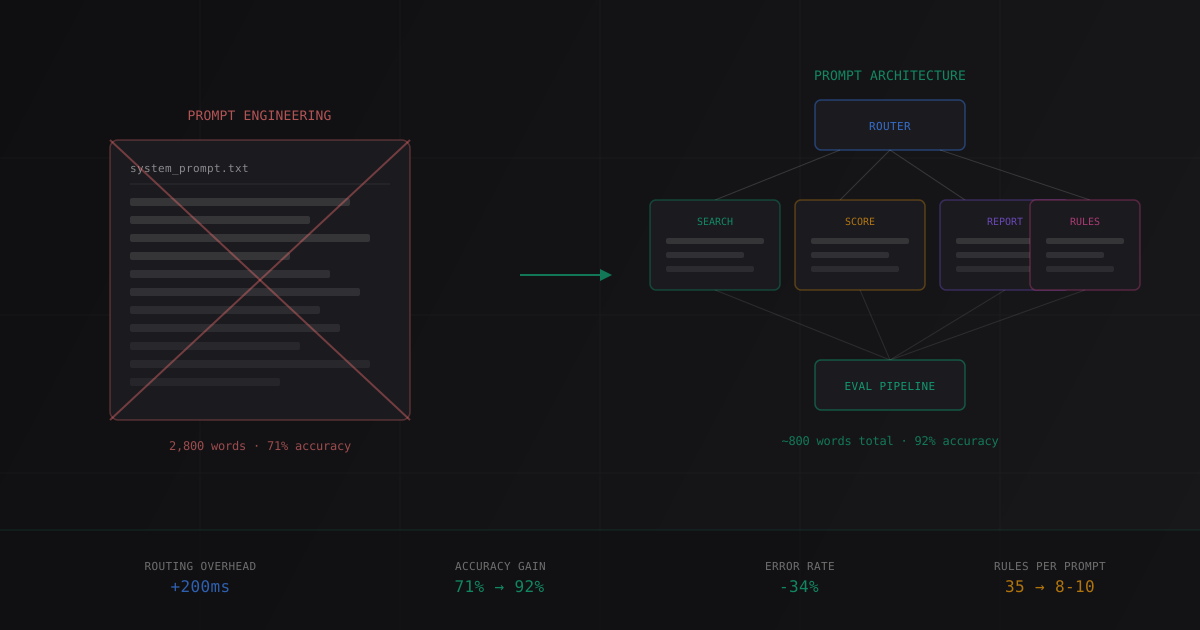
We built a compliance agent that needed to handle four distinct task types: transcript search, rule lookup, compliance scoring, and report generation. The first version had a single 2,800-word system prompt with sections for each task type.
It worked 71% of the time.
The model would confuse instructions meant for scoring with instructions meant for search. It would try to generate a report when asked for a rule lookup. The prompt was doing too much.
The Fix: Route First, Then Specialize
# Step 1: Lightweight classifier determines task type
ROUTER_PROMPT = """Classify this user request into exactly one category:
- SEARCH: Finding specific calls or transcripts
- RULES: Looking up compliance rules or policies
- SCORE: Evaluating compliance of a specific call
- REPORT: Generating summary reports

Respond with only the category name."""

# Step 2: Each category has its own focused prompt
PROMPTS = {
    "SEARCH": """You are a transcript search specialist.
You have access to search_call_transcripts(query, date_range, agent_name).
Always confirm the date range before searching.
Return results as a numbered list with call ID, date, and relevance score.""",

    "SCORE": """You are a compliance evaluator.
You have access to get_compliance_rules(category) and score_compliance(transcript_id, rule_ids).
Always retrieve the relevant rules before scoring.
Score each rule independently. Never skip a rule.""",

    # ... RULES and REPORT prompts
}

async def handle_request(user_input: str):
    task_type = await classify(ROUTER_PROMPT, user_input)
    response = await run_agent(PROMPTS[task_type], user_input)
    return response
The router prompt is 50 words. Each specialized prompt is 150 to 300 words. The total system is more words than the original monolithic prompt, but each model call sees only what it needs.
After the switch, task completion went from 71% to 92%. The router itself is correct 97% of the time (we measured on 200 test cases). When it misroutes, the specialized prompt still handles the input gracefully about half the time because the tasks have some overlap.
The cost: One extra model call per request for routing. We use Claude 3.5 Haiku for the router at $0.25 per million input tokens. At 1,000 requests per day, that’s roughly $0.08 per day. The reliability gain pays for itself before lunch.
Pattern 2: Task Decomposition
Some tasks can’t be routed to a single prompt because they require multiple reasoning steps. A user asks “compare Agent Smith’s compliance scores this quarter versus last quarter and flag any declining areas.”
That’s three sub-tasks:
- Score this quarter’s calls for Agent Smith
- Score last quarter’s calls
- Compare the two sets and identify trends
A single prompt trying to do all three in one pass will make errors. It might score this quarter correctly but fumble the comparison. Or it’ll get the comparison right but miscalculate one of the scores.
The Fix: Explicit Decomposition
DECOMPOSER_PROMPT = """Break this request into sequential sub-tasks.
Each sub-task must be completable with a single tool call or reasoning step.
Return as a JSON array: [{"step": 1, "task": "...", "depends_on": []}]"""

async def handle_complex_request(user_input: str):
    plan = await decompose(DECOMPOSER_PROMPT, user_input)

    results = {}
    for step in plan:
        # Build context from previous step results
        context = {s: results[s] for s in step["depends_on"]}
        step_prompt = build_step_prompt(step["task"], context)
        results[step["step"]] = await run_agent(step_prompt, step["task"])

    return await synthesize(results)
The decomposer doesn’t execute anything. It plans. Each sub-task then gets its own prompt with its own context, and only the tools it needs.
We use this pattern for our call analysis pipeline where a single user request might involve searching transcripts, scoring compliance, and generating a report. The decomposer turns that into a three-step plan, and each step runs against a focused prompt.
What didn’t work: Letting the model decompose and execute in the same loop. We tried a ReAct-style approach where the model plans and executes step by step. The problem was cascading errors. If step 2 misinterprets the output of step 1, step 3 compounds the error. Separating planning from execution lets us validate each step’s output before passing it forward.
Pattern 3: Dynamic Prompt Assembly
Hardcoded system prompts are fine for prototypes. In production, you need prompts that assemble dynamically based on context.
Consider this: you’re building a customer support agent that handles three product lines. Each product line has different policies, different terminology, and different escalation rules. You could write three separate system prompts. But what happens when you add a fourth product line? A fifth? When policies change quarterly?
Typed Prompt Templates
We use a template system that composes prompts from typed components:
from dataclasses import dataclass
from typing import Optional

@dataclass
class PromptContext:
    role: str
    product_line: str
    policies: list[str]
    tools: list[str]
    constraints: list[str]
    output_format: str
    examples: Optional[list[dict]] = None

ROLE_TEMPLATES = {
    "compliance_scorer": "You evaluate sales calls against compliance rules.",
    "data_analyst": "You query databases and present findings clearly.",
    "support_agent": "You help customers resolve issues with {product_line}.",
}

def build_prompt(ctx: PromptContext) -> str:
    sections = []

    # Role
    role_text = ROLE_TEMPLATES[ctx.role].format(product_line=ctx.product_line)
    sections.append(f"## Role\n{role_text}")

    # Policies (injected per product line)
    if ctx.policies:
        policy_text = "\n".join(f"- {p}" for p in ctx.policies)
        sections.append(f"## Policies\n{policy_text}")

    # Available tools
    tool_text = "\n".join(f"- {t}" for t in ctx.tools)
    sections.append(f"## Available Tools\n{tool_text}")

    # Constraints
    constraint_text = "\n".join(f"- {c}" for c in ctx.constraints)
    sections.append(f"## Constraints\n{constraint_text}")

    # Output format
    sections.append(f"## Output Format\n{ctx.output_format}")

    # Few-shot examples
    if ctx.examples:
        example_text = "\n\n".join(
            f"User: {e['input']}\nAssistant: {e['output']}"
            for e in ctx.examples
        )
        sections.append(f"## Examples\n{example_text}")

    return "\n\n".join(sections)
This gives you:
- Type safety. You can’t forget to include the output format. The dataclass enforces it.
- Reusability. The same constraint (“never disclose internal pricing”) goes into every prompt without copy-pasting.
- Testability. You can unit test the prompt builder without calling any model.
- Version control. Templates are code. They live in git. They go through code review.
- Tool scoping. The
toolsfield maps to OpenAI function calling definitions or Anthropic’s tool use schema — the template ensures each task type only exposes the tools it needs.
The difference in practice: When a client updated their compliance rules in February, we changed one policy template and redeployed. Every prompt in the system picked up the new rules. With hardcoded prompts, that would have been a find-and-replace across 8 files with a high chance of missing one.
Pattern 4: Prompt Versioning and Evaluation
This is where most teams skip straight to production and regret it three weeks later.
A prompt change is a code change. It should go through the same process: version control, testing, review, and rollback capability. On one compliance project, a “minor wording tweak” to the scoring prompt dropped accuracy from 89% to 74%. The previous version existed only in a Slack thread. That’s when we started versioning prompts in git.
How We Version Prompts
prompts/
  compliance/
    v1_router.txt
    v1_scorer.txt
    v2_scorer.txt        # Added edge case handling
    v2_scorer_eval.json  # Eval results for v2
  analytics/
    v1_decomposer.txt
    v1_synthesizer.txt
Every prompt has a version number. Every version has an eval result file. The production config points to specific versions:
PROMPT_VERSIONS = {
    "compliance_router": "v1",
    "compliance_scorer": "v2",  # Upgraded 2026-03-15, eval score 91.2%
    "analytics_decomposer": "v1",
}
The Eval Pipeline
For every prompt change, we run the same eval suite we use for model selection decisions:
async def eval_prompt(prompt_version: str, test_cases: list[dict]):
    results = []
    for case in test_cases:
        output = await run_with_prompt(prompt_version, case["input"])
        score = evaluate_output(output, case["expected"])
        results.append({
            "input": case["input"],
            "expected": case["expected"],
            "actual": output,
            "score": score,
            "latency_ms": output.latency_ms,
            "tokens_used": output.total_tokens,
        })

    accuracy = sum(r["score"] for r in results) / len(results)
    p95_latency = percentile(
        [r["latency_ms"] for r in results], 95
    )

    return {
        "accuracy": accuracy,
        "p95_latency_ms": p95_latency,
        "avg_tokens": mean([r["tokens_used"] for r in results]),
        "failures": [r for r in results if r["score"] < 0.5],
    }
Our rule: A new prompt version ships only if it scores equal to or higher than the current version on the eval suite. No exceptions. A prompt that “feels better” but scores worse stays in draft.
What Didn’t Work
Mega-Prompts with Numbered Rules
We tried writing system prompts with 30+ numbered rules. “Rule 1: Always greet the user. Rule 2: Never disclose pricing. Rule 3: If the user asks about…”
Models follow the first 10 to 12 rules reliably. After that, compliance drops. We measured this across Claude 3.5 Sonnet and GPT-4o on a 35-rule prompt: rules 1 through 10 were followed 94% of the time, rules 11 through 20 dropped to 82%, and rules 21 through 35 hit 61%.
The fix was the routing pattern above. Instead of 35 rules in one prompt, 8 to 10 rules in each of four specialized prompts.
Chain-of-Thought Everywhere
“Think step by step” became a cargo cult. We added it to every prompt, including classification tasks where the model just needs to output one word.
On simple classification (is this a search query or a report request?), adding chain-of-thought increased latency by 40% and accuracy by 0.3%. Not worth it.
Chain-of-thought helps for complex multi-step reasoning. For routing, classification, and extraction, it’s overhead. Match the technique to the task.
Prompt Optimization Tools
We tested DSPy for automated prompt optimization. The idea is appealing: define your task, provide examples, and let the framework find the optimal prompt.
In practice, the optimized prompts were brittle. They worked well on the training distribution but failed on slightly different inputs. A hand-written prompt with clear structure outperformed the DSPy-optimized version on our held-out test set by 8 percentage points.
DSPy is a good research tool. For production systems where you need to understand and debug every prompt, we still write them by hand with systematic evaluation.
The Architecture Checklist
Before shipping any multi-prompt system, we verify:
- Every model call has a dedicated prompt. No prompt handles more than one task type.
- Routing is explicit. A lightweight classifier decides which prompt handles each request.
- Prompts are templates, not strings. Dynamic assembly from typed components.
- Every prompt is versioned. With eval results attached.
- The eval suite covers the full pipeline. Not just individual prompts, but the routing and composition logic.
- Cost is tracked per prompt. So you know which component is expensive.
- Fallback paths exist. If routing fails, if a sub-task fails, the system degrades gracefully.
If you’re building a single-prompt application, prompt engineering is fine. The moment you have two or more model calls that interact, you need prompt architecture.
FAQ
What’s the difference between prompt engineering and prompt architecture?
Prompt engineering optimizes a single prompt for a single model call. You tweak wording, add examples, adjust formatting. Prompt architecture designs how multiple prompts work together in a system: which prompt handles which input, how complex tasks decompose into sub-tasks, how prompts are assembled from templates, and how the full pipeline is evaluated. The distinction matters once your system makes more than one model call per user request.
When should I switch from a single system prompt to a routed prompt system?
When your single prompt exceeds roughly 1,500 words or contains instructions for more than two distinct task types. At that point, the model starts dropping rules, and debugging becomes difficult because you can’t tell which instruction caused a failure. A routed system with a lightweight classifier adds one extra model call but typically improves task completion by 15 to 25 percentage points based on our measurements across four agent projects.
How do I evaluate a multi-prompt pipeline?
Build a test suite of 50 to 100 end-to-end cases that cover the full pipeline, not just individual prompts. Each test case should specify the input, expected routing decision, expected tool calls, and expected output characteristics. Run the suite on every prompt change. Measure both individual prompt accuracy and end-to-end task completion rate, because a prompt that scores well in isolation can still break the pipeline if its output format doesn’t match what the next stage expects.
Does prompt architecture add latency?
The routing step adds one extra model call, typically 200 to 400ms using a fast model like Claude 3.5 Haiku or GPT-4o-mini. Task decomposition adds more calls proportional to the number of sub-tasks. In practice, the total latency increase is 300ms to 1.5 seconds depending on pipeline complexity. For interactive applications, we’ve found that users accept 2 to 4 seconds total response time if the answer is consistently accurate. The reliability gain almost always justifies the latency cost.
Can I use prompt architecture with open-source models?
Yes, but with caveats. The router and decomposer prompts need strong instruction-following ability, which means Llama 3.1 70B or Mixtral 8x22B at minimum. Smaller models (7B to 13B parameter range) struggle with reliable routing classification. One pattern that works: use a closed-source model for routing and decomposition, then use open-source models for the execution steps where the task is well-scoped and the prompt is highly specific. This cuts costs by 60 to 70% compared to using Claude or GPT-4o for every call.
Building an AI agent system? We prototype agent architectures in 72 hours, including the prompt routing, evaluation pipeline, and cost analysis. Book a technical call and I’ll walk through how we’d structure yours.