A founder we talked to last month was budgeting $300/month for an AI assistant in their B2B SaaS product. They’d done the math: 10,000 queries per month, roughly $0.03 per query, based on an estimate they got from a developer friend. Seemed reasonable. By month two in production, the bill was $2,100.
The estimate wasn’t wildly wrong on the model cost itself. The problem was that $0.03/query assumed short, stateless interactions. Their assistant was a help tool that remembered context across a session. By query 8 in a conversation, the system was passing the entire prior exchange plus a system prompt plus retrieval context into every request. That first query cost $0.03 on 1,500 input tokens. By turn 8, each request was 14,000 tokens.
This post is the breakdown we give founders before they commit to a budget. Five cost buckets, the context-accumulation math, three architecture options with real cost comparisons, and a monthly budget for three SaaS scales. Numbers are approximate from our builds and provider pricing pages as of Q1 2026; verify current rates before you finalize anything.
The Five Cost Buckets
Most AI assistant cost conversations start and end with the LLM. There are four other buckets.
Bucket 1: LLM inference (the obvious one)
Provider pricing is per million tokens, split between input and output. From our recent builds:
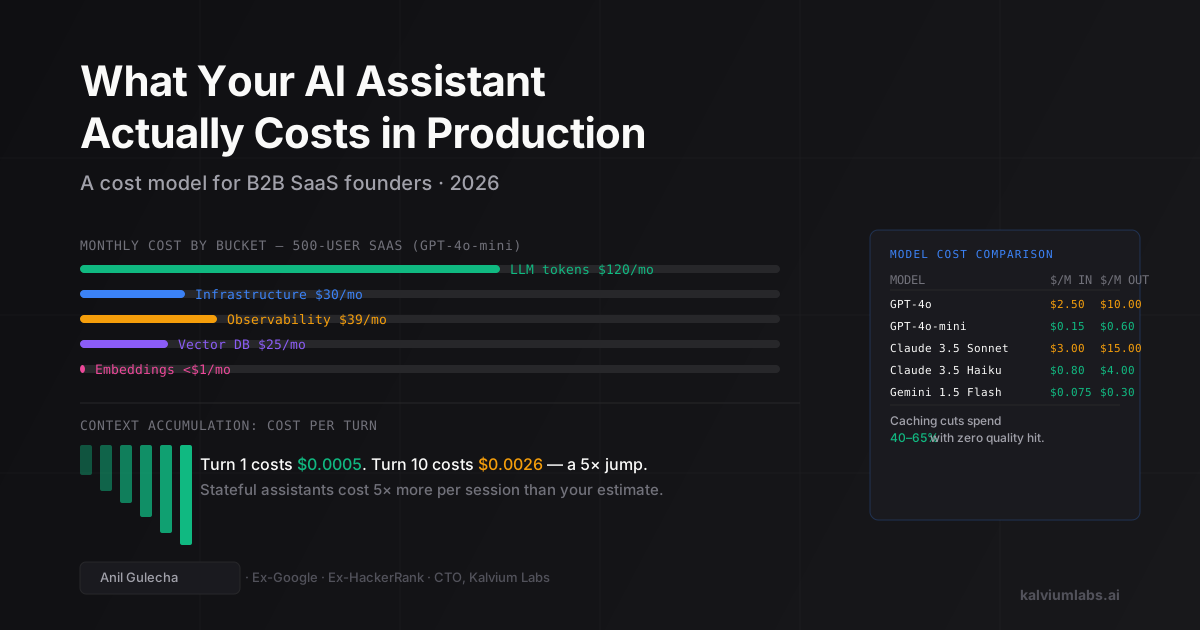
| Model | Input ($/M tokens) | Output ($/M tokens) | Best for |
|---|---|---|---|
| GPT-4o | ~$2.50 | ~$10.00 | Complex reasoning, high-accuracy tasks |
| GPT-4o-mini | ~$0.15 | ~$0.60 | High-volume, simpler responses |
| Claude 3.5 Sonnet | ~$3.00 | ~$15.00 | Long documents, complex instructions |
| Claude 3.5 Haiku | ~$0.80 | ~$4.00 | Volume with quality floor |
| Gemini 1.5 Flash | ~$0.075 | ~$0.30 | Budget tier, structured output |
Output tokens are 4–6× more expensive than input on every model listed above. An assistant that responds in long paragraphs costs more than one that’s brief and structured. Telling the model to answer in three bullet points isn’t only a UX decision. It cuts output token spend.
Bucket 2: Embedding generation
If your assistant uses RAG, you’re generating embeddings for documents on ingestion and for each user query at runtime. OpenAI text-embedding-3-small costs $0.02 per million tokens. For a 500-document knowledge base averaging 2,000 tokens per document, ingestion costs about $0.02 total. Per-query embedding costs are negligible unless you’re re-embedding on every request, which is waste. Embed once per unique query, cache the result.
Bucket 3: Vector database hosting
Three realistic options:
- pgvector on your existing Postgres: adds zero cost if you’re already running Postgres (Supabase, Railway, RDS). Handles up to roughly 500K vectors adequately with HNSW indexing. Under a million records and under 1,000 QPS, this is the right answer 90% of the time. pgvector’s benchmarks are honest about the QPS ceiling.
- Qdrant Cloud: free tier covers 1GB (~100K dense vectors), then $25/month for 4GB. Better price-to-scale ratio than most alternatives for mid-size RAG systems.
- Pinecone: managed, starts at $0 for serverless (usage-based), then $70+/month for dedicated pods. The operational simplicity is real. So is the price at scale.
Start with pgvector. Migrating to a dedicated vector DB later is a one-sprint project. Avoiding Pinecone’s billing complexity early saves you an awkward conversation at your next board review.
Bucket 4: Infrastructure and compute
Your API server, orchestration layer, and middleware aren’t free. The choice that matters is serverless vs containers:
- Serverless (AWS Lambda, Cloudflare Workers): near-zero at under 1M requests/month, then usage-based. Cold starts add 200–800ms latency on the first request per session.
- Containers (Fly.io, Railway, ECS): $10–50/month for a small instance, flat rate, no cold starts. Better for real-time chat where first-token latency matters.
We typically use containers for chat assistants because the cold-start latency on serverless is noticeable in a synchronous conversation. For async or batch processing, serverless is fine. At 10,000 queries/month, infrastructure is not your cost driver. At 1M+, the architecture decision starts appearing on the invoice.
Bucket 5: Observability and evaluation
Optional until something breaks, at which point it becomes urgent. LangSmith starts free (limited traces) then $39+/month for production volume. Helicone offers a free tier up to 10K requests/month, then $20–100/month depending on volume.
For a production assistant, you need at minimum: request/response logging, latency tracking by query type, and error rates by model and prompt version. We’ve had to debug prompt regressions that only appeared for a specific query type, which took three hours to isolate without proper logging. Running without this means debugging in the dark. The $50/month is not optional above a few hundred active users.
The Context Accumulation Problem
This is the math the founder I mentioned was missing.
A stateless assistant that answers one-off questions passes roughly:
- System prompt: ~1,500 tokens
- User query: ~50 tokens
- Retrieved context (RAG): ~1,000 tokens
- Total input per request: ~2,550 tokens
A stateful assistant that maintains conversation history sends the full prior exchange on every turn:
| Turn | Input tokens sent | Output tokens | Per-turn cost (GPT-4o-mini) |
|---|---|---|---|
| 1 | 2,550 | 200 | ~$0.0005 |
| 3 | 5,100 | 200 | ~$0.0009 |
| 5 | 7,650 | 200 | ~$0.0013 |
| 8 | 12,000 | 200 | ~$0.0021 |
| 10 | 15,000 | 200 | ~$0.0026 |
By turn 10, a single exchange costs 5× more than the first one. A user who runs 10-turn conversations costs roughly 5× your stateless estimate. If that user has 5 such sessions per day, they’re consuming the token budget of 25 single-query users.
Three ways to manage this:
Conversation summarization: instead of appending raw history, summarize completed turns every 3–4 exchanges. Maintains context fidelity while keeping input token count bounded. Adds a small summary-generation cost that’s cheaper than the context it replaces. This is what we use by default, and we’ve found that a 200-token summary of 4 turns replaces roughly 2,000 tokens of raw history with less than 5% retrieval degradation.
Context truncation: keep only the last N turns. Blunt instrument; breaks on sessions where early context matters (the user mentioned a specific config file in turn 2 and references it again in turn 9).
Session length caps: don’t allow sessions longer than X turns. Acceptable for support assistants where queries are independent. Bad UX for research or analysis workflows where depth is the value proposition.
Above roughly 100 daily active users, conversation summarization is worth the engineering overhead. Below that, truncation is fine.
Three Architectures, Three Cost Profiles
Stateless RAG assistant: retrieves context on each query, no conversation memory. Predictable cost, simple architecture. Good for documentation search, FAQ systems, structured help centers.
Stateful conversational assistant: maintains session history with summarization. Higher per-session cost, much better UX for multi-step workflows. Good for onboarding assistants, data analysis tools, technical support for complex products.
Long-context assistant (no RAG): puts the entire knowledge base into context on every request. Expensive but simple to build. Sometimes justified when your document set fits in 100K tokens and query volume is low. Usually wrong at scale.
Cost comparison for 10,000 queries/month, average session 5 turns, GPT-4o-mini:
| Architecture | Avg tokens/query (input + output) | Monthly LLM cost |
|---|---|---|
| Stateless RAG | 3,000 input + 300 output | ~$63 |
| Stateful (no summarization) | 8,000 input + 400 output | ~$168 |
| Stateful (with summarization) | 5,000 input + 450 output | ~$116 |
| Long-context, no RAG (50K ctx) | 52,000 input + 400 output | ~$1,020 |
The long-context column explains why that architecture is usually wrong. You’re paying for the full document on every query even when 95% of it is irrelevant to the question asked.
For a deeper breakdown of per-architecture token mechanics and caching strategies, our post on RAG in production covers the retrieval side in more detail.
The Mix-Model Approach
Rather than picking one model for all queries, route based on complexity:
- Simple queries (single-step, factual, short): GPT-4o-mini or Gemini 1.5 Flash
- Complex queries (multi-step reasoning, ambiguous instructions, long documents): GPT-4o or Claude 3.5 Sonnet
This routing adds engineering complexity but can cut LLM spend 40–60% versus running everything on the expensive model. The routing classifier itself adds roughly 200 tokens and 20ms per request, which comes to under $2/month at 10,000 queries. Trivial against the savings.
Practical starting point: rule-based routing. If the query is under 80 words and doesn’t contain terms like “summarize,” “compare,” or “analyze,” route to mini. Graduate to a small classifier if the rule-based approach misclassifies more than 15% of your validation set. We’ve found rule-based routing handles 80% of use cases adequately before a learned classifier becomes necessary.
We covered LLM model selection and cost optimization strategies in more depth if you want the benchmarks behind the tiering decision.
Caching: The 50% Bill Reduction Teams Skip
Three caching layers matter for AI assistants:
Exact caching: if you’ve already answered “how do I reset my password?” today and someone asks the same thing, return the cached response. Implemented with a Redis hash of the query string. Hit rates in our builds: 10–25% for general-purpose assistants, 35–50% for FAQ-focused systems.
Semantic caching: find semantically similar prior queries using embeddings. “How do I change my password?” and “where’s the password reset link?” should return the same answer. Tools like GPTCache handle this, or you build it with pgvector. Hit rates: 25–45% for same-topic queries. Adds 20–50ms latency per request for the similarity lookup.
Prompt caching: both OpenAI and Anthropic offer caching on repeated system prompt prefixes. If you’re passing a 2,000-token system prompt on every request, cached tokens cost roughly 10% of uncached input. This is a one-line change and saves 15–30% of input token costs with zero quality impact.
Combined, these three layers reduce LLM spend by 40–65% in production systems with predictable query distributions. On a $2,000/month GPT-4o bill, that’s $800–1,300/month saved. We always implement prompt caching first because it’s zero-risk and immediate; exact caching second; semantic caching last (only if the hit rate from exact caching is below 20%).
Monthly Budget by SaaS Scale
These numbers use GPT-4o-mini as the primary model, stateful architecture with summarization, semantic plus exact caching at a 35% combined hit rate, pgvector on existing Postgres, and Helicone for observability.
Small SaaS (50 active users, 10 queries/day):
- Queries/month: ~15,000
- LLM cost after caching: ~$12
- Embeddings: ~$0.01
- Vector DB: $0 (pgvector on existing Postgres)
- Infrastructure: $10/month (shared server)
- Observability: $0 (Helicone free tier)
- Total: ~$22/month
Mid-size SaaS (500 active users, 10 queries/day):
- Queries/month: ~150,000
- LLM cost after caching: ~$120
- Embeddings: ~$0.10
- Vector DB: $25/month (Qdrant Cloud 4GB)
- Infrastructure: $30/month
- Observability: $39/month (LangSmith production)
- Total: ~$215/month
Growth-stage SaaS (5,000 active users, 10 queries/day):
- Queries/month: ~1.5M
- LLM cost after caching: ~$1,200
- Embeddings: ~$1
- Vector DB: $70/month (dedicated)
- Infrastructure: $80/month
- Observability: $100/month
- Total: ~$1,450/month
At 5,000 users, LLM cost still dominates. The optimization levers at that scale: push caching hit rates above 45%, evaluate mix-model routing, and audit whether power users with unusually long sessions warrant a per-user session cap.
What Surprises Founders in Year 2
Three things show up consistently in year-2 cost reviews:
Caching hit rates plateau then decline after product updates. Caches are optimized for the question distribution when you built them. A new feature launches, users start asking unfamiliar questions, and cache miss rate jumps for 4–6 weeks. The bill spikes in the month after every major feature release.
Usage grows faster than the budget assumed. The assistant works well, power users start running 3× more queries than average. The “10 queries/day average” becomes 28 for your most engaged cohort. Your cost-per-user math needs updating, and probably so does your pricing.
Model deprecation. GPT-4o-mini will be deprecated eventually. Its replacement will likely cost more per token and require prompt recalibration. Teams that hard-coded model names into prompt templates spend a sprint doing find-and-replace across the codebase. Teams that built a model-agnostic prompt abstraction layer spend an afternoon.
The fix for all three: build a dashboard that tracks LLM spend by user, by query type, and by model version from day one. Helicone’s custom properties make this a half-day project. Don’t wait for a surprise invoice.
FAQ
How much does a production AI assistant cost for a B2B SaaS product?
For a mid-size product with 500 active users doing 10 queries each per day, expect $150–400/month using GPT-4o-mini with caching enabled, including vector DB and observability costs. Using GPT-4o instead multiplies LLM costs 15–20×. The honest answer depends on conversation length, query complexity, and caching hit rates, all of which vary significantly by product type.
Is GPT-4o-mini good enough for a production SaaS assistant?
For most B2B SaaS use cases, yes. Documentation Q&A, help desk, onboarding guidance, and structured form workflows are all well within its capability range. Where it falls short: multi-step reasoning on ambiguous instructions, tasks requiring careful judgment calls, and contexts where getting a wrong answer has high cost (compliance review, contract summarization). Test on your actual query sample before deciding.
Do I need a dedicated vector database?
Only if you’re doing RAG with more than ~500K vectors or above ~1,000 QPS. Start with pgvector on your existing Postgres. It’s free, works well at startup and mid-growth scale, and migrating to Qdrant or Pinecone later is a one-sprint project. Don’t over-provision infrastructure for a problem you haven’t hit yet.
What causes unexpected AI assistant cost spikes?
Context accumulation in stateful assistants is the most common cause. A user runs a 15-turn debugging session instead of your assumed 5-turn query. That session costs 3× your per-session estimate. Second most common: a prompt change that increased average output token count by 40% went unnoticed because nobody was tracking output tokens separately. Set billing alerts at 2× expected monthly spend and log every request with token counts from day one.
When should I use Claude instead of GPT-4o for a SaaS assistant?
Route to Claude 3.5 Sonnet when the query requires processing long documents (10K+ tokens), where Sonnet’s 200K context window and consistent long-context performance justify the cost premium. For standard Q&A and support workflows, GPT-4o-mini and GPT-4o-mini are both adequate and cheaper. The model decision should follow from your query distribution, not from brand preference.
If you’re moving from prototype to production and want a cost model built for your specific query volume and architecture, book a 30-minute call. We’ll look at your usage patterns and give you a number that holds up past month two.