A B2B SaaS founder I spoke with last month had switched from Intercom to a custom-built chatbot. The trigger was a $4,100 invoice for their 4,200-customer base. They’d been running Intercom Fin for customer support, and most resolutions were simple: billing questions, password resets, where to find a specific setting. At roughly $0.99 per successful resolution, with around 4,000 bot-handled conversations that month, the math had finally landed somewhere uncomfortable.
For more on this, read our guide on Custom AI vs SaaS. Their custom chatbot now costs $80/month to run. Same query volume. Same resolution rate.
The gap between those numbers is real. But it doesn’t come free. Getting from Intercom’s invoice to $0.02/conversation takes a build investment, and not every product should make that call. Here’s the cost breakdown, the math behind the $0.02 figure, and when custom actually wins.
The Build-vs-Buy Comparison
The customer-facing chatbot market has two pricing models worth understanding before you decide which direction to go.
SaaS chatbot platforms charge either per seat (agent-facing copilot tools like Intercom Copilot) or per resolution (customer-facing bots like Intercom Fin, which charges when the bot successfully handles a conversation without a human agent). Per-resolution pricing sounds fair until you multiply it at scale.
Approximate comparisons at 1,000 conversations/month (pricing as of early 2026; verify current rates before committing):
| Platform | Pricing model | Approx. cost per 1,000 conversations |
|---|---|---|
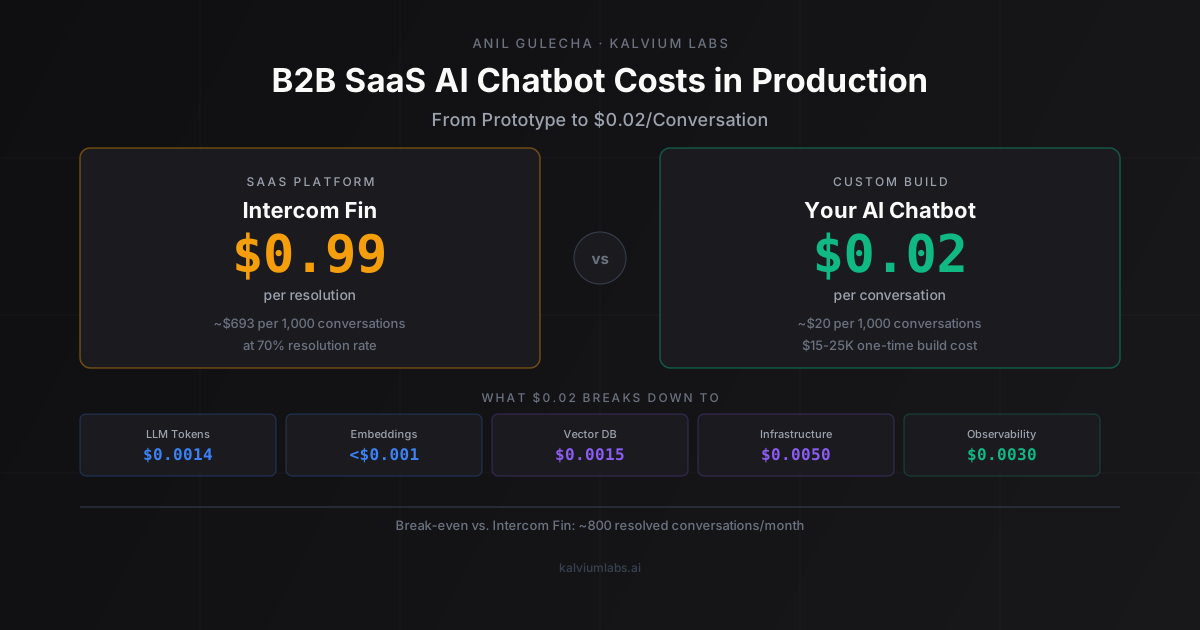
| Intercom Fin | ~$0.99/resolution | ~$693 (at 70% resolution rate) |
| Drift / Salesloft | Bundled at $2,500+/month | Hard to isolate per-conversation |
| Crisp AI | ~$95/month flat plus add-on | ~$30–80 depending on usage |
| Custom GPT-4o-mini chatbot | ~$0.01–0.04/conversation | ~$10–40 |
The per-resolution model has a structural quirk: Intercom Fin only charges when the bot resolves the query. If it fails to resolve, you pay nothing for that conversation, but you also didn’t get the deflection, and your support agent still had to handle it. At a 70% resolution rate (typical for tier-1 support queries in B2B SaaS), you’re paying $0.99 × 700 for every 1,000 conversations = $693 in bot fees, plus human agent time for the 300 that escalated.
Custom builds don’t have that structure. You pay a flat cost per conversation regardless of resolution outcome. The incentive aligns differently: make the bot better at resolving queries, rather than routing to resolution types that maximize fee-exempt failures.
Why $0.02/Conversation Is Achievable
A typical B2B SaaS customer support conversation runs 3-5 turns. “How do I export my data?” “Where are the billing settings?” “My integration isn’t syncing. What should I check?”
Here’s the token math for a 4-turn support conversation using GPT-4o-mini:
- System prompt: ~1,200 tokens (product instructions, brand voice, escalation rules)
- Conversation history across 4 turns: ~2,000 tokens total
- Retrieved knowledge base context (RAG lookup): ~1,500 tokens
- Assistant responses across 4 turns: ~1,200 output tokens
Total per conversation: ~4,700 input tokens + ~1,200 output tokens
At GPT-4o-mini API pricing (approximately $0.15/M input, $0.60/M output as of Q1 2026; see the page for current rates):
- Input: 4,700 × ($0.15 / 1,000,000) = $0.00071
- Output: 1,200 × ($0.60 / 1,000,000) = $0.00072
- LLM total: ~$0.0014 per conversation
The other four cost buckets:
| Component | Per conversation |
|---|---|
| LLM tokens (GPT-4o-mini) | $0.0014 |
| Embedding generation (query vectorization) | < $0.0001 |
| Vector DB (amortized across daily volume) | $0.0015 |
| Infrastructure (API server, containers) | $0.0050 |
| Observability (Helicone or LangSmith) | $0.0030 |
| Total | ~$0.011 |
With prompt caching on the repeated system prompt prefix (OpenAI caches repeated prefixes at roughly 10% of normal input cost), the LLM line drops ~20%. Add semantic caching at a 25–30% hit rate for repeated or near-identical queries, and you land consistently between $0.008 and $0.015 per conversation. The $0.02 figure is a conservative production target with headroom for longer, more complex sessions.
What Drives the Cost Up
Three variables push the per-conversation number meaningfully higher than the simple average:
Context accumulation in long sessions. The average is 4 turns. The actual distribution isn’t symmetric. You’ll have users with 12-turn troubleshooting sessions alongside 1-turn queries where the welcome message already answers the question.
At GPT-4o-mini rates, a 12-turn debugging session costs roughly 4× the average 4-turn session. If 10% of your conversations hit 10 or more turns, your true average cost per conversation is about 1.3× the simple per-turn estimate. Cap long conversations at 10 turns and route to a human agent after that. Not because the bot can’t continue, but because 10 turns without resolution is a strong signal the query type genuinely needs a human.
Knowledge base staleness. When your docs don’t keep pace with your product (features added, pricing changed, UI updated), the bot starts giving accurate answers about last year’s product. Resolution rates drop quietly. Users report that the bot was unhelpful without filing a specific ticket about it. This tends to appear as a gradual slope in resolution metrics rather than a sudden drop, which makes it easy to miss for months.
The practical fix: include a last_verified date on every document chunk in your RAG index. Automatically flag chunks older than 90 days for review. Pull unreviewed chunks from active context until a human marks them current. This is a half-day build and it catches the staleness problem before it shows up in support escalation rates.
Escalation quality. When the bot can’t resolve a query, the escalation path to a human agent determines both UX and cost. A clean escalation that passes a structured summary to the agent saves 3-4 minutes of re-explanation per handoff. At $25-40/hour loaded support staff cost, that’s $1.25–2.67 saved per escalation. For 500 escalated conversations/month, that’s $625-1,335 in recovered agent time, often more than the entire monthly chatbot infrastructure cost.
Design the escalation path as part of version 1, not as a sprint 3 add-on.
Model Selection: Where to Spend, Where to Save
GPT-4o-mini handles the majority of B2B SaaS customer support queries well. The queries it struggles with: ambiguous multi-part questions that require inferring product context across multiple prior conversations, compliance-adjacent responses (data privacy, contractual terms, anything touching a legal claim), and queries where a wrong answer has meaningful cost to the user or to you.
For those query types, route to GPT-4o or Claude 3.5 Sonnet. The routing step adds roughly 200 tokens and 20ms per request, which is negligible against the 15-20x cost premium for the heavy model.
Two-stage routing approach we use in production:
Stage 1: Rule-based routing. If the query contains terms like “GDPR,” “data deletion,” “terminate my account,” “contract,” or “billing dispute,” route to the heavy model. If query length is under 80 words and doesn’t match those terms, route to mini.
Stage 2: Classifier (add when rule-based misclassification exceeds 15%). A small classifier trained on your actual query distribution handles edge cases rule-based routing misses. We’ve found rule-based routing handles about 80% of use cases adequately; graduate to a classifier only when the misclassification rate becomes visible in user feedback.
The model cost optimization post covers the benchmarking methodology for tiering decisions in more depth if you want to calibrate the classifier threshold for your specific query distribution.
We also use Helicone for observability in most chatbot builds; it adds $20-100/month depending on volume and gives us per-model cost tracking that makes the routing decision data-driven rather than guesswork.
Three Production Architectures
Stateless RAG chatbot. No conversation memory across turns. Retrieves from your knowledge base on every query. Predictable cost, simple architecture.
Cost per conversation: $0.008–0.012.
Works well for FAQ systems, feature documentation lookups, and single-shot support queries where the user’s context doesn’t carry across turns. Breaks down when users send follow-up messages referencing earlier parts of the conversation (“What about in that case?” has no answer without the prior context).
Stateful chatbot with session summarization. Keeps conversation state for the duration of a session. Uses summarization every 3–4 turns to bound the context window: instead of passing the full prior conversation, we generate a 150-token summary of the first N turns and append it as context for subsequent turns. This costs one additional LLM call per summarization trigger (~$0.0003) and reduces input tokens by roughly 60% for longer conversations.
Cost per conversation: $0.012–0.025.
The right architecture for most B2B SaaS support use cases. Better UX for multi-step troubleshooting, bounded cost, manageable complexity.
Agentic chatbot with tool calls. The bot can take actions: look up order status, query account data, create a support ticket, or trigger a password reset. Requires tool-call scaffolding and backend API integrations.
Cost per conversation: $0.02–0.08 depending on tool call frequency.
Each registered tool adds ~300–500 tokens to the system prompt for function definitions. Each tool execution adds the JSON response to context. A conversation triggering 2 tool calls costs roughly 2× a purely conversational exchange.
Build this only after you know which actions appear most frequently in escalated conversations. The data almost always surprises you. Teams assume “check account status” will be the top action and discover it’s actually “explain why their renewal date is different from their billing date.”
Monthly Budget at Three Scales
These numbers assume: GPT-4o-mini for 80% of queries, GPT-4o for 20%, semantic plus exact caching at 30% combined hit rate, stateful architecture with summarization, pgvector on existing Postgres, Helicone for observability.
Early-stage (200 customers, 1,000 conversations/month):
- LLM costs: ~$25
- Vector DB: $0 (pgvector on existing Postgres)
- Infrastructure: $15/month
- Observability: $0 (free tier)
- Total: ~$40/month
- vs. Intercom Fin (~70% resolution rate): ~$693/month
Growth-stage (2,000 customers, 10,000 conversations/month):
- LLM costs: ~$180
- Vector DB: $25/month
- Infrastructure: $35/month
- Observability: $39/month
- Total: ~$280/month
- vs. Intercom Fin (~70% resolution rate): ~$6,930/month
Scale-stage (10,000 customers, 50,000 conversations/month):
- LLM costs: ~$700
- Vector DB: $70/month
- Infrastructure: $100/month
- Observability: $100/month
- Total: ~$970/month
- vs. Intercom Fin (~70% resolution rate): ~$34,650/month
The engineering build covers RAG pipeline, session state, escalation logic, knowledge ingestion, and basic analytics. In our experience it runs $15,000-25,000 in a typical 6-10 week engagement. At 2,000 customers, you recover that in roughly 2 months of Intercom savings. At 200 customers, the payback period is 18+ months.
The break-even: approximately 800 resolved conversations/month. Below that threshold, Intercom Fin or Crisp is the rational choice. Above it, custom builds ahead.
What Doesn’t Work in Prototype
Four patterns we’ve seen break between prototype and production:
Naive full-history context passing. Works fine in 3-turn demos where the conversation history is 600 tokens. In production, real users run 8-turn troubleshooting sessions. By turn 8, you’re passing a 14,000-token history into every request. The bill spikes and nobody notices until month-end.
Single model for all queries. A prototype that routes everything through GPT-4o performs well in demos and costs 15× more than it needs to in production. Build model routing from day one: it’s one classification step per query and typically cuts LLM spend 50-60%.
Knowledge base as a static dump. Loading your docs once and never updating them is fine for a demo. In production, every product release creates staleness. Without a freshness gate, the bot will confidently explain how to do something in the UI that was redesigned 3 sprints ago.
No fallback logic. Bots that try to handle every query themselves look capable in demos and cause support escalation spikes in production. The question “what percentage of queries should the bot escalate?” should have an answer in your design doc, not be discovered empirically in week 3.
We still don’t have a clean formula for predicting where the escalation rate will settle for a new product. It depends on documentation quality, query distribution, and how frequently the product changes, all of which vary too much to generalize. We set an initial target of 30% escalation and calibrate from there, but the first 4 weeks of production data usually reveal the actual number.
Year-2 Surprises
The AI assistant costs post covers general year-2 surprises like caching hit rate decay and model deprecation. Chatbot-specific issues we see more frequently:
Knowledge base staleness compounds. In year 1, the product is changing fast and the team keeps docs current. In year 2, older product areas stop getting attention in sprint cycles. The bot starts giving correct-ish answers about your 2024 product and wrong answers about your 2025 one. Resolution rates drift down 8–12 percentage points over 18 months without a freshness monitoring system.
Resolution rate has a hidden dependency on your CS team’s workload. When your support team is understaffed, they tend to relax the escalation threshold, letting the bot handle queries it’s not quite ready for. Resolution rates look worse, cost per resolved query goes up, and it looks like a chatbot problem when it’s actually a staffing decision. Build a weekly resolution-rate dashboard that your CS lead owns, not just your engineering team.
Volume growth outpaces the cost model. The assumption of “1,000 conversations/month for 200 customers” becomes “4,200 conversations/month for 200 customers” when you launch a new feature and everyone has questions. Your cost model needs a per-customer conversation rate ceiling built in from the start. Set a soft cap of 25 conversations per customer per month and alert when any customer account exceeds it. Power users running automated testing against your chatbot are a real phenomenon we’ve encountered.
FAQ
How much does it cost to build a B2B SaaS customer support chatbot?
A production-ready chatbot with RAG knowledge retrieval, session history, escalation logic, and a basic analytics dashboard runs $15,000-25,000 in a typical engagement (roughly 6-10 engineering weeks). A simpler FAQ-only bot with no stateful context can ship in 3 weeks for less. The cost range reflects the production-readiness gap, not just the prototype.
When does custom build beat Intercom Fin on economics?
The break-even is roughly 800–1,200 resolved conversations per month. Above that threshold, the infrastructure cost of a custom chatbot ($0.01–0.04/conversation) beats Intercom Fin’s per-resolution fee (~$0.99). Below the threshold, the one-time build investment doesn’t pay back in a reasonable timeframe. Early-stage products under 500 customers should start with Intercom or Crisp and revisit when they hit the volume threshold.
Which LLM should I use for a customer support chatbot?
GPT-4o-mini for 80% of queries (factual, single-step, FAQ-style). GPT-4o or Claude 3.5 Sonnet for the remaining 20%, specifically queries where a wrong answer has meaningful cost: GDPR/data privacy questions, contract or billing disputes, anything involving compliance language. Build rule-based routing from day one. It costs one classification step per query and cuts your LLM bill 50-60% versus routing everything through the expensive model.
What resolution rate should I expect from a production AI chatbot?
For well-designed tier-1 support queries (billing, feature location, basic configuration, account management), expect 65–75% resolution without human escalation after the first 4–6 weeks of production tuning. For complex technical queries, 30–50%. The resolution rate matters for two reasons: it determines support ticket deflection ROI, and if you’re on Intercom Fin, it directly determines what you pay per month.
How do I handle customer data and privacy in a chatbot that sees account information?
Route any query involving data deletion, personal data export, account termination, or GDPR/CCPA rights to GPT-4o (not mini) and use a structured response template that quotes your documented policy precisely, not free-form LLM generation. Log all data-related chatbot conversations with a 90-day retention for audit purposes. If you’re processing EU customer data, run inference through an EU-region endpoint and document the processor relationship in your privacy policy.
If you’re evaluating whether a custom chatbot makes economic sense for your product at your current customer volume, book a 30-minute call. We’ll run the break-even math for your specific query distribution and tell you whether the build investment pays back.