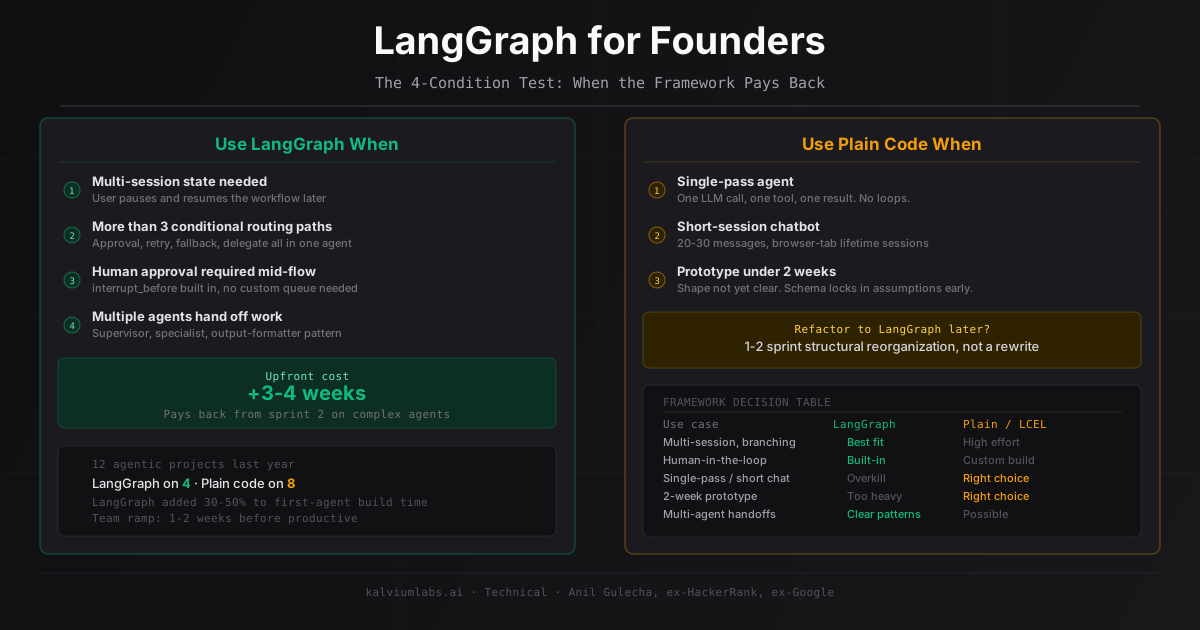
Twelve agentic projects in the last year. LangGraph on four of them. The other eight shipped in plain Python or LangChain LCEL, and for those eight, adding LangGraph upfront would have cost 3-4 weeks of setup for zero benefit.
That ratio matters. Most tutorials and agency pitches treat LangGraph as the natural choice for anything with “agent” in the description. It’s a serious production framework built by the LangChain team, and it solves real problems. It also adds meaningful complexity before it gives anything back. The founders who get this right ask one question before their team reaches for it: does our specific project actually need what LangGraph provides?
This post gives you the test to answer that question.
What LangGraph Actually Does (And What It Doesn’t)
LangGraph is a graph execution engine for stateful AI agents. It doesn’t make your agents smarter. It doesn’t make LLM calls for you. What it does is give you a structured way to manage state transitions across agent steps: defining nodes (functions that transform state), edges (connections between nodes), conditional routing (branch based on what the agent knows now), checkpointing (persist state across sessions), and human-in-the-loop pauses (interrupt execution for approval, then resume exactly where the agent stopped).
The core abstraction is a typed state object: a Python TypedDict where every key represents something the agent knows or has completed. Each node receives that state, does work, and returns a partial update. LangGraph merges the updates and routes to the next node. The full graph is defined once at startup; execution follows the edges.
Two existing posts cover the mechanics in depth: our LangGraph vs LangChain comparison for the framework selection question, and our LangGraph in Production guide for the implementation patterns including StateGraph, checkpointing, and human-in-the-loop.
This post is different. It’s about whether your project needs LangGraph at all, written for the founder evaluating the proposal rather than the engineer building the system. The LangGraph documentation and GitHub repo are both worth reading for the vendor’s framing. That framing naturally highlights what the framework can do, not when it’s overkill.
What LangGraph Costs Before It Pays Back
The overhead is real and front-loaded. For a team that hasn’t shipped a LangGraph agent before, plan for these:
State schema design: 3-5 days. Designing a state schema that doesn’t create subtle production bugs is non-trivial. The most common mistake is treating state keys as simple dict values when some need to accumulate across parallel nodes (tool outputs, message history) and others need to overwrite (current step index, error count). The bug this creates (a parallel branch silently overwriting another branch’s output) doesn’t appear until you run a multi-branch flow in production. Getting the Annotated reducers right upfront is worth the time. Debugging the same bug later costs more.
Team learning curve: 1-2 weeks. LangGraph’s debugging model differs from standard Python. State transitions are the unit of analysis, not function call stacks. A developer comfortable reading Python tracebacks needs a different mental model for reading graph execution traces. We estimate the first LangGraph agent from any team costs 30-50% more in developer time than an equivalent state machine built without a framework.
Graph topology changes: harder than they sound. Refactoring a 7-node LangGraph agent to add a new conditional routing path means updating the state schema, adding the node, updating edges, and verifying that existing checkpoints don’t break when the new node is introduced. On a plain Python agent, this is a function and an if statement. The framework earns its overhead on projects where the topology is stable and complex, not on projects where requirements are still being discovered.
On a 4-week prototype, this front-loaded cost is real money. On an 8-week production build with defined requirements, it typically pays back from sprint 2 onward.
The 4 Conditions When LangGraph Pays Back
The projects where we’ve used LangGraph and not regretted it share these four properties. Your project doesn’t need all four to justify the framework. But if none of them apply, you’re adding complexity without a clear return.
Condition 1: The agent needs to survive user interruptions.
If a user starts a workflow, closes their browser, and expects to pick it back up two hours (or two days) later from exactly where they stopped, you need session persistence. LangGraph’s checkpointing handles this in about 20 lines: MemorySaver for development, SqliteSaver for single-server production, PostgresSaver for multi-instance deployments. Without it, you’re writing a custom serialization layer, a database schema for storing arbitrary agent state, a session reconstruction function, and the logic to merge in-flight state with persisted state when a user returns.
We estimated that persistence layer at 1.5 sprints on a document review project that needed it. LangGraph’s checkpointing closed the gap in half a day. That’s when the framework earns its cost.
Condition 2: The agent has more than 3 conditional routing paths.
A simple retry-on-failure pattern doesn’t need a graph. An if statement does the same job and it’s easier to read. But if your routing logic looks like “route to human approval for high-value actions, retry with different tool parameters on format errors, return to the user on missing context, log and halt on fatal errors, delegate to a specialist agent for out-of-scope queries,” then the graph topology makes that maintainable. In plain Python, the same logic becomes nested conditionals that no one wants to touch after six months.
LangGraph’s conditional edges express routing logic at the same structural layer as the agent logic itself. When the routing changes (and it will), you change the graph, not a buried if-else chain in a callback.
Condition 3: Human approvals are required before the agent acts.
Any workflow where a person must review or approve before the agent proceeds benefits from LangGraph’s interrupt_before mechanism. The agent pauses at a designated node, notifies whoever needs to approve, and resumes with graph.update_state() and graph.invoke(None, config) when the decision arrives. The agent’s state is checkpointed through the pause, so nothing is lost if the review takes 20 minutes or 20 hours.
We’ve built a custom approval queue for this pattern twice, before we used LangGraph. A database table, a polling mechanism, a state reconstruction step on resumption, and the testing surface to verify the agent didn’t drift between pause and resume. We don’t want to build it again.
Condition 4: Your system involves multiple agents handing off work.
LangGraph has native patterns for multi-agent systems: supervisor agents that delegate to specialist sub-agents, parallel sub-agents that run simultaneously and merge results, agent handoffs where one agent’s terminal state becomes another’s initial state. If you’re building a system where an intake agent routes to a research agent that feeds a synthesis agent, the framework provides the routing and state-passing infrastructure without you designing it from scratch.
One caveat worth naming: “multiple agents” in a proposal doesn’t automatically mean a multi-agent system. If your agents are independent and don’t share state or route to each other, plain Python is fine. The LangGraph overhead is only justified when the agents genuinely interact.
When Plain Python Wins
Three project types where we don’t use LangGraph, and the reasoning sticks:
Single-pass agents. Call LLM, get structured output, execute a function, return the result. One round trip, no loops, no branching. There’s no state to manage across turns because there’s only one turn. A well-typed Python function is cleaner, faster to ship, and produces standard tracebacks when it breaks.
Short-session chatbots. If the conversation history fits in 20-30 messages and sessions don’t need to outlast a browser tab, you’re paying LangGraph setup cost for zero benefit. The stateful complexity the framework solves isn’t a problem for a short conversation with local memory management. We’d reach for LangChain LCEL if there’s a retrieval layer involved, or plain Python if the pipeline is simple.
Prototypes under 2 weeks. We’ve shipped LangGraph prototypes. They work. But the state schema you define on day 1 locks in assumptions about what the agent does. On a 2-week prototype, the product shape changes fast enough that the schema becomes an obstacle before it becomes an asset. Build in plain Python first. If the prototype validates the use case and the agent needs to grow into a multi-session, branching system, the refactor to LangGraph is real but manageable. We’ve done it three times. It’s never been a rewrite from scratch: it’s a 1-2 sprint structural reorganization.
Framework vs No Framework: A Decision Table
| Project type | LangGraph | Plain Python | LangChain LCEL |
|---|---|---|---|
| Multi-session state | Best option | High-effort build | Not designed for this |
| Human-in-the-loop | Built-in | Custom queue needed | Custom queue needed |
| Branching with 4+ paths | Clean | Gets messy fast | Not native |
| Single-pass agent | Overkill | Correct choice | Fine |
| Short chatbot | Overkill | Correct choice | Good choice |
| 2-week prototype | Too heavy | Correct choice | Good choice |
| Multi-agent handoffs | Clear patterns | Possible, unstructured | Possible, unstructured |
| Debugging simplicity | Graph trace learning curve | Standard Python | Standard LCEL traces |
If your project’s requirements map primarily to the LangGraph column, the framework is justified. If they map to plain Python or LCEL, the additional overhead won’t pay back.
5 Questions to Ask Before Your Team Reaches for LangGraph
These take 15 minutes in a project kickoff call. They’ll tell you quickly whether the recommendation is justified or whether your team is defaulting to framework sophistication without checking the actual use case.
“Does the agent need to survive user interruptions longer than 30 minutes?” If not, session persistence isn’t driving the decision, and Condition 1 doesn’t apply. If the answer is yes, ask which specific user flow requires resumption.
“How many conditional routing paths does the agent need to handle, and have you defined what happens on each one?” A team that can answer this concretely has thought through the agent logic. A team that says “we’ll figure it out as we build” hasn’t yet determined whether the routing complexity justifies the framework.
“Will any action require a human to approve before the agent proceeds?” Compliance actions, high-value writes, content publishing. If yes, interrupt_before is the cleanest implementation available.
“What’s the plan if we start without LangGraph and need it in sprint 4?” A team that’s thought about the refactor path is less likely to reach for the framework prematurely. The right answer sounds like: “it’s a 1-sprint refactor: lift the state dict into StateGraph, add checkpointing, define conditional edges for the routing logic that’s currently inline Python.” If the answer is “we’d have to rewrite everything,” that signals the current architecture is too tightly coupled to state handling, which is a different problem.
“Have you shipped a LangGraph agent in production, and what broke in the first month?” Framework familiarity matters. A team that has shipped one LangGraph system knows the state schema pitfalls, the checkpointing edge cases, and the debugging model. A team that used it in a hackathon will learn on your project, which isn’t wrong, but that’s a cost to factor into the timeline estimate, not a reason to trust the recommendation automatically.
FAQ
How much extra time does LangGraph add to a project?
On a team’s first LangGraph deployment, add 3-4 weeks compared to an equivalent plain Python state machine. Most of that is front-loaded in state schema design and team ramp-up. If the team has shipped LangGraph agents before, the overhead drops to roughly 1 week. If the project genuinely needs what LangGraph provides (session persistence, human-in-the-loop, complex branching), the framework typically saves more than it costs from sprint 2 onward.
Should I ask my development team to use LangGraph, or let them decide?
Let them decide, but give them the 4-condition test from this post. If they can’t point to at least one condition your project meets, ask them what problem they’re solving with the framework. Good teams welcome the question. Teams that can’t answer it are a signal worth noting.
What’s the difference between LangGraph and LangChain?
LangGraph is built by the LangChain team but solves a different problem. LangChain (via LCEL) is a chaining library: compose prompts, retrievers, and output parsers into linear pipelines. It’s fast to build with and excellent for RAG chains, document Q&A, and straightforward LLM pipelines. LangGraph is a stateful graph execution layer: manage complex multi-step agents with branching, checkpointing, and human-in-the-loop flows. They’re not competitors; they’re different layers for different problem sizes. Most of our projects use LangChain components inside LangGraph nodes. The full framework selection comparison with production code examples is in our LangGraph vs LangChain post.
What happens if my project outgrows plain Python and needs LangGraph in sprint 4?
This is common and manageable. The refactor involves lifting your state dict into a typed StateGraph schema, wrapping existing agent logic in LangGraph nodes, adding checkpointing, and defining explicit conditional edges for routing logic that was previously inline Python. On a well-structured codebase, we’ve done this in under 2 sprints. On a codebase where state handling is spread across multiple files without clear interfaces, plan for 3 sprints. Either way it’s not a rewrite from scratch.
How do I know if my project actually needs multi-agent architecture?
If a single agent can complete the full task in one execution path, multi-agent architecture is premature. Multi-agent makes sense when the task requires genuinely parallel work (a research agent running four searches simultaneously while a synthesis agent waits for results) or when separable domain expertise maps cleanly to separate agents (intake, specialist, output-formatting). If you’re adding agents because they sound more sophisticated, you’re adding coordination overhead without adding capability.
If you’re evaluating LangGraph for a specific project and want a second read on whether the complexity is justified, book a 30-minute call. We’ve shipped four LangGraph agents and eight plain-code agents in the last year, and we have a clear sense of when each is the right call.