B2B SaaS has a retention math problem. Acquiring a customer costs 5-7x more than keeping one, but most pre-Series-A product roadmaps allocate 80% of capacity to features that attract new users. Retention features are deprioritized as “nice to have after we grow.” The result is a leaky bucket: new logos cover up churn until the numbers are too large to hide.
AI changes the economics of this tradeoff in a specific way. Not by making your product generally smarter, but by targeting the two points where B2B SaaS products actually lose customers. Miss those two windows and you’re adding features to a product that people are already planning to leave.
Where B2B SaaS Actually Loses Customers
Churn in B2B SaaS doesn’t happen randomly. It clusters at two inflection points with predictable patterns.
The first is the activation cliff, which plays out across days 0 to 90. A user signs up, pokes around, doesn’t reach the “aha moment” in time, and the account goes dormant. Nobody formally cancels. They stop logging in, and when renewal arrives, there’s nothing to fight for. This happens most in products that require workflow change or data input before they deliver value. The product works. The path from sign-up to “this is clearly worth it” is just too long and too unclear.
The second is the ROI realization cliff, which typically hits between months 9 and 12. The power users know the product well. The CSM relationship is fine. But when the renewal conversation happens, the buyer (who often isn’t the same person as the power user) asks what the product actually delivered in measurable terms. If nobody can answer that question with specifics, renewal stalls. The product delivered value that nobody captured.
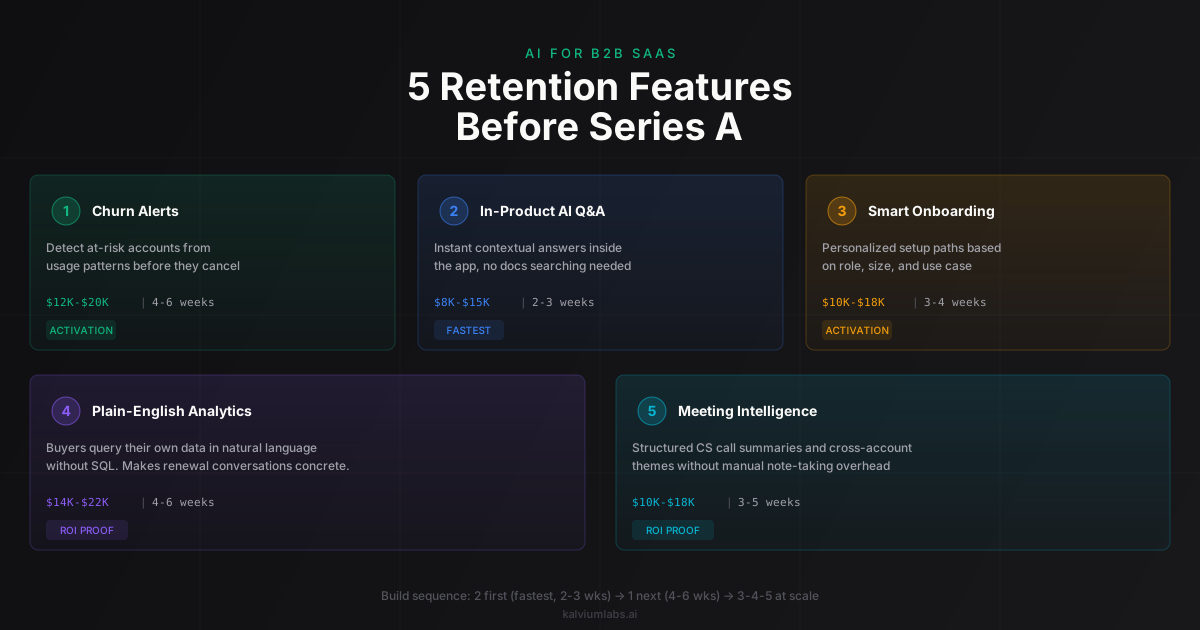
Five AI features address these two cliffs. Three target activation. Two target ROI realization.
Feature 1: Churn Alerts from Usage Pattern Analysis
This feature monitors product usage across accounts, identifies early warning signals (declining login frequency, skipped workflow steps, drop in specific feature adoption), and surfaces alerts to the customer success team before accounts go cold.
Most SaaS products track usage data. Very few do anything predictive with it. The CS team finds out an account is at risk when the customer tells them directly, which is usually one step before they cancel. Usage-based churn alerts shift this from reactive to proactive. A CSM gets a signal that an account hasn’t run the weekly report it used to generate every Monday. They reach out on Wednesday. That’s recoverable. Finding out at the renewal call is not.
The build requires three components: a usage event pipeline (which you likely already have in Segment or Mixpanel or similar), an anomaly detection layer (a combination of threshold rules and a lightweight model trained on your product’s specific engagement patterns), and an alert surface (Slack or email notification plus a CS dashboard). The hardest part is defining what “healthy engagement” looks like for your specific product, which requires several weeks of calibration data before the alerts become reliable.
Build estimate: 4-6 weeks. $12K-$20K depending on existing data infrastructure. If you’re starting from a raw event stream without much structure, plan for the higher end.
When to integrate instead of building: ChurnZero, Gainsight, and Totango all have similar features. Below 200 seats with one CS person, start with ChurnZero’s entry tier. Build custom when your churn signals are domain-specific (usage patterns unique to your product’s workflows that generic tools don’t model well) or when you need to combine product usage data with CRM context for a single account view.
Feature 2: In-Product AI Q&A
Users ask questions about how to do something in the product, get instant answers grounded in your documentation and in-product context, and complete the task without leaving the app or searching help articles.
This directly attacks the activation cliff. Users who reach the “aha moment” fastest are the ones who can get unstuck immediately when something isn’t obvious. In-product AI Q&A compresses the learning curve. Instead of “search the help center, find the right article, check if it applies to my version, go back to the product and try again,” the user types “how do I set up automated reports for this project” and gets a specific, contextual answer in under 5 seconds.
One constraint worth naming: this feature won’t rescue fundamentally confusing UX. If the product doesn’t work well for a use case, AI Q&A surfaces that gap faster, not slower. Some teams discover their Q&A system is answering “how do I do X?” with “you can’t do X in this product” at an uncomfortable rate. That’s actually useful signal about product gaps, even if it’s uncomfortable to see.
Build estimate: 2-3 weeks for a solid retrieval-augmented implementation over your existing documentation. $8K-$15K. The key investment is in document chunking and retrieval quality, not in the LLM call itself. A poorly retrieved context produces confident wrong answers, which is worse than no answer.
When to integrate instead of building: Intercom Fin handles this well for most SaaS use cases. If your user questions are standard (“how do I export a CSV,” “where do I find billing settings”), Fin is faster to deploy than a custom build. Custom wins when the Q&A needs in-product state awareness, meaning the system can see the user’s current account configuration and answer “based on your current setup, here’s what you need to change” rather than pulling from static documentation.
Feature 3: Smart Onboarding Personalization
The standard onboarding checklist is designed for the median user. Enterprise admins setting up 200 seats have different priorities than solo founders trialing the product solo. A checklist optimized for one looks like noise to the other.
Personalized onboarding uses what you know about a user at signup (company size, role, primary use case, industry) to generate a customized onboarding path with the steps most relevant to them. The simplest version segments users into 3-5 profiles and serves each profile a different checklist. A more sophisticated version generates the path dynamically using an LLM that understands the user’s stated goal and adjusts recommendations as they progress.
The simpler version often outperforms the dynamic one in practice. Added complexity of dynamic generation isn’t worth it unless you have enough user diversity and traffic volume to actually test variants and measure improvement.
Build estimate: 3-4 weeks for a well-implemented segmented version. $10K-$18K. If you want dynamic LLM-generated paths with A/B testing built in, add 2-3 weeks and $6K-$10K on top.
When to integrate instead of building: Appcues and Pendo both support segmented onboarding flows without custom code. Get one of these set up first if you’re pre-200 seats. Build custom when your onboarding needs product-state awareness (the system sees that the user has connected their CRM and surfaces the next step that’s contingent on that connection) that off-the-shelf tools can’t access.
Feature 4: Plain-English Analytics for End Users
This lets your customers query their own product data in plain English without building custom reports or waiting on an analyst. “Show me which team members had the highest completion rate last month” becomes an answer, not a help ticket.
This is the most underrated retention feature in B2B SaaS. Most products have dashboards. Very few have dashboards that the actual buyer (not the power user) can navigate. The VP or CEO who needs to answer “what did we get from this tool this quarter” for a board update can’t read a pivot table. They need to ask a question and get an answer they can report upward.
This directly addresses the ROI realization cliff. If the buyer can walk into the renewal conversation with a specific answer (“we processed 4,300 contracts last quarter with a 94% approval rate versus 67% before we implemented this”), the renewal conversation is fundamentally different from “let me check with the team.”
We built a version of this for our own internal use, a plain-English analytics layer over operational data that lets team leads pull numbers without touching SQL. The same retrieval and reasoning pattern has become one of the most useful internal tools we run, and we’ve built variants of it for client products as well. The post What an AI Assistant Actually Costs in Production covers the cost model in more detail.
Build estimate: 4-6 weeks for a text-to-SQL implementation calibrated to your specific data schema. $14K-$22K. The hardest part is handling edge cases in your schema (ambiguous column names, multi-table joins, time-period calculations). Budget for QA time here, the initial build goes fast but hardening it against real user queries takes another week.
When to integrate instead of building: If your product data is already in Snowflake or BigQuery, Amplitude handles a lot of this for analytics-literate users. Build custom when the queries need to reference domain-specific terminology and concepts that generic BI tools don’t understand (your product’s own entity names, status codes, workflow stages).
Feature 5: Meeting Intelligence for Customer Success Teams
This processes customer calls and CS meetings automatically, extracts themes (feature requests, complaints, competitor mentions, renewal risk signals), and delivers a structured summary the CSM can act on immediately without spending 30 minutes per call on notes.
This is a two-sided feature. For the CSM, it removes the note-taking burden and surfaces patterns across accounts (“three enterprise customers asked about the same missing integration this month,” which becomes a product priority signal). For the product team, it creates a systematic channel for hearing what customers actually say versus what they submit through formal feedback forms.
We run a version of this on our own operations using the same architecture that underlies our Call Analyzer for enterprise clients: transcription with Deepgram for accuracy on business English, speaker diarization to separate participants, and LLM extraction of specific categories we care about. The signal quality from real call transcripts consistently exceeds what comes through formal feedback channels.
Build estimate: 3-5 weeks. $10K-$18K. If you need this to integrate with an existing call recording tool (Gong, Chorus, Zoom), add roughly a week for integration work.
When to integrate instead of building: Gong and Chorus already handle most of this for sales-oriented use cases. If your CS team is already on Gong, the analysis features there are often sufficient. Build custom when the analysis needs domain-specific categories (technical error patterns, specific product workflow terminology, compliance language) that sales tools weren’t built to extract.
The Build Sequence That Works Before Series A
Order matters. Here’s the sequence that pays back fastest for most pre-Series-A B2B SaaS products.
Start with Feature 2 (in-product Q&A). It’s the fastest build, it attacks the most common pre-Series-A churn trigger (activation failure), and it generates customer interaction data that makes every other feature you build better. The questions users ask, and especially the ones they ask where the answer is “you can’t do that,” are a map of your product gaps.
Then Feature 1 (churn alerts). Once you understand what healthy product engagement looks like (which Feature 2’s usage data helps clarify), the signal for “this account is at risk” gets more accurate. Building churn alerts before you understand your healthy engagement patterns produces too many false positives, and false positives burn CS team credibility fast.
Features 3, 4, and 5 depend on scale. Smart onboarding pays back most above 50 new accounts per month, when the team can no longer handle onboarding one-on-one. Plain-English analytics earns its keep when renewals are consistent enough that the renewal conversation is a real recurring event. Meeting intelligence pays back when the CS team is handling enough calls per week that manual note synthesis is a genuine time drain.
The Build vs Buy Threshold
There’s a break-even point that most teams don’t calculate explicitly. Below 500 seats, integration wins on almost every dimension. Tools like Intercom Fin, ChurnZero, and Appcues cover the same use cases at lower cost and faster deployment time. A focused integration sprint often takes 2-3 weeks versus 4-6 weeks for a custom build, and costs $3K-$8K versus $10K-$20K.
Above 500 seats, custom starts winning on two dimensions. Data ownership: you stop renting access to your own customer behavior data and own the raw signals, which matters when you need to train models on your specific user patterns. Domain specificity: generic tools optimize for generic SaaS workflows, custom builds optimize for the specific workflows and terminology of your product category.
The break-even math typically works out like this: custom build cost ($15K-$25K) amortized over three years runs $5K-$8K per year. Mid-tier SaaS tools for CS analytics at 500+ seats typically run $30K-$60K per year. The economics shift noticeably somewhere between 300 and 600 seats depending on which tools you’re comparing against. The post Custom AI Solution vs SaaS: The Decision Framework runs through this math in more detail.
What Doesn’t Work
AI features don’t rescue products that lack product-market fit. This comes up in most conversations we have with pre-Series-A founders considering AI retention features. The framing is usually: “if we could just show customers the value more clearly, they’d stick around.”
Sometimes that’s true. Often what’s actually happening is that the product doesn’t deliver clear enough value, and AI features are being asked to compensate for that gap.
The diagnostic is straightforward: talk to customers who churned in the past 6 months and ask why. “We didn’t understand how to use it” and “we couldn’t find what we needed quickly” are activation problems that AI features can address. “It didn’t solve our problem” and “we found something that works better” are product-market fit problems that AI features can’t fix.
If the majority of your churned customers say the first type, the five features above can move the needle. If the majority say the second type, the priority isn’t AI features, it’s understanding whether the core product solves the problem well enough to justify keeping customers around.
Thinking through which of these five features matters most for your product, and what the build vs buy math looks like at your seat count? Book a 30-minute call and we’ll tell you honestly which of these pays back first for your specific situation.
FAQ
How much does it cost to add AI features to a B2B SaaS product before Series A?
The five features covered here range from $8K to $22K each for a focused custom build. The two highest-ROI features for most pre-Series-A products (in-product AI Q&A and churn alerts from usage data) together run $20K-$35K and typically take 6-9 weeks combined. These are actual build costs based on projects we’ve shipped, not estimates from a pitch deck.
Should I build AI features or use existing tools like Intercom, Amplitude, or Gainsight?
Below 500 seats, integrate first. Tools like Intercom Fin, ChurnZero, and Appcues cover the same use cases at lower cost and faster deployment time. Build custom when your use case requires domain-specific understanding that generic tools don’t have, when you need to own the underlying data rather than renting access to it, or when your seat count has grown to where the SaaS tool cost exceeds the amortized build cost over three years.
What’s the fastest AI feature to implement for B2B SaaS retention?
In-product AI Q&A, built on a retrieval-augmented architecture over your existing documentation. A focused build with a team that knows the retrieval patterns typically runs 2-3 weeks. The longer investment is in documentation quality and chunking strategy rather than AI infrastructure. A system with mediocre retrieval over good docs underperforms a system with good retrieval over mediocre docs every time.
How do I know which retention problem AI can actually fix?
The reliable diagnostic is talking to churned customers. “We didn’t know how to use it” and “we couldn’t find what we needed” are activation problems that AI features directly address. “It didn’t solve our core problem” and “we switched to a competitor” are product-market fit problems that AI features can’t compensate for. The mistake is treating all churn as the same category. It isn’t, and the right feature depends entirely on which failure mode is actually driving the churn.
What metrics tell me whether an AI retention feature is working?
For in-product Q&A: track activation rate (percentage of new accounts completing the core onboarding workflow) and 30-day retention for cohorts that used the Q&A versus those that didn’t. For churn alerts: track whether CS outreach to flagged accounts results in retained accounts at a meaningfully higher rate than your baseline, this tells you whether your churn signal is real or just noisy. For plain-English analytics: compare renewal rates between accounts that actively query their analytics versus those that don’t. That gap is usually larger than expected.