Think about the last time you renovated a kitchen in a house someone was already living in. You can’t tear out every wall on day one. People still need to cook dinner tonight. The plumbing connects to systems you didn’t install and don’t fully understand. And the family has opinions, strong ones, about where the coffee maker goes.
Adding AI to an existing product is that renovation. You’re not building on an empty lot. You’re working inside a system that already has users, data, workflows, and expectations. The constraints are completely different from starting fresh, and most teams underestimate that difference until they’re three weeks into an integration that should have taken one.
Why “Just Add AI” Is the Wrong Mental Model
The pitch sounds simple. Take your existing product, plug in GPT-4o or Claude, add a chat interface or smart search, and now you have an AI-powered product. Investors are happy. Marketing has something to announce.
The reality is messier.
Your existing product has users who chose it for specific reasons. They built habits around your current UX. Their data lives in schemas designed years ago for purposes nobody fully remembers. Your API layer may not support the real-time streaming that modern AI interfaces expect. And your team, the people who built and maintain this product, may have zero experience with prompt engineering, model evaluation, or the operational patterns that AI features require.
A 2024 McKinsey study on enterprise AI adoption found that 74% of companies struggle to move AI initiatives past the pilot stage. The number one blocker wasn’t technology. It was integration complexity with existing systems.
That’s the gap between “AI works in a demo” and “AI works inside the product our customers actually use every day.”
The Three Layers of AI Integration
Not all AI integration is the same. There’s a natural progression, and skipping layers creates the kind of technical debt that compounds for years.
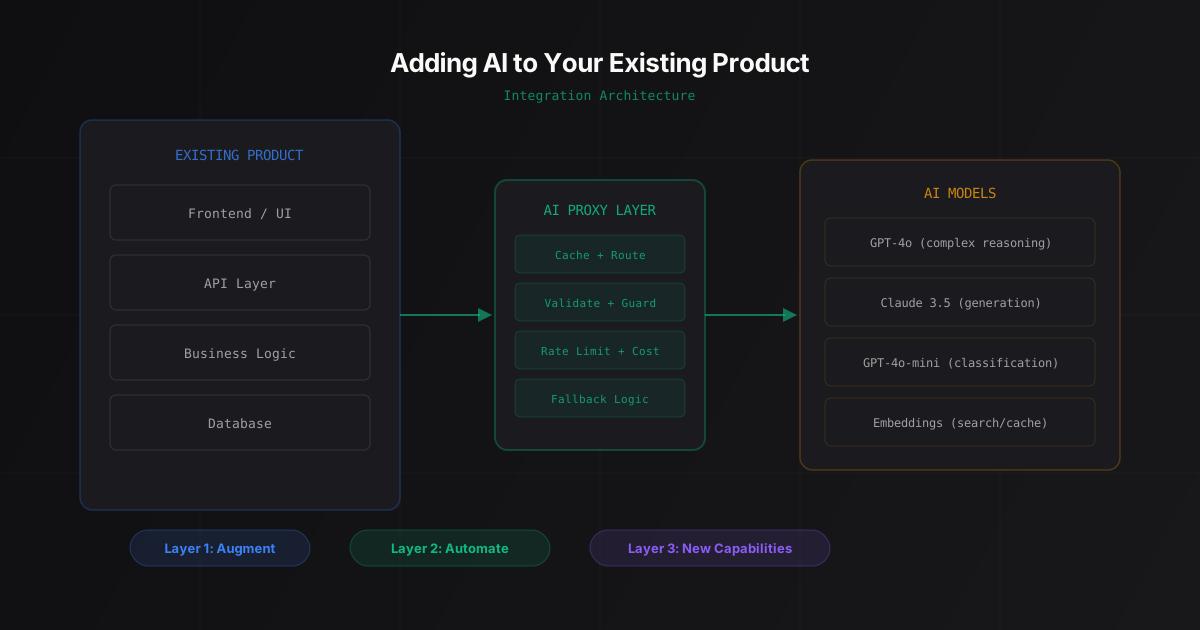
Layer 1: Augmentation. Add AI to features that already exist. Your product already has search, so you make it semantic. Your product already has a help section, so you add a conversational FAQ. Your users already fill out forms, so you auto-populate fields from uploaded documents. The workflow doesn’t change. The feature just gets better.
This is the lowest-risk layer because you’re improving something users already do. If the AI fails, the original workflow still works. Users don’t need to learn anything new.
Layer 2: Automation. Identify repetitive, rules-based workflows and replace them with AI that handles the routine cases. Document classification. Data extraction from invoices. Compliance checks on form submissions. The workflow changes, but only for the boring parts. Humans still handle exceptions and edge cases.
This layer requires more trust from users. They need to believe the automation is correct before they stop checking every result manually. Transparency matters here: show the AI’s reasoning, flag low-confidence results, let users override easily.
Layer 3: New capabilities. Build features that weren’t possible before AI. Natural language querying of your database. Predictive analytics on user behavior. Generative features like content creation or document drafting. These are genuinely new product surface areas.
This layer carries the most risk because there’s no existing workflow to fall back on. If the AI feature doesn’t work well, users don’t downgrade to the old version. They just stop using it and question whether your product is as capable as you claimed.
We built a text-to-SQL data analyst that’s a Layer 3 integration. It created a capability the client’s product never had before. The approach worked because the client already had Layer 1 and Layer 2 features working. Jumping straight to Layer 3 would have been a different story.
The Data Audit Nobody Wants to Do
Every AI integration project starts with the same question: what data do we have, and is it ready?
Nobody enjoys this step. It’s not glamorous. It doesn’t produce a demo you can show stakeholders. But teams that skip the data audit consistently take 2-3x longer to ship, because they hit data quality issues in week four that they could have identified in day two.
The audit has three parts.
Schema review. What tables exist, what columns mean, how they relate to each other. Legacy products almost always have columns named by people who left the company years ago. usr_sts_cd might mean “user status code” or it might mean something else entirely. You won’t know until you check.
Data quality check. What percentage of records have null values in fields the AI needs? Are there encoding inconsistencies? Do date formats change halfway through your dataset because someone migrated databases in 2023?
Volume estimation. How many API calls will this generate at current usage levels? If your product has 10,000 daily active users and the AI feature triggers on every page load, that’s 10,000 model calls per day minimum. At GPT-4o pricing, that’s roughly $50-150/day depending on prompt length. At scale, these numbers dictate which architecture is viable and which isn’t.
The companies that get this right do the audit before they write a single line of integration code. The ones that get it wrong discover their data problems when the AI starts returning garbage results in production.
Where to Start: Follow the Support Tickets
If you’re unsure which part of your product to add AI to first, here’s the simplest heuristic: look at your support queue.
The features generating the most support tickets are, by definition, the places where your current product fails to serve users well enough. Those are your highest-value integration points.
Common patterns we see:
- “How do I find X?” problems point to search enhancement (Layer 1). Your users can’t find what they need. Semantic search or a conversational interface solves this without changing any workflows.
- “I uploaded a document but the data didn’t populate correctly” problems point to document processing automation (Layer 2). Manual data entry from uploaded files is tedious and error-prone. AI extraction handles the common cases.
- “Can your product do X?” where X is something you don’t support yet, those are potential Layer 3 features. Track how often each request appears before committing to build it.
This isn’t theory. When we worked on a sales call compliance AI, the starting point was exactly this: the client’s QA team was spending hours manually reviewing call recordings. That was the support-ticket equivalent, a workflow that consumed enormous time and produced inconsistent results. AI integration cut QA costs by 95%.
The Architecture Decision That Matters Most
There’s one decision early in any AI integration project that shapes everything downstream: where does the AI processing happen?
Option A: Client-side. The user’s browser or device calls the AI API directly. Lowest latency, simplest architecture, but exposes your API keys and gives you zero control over cost, caching, or request filtering.
Option B: Server-side proxy. Your backend sits between the user and the AI model. You control caching, rate limiting, cost management, and can swap models without touching the frontend. This is what most production integrations use.
Option C: Background processing. AI runs on data asynchronously, not in response to user actions. Results get stored and served from your database. Best for features where freshness matters less than cost control. Document classification, batch analytics, content generation for approval workflows.
Most teams default to Option B and it’s the right choice for 80% of cases. But Option C gets overlooked more than it should. If your AI feature doesn’t need real-time responses, batch processing cuts API costs by 60-80% compared to per-request calls, because you can use cheaper models, optimize prompt caching, and process during off-peak hours.
Google Cloud’s AI architecture patterns documentation covers these tradeoffs in detail, including scaling considerations most teams don’t think about until they’re already in production.
API Cost Modeling: The Number Everyone Gets Wrong
Here’s a number that surprises most founders: the model API cost for a single user interaction.
A typical AI integration (query processing, context injection, response generation) uses roughly 2,000-4,000 tokens per request with GPT-4o. At current pricing, that’s $0.01-0.03 per interaction. Sounds trivial.
Now multiply. 5,000 daily active users, 3 AI interactions per session on average, 30 days a month. That’s 450,000 interactions per month, costing $4,500-$13,500 in model API fees alone. Before infrastructure, before engineering time, before monitoring.
The teams that model this before starting the integration make better architecture decisions. They know where to add caching (responses to common queries don’t need fresh model calls every time). They know where to use smaller, cheaper models (classification tasks don’t need GPT-4o). They know where to batch process instead of doing real-time inference.
The teams that don’t model this discover it in their first invoice.
Some concrete cost reduction strategies we’ve used:
- Response caching with semantic similarity. If a user asks something within 0.95 cosine similarity of a cached query, serve the cached response. This typically catches 30-40% of queries in products where users ask similar questions.
- Model routing. Use GPT-4o for complex reasoning tasks, Claude 3.5 Haiku or GPT-4o-mini for classification and extraction. Route based on query complexity. This alone reduces costs by 40-60% for mixed workloads.
- Prompt caching. Anthropic’s prompt caching and OpenAI’s cached tokens both reduce costs on repeated system prompts, which is almost every integration pattern.
The Integration Timeline: What’s Realistic
Founders consistently underestimate AI integration timelines. Not because the AI part is hard. Because the integration-with-existing-systems part is hard.
Here’s what we’ve seen across dozens of projects:
Layer 1 (Augmentation): 2-4 weeks. Semantic search, smart autocomplete, conversational FAQ. The AI portion ships in a week. The remaining time goes to testing with real production data, handling edge cases, and making sure the feature degrades gracefully when the AI is slow or unavailable.
Layer 2 (Automation): 4-8 weeks. Document processing, data extraction, classification workflows. The pipeline ships in 2-3 weeks. Testing and validation take the rest, because these features touch real data and wrong outputs have business consequences. You need accuracy benchmarks on your actual data, not demo data.
Layer 3 (New capabilities): 6-12 weeks. Depends heavily on complexity. A natural language query interface over your existing database typically takes around 6 weeks. A full AI agent that orchestrates multiple tools and handles multi-step workflows is closer to 12 weeks.
These timelines assume a team that’s done this before. Teams building their first AI integration should add 30-50% buffer for the learning curve on prompt engineering, model evaluation, and the operational patterns that AI features demand.
Five Mistakes That Kill AI Integration Projects
We’ve watched enough of these projects to name the patterns that reliably cause problems.
Mistake 1: No fallback path. The AI feature launches, the model provider has an outage for 3 hours, and your product is broken. Every AI feature needs a degradation strategy. Search falls back to keyword matching. Document extraction falls back to manual upload. The product keeps working, just without the AI enhancement.
Mistake 2: Testing on demo data instead of production data. Your demo dataset has clean, well-formatted documents. Your production data has PDFs scanned sideways, OCR artifacts, and fields with values like “N/A” and “see attached.” The accuracy numbers from demo testing mean nothing. Test on the messiest real data you have.
Mistake 3: Building custom when a managed service exists. Before building a document extraction pipeline from scratch, check if AWS Textract or Google Document AI handles your use case at sufficient accuracy. Custom pipelines make sense for domain-specific needs. They don’t make sense for standard invoice processing.
Mistake 4: Treating AI as a feature instead of a system. AI features need monitoring, evaluation, cost tracking, and version management. The model you integrate today will be deprecated next year. Your prompt engineering will need updates as model capabilities change. Budget ongoing operational capacity, not just the initial build.
Mistake 5: No user feedback loop. If users can’t flag when the AI is wrong, you can’t improve it. Thumbs up/down on AI responses, a “report incorrect result” button, or even simple analytics on which AI suggestions users accept vs. reject. Without this loop, you have no signal for where to invest improvement effort.
When AI Integration Doesn’t Make Sense
Honest answer: sometimes it doesn’t.
If your product’s core problem is a UX issue, AI won’t fix it. A confusing interface with AI search is still a confusing interface.
If your data is too sparse, inconsistent, or siloed across systems you don’t control, the integration effort will be 80% data engineering and 20% AI. That’s fine if you know it going in. It’s a disaster if you expected the opposite ratio.
If your users don’t have a workflow that generates enough interactions to justify the API costs, the economics won’t work. An AI feature that 50 users hit twice a month doesn’t justify the engineering investment. The same feature serving 5,000 users daily changes the math entirely.
The right call is sometimes “not yet” rather than “never.” Fix the data layer first. Clean up the schema. Build the monitoring infrastructure. Then come back to AI integration with a foundation that can support it.
FAQ
How much does AI integration cost for an existing product?
For Layer 1 augmentation (semantic search, smart features), expect $5,000-$15,000 for the initial build with a qualified team, plus $200-$1,000/month in ongoing API costs depending on usage volume. Layer 2 automation projects typically run $15,000-$30,000. Layer 3 new capabilities range from $20,000-$50,000+. The biggest variable isn’t the AI development. It’s the integration complexity with your existing codebase and data layer.
How long does it take to add AI features to an existing product?
Layer 1 features (search enhancement, conversational FAQ) ship in 2-4 weeks. Layer 2 automation (document processing, classification) takes 4-8 weeks. Layer 3 new capabilities take 6-12 weeks. The AI portion is typically 30-40% of the total effort. The rest goes to data preparation, integration with existing systems, testing on production data, and building fallback paths.
Can I integrate AI without rewriting my backend?
Yes, and you should avoid rewriting your backend if possible. The standard approach is a server-side proxy layer that sits between your existing application and the AI model API. Your frontend sends requests to your backend as usual. Your backend routes AI-relevant requests through the proxy layer. This keeps your existing architecture intact while adding AI capabilities. The proxy handles caching, rate limiting, cost management, and model switching.
What’s the biggest risk in AI integration projects?
Data quality. Teams consistently overestimate how ready their data is for AI features. Column names that don’t match what they mean, inconsistent formats across records, null values in critical fields, and encoding issues from past migrations. These problems surface when the AI starts producing inaccurate results, and by then you’ve already built features on top of the assumption that the data was clean. Run a data audit before you write integration code.
Should I build AI features in-house or hire an AI development team?
If your team has experience with prompt engineering, model evaluation, and production AI operations, building in-house makes sense for Layer 1 features. For Layer 2 and Layer 3 integrations, most teams benefit from working with a team that’s done this before, at least for the first project. The patterns around validation, cost optimization, and reliability aren’t obvious until you’ve shipped a few AI features. After the first successful integration, your team will have enough context to maintain and extend it internally. Book a 30-minute call if you want to talk through your specific setup.
Have an existing product that could benefit from AI? Book a 30-minute call. We’ll look at your architecture and tell you which integration layer makes the most sense to start with.