We’ve been burned twice by picking the wrong model early in a project. Once on a compliance AI where we routed everything through GPT-4o and hit unexpected costs at scale. Once on a content pipeline where we used Claude for overnight batch processing and watched the monthly bill triple when the client’s document volume grew.
Picking an LLM for a prototype is easy. Picking one for production, where cost compounds daily and reliability affects real users, requires a different kind of thinking. Here’s ours.
The Models We Have Production Data On
We’ve run six models in real client systems:
- GPT-4o (OpenAI): general-purpose workhorse, best structured output guarantees
- GPT-4o-mini (OpenAI): fast, cheap, good enough for routing and classification
- Claude 3.5 Sonnet (Anthropic): our default for agent tasks and long-context reasoning
- Claude 3.5 Haiku (Anthropic): high-volume inference at lower cost
- Gemini 2.0 Flash (Google): underrated for speed and cost, improving fast
- Llama 3.1 70B (Meta, hosted on Together AI or vLLM): batch processing workhorse
One model we’ve benchmarked but haven’t shipped in production yet: Gemini 1.5 Pro. The 1M context window is genuinely useful for certain document analysis tasks, but the latency and cost profile hasn’t matched any client project so far.
Mixtral 8x7B used to be in our rotation. We’ve replaced it almost entirely with Llama 3.1 70B, which gives better instruction following at a similar cost point.
As an LLM development company running these pipelines across multiple client projects simultaneously, we see patterns that are hard to see from a single prototype.
Cost: The Math Your Prototype Budget Ignores
This is where most teams get surprised. Prototype usage is maybe 10,000 tokens per day. Production is 10,000 tokens per minute.
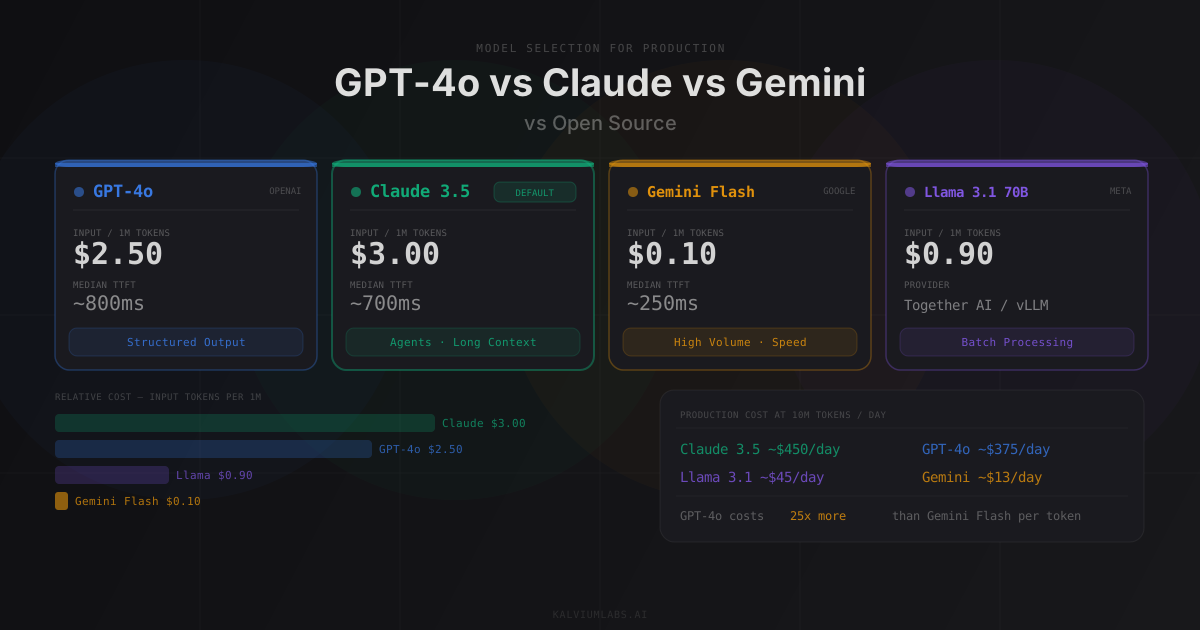
Here’s what we’re paying as of Q1 2026, sourced from official pricing pages:
| Model | Input ($/1M) | Output ($/1M) | Cost at 10M tokens/day |
|---|---|---|---|
| GPT-4o | $2.50 | $10.00 | ~$375/day |
| Claude 3.5 Sonnet | $3.00 | $15.00 | ~$450/day |
| Gemini 1.5 Pro | $1.25 | $5.00 | ~$156/day |
| Claude 3.5 Haiku | $0.80 | $4.00 | ~$100/day |
| Llama 3.1 70B (Together AI) | $0.90 | $0.90 | ~$45/day |
| GPT-4o-mini | $0.15 | $0.60 | ~$19/day |
| Gemini 2.0 Flash | $0.10 | $0.40 | ~$13/day |
The “cost at 10M tokens/day” column assumes a 75% input, 25% output token split, which is realistic for document processing. For agent workflows with longer outputs, the output token share increases and costs rise faster.
The number that matters: GPT-4o costs 25x more than Gemini 2.0 Flash per token. At prototype scale, that’s $5 vs $0.20. At production scale, it’s $375/day vs $13/day. Over a month, $11,250 vs $390. For most startups, that difference pays an engineer’s salary.
Latency and Structured Output
Cost and quality are the obvious axes. Latency is the one that kills user experience.
Based on our production monitoring and ArtificialAnalysis benchmarks:
| Model | Median TTFT | Throughput | Good for |
|---|---|---|---|
| Gemini 2.0 Flash | ~250ms | ~180 tok/s | Real-time chat, autocomplete |
| Claude 3.5 Haiku | ~350ms | ~160 tok/s | High-volume inference |
| GPT-4o-mini | ~380ms | ~150 tok/s | Classification, routing |
| Claude 3.5 Sonnet | ~700ms | ~80 tok/s | Agents, long-context tasks |
| GPT-4o | ~800ms | ~70 tok/s | Structured output, complex reasoning |
| Gemini 1.5 Pro | ~1,200ms | ~55 tok/s | Deep document analysis |
TTFT = time to first token. For streaming responses, this is what the user perceives as response speed.
Structured Output: Where GPT-4o Dominates
For extraction tasks that populate a database or call a typed API, you need guaranteed JSON compliance. GPT-4o’s structured output mode enforces a JSON schema at the API level. The response will match your schema. Every call.
from openai import OpenAI
from pydantic import BaseModel

class ComplianceScore(BaseModel):
    agent_name: str
    call_id: str
    score: float  # 0.0–1.0
    violations: list[str]
    recommended_action: str

client = OpenAI()
response = client.beta.chat.completions.parse(
    model="gpt-4o-2024-11-20",
    messages=[
        {"role": "system", "content": "Extract compliance data from this call transcript."},
        {"role": "user", "content": transcript_text}
    ],
    response_format=ComplianceScore
)

score = response.choices[0].message.parsed
# score.agent_name, score.violations, etc. are typed and guaranteed non-null
We used this pattern on a sales call compliance system. Before switching to GPT-4o structured output, our extraction pipeline had a 4% malformed JSON rate, which meant 4% of calls required manual review. After: 0%.
Claude follows JSON instructions reliably for most tasks, but without schema enforcement at the API level, you’ll occasionally see responses with extra fields, or nested objects that don’t match your expected structure. For interactive tasks, you can handle this with validation and retry. For a batch pipeline processing 10,000 calls, a 1% parse error rate means 100 manual reviews per batch.
Tool Calling
For complex multi-step agents, Claude 3.5 Sonnet has more reliable tool-calling behavior. It’s better at sequencing tool calls correctly and less likely to hallucinate parameter values. GPT-4o sometimes conflates tool purposes when tool descriptions are similar in wording.
For a deeper look at how we design tool schemas, see our agent architecture post.
When Open Source Actually Wins
Commercial models win on ease of use and reliability. Open source wins on cost and on not depending on an external API.
The specific scenario where we reach for Llama 3.1 70B: batch document processing where quality requirements are below 85% precision.
On a content generation project, the pipeline processed roughly 4,000 documents per day, extracting structured metadata: topics, entities, reading level, target audience. The precision requirement was “good enough for internal search,” not “accurate enough to display to end users.”
Claude 3.5 Sonnet quality: 91% accuracy on our test set. Cost: ~$280/day at that volume.
Llama 3.1 70B on Together AI quality: 83% accuracy on the same test set. Cost: ~$28/day.
The client took the 8-point quality drop for a 10x cost reduction. That’s a reasonable trade-off for a batch enrichment pipeline running overnight.
Where open source doesn’t work for us:
Real-time user-facing applications. Latency variance on hosted open-source models is higher than commercial APIs, and self-hosting adds operational overhead most clients don’t want.
Tool-calling reliability. Llama 3.1 70B struggles with complex tool schemas. We’ve seen parameter hallucination rates 3x higher than Claude or GPT-4o for the same tool definitions.
Long-context tasks. Instruction-following quality on open-source models degrades faster than commercial models once context length exceeds 32K tokens.
Our model router for a mixed pipeline:
def select_model(task_type: str, quality_floor: float, daily_volume: int) -> str:
    if task_type == "structured_extraction":
        return "gpt-4o-2024-11-20"  # schema enforcement, no parse errors

    if task_type == "batch_enrichment" and quality_floor < 0.85:
        if daily_volume > 2000:
            return "meta-llama/Meta-Llama-3.1-70B-Instruct-Turbo"  # Together AI

    if task_type in ("classification", "routing", "summarization"):
        if daily_volume > 5000:
            return "gemini-2.0-flash"  # cost + speed
        return "gpt-4o-mini"

    # Default: Claude for agent tasks and complex reasoning
    return "claude-3-5-sonnet-20241022"
This router runs in production for one client’s pipeline. The model mix saves roughly 60% compared to routing everything through Claude or GPT-4o.
Context Windows: Bigger Isn’t Always Better
Context windows have expanded significantly. Gemini 1.5 Pro: 1M tokens. Claude 3.5 Sonnet: 200K tokens. GPT-4o: 128K tokens.
The temptation is to stuff the entire document corpus into context and skip retrieval entirely. We tried this on a document Q&A project. It failed.
Past 40K tokens, answer quality on specific factual questions drops on every model we tested. The model “knows” the information is in context, but retrieval from a very long context becomes unreliable as document count grows. This is the lost-in-the-middle problem: models pay less attention to content buried in the middle of very long contexts.
The practical context limits we actually use in production:
| Model | Practical limit | Beyond that |
|---|---|---|
| GPT-4o | 40–50K tokens | Use RAG |
| Claude 3.5 Sonnet | 60–80K tokens | Use RAG |
| Gemini 1.5 Pro | 80–120K tokens | Use RAG |
Claude handles long context best of the three. It’s the most reliable for multi-document synthesis when you need to hold 20+ documents simultaneously. For anything requiring information retrieval across a large corpus, RAG is still the right answer. See how we build those pipelines in our RAG in production post.
The Selection Framework
Here’s the decision matrix we use at the start of a new project:
| Task Type | First Choice | Fallback | Why |
|---|---|---|---|
| Interactive agent | Claude 3.5 Sonnet | GPT-4o | Best instruction following, reliable tool calls |
| Structured data extraction | GPT-4o | Claude 3.5 Sonnet | Schema enforcement at API level |
| Batch processing, high volume | Llama 3.1 70B | Gemini 2.0 Flash | Cost |
| Classification or routing | Gemini 2.0 Flash | GPT-4o-mini | Speed and cost |
| Long-context document analysis | Claude 3.5 Sonnet | Gemini 1.5 Pro | Context reliability |
| Code generation | Claude 3.5 Sonnet | GPT-4o | Code quality |
| Real-time chat or autocomplete | Gemini 2.0 Flash | Claude 3.5 Haiku | Latency |
The default rule: start with Claude 3.5 Sonnet. It handles the widest range of tasks without surprises. Move to GPT-4o if you need structured output guarantees. Move to Gemini 2.0 Flash or Llama 3.1 70B if cost is the primary constraint.
What Failed (And Why)
Project 1: All-GPT-4o Compliance Agent
On a sales call compliance project, we routed everything through GPT-4o: transcript parsing, rule extraction, compliance scoring, and report generation. Quality was excellent. Cost was $180/day at 500 calls/day.
When the client scaled to 2,000 calls/day, that became $720/day. At 5,000 calls/day (the target), it would have been $1,800/day. That conversation was not fun.
The fix: route transcript parsing and entity extraction to GPT-4o-mini, keep scoring and report generation on GPT-4o. Final cost at 5,000 calls/day: $340/day. Output quality stayed the same.
Project 2: Batch Enrichment with Claude Sonnet
A content pipeline running overnight batch jobs. 8,000 documents, extract topics, keywords, and reading level. We started with Claude 3.5 Sonnet because that’s what we knew and trusted.
Monthly cost: roughly $4,200. Accuracy: 93% on our eval set.
We tested Llama 3.1 70B for the same pipeline. Accuracy: 84% on the same eval set. Monthly cost: roughly $420.
The client’s requirement was 80%+ accuracy for internal search. We moved to Llama 3.1 70B. 10x cost reduction, quality stayed above the bar they’d defined.
The lesson: define your quality floor before picking a model. If you don’t know what “good enough” means for your use case, you’ll default to the best model and overpay. “Good enough” is not a compromise. It’s an engineering decision.
FAQ
Which LLM should I use for my first production system?
Start with Claude 3.5 Sonnet. It handles the widest range of tasks reliably, has strong instruction following, and produces well-formed tool calls without heavy prompt engineering. If you need guaranteed JSON output for database writes or typed API integrations, use GPT-4o with structured output mode. Don’t start with an open-source model unless cost is the primary constraint from day one, because the reliability gap shows up in production at the worst times.
For more on this, read our guide on Fine-Tuning vs RAG vs Prompt Engineering.
How much does it cost to run an LLM in production?
It depends on which model and how many tokens your use case generates. A typical interactive AI product with 1,000 daily active users averaging 2,000 tokens per session runs about 2M tokens per day. At GPT-4o pricing, that’s around $30/day or $900/month. At Gemini 2.0 Flash pricing, it’s $0.60/day. The gap is real and it matters once you reach any meaningful scale. Track cost-per-task from day one, not as an afterthought.
When does open source beat commercial models in production?
Open source wins for high-volume batch workloads with quality requirements below roughly 85%, where you’re willing to pay for hosted inference (Together AI, Fireworks AI) or manage your own vLLM deployment. It doesn’t win for real-time user-facing applications where latency variance matters, complex multi-step agents, or tasks requiring strong instruction following on ambiguous inputs. The quality gap is real on those use cases, and it shows up as support tickets, not benchmark scores.
Is Gemini 2.0 Flash production-ready?
For classification, summarization, routing, and real-time chat, yes. We’ve used it in production for high-volume classification pipelines and it holds up. For complex multi-step agent tasks or structured data extraction with strict schema requirements, Claude or GPT-4o are more reliable. Google’s model quality has improved significantly since Gemini 1.0, and the cost per token is hard to argue with.
How do I know when to switch models mid-project?
Set up cost-per-task tracking from day one. When your cost curve starts compressing margins, or when a better model drops, run a benchmark: take 100 representative tasks from your golden eval dataset, run both models, compare quality scores and cost. If the cheaper model scores within 5 percentage points of the expensive one on your data, switching is worth the migration effort. Don’t switch based on public benchmarks alone. Public benchmarks don’t use your prompts or your data.
The right model choice on a production system can mean a 10x cost difference at scale. Get it wrong and you’re either overpaying or underdelivering. Book a 30-minute call and I’ll review your model selection, cost profile, and where you’re likely to hit problems.